Exterminauts Hack with Aimbot, ESP and Radar Cheat for PC

Included only in Premium Package for now during the Beta
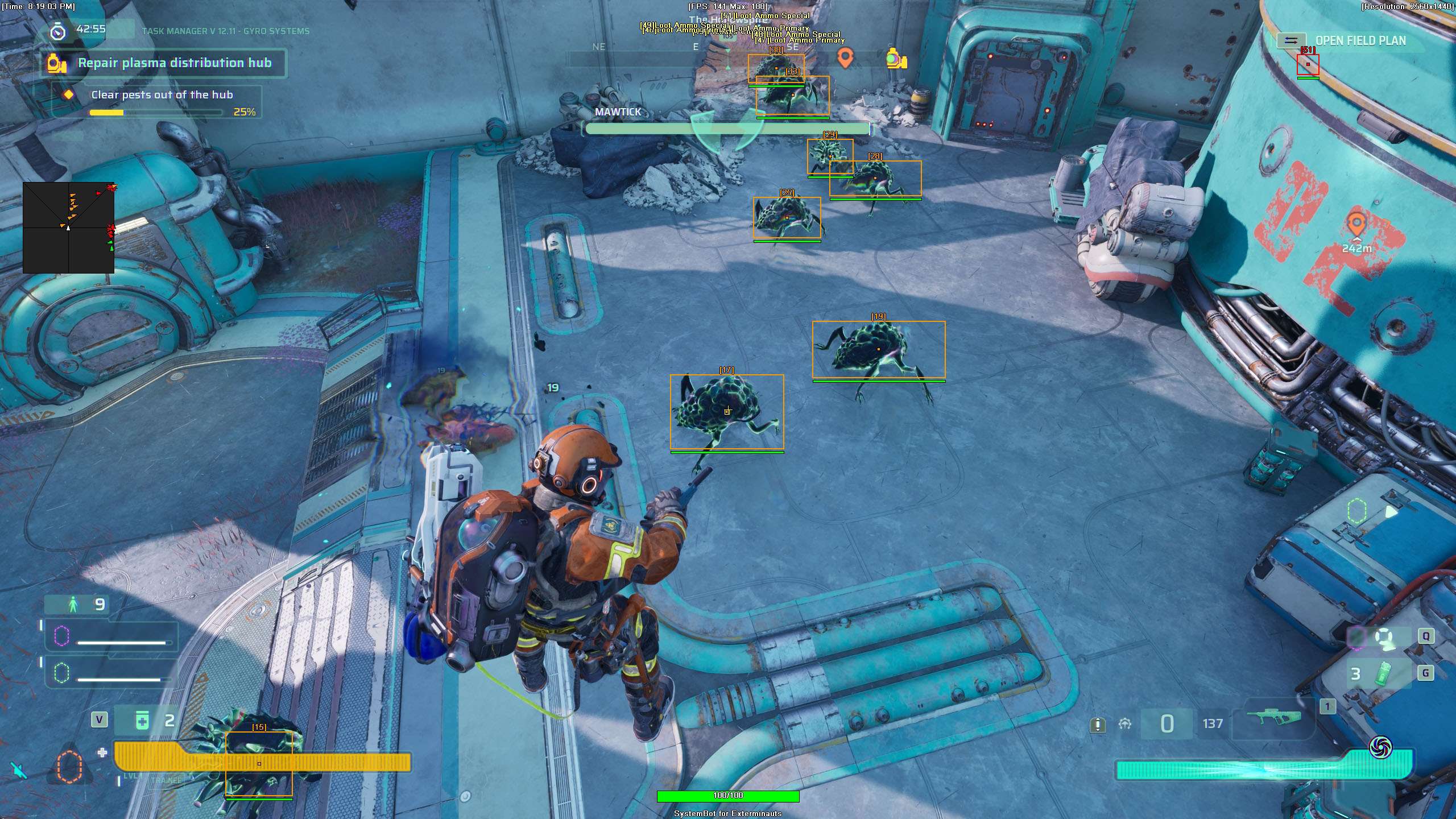
Exterminauts Hack ESP boxes and health bars on Pests at a plasma hub
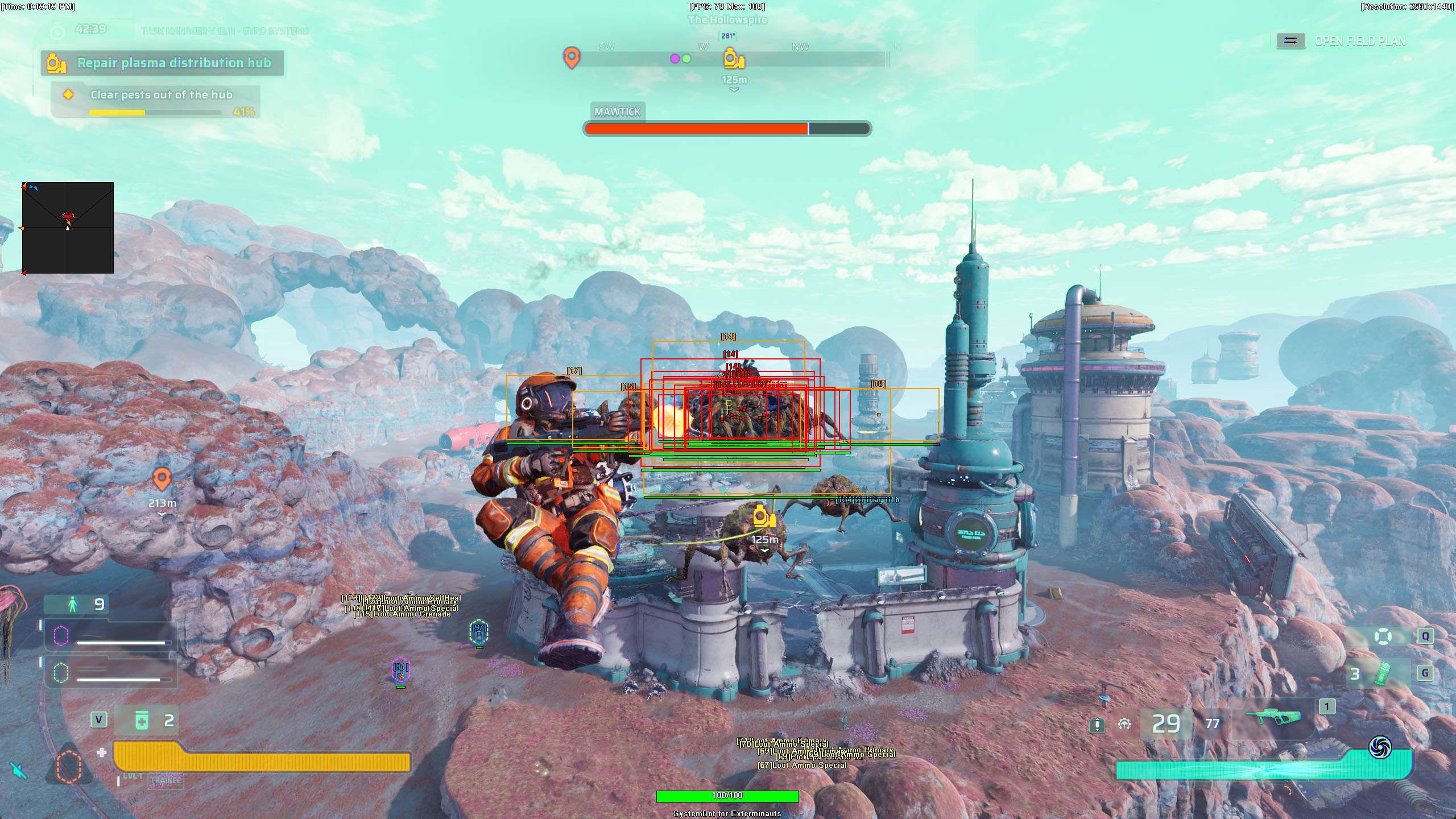
Exterminauts OPK gathering a swarm of Pests into one spot
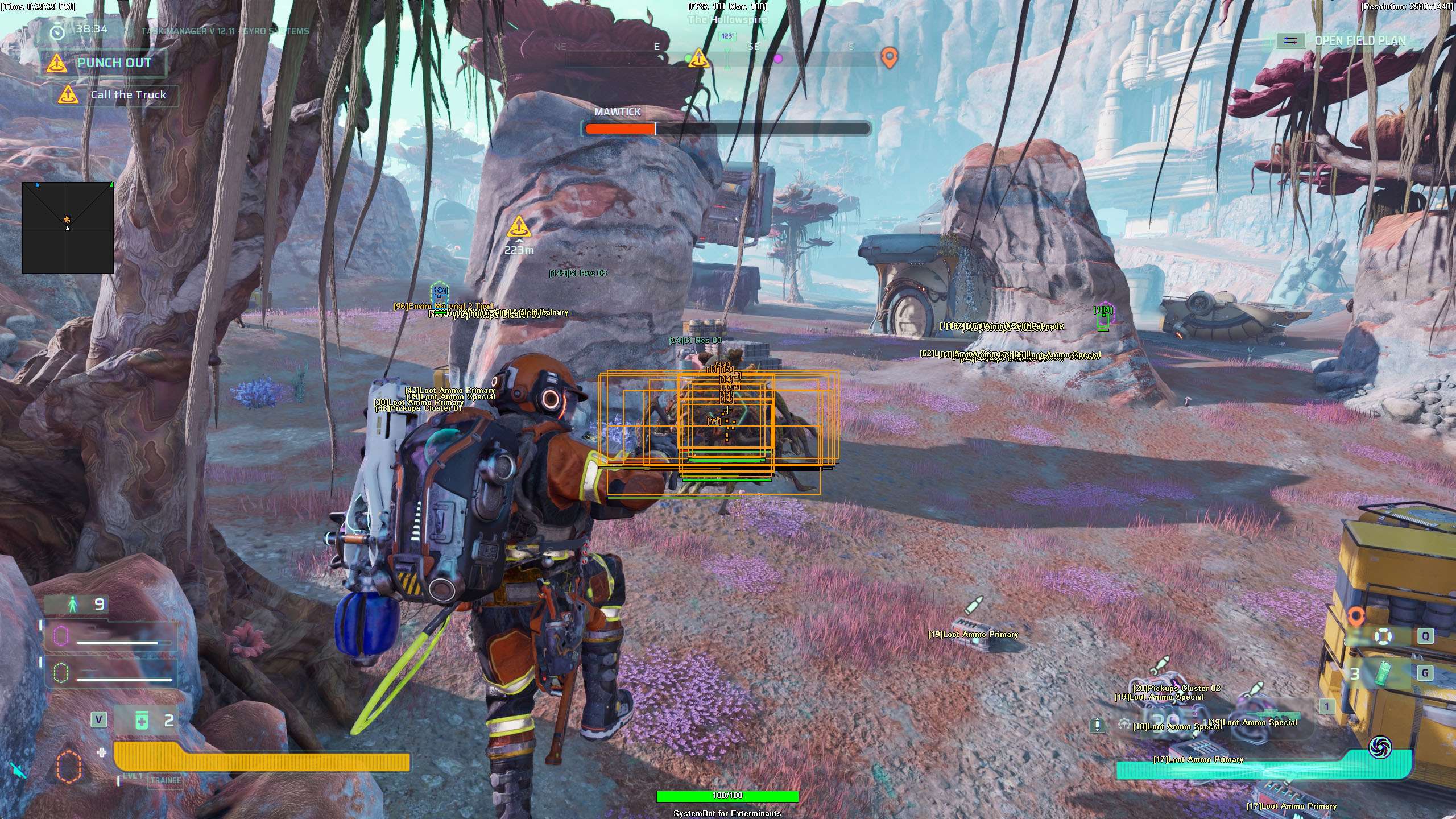
Exterminauts ESP with loot and ammo labels while OPK stacks Pests
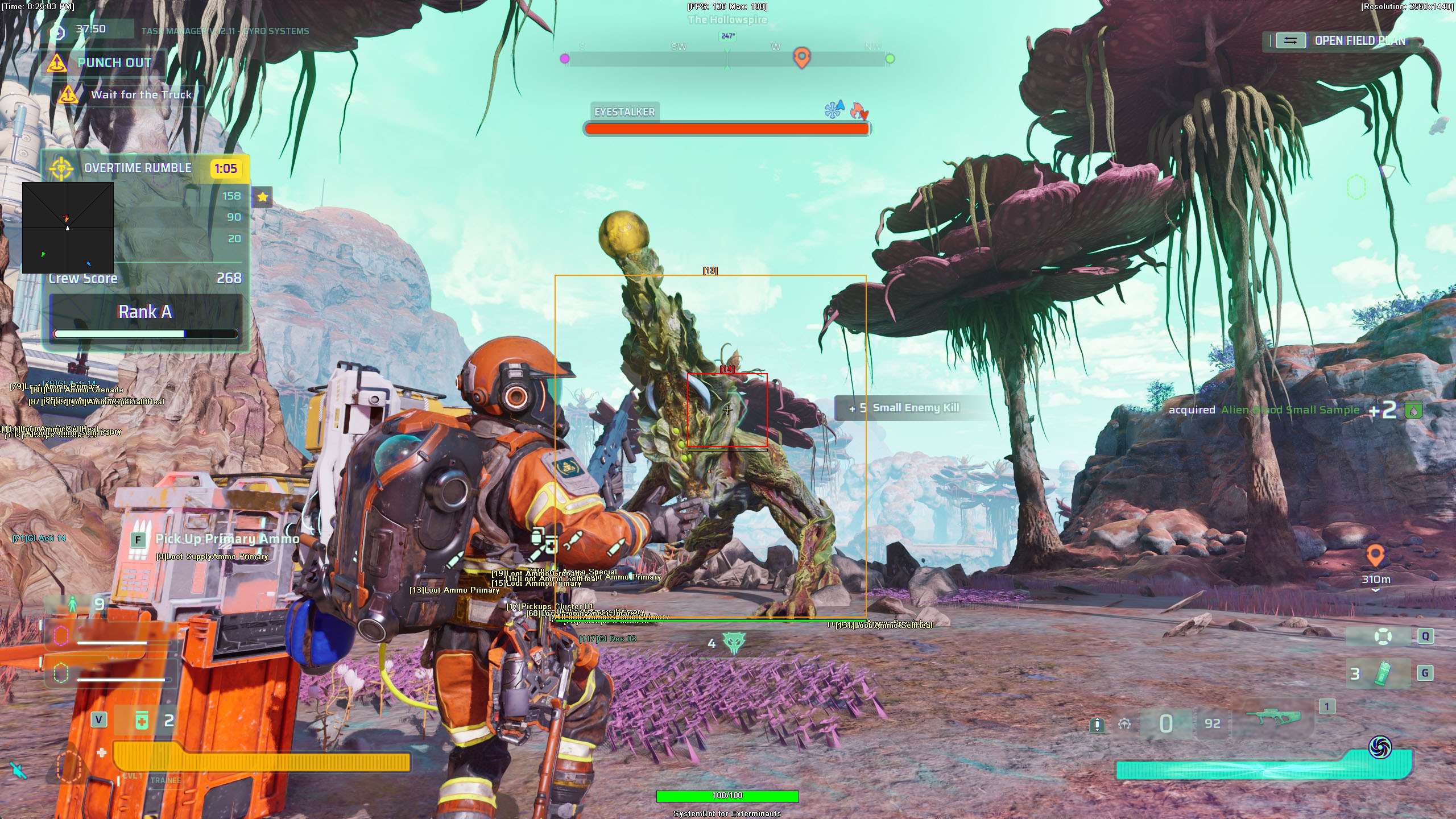
Exterminauts ESP box on a large Pest with ammo and loot labels nearby
Co-op PvE shooter • Pests, Work Orders and extraction • Steam

Exterminauts Hack with Aimbot, ESP and Radar Cheat for PC

Get the Exterminauts Cheat for PC.

Exterminauts is a co-op third person PvE shooter from Behaviour Interactive, published by Level Infinite. Its motto is “Punch In. Clean Up. Get Paid.” You play a blue-collar exterminator on the alien planet Tian and take contracts from a MegaCorp. The aliens on Tian are called Pests, and they want the Polymorphic Plasma.

You go out in a crew of up to three players, and solo or duo play is possible as well. Each job is a Work Order that you pick from the Job Board at the Rig. You choose a loadout, deploy to a Worksite and finish your objectives while the Pests attack. Then the crew has to extract. You only get paid if the crew gets out.

Your kit mixes Kinetic Weapons, Polymorphic Weapons, Grenades and Gadgets, and Overdrive changes how a Polymorphic Weapon performs. Our Exterminauts hack has an aimbot with Silent Aim and Magic Bullet, a triggerbot, a 2D Radar, a Warning System and Fullbright. Its 3D Radar ESP shows Pests and crew mates, Pest spawners, objectives, extraction zones, loot, chests and ammo. The cheat is in its first beta and in development, so its features are not final.

Shift briefing
Know Where the Pests Are Before You Punch In

On a Worksite the Pests come at your crew from all sides, and a failed extraction means no pay. The Exterminauts cheat is built to show Pests, their spawners, objectives, extraction zones, loot and ammo on your screen and to help your aim when a swarm closes in. While the cheat is in beta, the Exterminauts cheat comes with the Premium Package only.

Exterminauts Hack and Cheat Features

The Exterminauts cheat covers aim, awareness, loot and crowds. Enemy options are for the alien Pests, and Friendly options are for your crew mates. You open the in-game cheat menu with your Menu Key and control all options there. The highlights are below, and the full option list is in the Features panel on this page.

  • Aimbot with Silent Aim and Magic BulletAuto Aim and Auto Fire with Silent Aim, which sends your shots to the locked target without moving your camera. Magic Bullet lets your shots hit the locked target even without a clear line of sight. Smooth Aim, Miss Chance and Limit Angle tune the rest.
  • Exterminauts TriggerbotShoots for you when your crosshair is on a valid target. Set a Fire Delay from 0 to 1000 milliseconds, choose Trigger on Enemy or Trigger on Friendly, and turn on Use Trigger Key to fire only while you hold your Trigger Key.
  • 3D Radar ESP for Pests and CrewBounding Box in 2D or 3D, Head Dot, 2D Line and Aim Laser, with Name, Distance and Health ESP for Pests and crew mates. Friendly Downed ESP highlights crew mates who need a revive.
  • Loot ESP, Chest ESP and Ammo ESPLoot ESP shows loot and lootable containers such as drawers, Chest ESP shows loot chests you can open and Ammo ESP shows ammo boxes and pickups.
  • Objective, Extraction and Spawner ESPObjective ESP shows mission objectives, control points and waypoints. Extraction ESP shows extraction zones and rescue vehicles, and Spawner ESP shows the spots where enemies spawn.
  • 2D RadarA radar overlay with Radar Scale, Window Size, Cross Size and Stick To Window. It tracks Pests and crew mates as triangles or dots, and Center 2D Radar can place it around your crosshair.
  • Warning System and FullbrightOn-screen warnings when enemies are near, can see you or aim at you, with Is Aiming At You Angle, Can See You Angle and a Beep System. Fullbright lights up the whole map evenly so dark areas are easy to see.
  • OPK, One Position KillOPK teleports nearby enemies to one spot in front of you. OPK Distance sets how far in front they are gathered, and OPK Type chooses how they are lined up.
Exterminauts Hack ESP boxes and health bars on Pests at a plasma hub Exterminauts OPK gathering a swarm of Pests into one spot Exterminauts ESP with loot and ammo labels while OPK stacks Pests Exterminauts ESP box on a large Pest with ammo and loot labels nearby

Exterminauts Aimbot and Silent Aim for Pest Swarms

Pests do not wait in line. Steam news and previews describe crews finishing objectives while the aliens attack, and one Pest named on Steam, the Traproot, has a long reach and can swallow players. The Exterminauts aimbot starts with Auto Aim, which moves your aim onto a valid target for you. Silent Aim sends your shots to the locked target without moving your camera. Magic Bullet lets your shots hit the locked target even without a clear line of sight. Aim Bone selects Head, Neck or Chest, and Aim Style sets how the aimbot picks a target by FOV, Distance or Health when more than one is in range.

Limit Angle sets how far from your crosshair a target can be for the aimbot to lock on, and Draw Aim FOV shows that area as a circle on screen. Smooth Aim slows the aim movement so it looks natural, and Miss Chance lets some of your shots go where you really point. For moving targets, Bullet Speed Prediction leads the shot based on how long it takes to arrive, Bullet Drop Prediction aims a little higher over long distances and Prediction Scale fine tunes both. Stick to Target keeps the aimbot on one target until it is down or leaves range.

Exterminauts Triggerbot and Crew Target Switches

A crew in Exterminauts is up to three players, and the official FAQ on Steam says friendly fire exists. That makes the friendly switches in the cheat worth a careful look. Aim on Enemy lets the aimbot target and lock onto enemies, which in this game are the Pests. Aim on Friendly is a separate switch that lets it lock onto your teammates, so leave it off when you want your crew mates out of the aimbot. The Exterminauts triggerbot shoots for you when your crosshair is on a valid target.

Trigger on Enemy lets it fire at enemies in your crosshair, and Trigger on Friendly lets it fire at friendly teammates, so that switch also belongs off in a normal shift. Use Trigger Key makes the triggerbot fire only while you hold your Trigger Key, and Fire Delay adds a short wait from 0 to 1000 milliseconds before it fires. Auto Fire fires your weapon for you once the aimbot has a target locked. Visibility Check stops the aimbot from targeting enemies hidden behind walls or cover.

Exterminauts ESP for Pests and Their Spawners

Work Orders come in Hazard levels. Previews say the harder ones must be unlocked, and that difficulty and enemy density rise as you climb. The Exterminauts ESP lives in the 3D Radar tab. Show Enemy puts the Pests on the ESP and radar, and a Bounding Box in 2D or 3D, a Head Dot and a 2D Line mark each target in range. Enemy Name ESP and Enemy Distance ESP show what each enemy is and how far away it is.

Enemy Health ESP shows a health bar for each enemy you can see, in Scaled, Static or Vertical style, so you can tell which target is close to going down. Aim Laser draws a line that shows where each target is aiming, and Laser Size sets how long and thick it is. Spawner ESP shows the spots on the map where enemies spawn, with its own Spawner RGBA color. Pests get two colors of their own. Enemy Visible RGBA is used for Pests in your direct line of sight, and Enemy Invisible RGBA for Pests hidden behind walls or cover.

Objective ESP and Extraction ESP for Your Work Order

The loop of a shift is simple to describe and harder to finish. You punch in at the Rig, pick a Work Order, deploy, complete the objectives under attack and get out. A crew that does not extract does not get paid, and previews say respawns per run are limited. Objective ESP shows mission objectives, control points and waypoints, so you can see where the job is. Extraction ESP shows extraction zones and rescue vehicles for the moment you need to leave.

Each has its own color, set with Objective RGBA and Extraction RGBA, so the two stand out from the rest of the ESP. On the way, Ammo ESP shows ammo boxes and ammo pickups across the map, which helps when a long fight drains your magazines. Max Distance sets how far out targets are shown, up to 1500 meters, and the Filters tab holds 6 Friendly Player Filters and 6 Enemy Player Filters for names to show or hide on the ESP.

Exterminauts Loot ESP and Chest ESP

Steam tags Exterminauts as a Looter Shooter and an Extraction Shooter, and one preview names unlocking weapons, gadgets and upgrades as the long goal. Credits, Crystallized Plasma, Transit Tokens and Blackburn Scrip are among the currencies named for the game, and Seniority and weapon levels grow as you play. The item side of the cheat sits in the 3D Radar tab. Loot ESP shows loot and lootable containers such as drawers, and Chest ESP shows loot chests across the map that you can open.

Loot RGBA, Chest RGBA and Ammo RGBA give each kind of item its own color. Item Distance ESP shows how far away each item is from you, and Max Item Distance sets how far away items and loot are shown, up to 500 meters. That way a Worksite does not fill up with markers for things on the other side of the map.

Crew ESP and 2D Radar for a Crew of Three

Exterminauts is made for a crew, and one preview says it plays much better with friends than alone. Show Friendly puts your teammates on the ESP and radar. Friendly Name ESP and Friendly Distance ESP show who each one is and how far away they are, and Friendly Health ESP shows a health bar for each of them. Friendly Downed ESP highlights downed teammates who need a revive. Friendly Visible RGBA and Friendly Invisible RGBA set their colors in plain sight and behind cover. The 2D Radar adds a radar overlay to your screen.

Radar Scale sets the zoom, Dot Type switches between plain dots and triangles that point where targets face, and Show FOV draws a cone that shows where you are looking. Stick To Window keeps targets that are out of range pinned to the edge of the radar. Window Size sets how big the radar window is, Cross Size sets the length of its cross lines, and the RadarX and RadarY positions place it where you want it. Center 2D Radar puts it in the middle of the screen, around your crosshair.

Warning System, Fullbright and OPK

When Pests close in from behind, a warning helps. The Warning System shows on-screen warnings when enemies are near, can see you or aim at you. Is Aiming At You Angle and Can See You Angle set the angles behind those warnings, and the Beep System plays a warning beep when an enemy is looking or aiming at you. Fullbright lights up the whole map evenly so dark areas are easy to see.

When a swarm gets too big, the Misc tab has a crowd option. OPK teleports nearby enemies to one spot in front of you, OPK Distance sets how far in front, and OPK Type chooses how they are lined up. For the overlay itself, Streamproof hides cheat visuals from OBS and other recording software, and a Panic Key hides all cheat visuals and menus.

How to Get the Exterminauts Cheat

Setting up the Exterminauts hack on PC takes three steps.

01
Create Your Account

Create a forum account for free.

02
Get the Premium Package

While the cheat is in beta, the Exterminauts cheat comes with the Premium Package only. It includes the other games listed on the package page.

03
Load the Cheat

Download the loader and sign in. Then start the game and load the cheat.

Exterminauts Anti-Cheat and Account Risk

Steam lists Anti-Cheat Expert (ACE) for Exterminauts. Smooth Aim, Miss Chance, Limit Angle and Visibility Check let you control how the aimbot behaves, but they do not remove the risk to your account. The cheat is in its first beta and in development. No cheat is ever completely risk free. The live cheat status page always shows the current state of every cheat, including Exterminauts.

Frequently Asked Questions

Is the Exterminauts Cheat in the Premium Package?

Yes. While the cheat is in beta, the Exterminauts cheat comes with the Premium Package only. A single Exterminauts subscription is not sold while the cheat is in beta.

Is the feature list final?

No. The Exterminauts cheat is in its first beta and in development. Some options do not work during the beta, and options can change, be added or be removed.

Which version does it support?

Exterminauts is on Steam for Windows PC. The cheat is for Windows PC, Windows 10 and 11.

Which anti-cheat does Exterminauts use?

The Steam store page lists Anti-Cheat Expert (ACE) for Exterminauts.

Is the Exterminauts Cheat online?

The live cheat status page always shows the current state of every cheat, including Exterminauts. Check it before you play.

Does the Exterminauts ESP show where Pests spawn?

The cheat has a Spawner ESP option for that. It shows the spots on the map where enemies spawn and has its own color.

Does the ESP show the extraction zone?

The cheat has an Extraction ESP option that shows extraction zones and rescue vehicles, and Objective ESP shows mission objectives, control points and waypoints.

Can I keep the aimbot off my crew mates?

Yes. Aim on Friendly and Trigger on Friendly are separate switches for your teammates, and you can leave both off.

Get the Exterminauts Hack for PC

A Work Order on Tian means Pests on all sides and no pay unless your crew gets out. The Exterminauts cheat is built to show Pests, spawners, objectives and extraction zones, keep track of your crew, loot and ammo, and warn you when an enemy can see you or aims at you.

Need Help?

Our support team is available 24 hours a day, 7 days a week through the SystemCheats forum and TeamSpeak. Read what customers say on Trustpilot, or see all cheat packages.

Cheat & Hack Information

What is Exterminauts?


Exterminauts is a co-op third person PvE shooter from Behaviour Interactive, published by Level Infinite, listed on Steam for Windows PC. Crews of up to three exterminators take Work Orders on the alien planet Tian, fight swarms of alien Pests on a Worksite, finish their objectives and extract to get paid.


Cheating in Exterminauts


Our Exterminauts cheat includes an Aimbot with Silent Aim and Magic Bullet, a Triggerbot, a 2D Radar, a Warning System and Fullbright. Its 3D Radar ESP shows Pests and crew mates, Pest spawners, objectives, extraction zones, loot, chests and ammo. The cheat is in its first beta and in development, so its features are not final. While the cheat is in beta, it comes with the Premium Package only.


Is the Exterminauts cheat safe?


Steam lists Anti-Cheat Expert (ACE) for Exterminauts. No cheat is ever completely risk free. However, you can always adjust your settings to play legitimately for the long run. Check the live status page before you play.


Pricing

Premium Package ONLY during the beta. A single Exterminauts subscription is not sold during the beta.

Features

Aimbot
Auto Aim Moves your aim onto a valid target for you automatically
Silent Aim Sends your shots to the locked target without moving your camera
Magic Bullet Lets your shots hit the locked target even without a clear line of sight
Miss Chance (0 ~ 80) Lets some of your shots go where you really point, so your play looks natural
Auto Fire Fires your weapon for you once a target is locked
Fire Delay (0 ~ 1000) Adds a short wait in milliseconds before firing once a target is locked
Smooth Aim (1 ~ 50) Slows the aim movement so it looks natural, and higher values make it slower
Limit Angle (0 ~ 180) Sets how far from your crosshair a target can be for the aimbot to lock on
Use Aim Key Makes the aimbot work only while you hold or toggle your aim key
Bullet Speed Prediction Leads moving targets based on how long the shot takes to arrive
Bullet Drop Prediction Aims a little higher to make up for bullet drop over long distances
Prediction Scale (1 ~ 30) Fine tunes how strong the lead and bullet drop prediction is
Visibility Check Stops the aimbot from targeting enemies hidden behind walls or cover
Stick to Target Keeps the aimbot on one target until it is down or leaves range
Aim Style (FOV, Distance, Health) Sets how the aimbot chooses the best target when more than one is in range
Aim Bone (Head, Neck, Chest) Sets which body part the aimbot aims at, such as the head or chest
Aim on Friendly Lets the aimbot target and lock onto your teammates
Aim on Enemy Lets the aimbot target and lock onto enemies
Max Distance (0 ~ 1500) Sets the farthest distance, in meters, at which targets are still picked up or shown
Draw Locked Draws a marker on the target the aimbot is locked onto
Draw Aim FOV Draws a circle on screen that shows where the aimbot is active
Draw Silent Aim Trace Draws a line from your crosshair to where Silent Aim is sending your shots
Triggerbot
Triggerbot Shoots for you when your crosshair is on a valid target
Use Trigger Key Makes the triggerbot fire only while you hold the trigger key
Fire Delay (0 ~ 1000) Adds a short wait in milliseconds before firing once a target is locked
Trigger on Friendly Lets the triggerbot fire at friendly teammates
Trigger on Enemy Lets the triggerbot fire at enemies in your crosshair
Max Distance (0 ~ 1500) Sets the farthest distance, in meters, at which targets are still picked up or shown
3D Radar
Bounding Box (None, 2D, 3D) Draws a box around each target so you can see where they are
Box Size (1 ~ 10) Sets how thick the lines of each ESP box are drawn
2D Line Draws snap lines from your screen to each target
Friendly Name ESP Shows the name of each of your teammates on the map
Friendly Distance ESP Shows how far away each teammate is from you
Friendly Health ESP (None, Scaled, Static, Vertical) Shows a health bar for each teammate on the map
Enemy Name ESP Shows the name of each enemy you can see on the map
Enemy Distance ESP Shows how far away each enemy is from you
Enemy Health ESP (None, Scaled, Static, Vertical) Shows a health bar for each enemy you can see
Head Dot Draws a dot on the head of each target you can see
Dot Size (2 ~ 20) Sets how big the dot markers are drawn on each target
Aim Laser Draws a line that shows where each target is aiming
Laser Size (50 ~ 3000) Sets the length and thickness of the aim laser line
Friendly Downed ESP Highlights downed teammates who need a revive
Ammo ESP Shows ammo boxes and ammo pickups across the map
Loot ESP Shows loot and lootable containers such as drawers
Chest ESP Shows loot chests across the map that you can open
Objective ESP Shows mission objectives, control points and waypoints
Extraction ESP Shows extraction zones and rescue vehicles
Spawner ESP Shows the spots on the map where enemies spawn
Show Friendly Shows your teammates on the ESP and radar
Show Enemy Shows enemies on the ESP and radar so you always know where they are
Max Distance (0 ~ 1500) Sets the farthest distance, in meters, at which targets are still picked up or shown
Max Item Distance (0 ~ 500) Sets how far away items and loot are still shown
Item Distance ESP Shows how far away each item is from you
2D Radar
Show Radar Turns on the 2D radar overlay on your screen
Show Cross Draws cross lines through the middle of the radar
Show Window Draws the background frame of the radar window
Show Dot Shows targets as dots on the radar window
Show FOV Draws a cone on the radar that shows where you are looking
Show Friendly Shows your teammates on the ESP and radar
Show Enemy Shows enemies on the ESP and radar so you always know where they are
Stick To Window Keeps targets that are out of range pinned to the edge of the radar
Radar Scale (0 ~ 60) Sets the radar zoom, lower zooms in and higher zooms out
Window Size (45 ~ 260) Sets the width and height of the radar window
Cross Size (45 ~ 260) Sets the length of the cross lines in the middle of the radar
Dot Size (2 ~ 20) Sets how big the dot markers are drawn on each target
Dot Type (Triangle, Dot) Switches radar markers between plain dots and triangles that point where targets face
Center 2D Radar Places the radar in the middle of the screen, around your crosshair
Max Distance (0 ~ 1500) Sets the farthest distance, in meters, at which targets are still picked up or shown
Warning System
Warning System Shows on-screen warnings when enemies are near, can see you or aim at you
Is Aiming At You Angle (0 ~ 180) Sets the angle used to warn you when an enemy is aiming at you
Can See You Angle (0 ~ 180) Sets the angle used to warn you when an enemy can see you
Max Distance (0 ~ 1500) Sets the farthest distance, in meters, at which targets are still picked up or shown
Beep System Plays a warning beep when an enemy is looking or aiming at you
Misc
Crosshair (None, Cross, Dot, T-Cross) Draws a custom crosshair in the center of your screen, over the game's own
Crosshair Size (2 ~ 200) Sets the size of the custom crosshair on your screen
Draw FPS Shows your current frames per second on screen
Draw Resolution Shows your current screen resolution on the overlay
Draw Time Shows your local system time on the overlay
Draw Watermark Shows the SystemCheats watermark on screen so you know the cheat is active
Draw Health Bar Shows your own health as a bar on screen
Use Panic Key Turns on a hotkey that instantly hides all cheat visuals and menus
Font Size (10 ~ 20) Sets the size of the ESP and overlay text on screen
Font Shadow (None, Shadow, Bordered) Adds a shadow or border behind overlay text so it is easier to read
Streamproof Hides cheat visuals from OBS and other recording software
OPK Teleports all nearby enemies to one spot in front of you
OPK Type Chooses how One Position Kill lines up the enemies it gathers
OPK Distance (1 ~ 50) Sets how far in front of you enemies are gathered for One Position Kill
Fullbright Lights up the whole map evenly so dark areas are easy to see
Filters
6 Friendly Player Filters Lets you enter friendly player names to show or hide on the ESP
6 Enemy Player Filters Lets you enter enemy player names to show or hide on the ESP
Colors
Enemy Invisible RGBA Sets the color for enemies hidden behind walls or cover
Enemy Visible RGBA Sets the color for enemies in your direct line of sight
Friendly Invisible RGBA Sets the color for teammates hidden behind walls or cover
Friendly Visible RGBA Sets the color for teammates in your direct line of sight
Ammo RGBA Sets the color used to draw ammo boxes and pickups on the ESP
Loot RGBA Sets the color for loot shown on the ESP
Chest RGBA Sets the color used to draw loot chests on the ESP
Objective RGBA Sets the color for objectives shown on the ESP
Extraction RGBA Sets the color used to draw extraction zones and exits on the ESP
Spawner RGBA Sets the color for enemy spawners shown on the ESP
Crosshair RGBA Sets the color for the custom crosshair drawn on your screen
Menu RGBA Sets the color scheme for the in-game cheat menu
Is Aiming At You RGBA Sets the warning color used when an enemy aims at you
Can See You RGBA Sets the color of the warning shown when an enemy can see you
Is Visible RGBA Sets the indicator color used when you are exposed and visible
Aim FOV RGBA Sets the color of the aimbot FOV circle drawn on screen
Silent Aim Trace RGBA Sets the color of the Silent Aim trace line
Positions
RadarX Position Sets the horizontal screen position of the radar window
RadarY Position Sets the vertical screen position of the radar window
MenuX Position Sets the horizontal screen position of the cheat menu
MenuY Position Sets the vertical screen position of the cheat menu
Settings/Keys
Panic Key Sets a key that instantly hides or turns off all cheat features
Menu Key Sets the key that opens and closes the cheat menu
Aim Key Sets the key that turns on the aimbot while held or toggled
Trigger Key Sets the key you hold or toggle to turn the triggerbot on
Default Key Sets a key that loads the default profile instantly
Custom 1 Key Sets a key that loads custom profile 1 instantly
Custom 2 Key Sets a key that loads custom profile 2 instantly
OPK Key Sets the key that gathers nearby enemies in one spot for One Position Kill
Custom 3 Key Sets a key that loads custom profile 3 instantly
Save/Load Default Settings Saves your settings to the default profile or loads them back
Save/Load Custom 1 Settings Saves your settings to custom profile 1 or loads them back
Save/Load Custom 2 Settings Saves your settings to custom profile 2 or loads them back
Save/Load Custom 3 Settings Saves your settings to custom profile 3 or loads them back