HUNGER Hack with Aimbot, ESP and Radar Cheat for PC

Included only in Premium Package for now during the Playtest

Only Steam version supported
HUNGER Hack
HUNGER Aimbot
HUNGER Hacks
HUNGER Cheat
PvPvE extraction shooter and slasher • Aimbot, ESP and stamina • Steam

HUNGER Hack with Aimbot, ESP and Radar Cheat for PC

Get instant access to the HUNGER Cheat for PC.

HUNGER is a first person multiplayer PvPvE horror extraction shooter and slasher RPG from Good Fun Corporation, built on Unreal Engine 5. Set in post-apocalyptic Napoleonic Europe in the World After the End, an unknown pathogen called the Bacterium has ravaged the continent and twisted its victims into grotesque infected horrors. Survivors known as the Living stage out of the Chateau, a fortified social sanctuary where you trade with Piro, manage storage with Louis the Stashmaster, take quests from Eloise and launch Expeditions with Reynauld.

From the Chateau you deploy solo, in a duo or in a trio across ruined villages, forests, monasteries, mines and subterranean Dungeons on maps such as Jacques Bridge, Sarlat Farm and Sombre Forest. Each playable Living survivor, including Gabriel, Otto, Eva, Hugo, Marie and Serine, brings a Passive, a Tactical and an Ultimate ability, along with long-term progression from level 1 to 100 across the Arms, Material, Physiology and Survival mastery trees. Dying on an Expedition wipes out the gear and loot in your backpack, while extracting alive lets you level gathering and crafting professions like Gunsmith, Outfitter, Metallurgist, Artificer, Cook and Physician.

Combat blends slow black-powder muskets, repeating rifles, flintlock pistols and glass-grenade hand mortars with first person melee using clubs, daggers, maces, swords, axes and polearms. Missing a shot forces a long ramrod reload or a weapon swap while rival squads and infected Dregs, Shamblers and Bloaters close the distance. Our HUNGER hack is built for those high-stakes Expeditions: an aimbot with bullet speed and drop prediction, a 3D Radar ESP for players, sleeping or active monsters, rarity-filtered loot and extraction points, a 2D Radar, a Warning System and stamina, energy and visibility tools.

Tactical upgrade briefing
Keep Your Backpack and Extract Alive

In HUNGER a single ambush in a dark cellar or at a smoky extraction point can cost you your weapons, your armor and a full bag of crafting materials. The HUNGER cheat reveals rival Living squads, dormant monsters, traps and high-rarity loot through walls, warns you when someone aims at you and keeps your stamina full in melee brawls. At this stage the HUNGER cheat comes with the Premium Package only. A separate HUNGER subscription comes later.

HUNGER Hack and Cheat Features

The HUNGER cheat covers black-powder gunplay, melee survival, player and monster tracking, loot filtering and map visibility, with separate switches for friendly teammates, enemy players and hostile AI. You control all options from the in-game menu on your Menu Key, and you can place both the menu and the 2D radar window anywhere on screen with MenuX Position, MenuY Position, RadarX Position and RadarY Position. The highlights are below, and the full option list is in the Features panel on this page.

  • Aimbot with Bullet PredictionAuto Aim and Auto Fire with Smooth Aim, Limit Angle and Fire Delay. Bullet Speed Prediction, Bullet Drop Prediction and Prediction Scale lead moving targets over distance. Aim Bone selects Head, Neck or Chest, and Aim Style picks by FOV, Distance or Health.
  • TriggerbotShoots automatically when your crosshair crosses a valid target. Set a Fire Delay in milliseconds, choose friendly teammates, enemy players or hostile AI, cap the Max Distance and bind it to your Trigger Key.
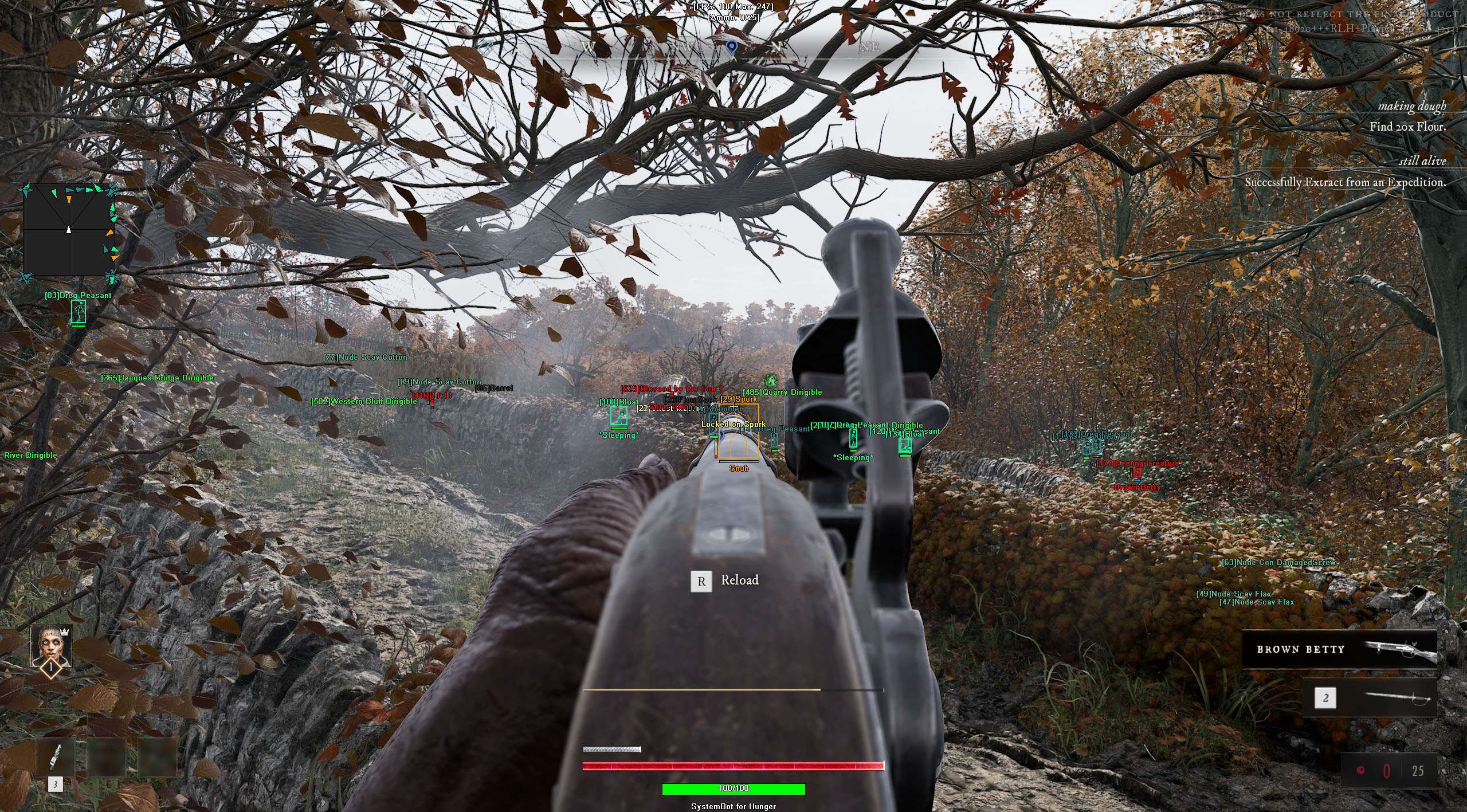
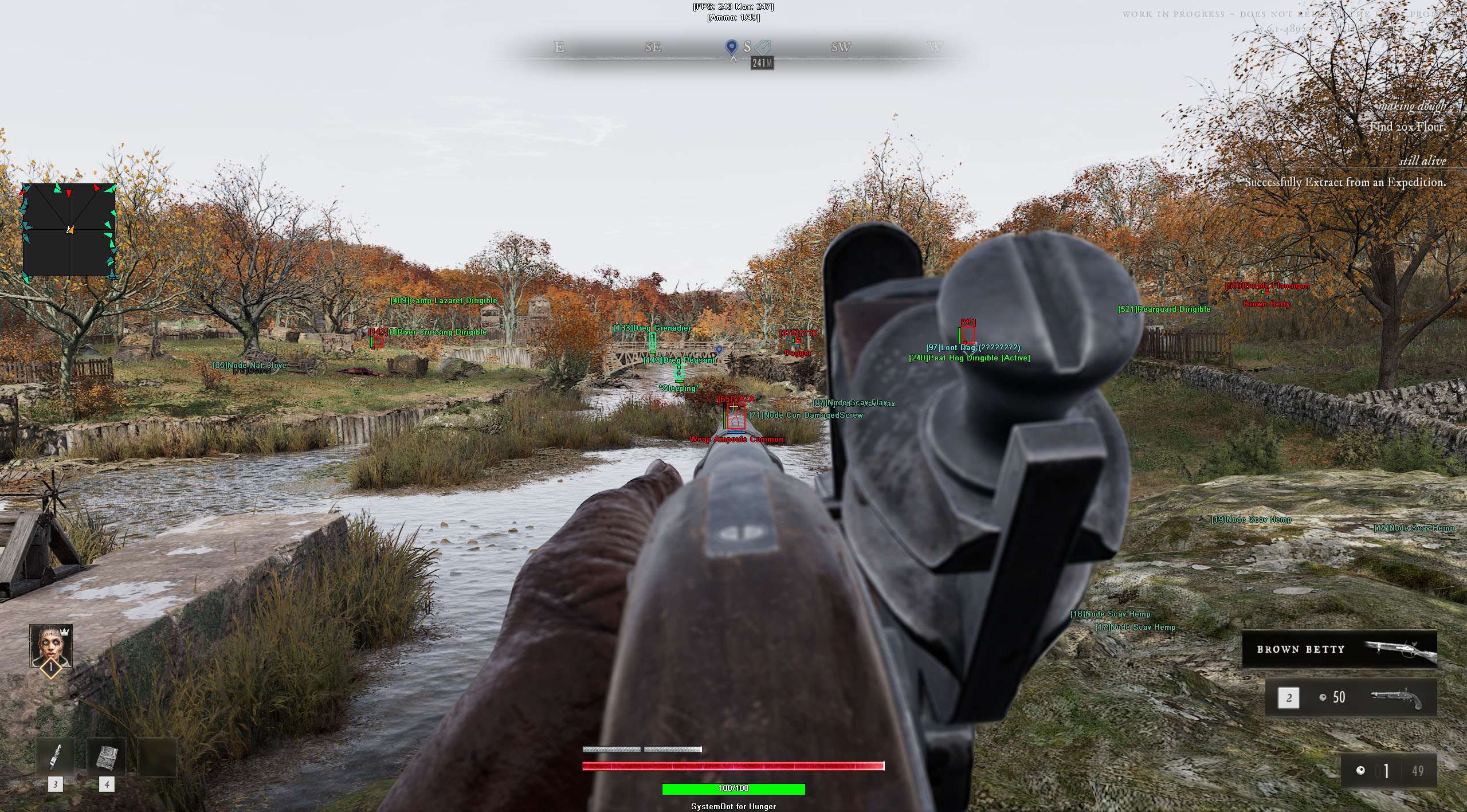
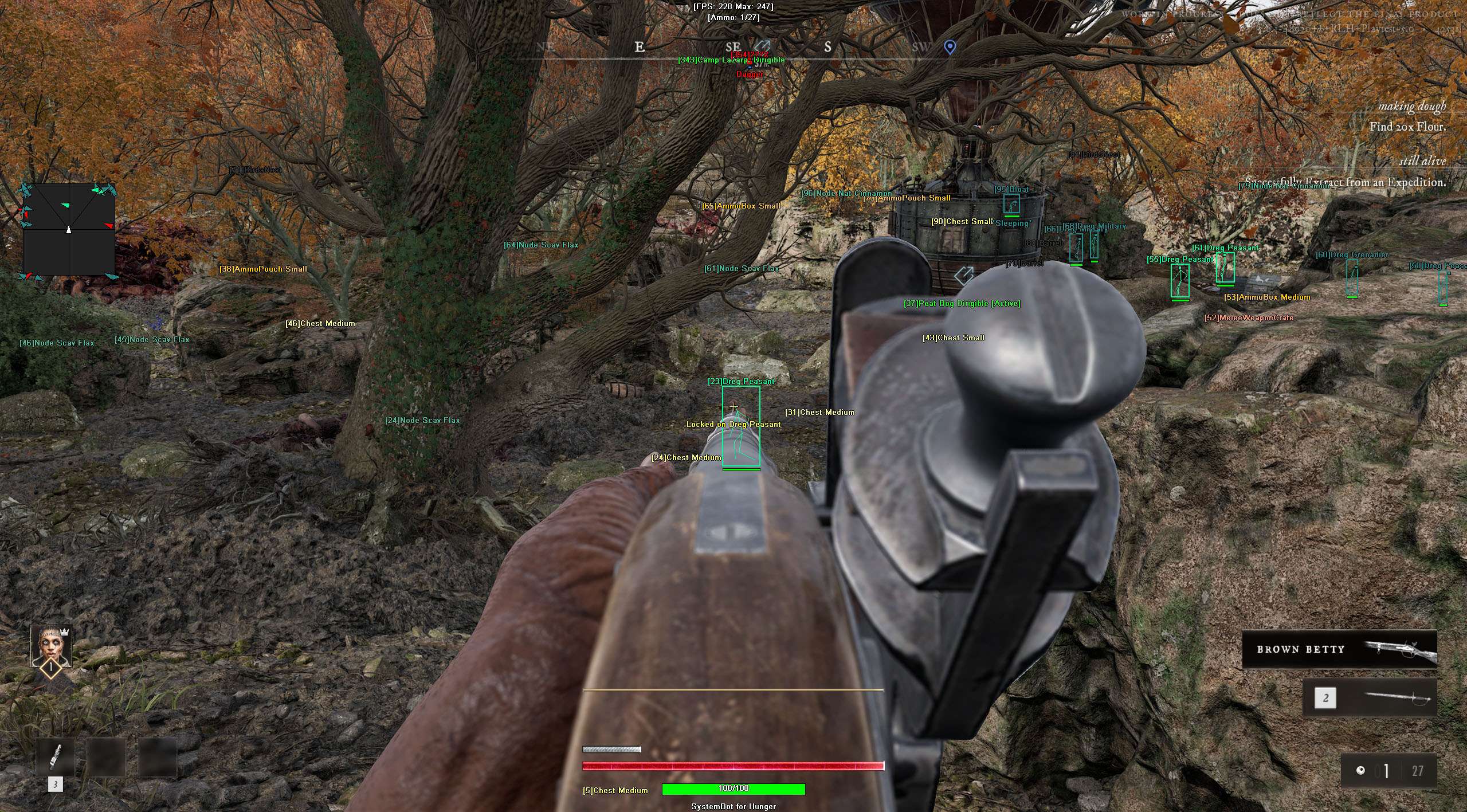
  • 3D Radar ESP for Players and MonstersBounding Box in 2D or 3D, Head Dot, 2D Line and Aim Laser, with Name, Distance, Weapon, Health, Armor, Downed and Skeleton ESP for friendly and enemy players, plus AI Name, Distance, Health, Skeleton and AI Sleeping ESP.
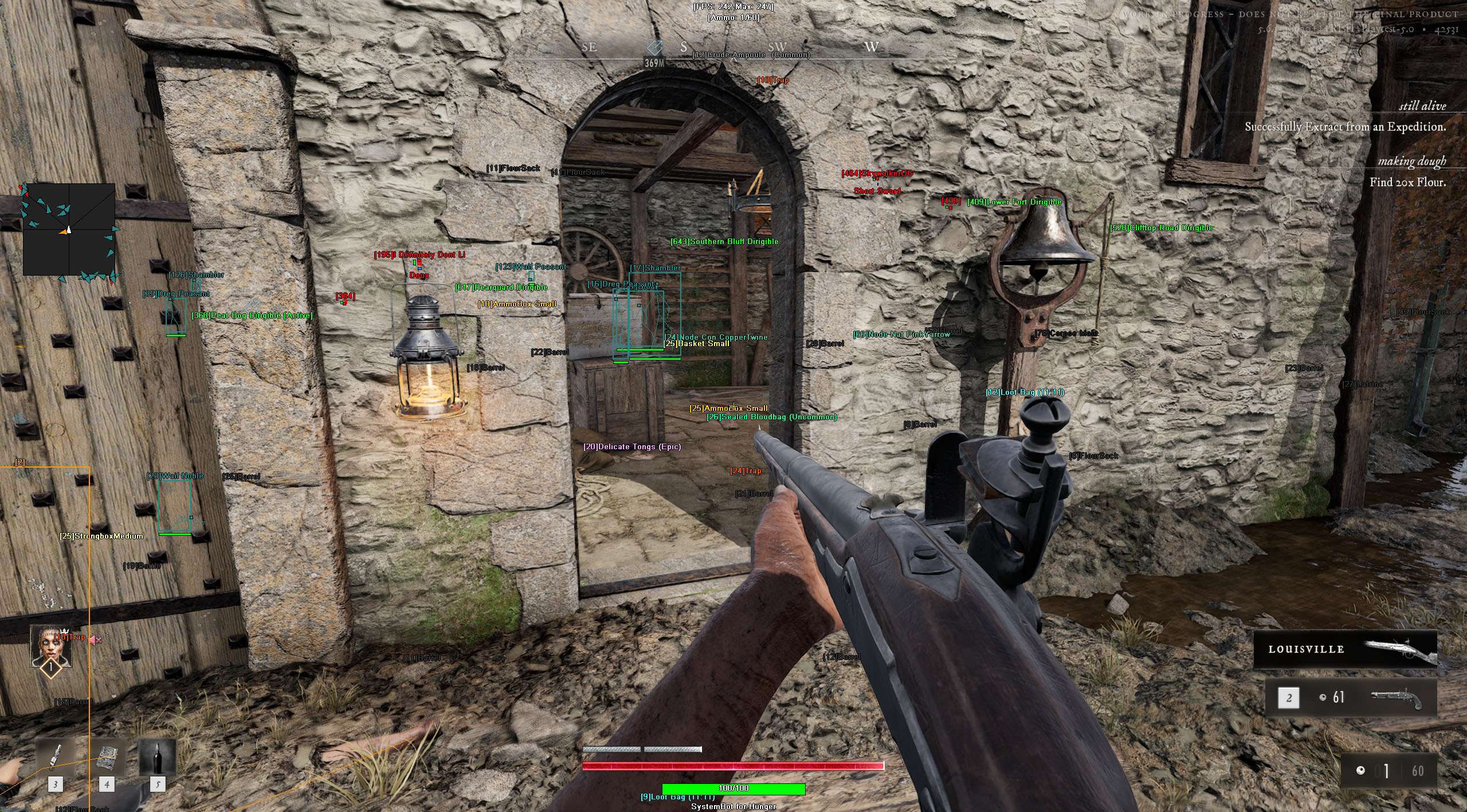
  • Rarity-Filtered Loot and Extraction ESPChest ESP with Hide Opened Chests, Weapon Crate, Armor Crate, Ammo Box, Medical, Corpse, Container, Loot Bag, Item, Resource ESP, Quest, Trap and Extraction ESP, filtered by Item Rarity ESP and Min Item Rarity from Common to Artifact.
  • 2D RadarA movable top-down radar window with Radar Scale, Window Size, Cross Size and Stick To Window. Tracks friendly players, enemy players and hostile AI as directional triangles or dots, with Show FOV and Center 2D Radar.
  • Warning System and Audio BeepsOn-screen alerts when an enemy is within your Is Aiming At You Angle or Can See You Angle, out to a configurable Max Distance, paired with a Beep System and Max Beep Distance.
  • Infinite Stamina, Energy and Weapon ControlInfinite Stamina for sprinting, dodging and melee swings, Infinite Energy, and No Recoil, No Spread and No Camera Shake to keep black-powder rifles, pistols and mortars steady.
  • Fullbright, No Fog, No Blind and Panic KeyFullbright lights dark interiors evenly, No Fog clears distance haze and No Blind blocks flash, smoke and blinding effects. Use Panic Key hides all visuals with one press, and four custom profiles save your setup.
HUNGER Hack in-game screenshot 1 of 4 HUNGER Hack in-game screenshot 2 of 4 HUNGER Hack in-game screenshot 3 of 4 HUNGER Hack in-game screenshot 4 of 4

HUNGER Aimbot for Black-Powder Rifles, Pistols and Mortars

Firearms in HUNGER demand patience and precision. Whether you carry a single-shot musket, a flintlock pistol, a repeating rifle or a hand mortar that lobs explosive glass grenades, reloads are slow and swapping to a backup weapon from your inventory costs precious seconds. Missing your opening shot at Camp Lazaret or across Jacques Bridge leaves you vulnerable while a rival trio pushes in.

The HUNGER aimbot pairs Auto Aim with Bullet Speed Prediction, which leads moving targets based on projectile travel time, and Bullet Drop Prediction, which aims higher to make up for gravity drop over long distances. Prediction Scale fine-tunes the lead and drop correction from 1 to 30, Aim Bone locks onto the Head, Neck or Chest, and Aim Style chooses targets by FOV, Distance or Health out to a Max Distance of 1500 meters, with separate toggles for Aim on Enemy, Aim on Enemy AI, Aim on Downed and Aim on Friendly.

HUNGER Triggerbot, Natural Aim Control and Recoil Stability

Keeping your aim natural during squad fights is straightforward. With Use Aim Key active, the aimbot only pulls while you hold or toggle your bound key. Smooth Aim slows the camera pull across a 1 to 50 scale, Limit Angle restricts targeting to your chosen angle from 0 to 180, Draw Aim FOV draws that active circle on screen, and Draw Locked marks the target the aimbot is locked onto.

Visibility Check stops the aimbot from locking onto players or monsters behind stone walls or trees, and Stick to Target holds one enemy until they drop. For close ambushes, you can use Auto Fire or the HUNGER triggerbot with Use Trigger Key, Trigger Key, a customizable Fire Delay from 0 to 1000 milliseconds, and separate toggles for Trigger on Enemy, Trigger on Enemy AI and Trigger on Friendly. You can also turn on No Recoil, No Spread and No Camera Shake in the Misc tab so your sights stay steady under fire.

Surviving Melee Brawls with Infinite Stamina and Infinite Energy

When black-powder smoke clears, fights in HUNGER turn into brutal first person melee clashes with clubs, daggers, maces, short swords, longswords, axes and polearms. Parrying an incoming strike stuns the attacker, but swinging heavy weapons, dodging lunges and sprinting out of danger drain your stamina and energy reserves fast. Running dry mid-fight means you cannot swing or dodge.

Our HUNGER cheat includes Infinite Stamina, which gives unlimited stamina for sprinting, dodging and melee attacks, and Infinite Energy, which keeps your character energy full. During close-range brawls, No Camera Shake stops screen wobble when taking hits, No Blind blocks smoke and blinding effects, and Draw Health Bar keeps your own health visible on screen.

HUNGER ESP for Rival Living Squads and Dormant Monsters

On an Expedition you face more than one threat at a time. While your squad battles infected Dregs, a Shambler that inflicts stacking bleeds or a swollen Bloater that bursts into poison gas, a rival squad playing Gabriel, Eva or Hugo can stalk the gunfire to third-party you. The HUNGER ESP on the 3D Radar draws a 2D or 3D Bounding Box, Head Dot, 2D Line and Aim Laser on players in range.

Enemy Name ESP, Enemy Distance ESP, Enemy Weapon ESP, Enemy Health ESP, Enemy Armor ESP, Enemy Downed ESP and Enemy Skeleton ESP show you who is coming, what weapon they hold and how much armor they have left. Separate Enemy Visible RGBA and Enemy Invisible RGBA colors show who is in the open and who is behind cover, alongside Show Enemy and Show Friendly options. For PvE horrors, Show Enemy AI, Show Sleeping AI, AI Name ESP, AI Distance ESP, AI Health ESP, AI Skeleton ESP and AI Sleeping ESP mark both roaming monsters and dormant infected out to a Max AI Distance of 1500 meters.

Loot ESP, Crafting Resources and Rarity Filtering

Progression at the Chateau depends on what you carry out of an Expedition. You can train gathering professions like Naturalist, Conservator and Scavenger alongside crafting professions like Gunsmith, Outfitter, Metallurgist, Artificer, Cook and Physician. Raising those professions takes a steady supply of materials, weapons and medical gear, and because your backpack has limited slots, each pickup counts.

The 3D Radar provides individual toggles and RGBA colors for Chest ESP, Weapon Crate ESP, Armor Crate ESP, Ammo Box ESP, Medical ESP, Corpse ESP, Container ESP, Loot Bag ESP, Item ESP, Resource ESP and Quest ESP, with Item Distance ESP and a Max Item Distance up to 500 meters. Turning on Hide Opened Chests hides chests that have already been opened, while Item Rarity ESP and Min Item Rarity let you filter ground loot from Common and Uncommon up to Rare, Epic, Legendary and Artifact tiers.

Dark Dungeons, Plague Fog and Extraction Ambush Warnings

Subterranean Dungeons, cellars and wooded valleys in Sombre Forest and Sarlat Farm are wrapped in heavy shadow and fog, and extraction points become dangerous whenever two or more parties close in and trigger the extraction smoke signal. Fullbright lights the entire map evenly so dark corners cannot hide a crouching player, No Fog strips away distance haze across open fields, and No Blind blocks flash, smoke and screen blinding effects.

Around objectives and exits, Extraction ESP marks extraction zones out to a Max Extraction Distance of 1500 meters, and Trap ESP highlights bear traps and tripwires before you step into them. Meanwhile, the Warning System and Beep System alert you the moment an enemy enters your Can See You Angle or Is Aiming At You Angle.

2D Radar, Player Filters and Four Custom Config Profiles

For a clean top-down view alongside your 3D overlays, the 2D Radar uses Show Radar, Show Window, Show Cross, Show Dot and Show FOV to plot friendly teammates, enemy players and hostile AI with Dot Type set to directional triangles or dots, plus adjustable Radar Scale, Window Size, Cross Size, Stick To Window and Center 2D Radar. In the Filters tab, 6 Friendly Player Filters and 6 Enemy Player Filters let you enter player names to show or hide on the ESP.

Use Panic Key and your bound Panic Key hide all cheat visuals and menus with one press, and the Settings/Keys tab lets you save and load four complete profiles with Save/Load Default Settings, Save/Load Custom 1 Settings, Save/Load Custom 2 Settings and Save/Load Custom 3 Settings on Default Key, Custom 1 Key, Custom 2 Key and Custom 3 Key.

Custom Overlay Colors, Crosshair Sizing and HUD Readouts

Each visual layer in the HUNGER cheat can be tuned so your screen stays readable in dark cellars and bright snow or forest clearings. On the 3D and 2D radars, Box Size from 1 to 10 sets the line thickness of each ESP box, Dot Size from 2 to 20 scales head and radar dots, and Laser Size from 50 to 3000 adjusts the length and thickness of each Aim Laser.

Text overlays support Font Size from 10 to 20 and Font Shadow in None, Shadow or Bordered styles, while the Colors tab provides separate RGBA pickers for visible and invisible players and AI, each loot container type, all six item rarity tiers, warnings, the FOV circle and the menu itself. In the Misc tab, you can also pick a custom Crosshair in Cross, Dot or T-Cross styles, adjust Crosshair Size from 2 to 200 and toggle Draw Resolution, Draw Time and Draw Watermark alongside Draw FPS, Draw Ammo and Draw Health Bar.

How to Get the HUNGER Cheat

Setting up the HUNGER hack on PC takes three steps.

01
Create Your Account

Register on the forum for free. Your subscriptions, loader download and support all run through your forum account.

02
Get the Premium Package

At this stage HUNGER comes with the Premium Package only, together with the other games it includes. A separate HUNGER subscription comes later.

03
Load and Launch on Steam

Run the SystemCheats loader as administrator, load the HUNGER cheat before launching the Steam version of HUNGER, open the menu in game with your Menu Key and save your setup in Default, Custom 1, Custom 2 or Custom 3.

Is It Safe to Cheat in HUNGER?

HUNGER uses Easy Anti-Cheat on PC, integrated through Epic Online Services, along with an in-game player report system. Using Smooth Aim, Visibility Check and a low Limit Angle helps keep your gameplay looking natural to other players. Even so, no cheat is ever completely risk free. The live cheat status page always shows the current state of every cheat, including HUNGER.

Frequently Asked Questions

Is the HUNGER cheat included in the Premium Package?

Yes. At this stage the HUNGER cheat comes with the Premium Package only, alongside the other games listed on the package page. A separate HUNGER subscription comes later.

Which version of HUNGER does the cheat support?

The Steam version of HUNGER on Windows PC. Other stores and consoles are not supported.

Which anti-cheat does HUNGER use?

HUNGER uses Easy Anti-Cheat on PC, together with an in-game player reporting system.

Is the HUNGER cheat online?

The live cheat status page always shows the current state of every cheat, including HUNGER. Check it before you buy or play.

Does the HUNGER aimbot account for bullet drop on black-powder guns?

Yes. The aimbot includes Bullet Speed Prediction to lead moving targets and Bullet Drop Prediction to compensate for gravity over distance, with a Prediction Scale slider from 1 to 30.

Can the HUNGER ESP filter loot by rarity and hide opened chests?

Yes. The 3D Radar has Hide Opened Chests to clear opened chests from your screen, plus Item Rarity ESP and Min Item Rarity so you only see items at or above your chosen tier, from Common and Uncommon up to Rare, Epic, Legendary or Artifact.

Does the cheat show sleeping monsters, traps and extraction points?

Yes. AI Sleeping ESP and Show Sleeping AI mark dormant infected before they wake up, Trap ESP highlights bear traps and tripwires, and Extraction ESP marks extraction zones out to 1500 meters.

Extract from Your Expeditions with the HUNGER Hack

In HUNGER an Expedition puts your weapons, armor and gathered resources on the line against rival Living trios and infected horrors. With the HUNGER cheat you spot players and sleeping monsters through walls, filter high-rarity loot and crafting materials, keep your stamina full in melee fights and reach extraction without walking into a trap.

Need Help?

Our support team is available 24 hours a day, 7 days a week through the SystemCheats forum and TeamSpeak. Read what customers say on Trustpilot, or compare all cheat packages to find the right fit.

Cheat & Hack Information

What is HUNGER?


HUNGER is a first-person PvPvE extraction shooter and slasher RPG from Good Fun Corporation, set in Napoleonic Europe after a plague outbreak. You enter expeditions solo or in a squad of up to three Living, fight rival players and infected creatures with black-powder firearms and melee weapons, and extract back to the Chateau with your loot.


Cheating in HUNGER


Our HUNGER cheat includes an aimbot with Bullet Speed Prediction and Bullet Drop Prediction, a 3D Radar ESP for players, monsters, loot and extraction points, a 2D Radar, a Warning System, Infinite Stamina and Fullbright. During the playtest, it comes with the Premium Package only.


Is the HUNGER cheat safe?


HUNGER uses Easy Anti-Cheat on PC. No cheat is ever completely risk free. However, you can always adjust your settings to play legitimately for the long run. Check the live status page before you play.


Pricing

Premium Package ONLY until HUNGER releases. A single HUNGER subscription is not sold before the release.

Features

Aimbot
Auto Aim Moves your aim onto a valid target for you automatically
Auto Fire Fires your weapon for you once a target is locked
Fire Delay (0 ~ 1000) Adds a short wait in milliseconds before firing once a target is locked
Smooth Aim (1 ~ 50) Slows the aim movement so it looks natural, and higher values make it slower
Limit Angle (0 ~ 180) Sets how far from your crosshair a target can be for the aimbot to lock on
Use Aim Key Makes the aimbot work only while you hold or toggle your aim key
Bullet Speed Prediction Leads moving targets based on how long the shot takes to arrive
Bullet Drop Prediction Aims a little higher to make up for bullet drop over long distances
Prediction Scale (1 ~ 30) Fine tunes how strong the lead and bullet drop prediction is
Visibility Check Stops the aimbot from targeting enemies hidden behind walls or cover
Stick to Target Keeps the aimbot on one target until it is down or leaves range
Aim Style (FOV, Distance, Health) Sets how the aimbot chooses the best target when more than one is in range
Aim Bone (Head, Neck, Chest) Sets which body part the aimbot aims at, such as the head or chest
Aim on Friendly Lets the aimbot target and lock onto your teammates
Aim on Enemy Lets the aimbot target and lock onto enemies
Aim on Enemy AI Lets the aimbot target hostile AI, such as bots, monsters and bosses
Aim on Downed Lets the aimbot target players and enemies who are downed
Max Distance (0 ~ 1500) Sets the farthest distance, in meters, at which targets are still picked up or shown
Draw Locked Draws a marker on the target the aimbot is locked onto
Draw Aim FOV Draws a circle on screen that shows where the aimbot is active
Triggerbot
Triggerbot Shoots for you when your crosshair is on a valid target
Use Trigger Key Makes the triggerbot fire only while you hold the trigger key
Fire Delay (0 ~ 1000) Adds a short wait in milliseconds before firing once a target is locked
Trigger on Friendly Lets the triggerbot fire at friendly teammates
Trigger on Enemy Lets the triggerbot fire at enemies in your crosshair
Trigger on Enemy AI Lets the triggerbot fire at hostile AI enemies
Max Distance (0 ~ 1500) Sets the farthest distance, in meters, at which targets are still picked up or shown
3D Radar
Bounding Box (None, 2D, 3D) Draws a box around each target so you can see where they are
Box Size (1 ~ 10) Sets how thick the lines of each ESP box are drawn
2D Line Draws snap lines from your screen to each target
Head Dot Draws a dot on the head of each target you can see
Dot Size (2 ~ 20) Sets how big the dot markers are drawn on each target
Aim Laser Draws a line that shows where each target is aiming
Laser Size (50 ~ 3000) Sets the length and thickness of the aim laser line
Friendly Name ESP Shows the name of each of your teammates on the map
Friendly Distance ESP Shows how far away each teammate is from you
Friendly Weapon ESP Shows the weapon each teammate is holding
Friendly Health ESP (None, Scaled, Static, Vertical) Shows a health bar for each teammate on the map
Friendly Armor ESP Shows an armor bar or value for each teammate on the map
Friendly Downed ESP Highlights downed teammates who need a revive
Friendly Skeleton ESP Draws skeleton bone lines on your teammates
Enemy Name ESP Shows the name of each enemy you can see on the map
Enemy Distance ESP Shows how far away each enemy is from you
Enemy Weapon ESP Shows the weapon each enemy player is holding
Enemy Health ESP (None, Scaled, Static, Vertical) Shows a health bar for each enemy you can see
Enemy Armor ESP Shows an armor bar or value for each enemy you can see
Enemy Downed ESP Highlights enemies who are downed and crawling
Enemy Skeleton ESP Draws skeleton bone lines on enemy players so you can see their pose
AI Name ESP Shows the name or type of each AI character
AI Distance ESP Shows how far away each AI character is from you
AI Health ESP (None, Scaled, Static, Vertical) Shows a health bar for each AI character
AI Sleeping ESP Shows whether each AI enemy is dormant or sleeping
AI Skeleton ESP Draws skeleton body lines on AI enemies so you can see how they stand
Show Friendly Shows your teammates on the ESP and radar
Show Enemy Shows enemies on the ESP and radar so you always know where they are
Show Enemy AI Shows hostile AI, such as bots and monsters, on the ESP and radar
Show Sleeping AI Shows dormant and sleeping AI enemies on the ESP and radar
Max Distance (0 ~ 1500) Sets the farthest distance, in meters, at which targets are still picked up or shown
Max AI Distance (0 ~ 1500) Sets how far away AI characters are still shown
Chest ESP Shows loot chests across the map that you can open
Hide Opened Chests Hides loot chests that have already been opened from the ESP
Ammo Box ESP Shows ammo boxes and ammunition refills across the map
Medical ESP Shows bandages, healing items and medical supplies across the map
Armor Crate ESP Shows armor crates and protective gear caches through walls
Weapon Crate ESP Shows weapon crates through walls so you can find them fast
Corpse ESP Highlights dead players and lootable bodies on the ground
Container ESP Shows lootable containers and supply caches
Loot Bag ESP Shows dropped loot bags and pouches on the ground
Item ESP Shows items and supplies in the game world
Resource ESP Highlights crafting materials and research parts on the ESP
Quest ESP Highlights quest objectives, quest items and waypoints
Trap ESP Highlights traps placed on the map, such as bear traps and tripwires
Extraction ESP Shows extraction zones and rescue vehicles
Item Rarity ESP Shows the rarity tier of each item on the ESP
Min Item Rarity (Common, Uncommon, Rare, Epic, Legendary, Artifact) Only shows items at or above the chosen rarity tier
Item Distance ESP Shows how far away each item is from you
Max Item Distance (0 ~ 500) Sets how far away items and loot are still shown
Max Extraction Distance (0 ~ 1500) Sets how far away extraction points are still shown on screen
2D Radar
Show Radar Turns on the 2D radar overlay on your screen
Show Cross Draws cross lines through the middle of the radar
Show Window Draws the background frame of the radar window
Show Dot Shows targets as dots on the radar window
Show FOV Draws a cone on the radar that shows where you are looking
Show Friendly Shows your teammates on the ESP and radar
Show Enemy Shows enemies on the ESP and radar so you always know where they are
Show Enemy AI Shows hostile AI, such as bots and monsters, on the ESP and radar
Stick To Window Keeps targets that are out of range pinned to the edge of the radar
Radar Scale (0 ~ 60) Sets the radar zoom, lower zooms in and higher zooms out
Window Size (45 ~ 260) Sets the width and height of the radar window
Cross Size (45 ~ 260) Sets the length of the cross lines in the middle of the radar
Dot Size (2 ~ 20) Sets how big the dot markers are drawn on each target
Dot Type (Triangle, Dot) Switches radar markers between plain dots and triangles that point where targets face
Center 2D Radar Places the radar in the middle of the screen, around your crosshair
Max Distance (0 ~ 1500) Sets the farthest distance, in meters, at which targets are still picked up or shown
Warning System
Warning System Shows on-screen warnings when enemies are near, can see you or aim at you
Is Aiming At You Angle (0 ~ 180) Sets the angle used to warn you when an enemy is aiming at you
Can See You Angle (0 ~ 180) Sets the angle used to warn you when an enemy can see you
Max Distance (0 ~ 1500) Sets the farthest distance, in meters, at which targets are still picked up or shown
Beep System Plays a warning beep when an enemy is looking or aiming at you
Max Beep Distance (0 ~ 1500) Sets how far away an enemy can be and still set off the warning beep
Misc
Crosshair (None, Cross, Dot, T-Cross) Draws a custom crosshair in the center of your screen, over the game's own
Crosshair Size (2 ~ 200) Sets the size of the custom crosshair on your screen
Draw FPS Shows your current frames per second on screen
Draw Ammo Shows your current weapon ammo count on screen
Draw Resolution Shows your current screen resolution on the overlay
Draw Time Shows your local system time on the overlay
Draw Watermark Shows the SystemCheats watermark on screen so you know the cheat is active
Draw Health Bar Shows your own health as a bar on screen
Use Panic Key Turns on a hotkey that instantly hides all cheat visuals and menus
Font Size (10 ~ 20) Sets the size of the ESP and overlay text on screen
Font Shadow (None, Shadow, Bordered) Adds a shadow or border behind overlay text so it is easier to read
No Recoil Removes weapon recoil so your aim stays steady while firing
No Spread Removes bullet spread so every shot lands on your crosshair
No Camera Shake Removes camera shake and screen wobble when firing or taking hits
Infinite Stamina Gives unlimited stamina for sprinting, dodging and melee attacks
Infinite Energy Keeps your character energy full so it never runs out
No Blind Blocks flash, smoke and screen blinding effects
Fullbright Lights up the whole map evenly so dark areas are easy to see
No Fog Removes map fog and haze so you can see clearly across long distances
Filters
6 Friendly Player Filters Lets you enter friendly player names to show or hide on the ESP
6 Enemy Player Filters Lets you enter enemy player names to show or hide on the ESP
Colors
Enemy Invisible RGBA Sets the color for enemies hidden behind walls or cover
Enemy Visible RGBA Sets the color for enemies in your direct line of sight
Friendly Invisible RGBA Sets the color for teammates hidden behind walls or cover
Friendly Visible RGBA Sets the color for teammates in your direct line of sight
Enemy AI Invisible RGBA Sets the color for hostile AI hidden behind walls or cover
Enemy AI Visible RGBA Sets the color for hostile AI in your direct line of sight
Chest RGBA Sets the color used to draw loot chests on the ESP
Ammo RGBA Sets the color used to draw ammo boxes and pickups on the ESP
Medical RGBA Sets the color used to draw medical items and healing supplies on the ESP
Armor RGBA Sets the color used to draw armor pickups on the ESP
Weapon Crate RGBA Sets the color the ESP uses for weapon crates
Corpse RGBA Sets the color used to draw dead players and lootable bodies on the ESP
Container RGBA Sets the color used to draw loot containers on the ESP
Loot Bag Item RGBA Sets the color used to draw loot bags and dropped pouches on the ESP
Item RGBA Sets the color for general items shown on the ESP
Resource RGBA Sets the color used to draw crafting resources and materials on the ESP
Quest RGBA Sets the color used to draw quest items and objectives on the ESP
Trap RGBA Sets the color the ESP uses for placed traps
Extraction RGBA Sets the color used to draw extraction zones and exits on the ESP
Common RGBA Sets the color used for Common tier items on the ESP
Uncommon RGBA Sets the color used for Uncommon tier items on the ESP
Rare RGBA Sets the color used for Rare tier items on the ESP
Epic RGBA Sets the color used for Epic tier items on the ESP
Legendary RGBA Sets the color used for Legendary tier items on the ESP
Artifact RGBA Sets the color used for Artifact tier items on the ESP
Crosshair RGBA Sets the color for the custom crosshair drawn on your screen
Menu RGBA Sets the color scheme for the in-game cheat menu
Is Aiming At You RGBA Sets the warning color used when an enemy aims at you
Can See You RGBA Sets the color of the warning shown when an enemy can see you
Is Visible RGBA Sets the indicator color used when you are exposed and visible
Aim FOV RGBA Sets the color of the aimbot FOV circle drawn on screen
Positions
RadarX Position Sets the horizontal screen position of the radar window
RadarY Position Sets the vertical screen position of the radar window
MenuX Position Sets the horizontal screen position of the cheat menu
MenuY Position Sets the vertical screen position of the cheat menu
Settings/Keys
Panic Key Sets a key that instantly hides or turns off all cheat features
Menu Key Sets the key that opens and closes the cheat menu
Aim Key Sets the key that turns on the aimbot while held or toggled
Trigger Key Sets the key you hold or toggle to turn the triggerbot on
Default Key Sets a key that loads the default profile instantly
Custom 1 Key Sets a key that loads custom profile 1 instantly
Custom 2 Key Sets a key that loads custom profile 2 instantly
Custom 3 Key Sets a key that loads custom profile 3 instantly
Save/Load Default Settings Saves your settings to the default profile or loads them back
Save/Load Custom 1 Settings Saves your settings to custom profile 1 or loads them back
Save/Load Custom 2 Settings Saves your settings to custom profile 2 or loads them back
Save/Load Custom 3 Settings Saves your settings to custom profile 3 or loads them back