Available in Premium Package and One Day Trial during Playtest
Only Steam version supported
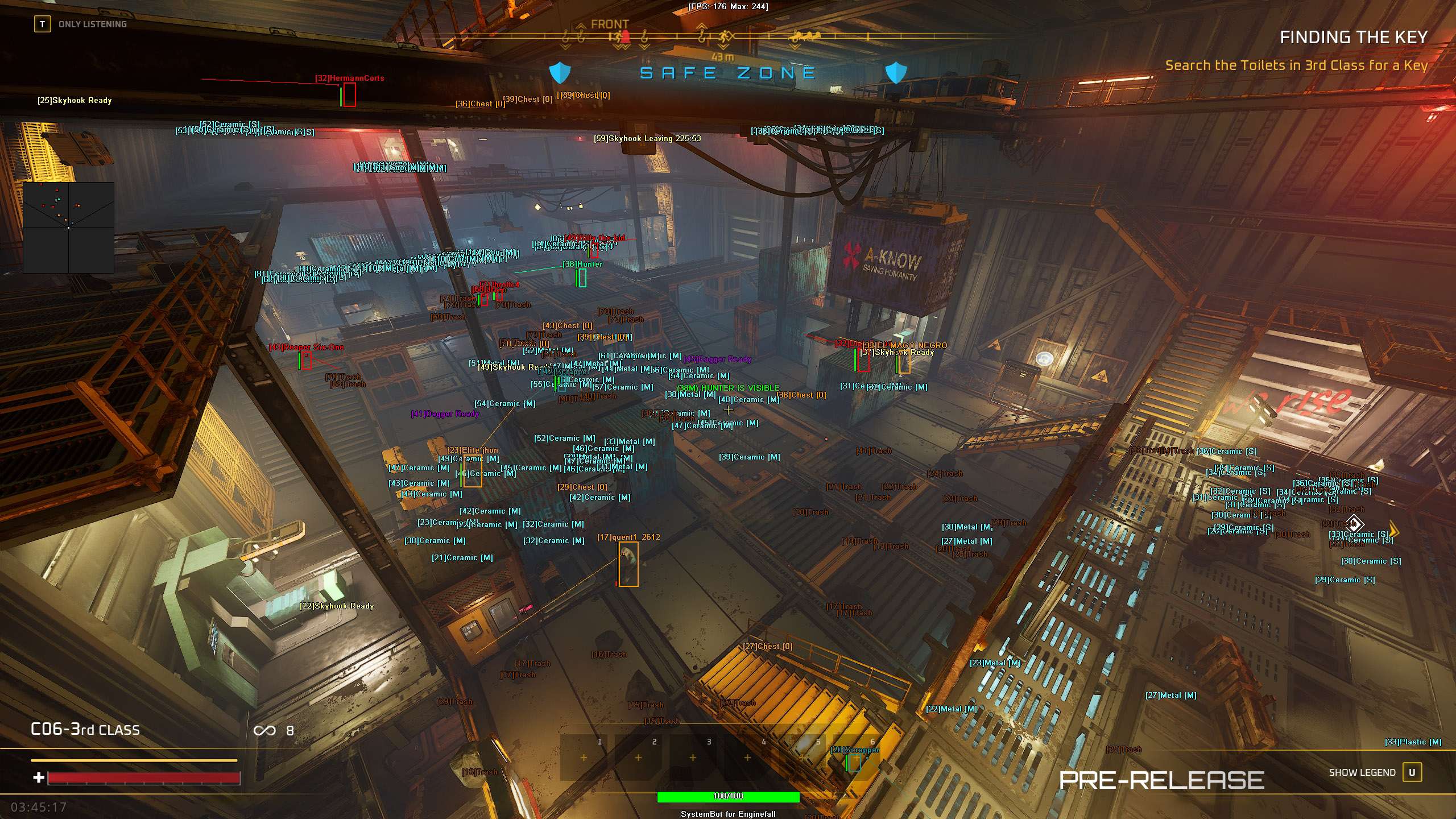
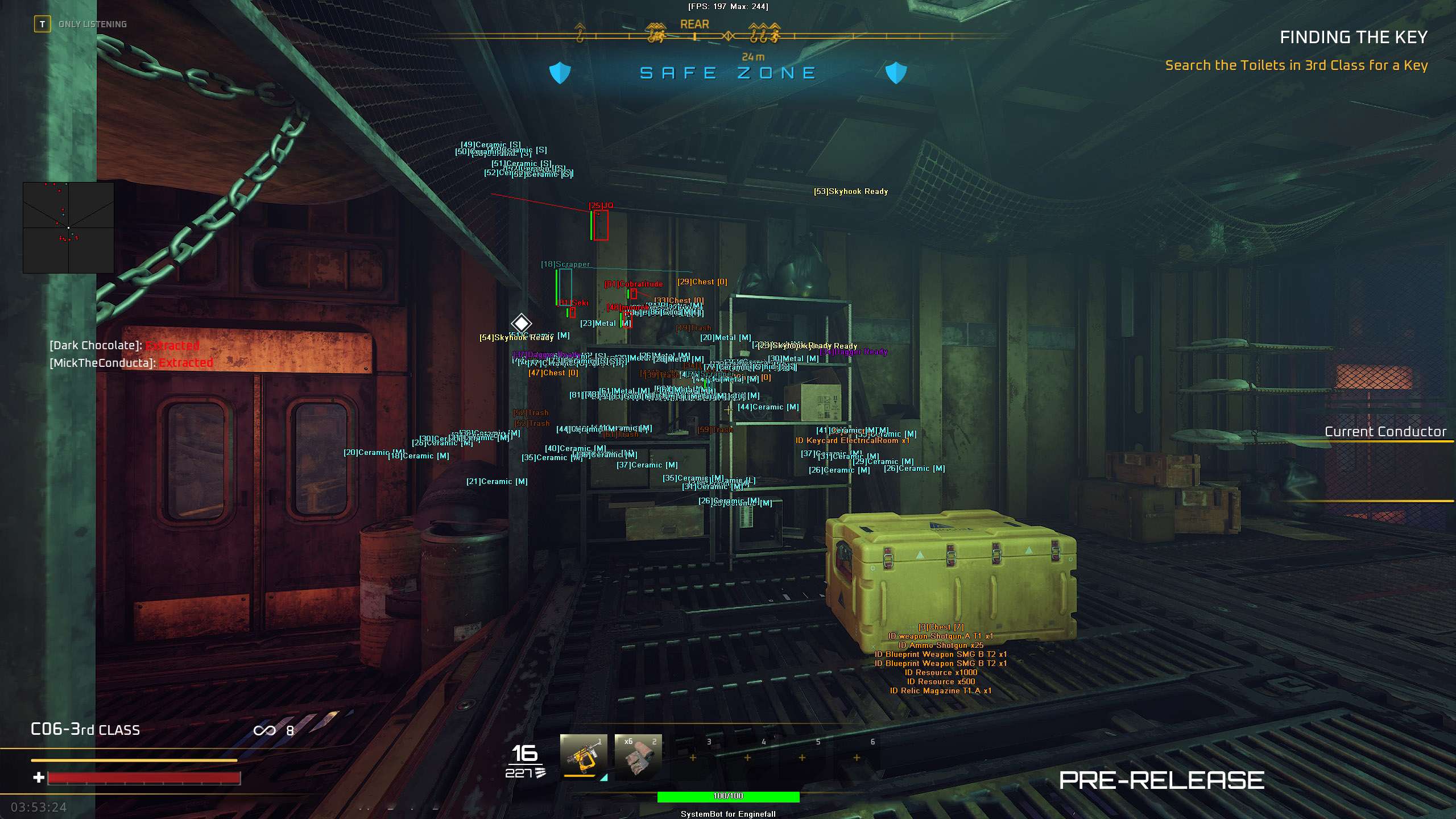
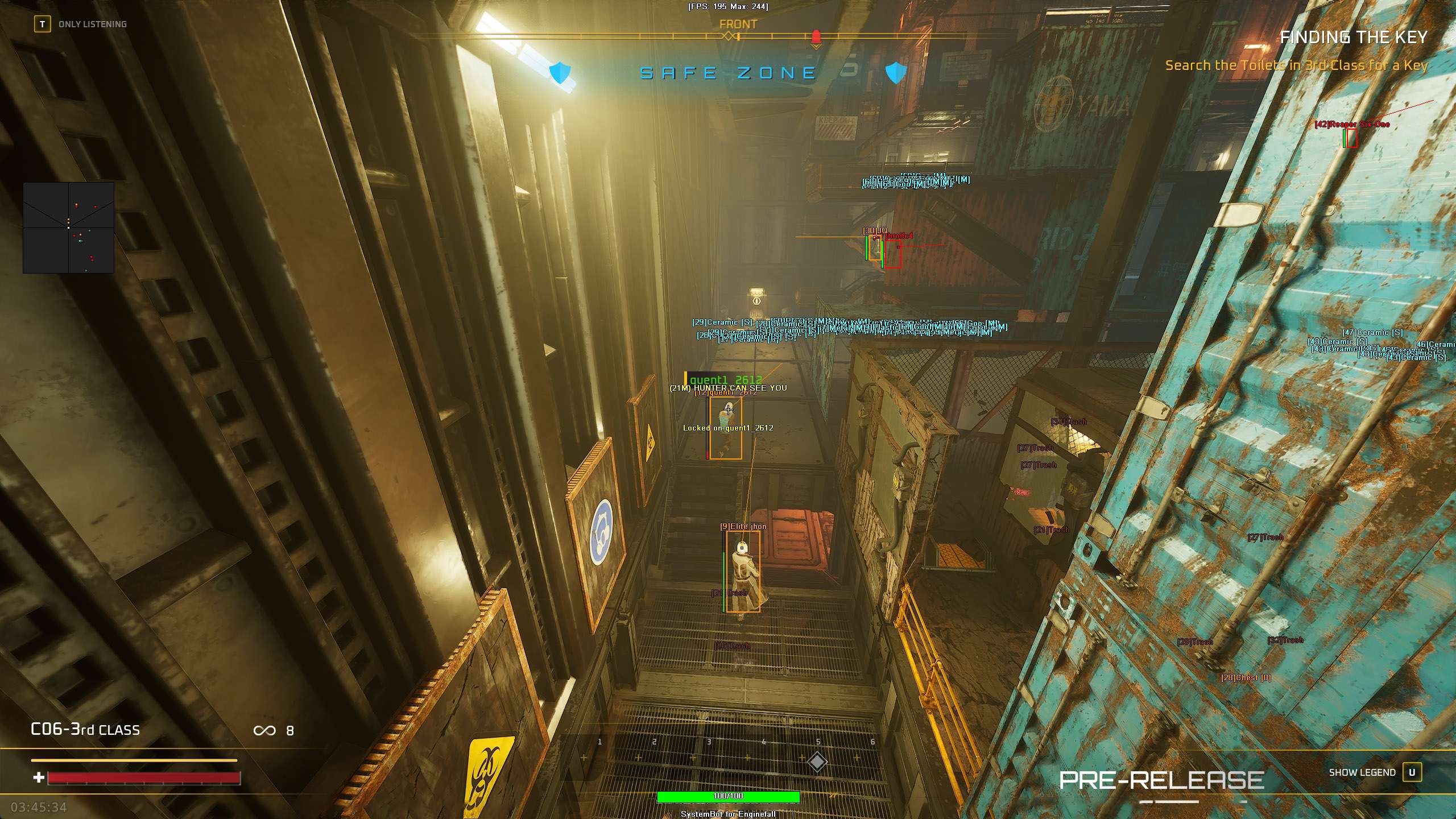
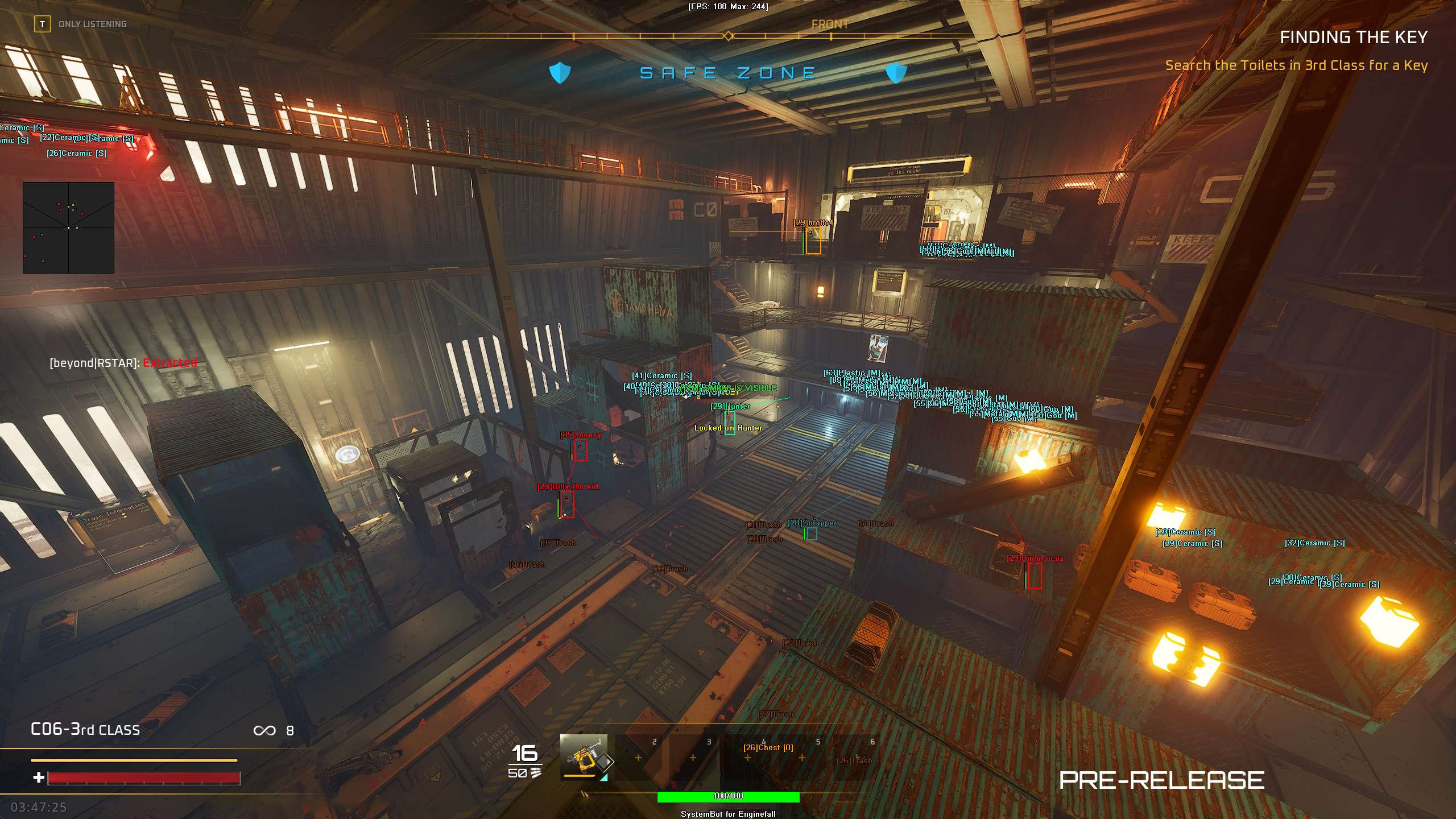
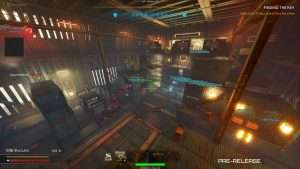
Aimbot, ESP and loot ESP in the Enginefall Cheat for PC.
Enginefall is a crafting multiplayer shooter from Red Rover Interactive, a studio with offices in Oslo and Newcastle upon Tyne. The studio describes it as PvP survival crafting with extraction shooter intensity. The world is post apocalyptic, and the rail network, called the Grid, is humanity’s last refuge. Giant Titan Trains roll across it like moving cities. You play a Freerailer, a nomad who lives out of a Dagger shuttle and roams the rails hunting for fuel and resources.
A raid starts at the back of a Titan Train. You board with your crew, scavenge, build small bases and push forward carriage by carriage for better gear, through Third, Second and First Class toward the Engine. Rival crews want the same loot, the train’s bots guard the markets and the airlocks, and poison gas and airlock purges can end your run as fast as a rifle. When the train begins to fail, a state the game calls Enginefall, you need to be out with your loot.
Our Enginefall hack is built for that loop: an aimbot with bullet speed and drop prediction, a 3D Radar ESP for players, AI and loot, Skyhook and Dagger ESP, a 2D Radar, a Warning System, and movement tools such as Ghost Mode and Speed Hack. Enginefall is in playtests, so some details on this page come from those tests, and the game can change before its release.
On a Titan Train the hard part is not finding loot, it is carrying it back to your Dagger. The Enginefall cheat shows the players, bots and loot around you and warns you when someone aims at you, so you pick your fights instead of walking into them. Until Enginefall releases, the cheat comes with the Premium Package only. Access to this cheat follows the game’s test phases, so check the live cheat status page before you buy.
The Enginefall cheat covers aim, awareness, loot and movement, with separate switches for friendly players, enemy players, friendly AI and enemy AI. Everything is set from the in-game menu, and a default slot plus Custom 1, Custom 2 and Custom 3 keep four setups ready, each with its own key. The highlights are below, and the full option list is in the Features panel on this page.
Many fights on a Titan Train happen inside the carriages, in the markets and at the airlocks, where a player can wait just around the next corner. The studio itself has named campers and spawn camping as problems it wants to deal with. The Enginefall ESP draws a box and a Head Dot on players in range, and Player Weapon ESP shows what each one is holding before you open the next door. The Enemy Visible and Enemy Invisible colours tell you who is in your line of sight and who is behind a wall, and the Aim Laser draws a line that shows where other players are aiming.
Scavenging drives progress in Enginefall. Resource dispensers eject Mini-Nodes that you break down with tools, searchable containers restock over time, and blue trash bags drop Data. Data turns into Schematics at Research Stations, and Schematics are what you spend to craft gear, weapons and advanced buildings. The Enginefall loot ESP puts that on your screen.
Node ESP covers dispensers and Mini-Nodes, Trash ESP covers trash bags and debris piles, Chest ESP marks loot chests and Vault ESP marks secure carriage vaults, each in its own colour. Item Distance ESP tells you how far each one is, and Item Max Distance keeps the far end of the train from filling your view.
Carrying good loot through a raid is tense, and the studio says so itself: players spend the rest of a raid terrified of losing it before they reach the Dagger. Skyhooks are the answer to that. These terminals sit on the outer walls of Cargo Carriages. You spend a Skyhook Token, deposit your loot and then defend the terminal through a countdown while rival crews can raid it.
Skyhook ESP shows where the terminals are. The Warning System tells you when an enemy is aiming at you or can see you, and the Beep System plays a tone when an enemy locks onto you, so you get a moment to react while the countdown runs.
Rival crews are not the only threat on a Titan Train. The train has its own bots: Scrappers in the undercarriage, Enforcers in the markets, Supply Drop Guards, Class Airlock Guards and Conductor Guards, with TRACE as the train’s security system. Scrappers drop fuel items and Data, so they are worth a fight.
Aim on Enemy AI and Trigger on Enemy AI let the Enginefall aimbot and the triggerbot work on hostile bots, Show Enemy AI marks them on the 3D Radar and the 2D Radar, and the Enemy AI Visible and Enemy AI Invisible colours set them apart from players. Switch the AI options off and the aim stays on players only.
Progress on a Titan Train runs from the back to the front. A Class Ticket, crafted from fuel items or bought with Credits, opens the next class, and each class brings better gear unlocks and richer resources. At the front, the Control Room holds the Conductor’s chair. You need a Breacher to get in, and the studio calls the breach a common flashpoint for combat.
The Conductor can talk to the whole train and craft the highest tier weapons and armor. Crews fight over the chair, and the Control Room breach is where many of those fights happen. For the breach, Aim Style set to Health picks the target with the lowest health, Visibility Check stops the aimbot from locking onto targets behind solid walls, Stick to Target stays on one enemy until they are down, and Draw Locked shows which target the aimbot is on.
A raid only pays off if you get out with your loot. You head to an extraction point and call in your Dagger shuttle, the mobile home your crew shares, with a shared vault on board. You also need to get out before Enginefall, the moment the train starts to fail, and Skyhooks stop working once it begins. Dagger ESP highlights your Dagger shuttle, and Draw Dagger Countdown shows its extraction timer on your screen, so you know if there is time for one more carriage.
A Titan Train is a long line of carriages, walls, airlocks and doors, and moving through it takes time. The movement tools in the Enginefall cheat change that. Ghost Mode lets your character fly and phase through solid carriage walls, with its own speed setting and its own key, and Save Ghost Location saves your position during Ghost Mode.
Speed Hack makes your character move faster, on a key that toggles it or holds it. Player Magnetizer pulls other players within range toward your location. Other players can notice these tools, so each one has its own key and you turn it on only when you need it. No Recoil and No Spread keep your shots on the crosshair when the fight starts.
Getting started with the Enginefall hack takes three steps.
Register on the forum for free. Your subscriptions, downloads and support all run through it.
Until Enginefall releases, the Enginefall cheat comes with the Premium Package only, together with the other games it covers.
Start the cheat with the SystemCheats loader, open the in-game menu with your menu key and save your setup in the default slot or Custom 1, 2 or 3.
The official playtest notes from Red Rover Interactive state that EasyAntiCheat is integrated and enabled in Enginefall. The studio also uses server side hit validation and other systems against combat cheating, which it does not explain, and it says enforcement is a large focus for the team. No official source says whether EasyAntiCheat stays in the release version of the game. No cheat is ever completely risk free. Settings such as Use Aim Key, Smooth Aim, Randomize Aim and Visibility Check keep the aim under your control, and the Panic Key hides the menu and all visuals with one press.
Access to the Enginefall cheat follows the game’s test phases, so check the live cheat status page before you buy. That page shows the real state of the Enginefall cheat.
Yes. Until Enginefall releases, the cheat is in the Premium Package only, together with the other games listed under Cheats Included on its page. A single Enginefall subscription is not sold before the release.
The Steam version of Enginefall on Windows 10 and 11 PC. Enginefall is a Windows PC game on Steam, and players get in through its playtests.
The official playtest notes say EasyAntiCheat is integrated and enabled. The studio has added more systems against combat cheating without naming them, and no official source says whether EasyAntiCheat stays in the release version.
The 3D Radar has Node ESP for resource dispensers and Mini-Nodes, Trash ESP, Chest ESP, Vault ESP, Grenade ESP, Dagger ESP and Skyhook ESP, each with its own colour, plus Item Distance ESP and Item Max Distance.
Yes. Aim on Enemy AI and Trigger on Enemy AI work on hostile security bots, and you can switch them off to keep the aimbot on players only. Show Enemy AI puts the bots on the 3D Radar and the 2D Radar.
Enginefall punishes a careless raid with lost loot. With the Enginefall cheat you see the crews, the bots and the loot around you, you get a warning when someone aims at you, and you decide when to push for the next carriage and when to head for your Dagger.
Our support team is available 24 hours a day, 7 days a week through the SystemCheats forum and TeamSpeak. Read what customers say on Trustpilot, or compare all cheat packages to find the right fit.
What is Enginefall?
Enginefall is a crafting multiplayer shooter from Red Rover Interactive that mixes PvP survival crafting with extraction shooter raids. You board a giant Titan Train with your crew, loot it carriage by carriage and fight rival crews and bots, then get out before the train fails.
Cheating in Enginefall
The Enginefall cheat has an aimbot with bullet speed and drop prediction, a 3D Radar ESP for players, AI and loot, a 2D Radar, a Warning System, Ghost Mode and Speed Hack. Until Enginefall releases, it comes with the Premium Package only.
Is the Enginefall cheat safe?
The official playtest notes say Enginefall uses EasyAntiCheat, together with server side hit validation. No cheat is ever completely risk free. However, you can always adjust your settings to play legitimately for the long run. Access to this cheat follows the game's test phases, so check the live status page before you play.