ROB RUN Hack with Aimbot, ESP and Radar Cheat for PC

Included in Premium Package and One Day Trial
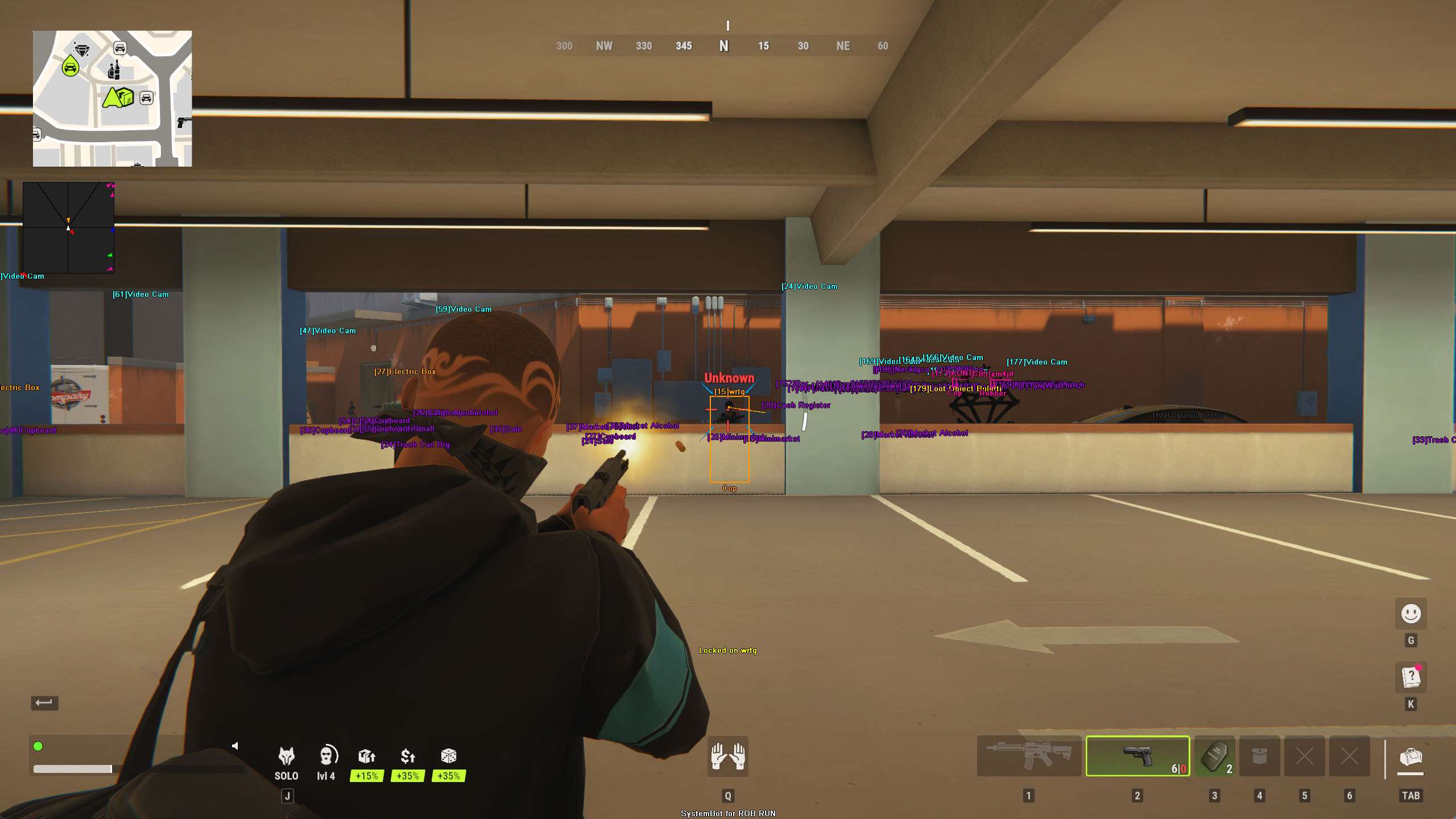
ROB RUN Hack ESP marking video cameras and cash in a parking garage
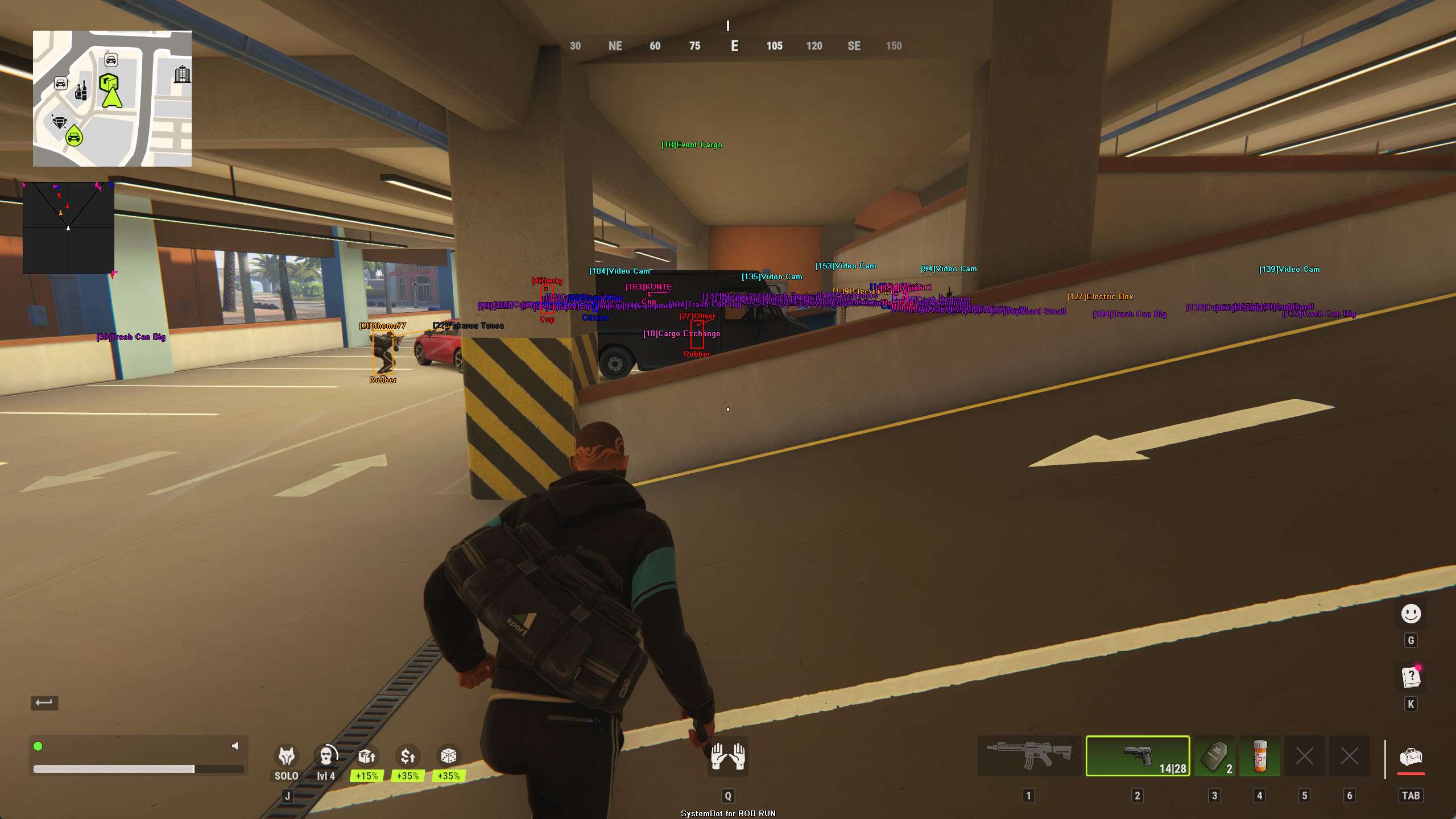
ROB RUN ESP showing a player, vehicles and cameras on a garage ramp
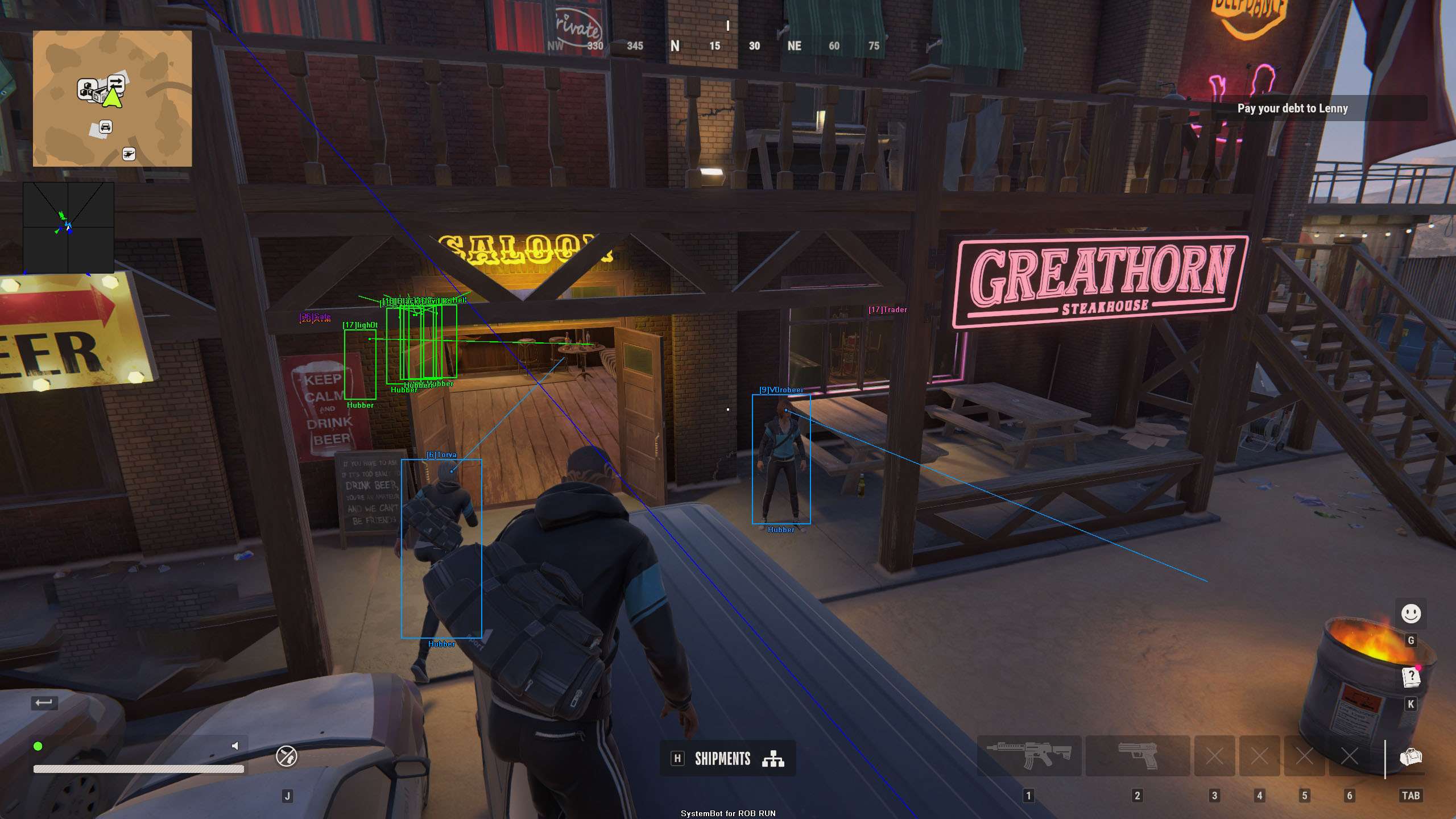
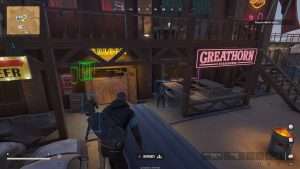
ROB RUN ESP boxes and snap lines on players outside a saloon
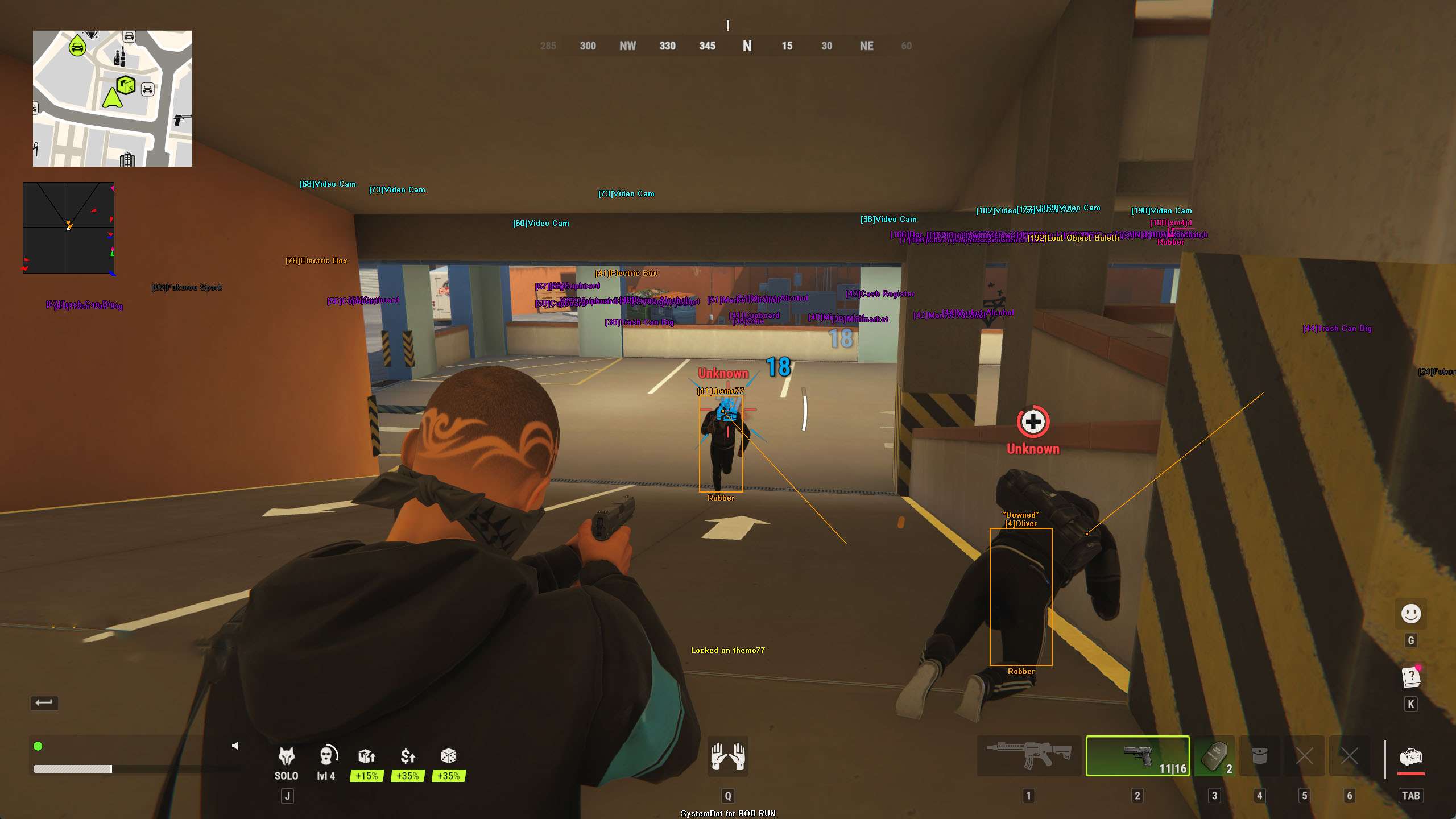
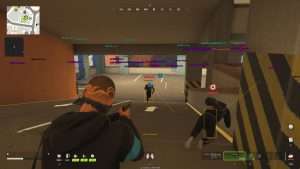
ROB RUN aimbot locked on a player, with a downed player marked by ESP
Crime sandbox • Heists, cash and real player cops • Steam

ROB RUN Hack with Aimbot, ESP and Radar Cheat for PC

Get the ROB RUN Cheat for PC.

ROB RUN is a free to play crime sandbox and third person extraction shooter from Kefir. You start with nothing and work your way up by any means. The main city is called Looty Bay, and it is the place for heists and robberies.

All cops and criminals in ROB RUN are real players. You become a Criminal when you put on a mask, and the split into cops and criminals happens only in Looty Bay. If the police catch you, you can surrender. The cops then take only your bag, and you keep the gear you have equipped.

Progress is built on money. Loot can be gear, vehicle keys, weapon mods, keys to locked rooms, blueprints and land deeds. You can build a base from items, join a clan and fight for land. Our ROB RUN hack is built for that climb. It has an aimbot with Silent Aim and Humanized Aim, No Recoil and No Spread, a triggerbot, a 2D Radar and a Warning System. Its 3D Radar ESP shows players and their roles, players hiding in closets, cash, safes, cargo, traders, loot, vehicles and cameras.

Heist briefing
Know What Is Around You Before You Mask Up

In Looty Bay the people hunting you are real players, and getting caught can cost you the bag you came for. The ROB RUN cheat shows who is a cop and who is a robber, who is hiding in a closet, plus cash, safes, cargo, loot, vehicles and cameras on your screen. It warns you when an enemy can see you or aims at you, and it helps your aim when a fight starts. The ROB RUN cheat is sold on its own and is also included in the Premium Package and the One Day Trial.

ROB RUN Hack and Cheat Features

The ROB RUN cheat covers aim, awareness, loot and vehicles, with separate switches for friendly and enemy players. Friendly options are for your teammates. You open the in-game cheat menu with your Menu Key and control all options there. The highlights are below, and the full option list is in the Features panel on this page.

  • Aimbot with Silent Aim and Humanized AimAuto Aim and Auto Fire with Silent Aim, which sends your shots to the locked target without moving your camera. Humanized Aim moves the aim on a curved path like a real hand. Linear and Constant Smooth Aim, Miss Chance, Randomize Aim and a Secondary Aim Key let you tune the rest.
  • ROB RUN TriggerbotShoots for you when your crosshair is on a valid target. Set a Pre Fire Delay and a Post Fire Delay, choose Trigger on Enemy, Trigger on Friendly or Trigger Downed, and turn on Use Trigger Key to fire only while you hold your Trigger Key.
  • 3D Radar ESP for PlayersBounding Box in 2D or 3D, Head Dot, 2D Line and Aim Laser, with Name, Distance, Downed, Role ESP and Hidden ESP for friendly and enemy players. Role ESP shows who is a cop and who is a robber, and Hidden ESP shows players hiding inside a closet or cabinet.
  • Cash ESP, Safe ESP and Cargo ESPCash ESP shows stacks of cash and money, Safe ESP shows the safes on the map and Cargo ESP shows cargo. Loot ESP, Container ESP and Ammo ESP show loot, lootable containers, supply caches and ammo boxes. Trader ESP shows traders on the map.
  • Vehicle ESP and Aim on VehicleVehicle ESP highlights vehicles through terrain, Show Vehicle puts them on the ESP, and Aim on Vehicle lets the aimbot lock onto vehicles as well as players on foot.
  • 2D RadarA radar overlay with Radar Scale, Window Size, Cross Size and Stick To Window. It tracks friendly and enemy players as triangles or dots, and Center 2D Radar can place it around your crosshair.
  • Warning System and Camera WarningOn-screen warnings when enemies are near, can see you or aim at you, with Is Aiming At You Angle, Can See You Angle and a Beep System. Camera ESP marks video cameras on the map, Camera Status ESP shows if each one is on, in scan or alarm mode or switched off, and Camera Warning warns you when you come close to one.
  • No Recoil, No Sway, No Flash and No SmokeNo Recoil, No Spread, No Camera Kick and No Sway keep your weapon steady. No Flash removes the blinding flash effect and No Smoke lets you see through smoke. A custom Crosshair, a Panic Key and four profiles round it off.
ROB RUN Hack ESP marking video cameras and cash in a parking garage ROB RUN ESP showing a player, vehicles and cameras on a garage ramp ROB RUN ESP boxes and snap lines on players outside a saloon ROB RUN aimbot locked on a player, with a downed player marked by ESP

ROB RUN ESP for a Heist in Looty Bay

The Bar is a neutral hub with a little storage, but the heists happen in Looty Bay. You drive into the city and pick a target, from corner stores and jewelry shops to bank vaults and police armories. The longer your crime spree runs, the higher your Notoriety climbs. Higher Notoriety means better loot and bigger payouts, but the danger grows with it. Grab the cash, the cargo or the safe and get out alive. Loot sells for more at the central hub of a district than in Looty Bay, and laundered cash is out of reach for thieves. The ROB RUN ESP helps you find your targets.

Cash ESP shows stacks of cash and money that you can pick up, and Safe ESP shows where the safes are. Cargo ESP marks cargo worth stealing, and Loot ESP shows loot and drawers you can search. Container ESP adds lootable containers and supply caches, Ammo ESP shows ammo boxes and pickups, and Trader ESP shows where the traders are.

Each of them has its own color on the ESP. Item Distance ESP shows how far away each item is from you, and Max Item Distance sets how far away items and loot are shown. When a shop is full of loot, Item Stack Distance and Item Stack Count group nearby items of the same name into one marker, and the Item Key shows or hides the item ESP.

Real Player Cops, Role ESP and Warnings in ROB RUN

The police in ROB RUN are not computer controlled. They earn money from a cut of confiscated goods, from arrests and from bribes, and they can trade Police Badges for stronger gear. Kefir wants the cops to be a serious threat. Enemy Role ESP shows the role of each enemy, so players on your screen are labeled Cop or Robber.

Friendly Role ESP does the same for your teammates. The 3D Radar draws a Bounding Box in 2D or 3D, a Head Dot and a 2D Line on players in range, and adds Enemy Name ESP, Enemy Distance ESP and Enemy Downed ESP, which highlights enemies who are downed and crawling.

Players in ROB RUN can hide inside closets and cabinets, and Enemy Hidden ESP shows enemies who are hiding there. Aim Laser draws a line that shows where each target is aiming. The Warning System shows on-screen warnings when enemies are near, can see you or aim at you. Max Distance sets how far out it works, up to 1500 meters. The Beep System plays a warning beep when an enemy is looking or aiming at you.

ROB RUN Aimbot, Silent Aim and Triggerbot for Player Fights

When a robbery turns into a fight, you are shooting at people who move, take cover and shoot back. The ROB RUN aimbot starts with Auto Aim, which moves your aim onto a valid target for you. Silent Aim sends your shots to the locked target without moving your camera. Aim Bone selects Head, Neck or Chest, and Aim Style sets how the aimbot chooses between targets by FOV, Distance or Health. Aim Spot ESP marks the exact spot on the target where your aim will land.

Linear Smooth Aim moves the aim toward the target at a steady pace for natural mouse movement, and Constant Smooth Aim keeps it at one speed no matter how far away the target is. Humanized Aim moves the aim on a curved path with small changes in speed, like a real hand, and Randomize Curve sets how strong that curve is. Randomize Aim adds small random changes to where your aim lands, and Miss Chance lets some of your shots go where you really point.

Aim Delay and Aim Switch Delay add a short wait before the aimbot starts moving or switches to another target. Deadzone Angle sets a small area around the crosshair where the aimbot stops pulling, and a Secondary Aim Key gives you a second key for the aimbot. Visibility Check stops the aimbot from targeting enemies hidden behind walls or cover, and Stick to Target keeps it on one target until it is down or leaves range.

Auto Fire or the ROB RUN triggerbot can shoot for you, with a Pre Fire Delay and a Post Fire Delay from 0 to 1000 milliseconds and separate switches for Trigger on Enemy, Trigger on Friendly and Trigger Downed. No Recoil removes weapon recoil so your aim stays steady while firing, No Spread puts your shots on your crosshair, and No Sway removes weapon sway while you aim. No Flash removes the blinding flash effect, and No Smoke lets you see clearly through smoke.

ROB RUN Vehicle ESP for the Getaway

Everyone starts with a cheap rental car. Better cars can be bought and upgraded. Your car is how you get stolen cargo and safes out of Looty Bay in one piece. Vehicle ESP highlights vehicles through terrain, and Show Vehicle puts them on the ESP, so you can see what is around you before you drive off. If a chase comes down to shooting, Aim on Vehicle lets the aimbot lock onto vehicles as well as players on foot.

ROB RUN Camera ESP and Camera Warning

Cameras get their own options in the cheat menu. Camera ESP marks video cameras on the map, labeled Video Cam, so you can see where they are, and Camera Color RGBA sets the color for cameras shown on the ESP. Camera Status ESP shows if each camera is on, in scan or alarm mode, or switched off. Camera Warning sits in the Warning System tab and warns you when you come close to a camera, and Camera Warn Distance sets how close a camera must be before the warning shows.

ROB RUN Base Building, Clans and Friendly ESP

Building in ROB RUN is item based. Houses, fences, farms, garages, safes and workbenches all come from your inventory. Your base is a respawn point, and you can move the whole base. Security modules and raid alerts protect it. Raiders need breach decoders to get in, and wiping a base off the map takes an extremely rare item found only as loot. Clans fight for districts and settlements.

You can play in a party, and the friendly options show your teammates. Friendly Name ESP, Friendly Distance ESP and Friendly Role ESP show your teammates and their roles on the map, Friendly Downed ESP highlights downed teammates who need a revive, and Friendly Hidden ESP shows teammates who are hiding inside a closet or cabinet. In the Filters tab, 6 Friendly Player Filters and 6 Enemy Player Filters let you enter player names to show or hide on the ESP.

ROB RUN Hack Radar for the Climb from Hobo to Shadow Governor

The power pyramid has five levels. You start as a Hobo, fresh out of prison with no cash. Next you rent land as a Settlement Resident, then you own a settlement as a Settlement Owner. With a clan behind you, you can become a District Owner. At the top sits the Shadow Governor, the leader of the clan that holds the central Highlands district. There is only one in the whole game world. Progress resets when the server wipes, so everyone gets another chance to climb.

Kefir itself says solo players will struggle in direct fights against full parties. When you play on your own, the 2D Radar shows the players around you in a radar overlay on your screen. Radar Scale sets the zoom, and Dot Type switches between plain dots and triangles that point where targets face. Stick To Window keeps targets that are out of range pinned to the edge of the radar, and Center 2D Radar places the radar around your crosshair.

How to Get the ROB RUN Cheat

Setting up the ROB RUN hack on PC takes three steps.

01
Create Your Account

Create a forum account for free.

02
Pick a Plan

Buy the ROB RUN cheat on its own, get it as part of the Premium Package, or try it with the One Day Trial. The price box on this page shows the plans.

03
Load the Cheat

Download the loader and sign in. Then start the game and load the cheat.

ROB RUN Anti-Cheat and Account Risk

Steam lists Easy Anti-Cheat for ROB RUN and marks it as kernel level. The store page also says the game requires agreement to a third party EULA. Humanized Aim, Miss Chance, Limit Angle and Visibility Check let you control how the aimbot behaves, but they do not remove the risk to your account. No cheat is ever completely risk free. The live cheat status page always shows the current state of every cheat, including ROB RUN.

Frequently Asked Questions

Is the ROB RUN Cheat in the Premium Package?

Yes. The ROB RUN cheat is sold on its own and is also included in the Premium Package and the One Day Trial.

Which version does it support?

ROB RUN is on Steam for Windows PC. The cheat is for Windows PC, Windows 10 and 11.

Which anti-cheat does ROB RUN use?

Steam lists one system for ROB RUN, Easy Anti-Cheat, and marks it as kernel level.

Is the ROB RUN Cheat online?

The live cheat status page always shows the current state of every cheat, including ROB RUN. Check it before you play.

Does the ROB RUN ESP show who is a cop?

Yes. Enemy Role ESP and Friendly Role ESP show the role of each player, such as cop or robber.

Does the ROB RUN ESP show players hiding in closets?

Yes. Enemy Hidden ESP and Friendly Hidden ESP show players who are hiding inside a closet or cabinet.

Does the ROB RUN ESP show cash and safes?

Yes. Cash ESP shows stacks of cash and money that you can pick up, and Safe ESP shows the safes on the map.

Can the ROB RUN aimbot lock onto vehicles?

Yes. Aim on Vehicle lets the aimbot lock onto vehicles as well as players on foot.

Does the cheat warn me when someone aims at me?

Yes. The Warning System shows on-screen warnings when enemies are near, can see you or aim at you, and the Beep System plays a warning beep when an enemy is looking or aiming at you.

Get the ROB RUN Hack for PC

A heist in Looty Bay puts your bag on the line against real player cops and rival crews. With the ROB RUN cheat you can see who is a cop and who is hiding, look for cash, safes and cargo, keep track of players, vehicles and cameras, and get a warning when an enemy can see you or aims at you. Create your account, pick a plan and take the cheat into your next heist.

Need Help?

Our support team is available 24 hours a day, 7 days a week through the SystemCheats forum and TeamSpeak. Read what customers say on Trustpilot, or see all cheat packages.

Cheat & Hack Information

What is ROB RUN?


ROB RUN is a free to play crime sandbox and extraction shooter from Kefir for Windows PC on Steam. Real player criminals rob stores, jewelry shops and bank vaults in Looty Bay, real player cops hunt them, and clans fight for districts on the global map.


Cheating in ROB RUN


Our ROB RUN cheat includes an Aimbot with Silent Aim and Humanized Aim, No Recoil and No Spread, a Triggerbot, a 2D Radar and a Warning System. Its 3D Radar ESP shows players and their roles, players hiding in closets, vehicles, loot, cash, safes, cargo and cameras. It is sold on its own and is also included in the Premium Package and the One Day Trial.


Is the ROB RUN cheat safe?


ROB RUN uses Easy Anti-Cheat, which Steam lists as kernel level. No cheat is ever completely risk free. However, you can always adjust your settings to play legitimately for the long run. Check the live status page before you play.
Pricing

Features

Aimbot
Auto Aim Moves your aim onto a valid target for you automatically
Auto Fire Fires your weapon for you once a target is locked
Pre Fire Delay (0 ~ 1000) Adds a short wait in milliseconds before firing once a target is locked
Post Fire Delay (0 ~ 1000) Adds a short wait in milliseconds after each shot
Linear Smooth Aim (1 ~ 50) Moves the aim toward the target at a steady pace for natural mouse movement
Constant Smooth Aim (1 ~ 100) Keeps the aim moving at one steady speed, no matter how far away the target is
Humanized Aim Moves the aim on a curved path with small changes in speed, like a real hand
Randomize Curve (0 ~ 100) Sets how strongly the aim path curves and changes speed for a human look
Limit Angle (0 ~ 180) Sets how far from your crosshair a target can be for the aimbot to lock on
Deadzone Angle (0 ~ 20) Sets a small area around the crosshair where the aimbot stops pulling
Angle Scaling (FOV, Static) Sets whether the aimbot angle grows and shrinks with your zoom or stays the same
Use Aim Key Makes the aimbot work only while you hold or toggle your aim key
Silent Aim Sends your shots to the locked target without moving your camera
Miss Chance (0 ~ 80) Lets some of your shots go where you really point, so your play looks natural
Visibility Check Stops the aimbot from targeting enemies hidden behind walls or cover
Stick to Target Keeps the aimbot on one target until it is down or leaves range
Randomize Aim Adds small random changes to where your aim lands for a human look
Randomize Speed (10 ~ 1000) Sets how often, in milliseconds, the random aim movement changes
Aim Style (FOV, Distance, Health) Sets how the aimbot chooses the best target when more than one is in range
Aim Bone (Head, Neck, Chest) Sets which body part the aimbot aims at, such as the head or chest
Aim on Friendly Lets the aimbot target and lock onto your teammates
Aim on Enemy Lets the aimbot target and lock onto enemies
Aim on Downed Lets the aimbot target players and enemies who are downed
Aim on Vehicle Lets the aimbot lock onto vehicles as well as players on foot
Max Distance (0 ~ 1500) Sets the farthest distance, in meters, at which targets are still picked up or shown
Aim Delay (0 ~ 1000) Adds a short delay before the aimbot starts moving, so it looks more human
Aim Switch Delay (0 ~ 1000) Adds a short wait in milliseconds before the aimbot switches to a new target
Draw Locked Draws a marker on the target the aimbot is locked onto
Draw Aim FOV Draws a circle on screen that shows where the aimbot is active
Triggerbot
Triggerbot Shoots for you when your crosshair is on a valid target
Use Trigger Key Makes the triggerbot fire only while you hold the trigger key
Pre Fire Delay (0 ~ 1000) Adds a short wait in milliseconds before firing once a target is locked
Post Fire Delay (0 ~ 1000) Adds a short wait in milliseconds after each shot
Trigger on Friendly Lets the triggerbot fire at friendly teammates
Trigger on Enemy Lets the triggerbot fire at enemies in your crosshair
Trigger Downed Lets the triggerbot fire at downed enemies
Max Distance (0 ~ 1500) Sets the farthest distance, in meters, at which targets are still picked up or shown
3D Radar
Bounding Box (None, 2D, 3D) Draws a box around each target so you can see where they are
Box Size (1 ~ 10) Sets how thick the lines of each ESP box are drawn
2D Line Draws snap lines from your screen to each target
Friendly Name ESP Shows the name of each of your teammates on the map
Friendly Distance ESP Shows how far away each teammate is from you
Friendly Downed ESP Highlights downed teammates who need a revive
Friendly Hidden ESP Shows teammates who are hiding inside a closet or cabinet
Friendly Role ESP Shows the role of each teammate, such as cop or robber
Enemy Name ESP Shows the name of each enemy you can see on the map
Enemy Distance ESP Shows how far away each enemy is from you
Enemy Downed ESP Highlights enemies who are downed and crawling
Enemy Hidden ESP Shows enemies who are hiding inside a closet or cabinet
Enemy Role ESP Shows the role of each enemy, such as cop or robber
Head Dot Draws a dot on the head of each target you can see
Dot Size (2 ~ 20) Sets how big the dot markers are drawn on each target
Aim Spot ESP Draws a dot on the spot of the target where the aim will land
Aim Spot Size (2 ~ 20) Sets how big the aim spot dot is drawn on the target
Aim Laser Draws a line that shows where each target is aiming
Laser Size (50 ~ 3000) Sets the length and thickness of the aim laser line
Container ESP Shows lootable containers and supply caches
Cash ESP Shows stacks of cash and money that you can pick up
Vehicle ESP Highlights vehicles, such as cars, trucks and tanks, through terrain
Camera ESP Shows cameras on the map so you can see where they are
Camera Status ESP Shows if each camera is on, in scan or alarm mode, or switched off
Safe ESP Shows the safes on the map so you can find them
Loot ESP Shows loot and lootable containers such as drawers
Cargo ESP Shows cargo on the map so you can find it
Trader ESP Shows traders on the map so you can find them
Ammo ESP Shows ammo boxes and ammo pickups across the map
Show Friendly Shows your teammates on the ESP and radar
Show Enemy Shows enemies on the ESP and radar so you always know where they are
Show Vehicle Shows vehicles on the ESP and radar so you always know where they are
Max Distance (0 ~ 1500) Sets the farthest distance, in meters, at which targets are still picked up or shown
Item Stack Distance (0 ~ 50) Groups nearby items of the same name into one marker within this distance
Item Stack Count (2 ~ 10) Sets how many items must sit together before they merge into one marker
Max Item Distance (0 ~ 500) Sets how far away items and loot are still shown
Item Distance ESP Shows how far away each item is from you
2D Radar
Show Radar Turns on the 2D radar overlay on your screen
Show Cross Draws cross lines through the middle of the radar
Show Window Draws the background frame of the radar window
Show Dot Shows targets as dots on the radar window
Show FOV Draws a cone on the radar that shows where you are looking
Show Friendly Shows your teammates on the ESP and radar
Show Enemy Shows enemies on the ESP and radar so you always know where they are
Stick To Window Keeps targets that are out of range pinned to the edge of the radar
Radar Scale (0 ~ 60) Sets the radar zoom, lower zooms in and higher zooms out
Window Size (45 ~ 260) Sets the width and height of the radar window
Cross Size (45 ~ 260) Sets the length of the cross lines in the middle of the radar
Dot Size (2 ~ 20) Sets how big the dot markers are drawn on each target
Dot Type (Triangle, Dot) Switches radar markers between plain dots and triangles that point where targets face
Center 2D Radar Places the radar in the middle of the screen, around your crosshair
Max Distance (0 ~ 1500) Sets the farthest distance, in meters, at which targets are still picked up or shown
Warning System
Warning System Shows on-screen warnings when enemies are near, can see you or aim at you
Is Aiming At You Angle (0 ~ 180) Sets the angle used to warn you when an enemy is aiming at you
Can See You Angle (0 ~ 180) Sets the angle used to warn you when an enemy can see you
Max Distance (0 ~ 1500) Sets the farthest distance, in meters, at which targets are still picked up or shown
Beep System Plays a warning beep when an enemy is looking or aiming at you
Camera Warning Warns you when you come close to a camera
Camera Warn Distance Sets how close a camera must be before the warning shows
Misc
Crosshair (None, Cross, Dot, T-Cross) Draws a custom crosshair in the center of your screen, over the game's own
Crosshair Size (2 ~ 200) Sets the size of the custom crosshair on your screen
Draw FPS Shows your current frames per second on screen
Draw Resolution Shows your current screen resolution on the overlay
Draw Time Shows your local system time on the overlay
Draw Watermark Shows the SystemCheats watermark on screen so you know the cheat is active
Use Panic Key Turns on a hotkey that instantly hides all cheat visuals and menus
Font Size (10 ~ 20) Sets the size of the ESP and overlay text on screen
Font Shadow (None, Shadow, Bordered) Adds a shadow or border behind overlay text so it is easier to read
No Recoil Removes weapon recoil so your aim stays steady while firing
No Camera Kick Stops the camera from kicking up when you fire
No Spread Removes bullet spread so every shot lands on your crosshair
No Sway Removes weapon sway so your sights stay still while aiming
No Flash Removes the blinding flash effect so your screen stays clear
No Smoke Removes smoke so you can see clearly through it
Filters
6 Friendly Player Filters Lets you enter friendly player names to show or hide on the ESP
6 Enemy Player Filters Lets you enter enemy player names to show or hide on the ESP
Colors
Enemy Invisible RGBA Sets the color for enemies hidden behind walls or cover
Enemy Visible RGBA Sets the color for enemies in your direct line of sight
Friendly Invisible RGBA Sets the color for teammates hidden behind walls or cover
Enemy Vehicle RGBA Sets the color for enemy vehicles shown on the ESP
Friendly Vehicle RGBA Sets the color for friendly team vehicles shown on the ESP
Friendly Visible RGBA Sets the color for teammates in your direct line of sight
Container Color RGBA Sets the color for containers shown on the ESP
Cash Color RGBA Sets the color for cash shown on the ESP
Vehicle Color RGBA Sets the color for vehicles shown on the ESP
Camera Color RGBA Sets the color for cameras shown on the ESP
Safe Color RGBA Sets the color for the safes shown on the ESP
Loot Color RGBA Sets the color for loot shown on the ESP
Cargo Color RGBA Sets the color for cargo shown on the ESP
Trader Color RGBA Sets the color for traders shown on the ESP
Ammo Color RGBA Sets the color for ammo shown on the ESP
Crosshair RGBA Sets the color for the custom crosshair drawn on your screen
Menu RGBA Sets the color scheme for the in-game cheat menu
Is Aiming At You RGBA Sets the warning color used when an enemy aims at you
Can See You RGBA Sets the color of the warning shown when an enemy can see you
Is Visible RGBA Sets the indicator color used when you are exposed and visible
Aim FOV RGBA Sets the color of the aimbot FOV circle drawn on screen
Positions
RadarX Position Sets the horizontal screen position of the radar window
RadarY Position Sets the vertical screen position of the radar window
MenuX Position Sets the horizontal screen position of the cheat menu
MenuY Position Sets the vertical screen position of the cheat menu
Settings/Keys
Panic Key Sets a key that instantly hides or turns off all cheat features
Menu Key Sets the key that opens and closes the cheat menu
Aim Key Sets the key that turns on the aimbot while held or toggled
Secondary Aim Key Sets a second key that also turns on the aimbot while you hold it
Trigger Key Sets the key you hold or toggle to turn the triggerbot on
Item Key Sets a key that shows or hides the item ESP
Default Key Sets a key that loads the default profile instantly
Custom 1 Key Sets a key that loads custom profile 1 instantly
Custom 2 Key Sets a key that loads custom profile 2 instantly
Custom 3 Key Sets a key that loads custom profile 3 instantly
Save/Load Default Settings Saves your settings to the default profile or loads them back
Save/Load Custom 1 Settings Saves your settings to custom profile 1 or loads them back
Save/Load Custom 2 Settings Saves your settings to custom profile 2 or loads them back
Save/Load Custom 3 Settings Saves your settings to custom profile 3 or loads them back