MORDHAU Hack with Aimbot, ESP and Auto Block Cheat for PC

Included for free with any cheat subscription

Only Steam version supported
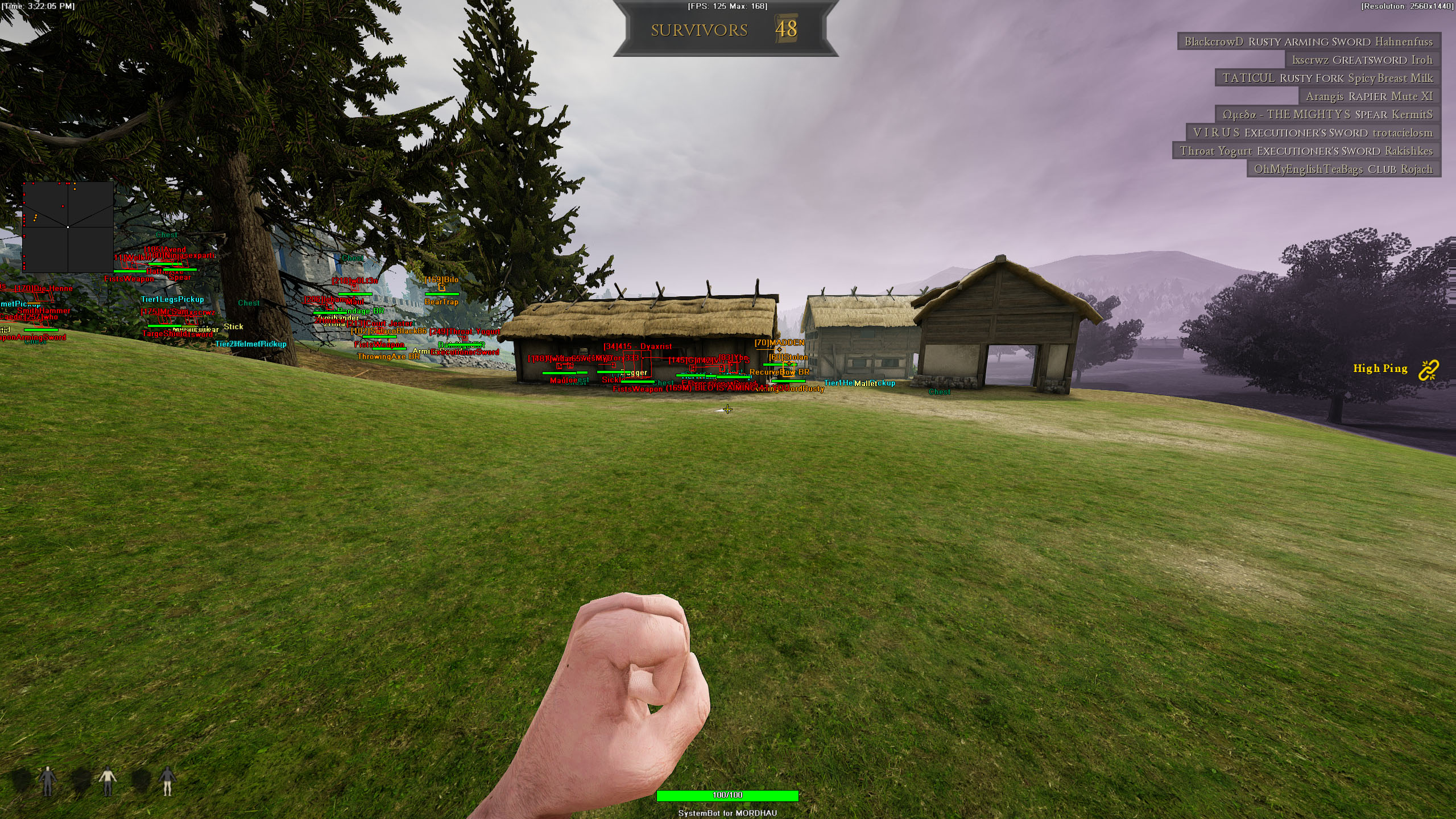
Mordhau Screenshot 4
Mordhau Screenshot 3
Mordhau Screenshot 2
Mordhau Screenshot 1
Medieval melee slasher • Auto Block and bow aimbot • Steam

MORDHAU Hack with Aimbot, ESP and Auto Block for PC

Get instant access to the MORDHAU Cheat for PC.

MORDHAU is a medieval multiplayer slasher built on Unreal Engine 4 by Triternion, an independent studio from Slovenia. You play a mercenary in a fictional but realistic medieval world, in first or third person, in battles that range from one on one duels to fights with up to 64 players. It is a paid game, and on PC it runs on Windows.

Combat is the heart of MORDHAU. Strikes are directional, and a fight is made of swings, stabs, kicks, dodges, blocks and parries, with a health bar and a stamina bar to watch. Good players chain attacks into combos, trick you with feints and punish a slow answer with a quick counter. Around the duels you find bows, cavalry charges, fights on ladders and siege engines such as the catapult and the ballista.

Our MORDHAU hack is built for that kind of fight. Auto Block, Auto Riposte and Auto Counter Kick take care of the melee answers, an aimbot with bullet prediction helps with ranged shots, and 3D and 2D radar ESP show you who is coming and what they carry. It supports Frontline, Horde, Skirmish and Deathmatch.

Tactical upgrade briefing
Free with any SystemCheats subscription

The MORDHAU cheat has no price of its own. It comes free with any SystemCheats subscription you buy, from a single game cheat to the Premium Package. Pick the cheat you want, and Auto Block, Auto Riposte, the aimbot and the full ESP for MORDHAU come with it.

MORDHAU Hack and Cheat Features

The MORDHAU cheat covers three things: melee defense, ranged aim and awareness. Everything is set from the in-game menu. You choose your own menu key, and three settings slots keep different setups ready. The highlights are below, and the full option list is in the Features panel on this page.

  • Auto BlockAuto Block with three modes: Manual Aim, Auto Aim or FOV. Set it to None to switch it off.
  • Auto RiposteAuto Riposte with an Auto Riposte Move you choose: Random, Right Swing, Left Swing, Right Stab or Left Stab.
  • Auto Counter KickAuto Counter Kick with the same Manual Aim, Auto Aim and FOV modes as Auto Block, or None to switch it off.
  • Aimbot with Bullet PredictionAuto Aim with Smooth Aim, Limit Angle and an aim key. Bullet Speed Prediction, Bullet Drop Prediction and Prediction Scale lead moving targets. Aim Bone picks Head Priority, Chest Priority, Head or Chest, and Aim Style picks targets by FOV, distance, first in list or health.
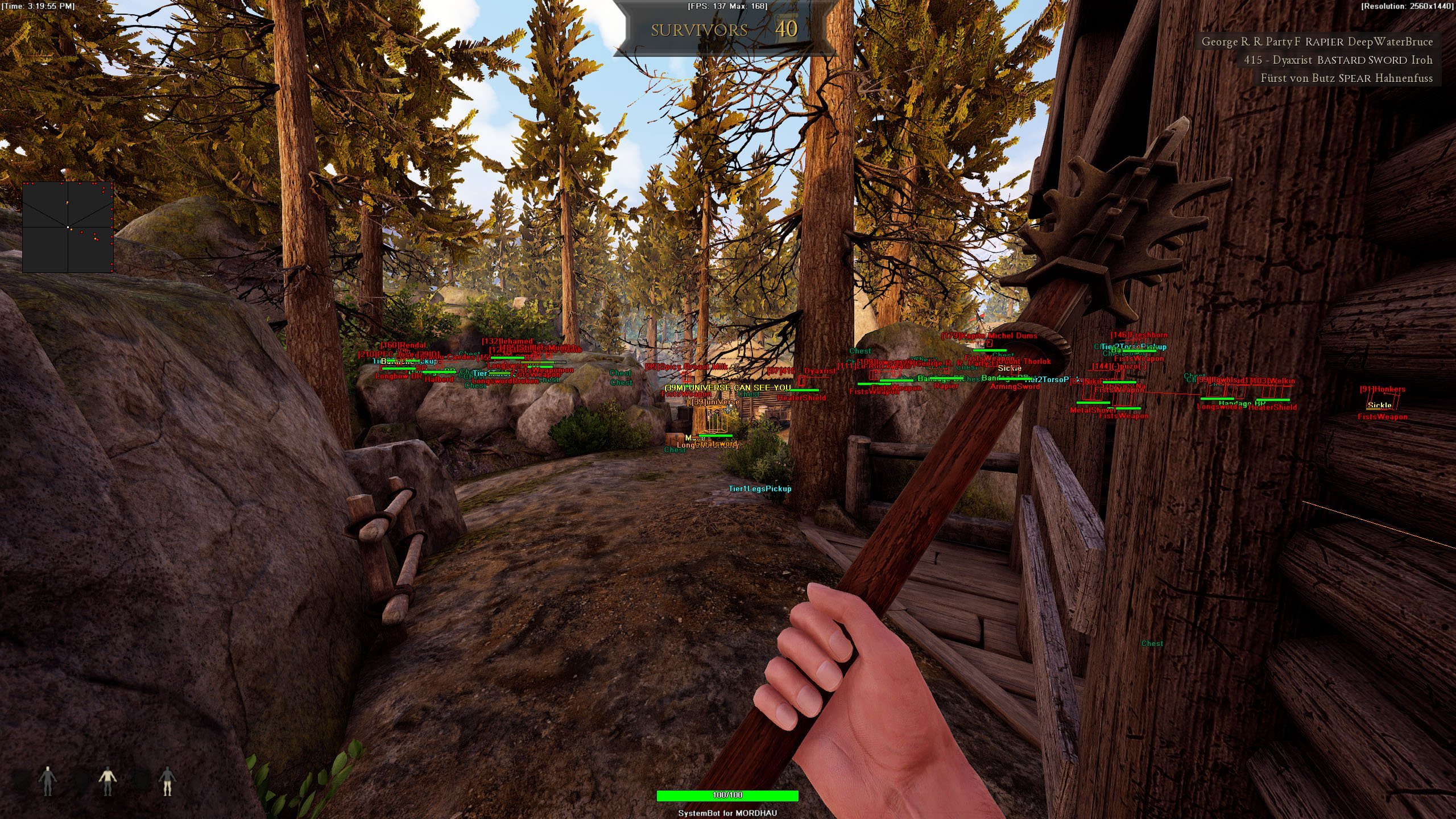
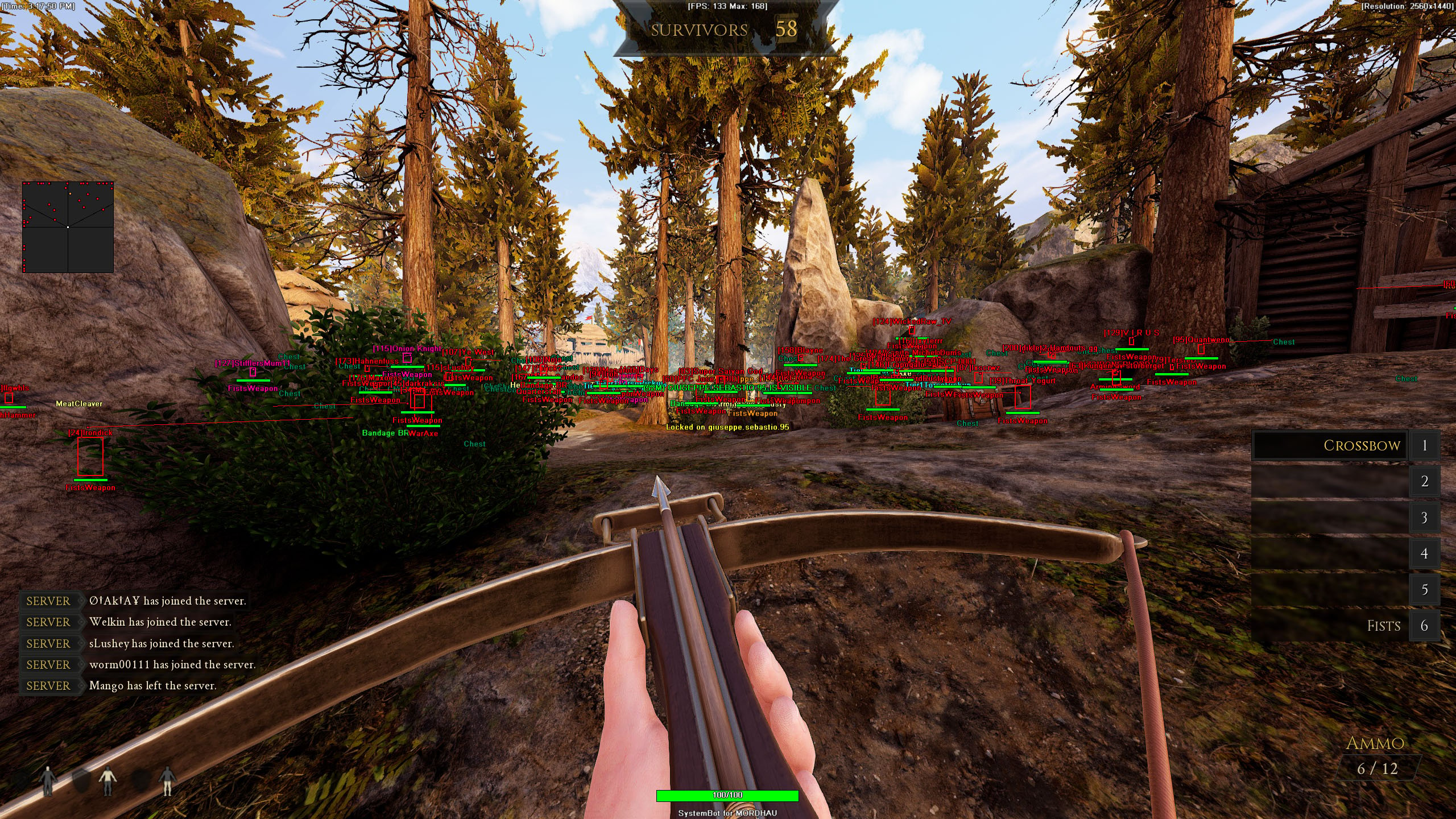
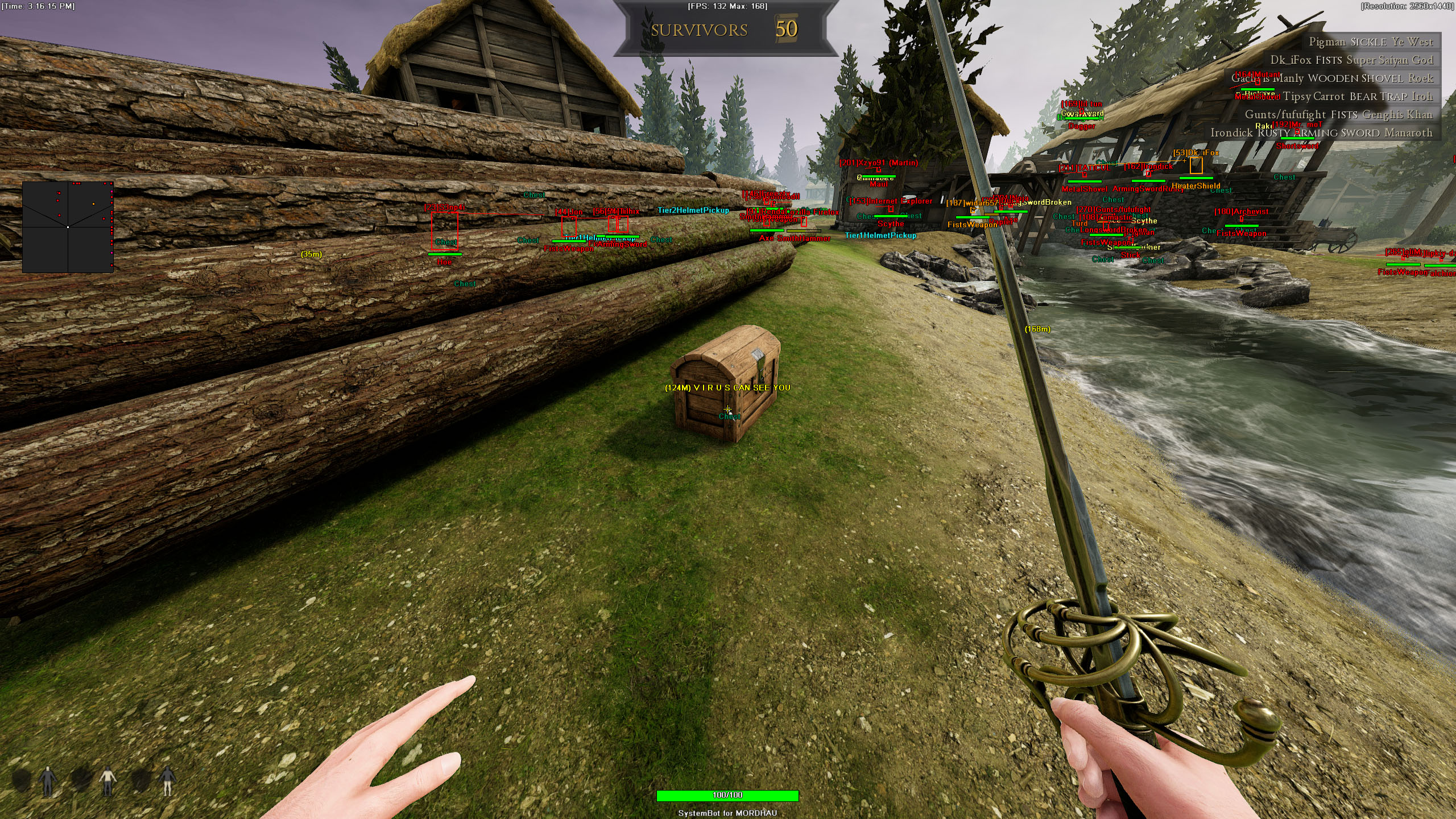
  • 3D Radar ESPBounding Box in 2D or 3D, Head Dot, 2D Line, Aim Spot and Aim Laser, with player name, distance, health and weapon. Show friendlies, enemies and NPCs, with separate colours for visible and hidden players.
  • Item and Catapult ESPWeapon ESP, Armor ESP, Health ESP, Ammo ESP and Throwable ESP for items within a Max Item Distance you set, plus Catapult ESP and Projectile ESP.
  • 2D Radar and WarningsA 2D Radar with Radar Scale, Window Size and Stick To Window, plus a Warning System for enemies aiming at you or able to see you, and a Beep System.
  • Misc and ControlA custom crosshair (Cross, Dot or T-Cross), Draw Health Bar, a Panic Key, six friendly and six enemy filter slots, and default plus two custom settings slots.
MORDHAU Hack in-game screenshot 1 of 4 MORDHAU Hack in-game screenshot 2 of 4 MORDHAU Hack in-game screenshot 3 of 4 MORDHAU Hack in-game screenshot 4 of 4

MORDHAU Auto Block for Directional Combat

MORDHAU melee is a game of reads. Attacks come from different directions, a stab looks different from a swing, and a feint is made to pull your block the wrong way. Players say the game has a steep learning curve, that swing timing takes a long time to learn and that there is no proper skill based matchmaking, so beginners can meet players far higher in level and die a lot in their first matches.

The MORDHAU Auto Block takes over the block for you. It has three modes, Manual Aim, Auto Aim and FOV, so you can pick the one that fits the way you fight, and None switches it off when you want to block by hand. With the block handled, your attention stays on your own attacks and on your stamina bar.

MORDHAU Cheat for Ripostes and Counter Kicks

Blocking is only half a duel. The official description of MORDHAU talks about punishing opponents with quick counters and pushing them away with kicks, and a slow answer gives the other player the next move. Auto Riposte answers for you with the move you set in Auto Riposte Move: Random, Right Swing, Left Swing, Right Stab or Left Stab. Random keeps your answers hard to predict, and a fixed move lets you use the attack that suits your weapon. Auto Counter Kick completes the melee set, with the same modes as Auto Block.

MORDHAU Bow Aimbot for Archers

Bows are part of MORDHAU, and players in Steam reviews complain that archers skip the melee duel and shoot from a distance. If you are the archer, a moving mercenary is a hard target. The MORDHAU aimbot uses Bullet Speed Prediction, Bullet Drop Prediction and Prediction Scale to place your aim where the target is going.

Aim Bone chooses between Head Priority, Chest Priority, Head and Chest, Visibility Check only picks enemies you can see, and Smooth Aim keeps the movement soft. Auto Fire with its Fire Delay and a Max Distance you set round off the ranged setup. Aim on Friendly and Aim on Enemy decide who the aimbot is allowed to target.

MORDHAU ESP for 64 Player Frontline

Frontline is where MORDHAU gets big. Up to 64 players fight in two teams, each team starts with 1,000 points, and kills and captured territory drain the enemy’s points. Finishing the team objective ends the match at once. With cavalry charges, fights on ladders, archers and catapult fire, danger comes from more than one side.

The 2D Radar with Show Enemy, Show Friendly and Radar Scale shows where both teams are, and Player Distance ESP tells you how far away each player in range is. The Warning System alerts you when an enemy is aiming at you or can see you, each with its own angle setting, and the Beep System adds a sound alert. Catapult ESP and Projectile ESP put catapults and projectiles on the overlay with their own colours.

MORDHAU ESP for Player Weapons and Health

In MORDHAU you build your own mercenary. Weapons, armor and perks cost loadout points, and weapons are built from parts such as blades, crossguards, grips and mace heads. So the player running at you could carry a light dagger or a heavy two handed weapon, and the right answer is different for each. Player Weapon ESP shows the weapon of each player in range before the fight starts, and Player Health ESP shows how much health they have left, so you know who to engage and who to leave alone. Player Name ESP and the Enemy Visible and Enemy Invisible colours complete the picture.

MORDHAU Horde Hack for Weapons, Armor and NPCs

Horde is the cooperative side of MORDHAU. A small team fights waves of AI enemies, and players start without weapons or armor. You earn currency from kills and waves and spend it on weapons and armor that are spread across the map. Weapon ESP, Armor ESP and Health ESP mark weapon, armor and health items within the Max Item Distance you set, and Ammo ESP and Throwable ESP mark ammo and throwables too. Aim on NPC and Show NPC let the aimbot and the ESP include the AI enemies, and Horde is one of the supported modes.

MORDHAU Cheat Setups for Skirmish and Deathmatch

The supported modes ask for different setups. Skirmish is a team fight without respawns, and the first team to take 7 rounds wins the match. In Deathmatch, many servers are duel servers where two players face each other.

The cheat saves a default setup plus Custom 1 and Custom 2, so one slot can hold a melee setup with Auto Block and Auto Riposte, another a ranged setup with Smooth Aim and a low Limit Angle, and the third a duel setup with Auto Counter Kick and Player Health ESP. With Use Aim Key on, the aimbot only works while you hold the key, Randomize Aim varies where the aim lands, and the Panic Key hides the whole overlay with one press.

How to Get the MORDHAU Cheat

Getting started with the MORDHAU cheat takes three steps.

01
Create Your Account

Register on the forum for free. Your subscriptions, downloads and support all run through it.

02
Pick Any Subscription

Choose a cheat from all cheats or one of our cheat packages. MORDHAU comes free with any subscription you buy.

03
Load and Play

Download the SystemCheats loader, select MORDHAU and start the game. Open the in-game menu with your menu key and set up Auto Block, the aimbot and the ESP.

Is It Safe to Cheat in MORDHAU?

MORDHAU is protected by Valve Anti-Cheat (VAC). Steam lists the game as VAC enabled, and no official source names any other anti-cheat system for it. Triternion has acted against cheaters before. It banned players for using third party cheating software and turned off Steam Family Sharing for the game because cheaters used it to get around bans. No cheat is ever completely risk free. Options such as Smooth Aim, Randomize Aim and Use Aim Key let you keep your aim soft, and the live cheat status page always shows the current state of every cheat.

Frequently Asked Questions

Does the MORDHAU cheat cost extra?

No. The MORDHAU cheat comes free with any SystemCheats subscription you buy, from a single game cheat to the Premium Package. There is no separate MORDHAU price.

Is the MORDHAU cheat online?

The live cheat status page always shows the current state of every cheat, including MORDHAU. Check it before you play.

Which platforms does the MORDHAU cheat support?

The Windows PC version of MORDHAU on Steam. The PlayStation and Xbox versions are not supported.

Which anti-cheat does MORDHAU use?

Valve Anti-Cheat (VAC). Steam lists MORDHAU as VAC enabled, and no official source names another anti-cheat system for the game.

Can the MORDHAU cheat block attacks for me?

Yes. Auto Block has Manual Aim, Auto Aim and FOV modes, and Auto Riposte answers with the move you pick in Auto Riposte Move. Auto Counter Kick uses the same three modes as Auto Block.

Does the MORDHAU aimbot help with bows?

Yes. The aimbot has Bullet Speed Prediction, Bullet Drop Prediction and Prediction Scale for ranged shots, together with Smooth Aim, Visibility Check and an aim key.

Does the cheat work in Horde?

Yes. Horde is one of the supported modes, together with Frontline, Skirmish and Deathmatch. Aim on NPC and Show NPC let the aimbot and the ESP include the AI enemies.

Get the MORDHAU Cheat

MORDHAU rewards good reads, fast answers and a clear view of the fight. The MORDHAU cheat helps with all three, and it comes free with any SystemCheats subscription you buy. Pick a single cheat, one of our cheat packages or the Premium Package, and MORDHAU is included.

Need Help?

Our support team is available 24 hours a day, 7 days a week through the SystemCheats forum and TeamSpeak. Read what customers say on Trustpilot, or compare all cheat packages to find the right fit.

Cheat & Hack Information

What is MORDHAU?


MORDHAU is a medieval multiplayer slasher from Triternion, an independent studio from Slovenia, built on Unreal Engine 4. Fights range from one on one duels to battles with up to 64 players, with directional strikes, blocks, parries and feints.


Cheating in MORDHAU


Our MORDHAU cheat has Auto Block, Auto Riposte, Auto Counter Kick, an aimbot with bullet prediction for ranged shots and 3D Radar ESP. It has no price of its own and comes free with any SystemCheats subscription.


Is the MORDHAU cheat safe?


MORDHAU uses Valve Anti-Cheat (VAC), and Triternion has banned players for using third party cheating software. No cheat is ever completely risk free. However, you can always adjust your settings to play legitimately for the long run. Check the live status page before you play.

Pricing

Features

Aimbot
Auto Aim Moves your aim onto a valid target for you automatically
Auto Fire Fires your weapon for you once a target is locked
Fire Delay (0 ~ 1000) Adds a short wait in milliseconds before firing once a target is locked
Smooth Aim (1 ~ 50) Slows the aim movement so it looks natural, and higher values make it slower
Limit Angle (0 ~ 180) Sets how far from your crosshair a target can be for the aimbot to lock on
Use Aim Key Makes the aimbot work only while you hold or toggle your aim key
Bullet Speed Prediction Leads moving targets based on how long the shot takes to arrive
Bullet Drop Prediction Aims a little higher to make up for bullet drop over long distances
Prediction Scale (1 ~ 30) Fine tunes how strong the lead and bullet drop prediction is
Visibility Check Stops the aimbot from targeting enemies hidden behind walls or cover
Stick to Target Keeps the aimbot on one target until it is down or leaves range
Randomize Aim Adds small random changes to where your aim lands for a human look
Aim Style (FOV, Distance, First in list, Health) Sets how the aimbot chooses the best target when more than one is in range
Aim Bone (Head Priority, Chest Priority, Head, Chest) Sets which body part the aimbot aims at, such as the head or chest
Aim on Friendly Lets the aimbot target and lock onto your teammates
Aim on Enemy Lets the aimbot target and lock onto enemies
Aim on NPC Lets the aimbot target non-player characters
Aim on Vehicle Lets the aimbot lock onto vehicles as well as players on foot
Max Distance (0 ~ 1500) Sets the farthest distance, in meters, at which targets are still picked up or shown
Draw Locked Draws a marker on the target the aimbot is locked onto
Auto Block (Manual Aim, Auto Aim, FOV, None) Blocks incoming melee attacks for you automatically
Auto Riposte Ripostes for you right after you parry an enemy attack
Auto Riposte Move (Random, Right Swing, Left Swing, Right Stab, Left Stab) Sets which swing or stab Auto Riposte uses on the enemy
Auto Counter Kick (Manual Aim, Auto Aim, FOV, None) Kicks back at once when an enemy tries to kick you
3D Radar
Bounding Box (None, 3D, 2D) Draws a box around each target so you can see where they are
Box Size (1 ~ 10) Sets how thick the lines of each ESP box are drawn
2D Line Draws snap lines from your screen to each target
Player Name ESP Shows the name of each player above their character
Player Distance ESP Shows how far away each player is in meters
Player Health ESP Shows a health bar for each player so you can see how hurt they are
Player Weapon ESP Shows the weapon each player is holding right now
Aim Spot ESP Draws a dot on the spot of the target where the aim will land
Aim Spot Size (2 ~ 20) Sets how big the aim spot dot is drawn on the target
Head Dot Draws a dot on the head of each target you can see
Dot Size (2 ~ 20) Sets how big the dot markers are drawn on each target
Aim Laser Draws a line that shows where each target is aiming
Laser Size (50 ~ 3000) Sets the length and thickness of the aim laser line
Projectile ESP Shows grenades, thrown items and other projectiles while they fly
Weapon ESP Highlights dropped weapons on the ground
Health ESP Highlights health pickups such as healing bottles and Health Orbs
Armor ESP Shows armor pickups lying on the ground near you
Ammo ESP Shows ammo boxes and ammo pickups across the map
Throwable ESP Shows grenades and other throwables you can pick up
Catapult ESP Shows where the catapults are on the map
Chest ESP Shows loot chests across the map that you can open
Show Friendly Shows your teammates on the ESP and radar
Show Enemy Shows enemies on the ESP and radar so you always know where they are
Show NPC Shows non-player characters on the ESP so you always know where they are
Show Vehicle Shows vehicles on the ESP and radar so you always know where they are
Max Distance (0 ~ 1500) Sets the farthest distance, in meters, at which targets are still picked up or shown
Max Item Distance (0 ~ 500) Sets how far away items and loot are still shown
2D Radar
Show Radar Turns on the 2D radar overlay on your screen
Show Cross Draws cross lines through the middle of the radar
Show Window Draws the background frame of the radar window
Show Dot Shows targets as dots on the radar window
Show FOV Draws a cone on the radar that shows where you are looking
Show Friendly Shows your teammates on the ESP and radar
Show Enemy Shows enemies on the ESP and radar so you always know where they are
Show NPC Shows non-player characters on the ESP so you always know where they are
Show Vehicle Shows vehicles on the ESP and radar so you always know where they are
Stick To Window Keeps targets that are out of range pinned to the edge of the radar
Radar Scale (0 ~ 60) Sets the radar zoom, lower zooms in and higher zooms out
Window Size (45 ~ 260) Sets the width and height of the radar window
Cross Size (45 ~ 260) Sets the length of the cross lines in the middle of the radar
Dot Size (2 ~ 20) Sets how big the dot markers are drawn on each target
Warning System
Warning System Shows on-screen warnings when enemies are near, can see you or aim at you
Aiming At You Angle Sets the angle within which an enemy aiming your way triggers the Aiming At You warning
Can See You Angle (0 ~ 180) Sets the angle used to warn you when an enemy can see you
Max Distance (0 ~ 1500) Sets the farthest distance, in meters, at which targets are still picked up or shown
Beep System Plays a warning beep when an enemy is looking or aiming at you
Max Distance (0 ~ 1500) Sets the farthest distance, in meters, at which targets are still picked up or shown
Misc
Crosshair (None, Cross, Dot, T-Cross) Draws a custom crosshair in the center of your screen, over the game's own
Crosshair Size (2 ~ 200) Sets the size of the custom crosshair on your screen
Draw Resolution Shows your current screen resolution on the overlay
Draw FPS Shows your current frames per second on screen
Draw Time Shows your local system time on the overlay
Draw Watermark Shows the SystemCheats watermark on screen so you know the cheat is active
Draw Health Bar Shows your own health as a bar on screen
Use Panic Key Turns on a hotkey that instantly hides all cheat visuals and menus
Font Size (10 ~ 20) Sets the size of the ESP and overlay text on screen
Colors
Customizable Enemy Invisible RGBA Color Sets the color for enemies hidden behind walls or cover
Customizable Enemy Visible RGBA Color Sets the color for enemies in your direct line of sight
Customizable Enemy Vehicle RGBA Color Sets the color for enemy vehicles shown on the ESP
Customizable Friendly Invisible RGBA Color Sets the color for teammates hidden behind walls or cover
Customizable Friendly Visible RGBA Color Sets the color for teammates in your direct line of sight
Customizable Friendly Vehicle RGBA Color Sets the color for friendly team vehicles shown on the ESP
Customizable Projectile RGBA Color Sets the color the ESP uses for incoming hostile projectiles
Customizable Weapon RGBA Color Sets the color the ESP uses for dropped weapons
Customizable Health RGBA Color Sets the color for health pickups shown on the ESP
Customizable Armor RGBA Color Sets the color used to draw armor items on the ESP
Customizable Ammo RGBA Color Sets the color used to draw ammo boxes and pickups on the ESP
Customizable Throwable RGBA Color Sets the color the ESP uses for throwable items
Customizable Catapult RGBA Color Sets the color used to draw catapults on the ESP
Customizable Chest RGBA Color Sets the color used to draw chests on the ESP
Customizable Crosshair RGBA Color Sets the color for the custom crosshair drawn on your screen
Customizable Menu RGBA Color Sets the color scheme for the in-game cheat menu
Customizable Is Aiming At You RGBA Color Sets the warning color used when an enemy aims at you
Customizable Can See You RGBA Color Sets the color of the warning shown when an enemy can see you
Customizable Is Visible RGBA Color Sets the indicator color used when you are exposed and visible
Filters
6 Friendly filter slots Lets you enter friendly player names to show or hide on the ESP
6 Enemy filter slots Lets you enter enemy player names to show or hide on the ESP
Positions
Customizable Radar position with the mouse Lets you move the radar by dragging it with the mouse
Customizable Menu position with the mouse Lets you move the menu by dragging it with the mouse
Keys
Customizable Panic Key Sets a key that instantly hides or turns off all cheat features
Customizable Menu Key Sets the key that opens and closes the cheat menu
Customizable Aim Key Sets the key that turns on the aimbot while held or toggled
Customizable Trigger Key Sets the key you hold or toggle to turn the triggerbot on
Settings
Save default settings Saves your current settings to the default profile
Load default settings Loads your saved settings from the default profile
Save custom 1 settings Saves your current settings to custom profile 1
Load custom 1 settings Loads your saved settings from custom profile 1
Save custom 2 settings Saves your current settings to custom profile 2
Load custom 2 settings Loads your saved settings from custom profile 2
Additional
Frontline Mode Supported Lets you use the cheat in the Frontline game mode
Battle Royale Mode Supported Lets you use the cheat in the Battle Royale game mode
Horde Mode Supported Lets you use the cheat in the Horde game mode
Skirmish Mode Supported Lets you use the cheat in the Skirmish game mode
Deathmatch Mode Supported Lets you use the cheat in the Deathmatch game mode