The First Descendant Hack with Aimbot and ESP Cheat for PC

Included in Premium Package and One Day Trial

Only Steam version supported
Cheat video
Cheat video
Cheat video
Cheat video
TFD Screenshot 1
TFD Screenshot 2
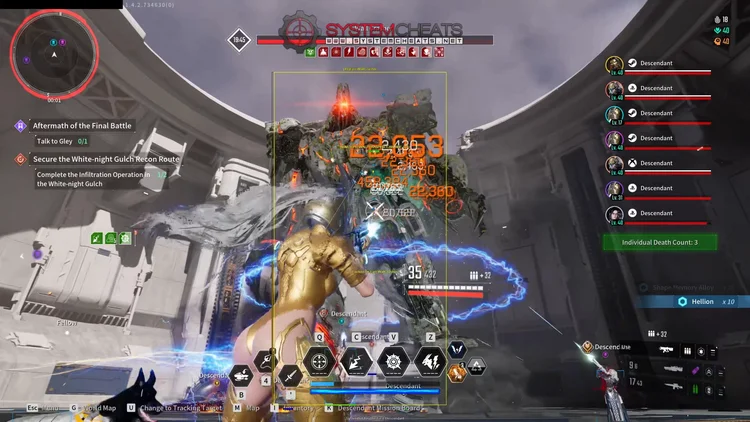
TFD Screenshot 3
TFD Screenshot 4
Looter shooter • Colossi and loot farming • Steam

The First Descendant Hack with Aimbot and ESP for PC

Get instant access to The First Descendant Cheat for PC.

The First Descendant is a free to play third person looter shooter from NEXON Games, published by NEXON and built on Unreal Engine 5. It is set on the planet Ingris, where two alien forces, the Vulgus and the giant Colossi, have invaded. You play a Descendant, one of the people whose Arche powers have awakened, and you defend humanity from the city of Albion. The game runs on Windows PC through Steam and on PlayStation 5 and Xbox Series X and S, with cross-platform multiplayer.

Each Descendant is a hero with four skills and a passive, from Freyna and Lepic to Sharen, Keelan and the shotgun specialist Raven. Up to four players team up in online co-op to clear missions, Infiltration Operations, Onslaught waves and Void Intercept Battles against Colossi such as Grave Walker, Dead Bride and Devourer. The loop is easy to explain and slow to finish: farm weapons, modules, Gold and Kuiper Shards, upgrade your build, and push into harder content.

The First Descendant hack from SystemCheats is built for that grind. It pairs an aimbot that can prioritize Colossus weak points with ESP for enemies, loot and Encrypted Vaults, and adds Item Vacuum, teleports and automation for the chores between fights. It supports the Steam version of the game on Windows PC.

Tactical upgrade briefing
Built for Colossi and the loot grind

Aim on Boss Parts and Boss Part Health ESP for Colossus fights, Rune, Equipment and Encrypted Vault ESP for farming, and Item Vacuum with Teleport To Quest to cut the walking. It is sold as a single cheat and is also part of the Premium Package.

The First Descendant Hack and Cheat Features

The TFD cheat covers aim, awareness, loot, automation and movement for missions, dungeons and boss fights. Everything is set in the in-game menu, which opens with its own Menu Key. The highlights are below, and the full option list is in the Features panel on this page.

  • Aimbot with Boss Part TargetingAuto Aim with Linear Smooth Aim, Constant Smooth Aim and Humanized Aim, and Use Aim Key so it only works while you hold the key. Aim on Boss Parts targets Colossus weak points first, Bullet Speed Prediction leads moving targets and Bullet Drop Prediction corrects long shots. Aim Style picks targets by FOV, Distance, Health or Prioritize Elite.
  • Silent Aim, Magic Bullet and TriggerbotSilent Aim redirects bullets to targets without moving your camera, and Magic Bullet lets bullets hit targets without direct line of sight. The Triggerbot fires when a valid target crosses your crosshair, with a Fire Delay, a Trigger Key and Ignore Immune.
  • Enemy and Colossus ESPBounding Box in 2D, Corners or 3D, with AI Enemy Name, Distance and Health ESP for Vulgus hostiles and Colossi. Show AI Elites marks elites and commanders, AI Immune ESP shows who sits behind an immune barrier, and Boss Part Health ESP shows health and frenzy bars per Colossus part.
  • Loot and Vault ESPRune ESP, Equipment ESP, Resource ESP and Gold ESP for drops, plus Encrypted Vault ESP, Supply Box ESP, Record ESP and Quest ESP. Item Stack Distance groups labels that sit close together, and the Filter includes or excludes the items you choose.
  • Item Vacuum and TeleportItem Vacuum pulls nearby dropped loot to your character, with Collect Gold, Collect Resources, Collect Runes, Collect Equipment and Collect Reward Boxes. Ammo, Health Orbs and Mana Orbs are pulled only when you run below the percentage you set. Teleport To Entity and Teleport To Quest move your Descendant with one key.
  • AutomationAuto Vault Decryption completes the Encrypted Vault mini-game, and Auto Outpost Infiltration handles the stealth disable of Vulgus Strategic Outpost power generators. Auto Supply Drop, Auto Breakable, Auto Ammo Resupply Drone, Auto Mission Orb Collect and Auto Task Interaction take care of the small jobs.
  • Speed Hack, Grapple and Weapon ModifiersSpeed Hack at 1.2x, 1.5x, 2x or 3x, and Modify Grapple extends your grapple hook range. No Recoil, No Spread, Instant Reload and a custom Fire Rate change how your gun behaves, and Use Restart Mission Key restarts a mission or dungeon run with one press.
  • Warnings, Radar and ControlProjectile ESP warns of hostile missiles and Colossus mortars, and the Warning System and Beep System alert you when enemies target or look at you. A 2D Radar with Stick To Window, a custom Crosshair, a Panic Key and four settings profiles with their own hotkeys round it off.
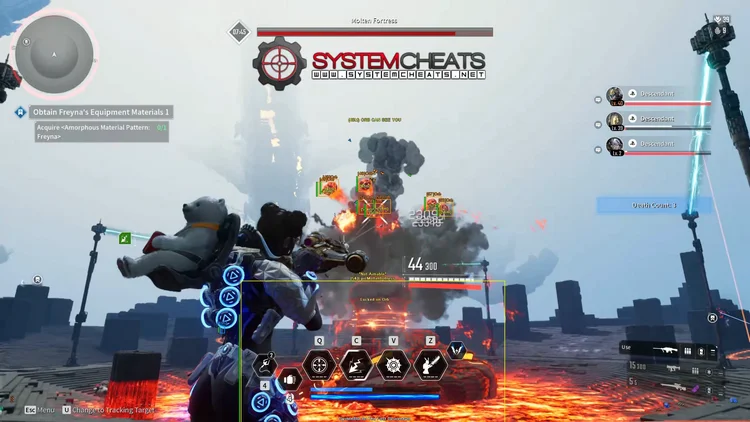
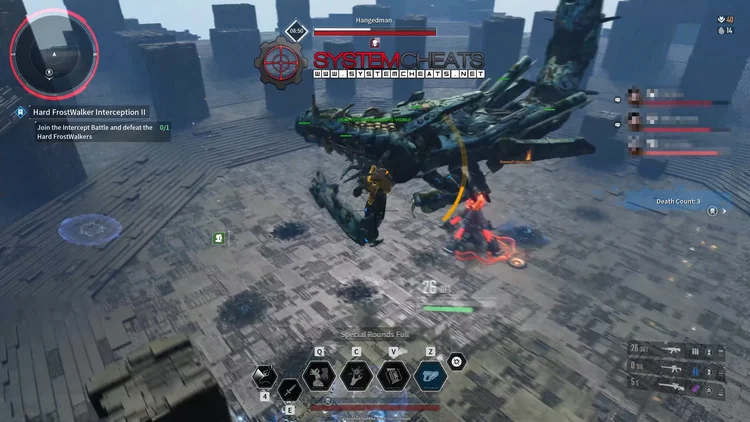
The First Descendant Hack in-game screenshot 1 of 4 The First Descendant Hack in-game screenshot 2 of 4 The First Descendant Hack in-game screenshot 3 of 4 The First Descendant Hack in-game screenshot 4 of 4

The First Descendant Aimbot for Colossus Weak Points

Void Intercept Battles are the big boss fights of the game. You face one of the giant Colossi, and the fight comes down to breaking its parts while you stay alive. Aim on Boss Parts makes the aimbot prioritize destructible Colossus weak points, sensors, shoulders and cores. Boss Part Health ESP puts health and frenzy bars on each part, and Boss Part Distance sets how far out those bars are drawn.

When a target enters an invulnerable phase or sits inside an immune barrier sphere, Ignore Immune stops the aimbot and triggerbot from wasting shots on it. Projectile ESP draws trajectory warnings for Colossus mortars and hostile missiles. One Intercept Battle is bigger than the rest. The fight against Wall Crasher in Axion Plains is an eight player battle, and there Friendly Name ESP and the friendly Head Dot help you keep track of your team.

The First Descendant ESP for Runes, Gold and Encrypted Vaults

The zones of Ingris, from Sterile Land and Vespers to Echo Swamp, Agna Desert, White-night Gulch and Axion Plains, are full of things worth picking up. Gold and Kuiper Shards are the main currencies, and modules, equipment and crafting materials drop across the map.

Rune ESP, Equipment ESP, Resource ESP and Gold ESP highlight those drops, Rune ESP even through terrain, and Item Name ESP and Item Distance ESP tell you what each one is and how far away it lies. Encrypted Vaults are hidden caches spread across the zones, and Encrypted Vault ESP reveals them through walls. Once you stand close to one, Auto Vault Decryption completes the vault’s rhythm mini-game for you. Record ESP marks collectible audio records and lore logs.

The First Descendant Item Vacuum for the Weapon Grind

Weapon farming takes a lot of time in The First Descendant. Transcendent Weapons roll a Quality value, and each drop is a matter of chance, so the right weapon can take many runs of the same mission or dungeon. Equipment ESP highlights dropped weapons, reactors and external components, and Item Vacuum pulls nearby loot to your character, with Item Vacuum Distance and Item Vacuum Delay to set the radius and the pace. Collect Equipment and Collect Reward Boxes bring weapons and mission reward chests to your feet. When a run goes wrong, Use Restart Mission Key restarts the mission or dungeon run with a single keypress.

Onslaught, Trials and Elite Commanders

Onslaught is a wave based mode that sends enemy after enemy at your squad. Trials is a rogue-lite battle simulation with rounds that get harder each time and combat zones that are linked at random. In both, picking the right target first matters.

Aim Style can pick targets by FOV, Distance, First in list, Health or Prioritize Elite, and Show AI Elites highlights elite and commander Vulgus units, with the Enemy Rare colours setting them apart from the rest. AI Enemy Health ESP shows health and shield bars. The 2D Radar with Stick To Window keeps enemies outside the radar range pinned to its border, and Mission ESP marks active mission points, defense targets and drop pods.

Vulgus Outposts and Mission Chores

Between the big fights, there are a lot of small jobs to do. Vulgus Strategic Outposts have power generators to switch off without being seen, and missions come with consoles to hack, supply caches to open and barrels to break. Auto Outpost Infiltration automates the stealth disable of the outpost power generators, and Auto Task Interaction performs task interactions and mission console hacking for you.

Auto Supply Drop interacts with nearby Munitions supply caches, Auto Breakable breaks nearby resource barrels and destructible objects, and Auto Ammo Resupply Drone calls a field ammo drone when your reserves fall below the percentage you set. Teleport To Quest moves your Descendant straight to the active quest objective.

Speed Hack and Grapple for Crossing Ingris

Moving between objectives across the zones of Ingris takes time. Speed Hack multiplies your sprint and running speed at 1.2x, 1.5x, 2x or 3x, on its own Speed Hack Key. Modify Grapple changes the grapple hook physics and extends its range, and Grapple Range sets how far it reaches. Teleport To Entity sends your Descendant to a targeted enemy or NPC, and Draw Teleport Entity Indicator shows which entity is chosen before you jump.

Descendant Builds and Four Settings Profiles

Builds in The First Descendant play very differently. Weapons range from shotguns, submachine guns and hand cannons to assault rifles, sniper rifles and beam rifles, plus melee weapons. Raven is a shotgun specialist with skills such as Shadow Step, while a sniper build works at long range. For long shots, Bullet Drop Prediction, Bullet Speed Prediction and Prediction Scale place the aim where the target will be.

Up close, No Spread removes bullet spread, and Stick to Target keeps the aim on one enemy until it is dead or you release the key. The cheat saves a Default profile plus Custom 1, Custom 2 and Custom 3, each with a hotkey to load it, so a Colossus setup, a farming setup and a close range setup are one press apart.

How to Use The First Descendant Cheat

Getting started with the TFD cheat takes three steps.

01
Create Your Account

Register on the forum for free. Your subscriptions, downloads and support all run through it.

02
Choose Your Plan

Buy The First Descendant as a single cheat, or get it with the Premium Package together with the other games it includes. The price box on this page shows the plans.

03
Load and Play

Run the loader, select The First Descendant, start the Steam version of the game, and open the cheat menu with the Menu Key.

Is It Safe to Cheat in The First Descendant?

The First Descendant uses NGS (Nexon Game Security), a kernel level anti-cheat from Nexon. The Steam store page names it and notes that it has to be removed by hand after you uninstall the game. Nexon also posts regular crackdown reports on Steam that list permanent bans for creating, distributing or using unauthorized programs, next to matchmaking penalties for unusual gameplay. No cheat is ever completely risk free. Settings such as Humanized Aim, Randomize Aim, Miss Chance, Visibility Check and Use Aim Key help your aim look natural, and the live cheat status page always shows the current state of every cheat.

Frequently Asked Questions

Is The First Descendant included in the Premium Package?

Yes. The First Descendant cheat is sold as a single cheat, and it is also included in the Premium Package and the One Day Trial. The price box on this page shows the plans.

Which versions of The First Descendant are supported?

Only the Steam version on Windows 10 and 11 PC is supported. The game is also on PlayStation 5 and Xbox Series X and S, but the cheat is for PC only.

Which anti-cheat does The First Descendant use?

NGS (Nexon Game Security), a kernel level anti-cheat from Nexon, as named on the Steam store page. Easy Anti-Cheat, which the game used before, has been removed.

Is The First Descendant cheat online?

The live cheat status page always shows the current state of every cheat, including this one. Check it before you buy.

What does Aim on Boss Parts do?

It makes the aimbot prioritize destructible Colossus weak points, sensors, shoulders and cores. Boss Part Health ESP adds health and frenzy bars for each part.

What does Item Vacuum pick up?

Nearby dropped loot within the Item Vacuum Distance you set, with separate switches for Gold, resources, Module Runes, equipment, reward boxes, mission items and misc loot.

Take the Fight to the Vulgus

The First Descendant rewards players who break Colossi fast and leave no loot behind. With The First Descendant Cheat you get The First Descendant aimbot with boss part targeting, The First Descendant ESP for enemies, loot and vaults, Item Vacuum, teleports and automation in one subscription. Browse all cheats or start with The First Descendant below.

Need Help?

Our support team is available 24 hours a day, 7 days a week through the SystemCheats forum and TeamSpeak. Read what customers say on Trustpilot, or compare all cheat packages to find the right fit.

Cheat & Hack Information

What is The First Descendant?


The First Descendant is a free to play third person looter shooter from NEXON Games. Up to four Descendants team up to fight the Vulgus and the giant Colossi, and farm weapons, modules and Gold.


Cheating in The First Descendant


Our cheat for The First Descendant has an aimbot with Aim on Boss Parts, enemy and Colossus ESP, Rune and Encrypted Vault ESP, Item Vacuum and Auto Vault Decryption. You can buy it as a single cheat or get it with the Premium Package.


Is The First Descendant cheat safe?


The First Descendant uses NGS (Nexon Game Security), a kernel level anti-cheat from Nexon. No cheat is ever completely risk free. However, you can always adjust your settings to play legitimately for the long run. Check the live status page before you play.

Reviews

Pricing

Features

Aimbot
Auto Aim Moves your aim onto a valid target for you automatically
Auto Fire Fires your weapon for you once a target is locked
Linear Smooth Aim (1 ~ 50) Moves the aim toward the target at a steady pace for natural mouse movement
Constant Smooth Aim (1 ~ 100) Keeps the aim moving at one steady speed, no matter how far away the target is
Humanized Aim Moves the aim on a curved path with small changes in speed, like a real hand
Randomize Curve (0 ~ 100) Sets how strongly the aim path curves and changes speed for a human look
Deadzone Angle (0 ~ 20) Sets a small area around the crosshair where the aimbot stops pulling
Angle Scaling (Static, FOV) Sets whether the aimbot angle grows and shrinks with your zoom or stays the same
Pre Fire Delay (0 ~ 1000) Adds a short wait in milliseconds before firing once a target is locked
Post Fire Delay (0 ~ 1000) Adds a short wait in milliseconds after each shot
Aim Delay (0 ~ 1000) Adds a short delay before the aimbot starts moving, so it looks more human
Aim Switch Delay (0 ~ 1000) Adds a short wait in milliseconds before the aimbot switches to a new target
Aim on Boss Parts Makes the aimbot go for Colossus weak points, sensors and cores
Limit Angle (0 ~ 180) Sets how far from your crosshair a target can be for the aimbot to lock on
Use Aim Key Makes the aimbot work only while you hold or toggle your aim key
Bullet Speed Prediction Leads moving targets based on how long the shot takes to arrive
Bullet Drop Prediction Aims a little higher to make up for bullet drop over long distances
Prediction Scale (1 ~ 30) Fine tunes how strong the lead and bullet drop prediction is
Visibility Check Stops the aimbot from targeting enemies hidden behind walls or cover
Stick to Target Keeps the aimbot on one target until it is down or leaves range
Randomize Aim Adds small random changes to where your aim lands for a human look
Randomize Aim Speed (10 ~ 1000) Sets how often, in milliseconds, the random aim movement changes
Aim Style (FOV, Distance, First in list, Health, Prioritize Elite) Sets how the aimbot chooses the best target when more than one is in range
Aim Bone (Head Priority, Chest Priority, Head, Chest) Sets which body part the aimbot aims at, such as the head or chest
Aim on Friendly Lets the aimbot target and lock onto your teammates
Aim on Enemy Lets the aimbot target and lock onto enemies
Aim on Object Lets the aimbot target shootable objects, such as mission objectives
Silent Aim Sends your shots to the locked target without moving your camera
Magic Bullet Lets your shots hit the locked target even without a clear line of sight
Miss Chance (0 ~ 80) Lets some of your shots go where you really point, so your play looks natural
Max Distance (0 ~ 1500) Sets the farthest distance, in meters, at which targets are still picked up or shown
Draw Silent Aim Trace Draws a line from your crosshair to where Silent Aim is sending your shots
Draw Locked (None, Text, Box, Both) Draws a marker on the target the aimbot is locked onto
Draw Aim FOV Draws a circle on screen that shows where the aimbot is active
Ignore Immune Stops the aimbot from targeting enemies or shields that cannot be hurt
Triggerbot
Triggerbot Shoots for you when your crosshair is on a valid target
Use Trigger Key Makes the triggerbot fire only while you hold the trigger key
Fire Delay (0 ~ 1000) Adds a short wait in milliseconds before firing once a target is locked
Trigger on Friendly Lets the triggerbot fire at friendly teammates
Trigger on Enemy Lets the triggerbot fire at enemies in your crosshair
Trigger on Object Lets the triggerbot fire at shootable mission objects and power spheres
Ignore Immune Stops the aimbot from targeting enemies or shields that cannot be hurt
Max Distance (0 ~ 1500) Sets the farthest distance, in meters, at which targets are still picked up or shown
Player
Bounding Box (None, 2D, Corners, 3D) Draws a box around each target so you can see where they are
Box Size (1 ~ 10) Sets how thick the lines of each ESP box are drawn
2D Line Draws snap lines from your screen to each target
Friendly Name ESP Shows the name of each of your teammates on the map
Friendly Distance ESP Shows how far away each teammate is from you
Friendly Health ESP (None, Scaled, Static, Vertical) Shows a health bar for each teammate on the map
Head Dot Draws a dot on the head of each target you can see
Dot Size (2 ~ 20) Sets how big the dot markers are drawn on each target
Aim Laser Draws a line that shows where each target is aiming
Laser Size (50 ~ 3000) Sets the length and thickness of the aim laser line
Show Friendly Shows your teammates on the ESP and radar
Max Distance (0 ~ 1500) Sets the farthest distance, in meters, at which targets are still picked up or shown
AI
Bounding Box (None, 2D, Corners, 3D) Draws a box around each target so you can see where they are
Box Size (1 ~ 10) Sets how thick the lines of each ESP box are drawn
2D Line Draws snap lines from your screen to each target
AI Enemy Name ESP Shows the name and unit type of Vulgus enemies and Colossi
AI Enemy Distance ESP Shows how far away enemy AI is in meters, even through walls
AI Enemy Health ESP (None, Scaled, Static, Vertical) Shows health and shield bars for enemy AI and elite commanders
AI Immune ESP Highlights enemies and commanders that are shielded by an immune barrier
Boss Part Health ESP Shows health bars for each Colossus part you can break
Boss Part Distance (10 ~ 500) Sets how far away Colossus part health bars are still shown
Head Dot Draws a dot on the head of each target you can see
Dot Size (2 ~ 20) Sets how big the dot markers are drawn on each target
Aim Laser Draws a line that shows where each target is aiming
Laser Size (50 ~ 3000) Sets the length and thickness of the aim laser line
Show AI Elites Shows elite and boss enemies in their own color
Show AI Enemy Shows Vulgus enemies and Colossi on the ESP and radar
Max Distance (0 ~ 1500) Sets the farthest distance, in meters, at which targets are still picked up or shown
Show Object Shows mission objects and devices on the ESP and radar
Object Name ESP Shows name labels on mission objects and devices you can use
Object Distance ESP Shows how far away mission objects and devices are in meters
Objective Immune ESP Highlights mission objectives that cannot be damaged right now
Item
Rune ESP Highlights dropped Module Runes through walls and terrain
Equipment ESP Highlights dropped weapons, reactors and external component gear
Resource ESP Highlights crafting materials and research parts on the ESP
Gold ESP Shows gold and other currency piles lying on the ground
Ammo ESP Shows ammo boxes and ammo pickups across the map
Health ESP Highlights health pickups such as healing bottles and Health Orbs
Mana ESP Highlights dropped Mana Orbs lying on the ground
Misc ESP Highlights miscellaneous items, quest drops and materials
Quest ESP Highlights quest objectives, quest items and waypoints
Encrypted Vault ESP Reveals hidden Encrypted Vault caches through walls across all zones
Supply Box ESP Highlights Munitions supply boxes and resource chests in the field
Record ESP Highlights collectible audio records, lore logs and data entries
Mission ESP Highlights mission objectives and the areas around them
Beacon ESP Highlights mission start beacons and fast travel tactical points
Breakable ESP Highlights breakable barrels, resource caches and other objects
Projectile ESP (None, Distance, Name, Both) Shows grenades, thrown items and other projectiles while they fly
Item Name ESP Shows the name of each item pickup on screen
Item Distance ESP Shows how far away each item is from you
Item Distance Fade Fades item labels out as they get further away from you
Item Stack Distance (0 ~ 50) Groups nearby items of the same name into one marker within this distance
Item Stack Count (2 ~ 10) Sets how many items must sit together before they merge into one marker
Max Item Distance (0 ~ 1500) Sets how far away items and loot are still shown
Filter (Include, Exclude) Sets how the item filter list works, hiding the listed items or showing only them
Radar
Show Radar Turns on the 2D radar overlay on your screen
Show Cross Draws cross lines through the middle of the radar
Show Window Draws the background frame of the radar window
Show Dot Shows targets as dots on the radar window
Show FOV Draws a cone on the radar that shows where you are looking
Stick To Window Keeps targets that are out of range pinned to the edge of the radar
Center 2D Radar Places the radar in the middle of the screen, around your crosshair
Radar Scale (0 ~ 60) Sets the radar zoom, lower zooms in and higher zooms out
Window Size (45 ~ 260) Sets the width and height of the radar window
Cross Size (45 ~ 260) Sets the length of the cross lines in the middle of the radar
Dot Size (2 ~ 20) Sets how big the dot markers are drawn on each target
Dot Type (Triangle, Dot) Switches radar markers between plain dots and triangles that point where targets face
Show Friendly Shows your teammates on the ESP and radar
Show AI Enemy Shows Vulgus enemies and Colossi on the ESP and radar
Show Object Shows mission objects and devices on the ESP and radar
Max Distance (0 ~ 1500) Sets the farthest distance, in meters, at which targets are still picked up or shown
Teleport
Teleport To Entity Moves your character instantly to the player or AI you target
Teleport To Quest Moves your character instantly to the active quest objective
Draw Teleport Entity Indicator Shows a marker on the target your next teleport will take you to
Item Vacuum Pulls all nearby dropped loot straight to your character
Item Vacuum Distance (5 ~ 500) Sets how far away in meters Item Vacuum reaches for loot
Item Vacuum Delay (100 ~ 5000) Sets the wait in milliseconds between each Item Vacuum pull
Collect Ammo Pulls dropped ammo to you when your ammo is below the set level
Ammo Below Pulls ammo to you only when your ammo reserve drops below this percentage
Collect Health Orbs Pulls dropped red Health Orbs to you when you are hurt
Health Below Pulls health orbs to you only when your health falls below this percentage
Collect Mana Orbs Pulls dropped blue Mana Orbs to you when your MP runs low
Mana Below Pulls mana orbs to you only when your MP drops below this percentage
Collect Gold Pulls all dropped Gold straight to your character
Collect Resources Pulls crafting materials, Kuiper and research drops straight to you
Collect Runes Pulls dropped Module Runes straight to your character
Collect Equipment Pulls dropped weapons, reactors and external components straight to you
Collect Reward Boxes Pulls mission reward chests and drop boxes right to your feet
Collect Mission Items Pulls quest items and mission drops straight to you
Collect Misc Pulls other loot items and collectible drops straight to you
Automation
Auto Supply Drop Uses nearby Munitions supply caches for you automatically
Keep Auto Supply Keeps using supply caches again each time their cooldown ends
Auto Supply Drop Distance (1 ~ 100) Sets how far away, in meters, supply caches can be used for you
Auto Supply Drop Delay (100 ~ 5000) Sets the wait in milliseconds between automatic supply cache uses
Auto Breakable Breaks nearby resource barrels and other breakable objects for you
Auto Breakable Distance (1 ~ 1000) Sets how far away, in meters, objects can be broken for you
Auto Breakable Delay (100 ~ 5000) Sets the wait in milliseconds between hits on breakable objects
Auto Ammo Resupply Drone Calls the ammo resupply drone for you when your ammo runs low
Auto Resupply Below % Calls the ammo drone when your ammo drops below this percentage
Auto Vault Decryption Completes the Encrypted Vault rhythm mini games for you
Auto Vault Decryption Distance (1 ~ 10) Sets how close, in meters, you must be for Auto Vault Decryption to start
Auto Outpost Infiltration Disables the power generators at Vulgus Strategic Outposts for you
Auto Mission Orb Collect Gathers energy orbs for you during special mission objectives
Auto Task Interaction Does mission task interactions and console hacking for you
Movement
Speed Hack (Off, 1.2x, 1.5x, 2x, 3x) Makes your character move faster than normal
Speed Hack Type (Toggle, Hold) Sets how the speed hack works, such as holding or toggling its key
Modify Grapple Changes the grapple hook physics and extends its tether range
Grapple Range (1000 ~ 50000) Extends how far your grapple hook can reach
Modifiers
No Recoil Removes weapon recoil so your aim stays steady while firing
No Spread Removes bullet spread so every shot lands on your crosshair
Instant Reload Removes the reload delay so your magazine refills instantly
Fire Rate Lets you change your weapon's fire rate so it shoots faster
Fire Rate Speed (1000 ~ 5000) Sets how fast your weapon fires when the fire rate feature is on
Use Restart Mission Key Restarts the current mission or dungeon run with a single key press
Warning
Warning System Shows on-screen warnings when enemies are near, can see you or aim at you
Is Aiming At You Angle (0 ~ 180) Sets the angle used to warn you when an enemy is aiming at you
Can See You Angle (0 ~ 180) Sets the angle used to warn you when an enemy can see you
Max Distance (0 ~ 1500) Sets the farthest distance, in meters, at which targets are still picked up or shown
Beep System Plays a warning beep when an enemy is looking or aiming at you
Misc
Crosshair (None, Cross, Dot, T-Cross) Draws a custom crosshair in the center of your screen, over the game's own
Crosshair Size (2 ~ 200) Sets the size of the custom crosshair on your screen
Draw FPS Shows your current frames per second on screen
Draw Resolution Shows your current screen resolution on the overlay
Draw Time Shows your local system time on the overlay
Draw Watermark Shows the SystemCheats watermark on screen so you know the cheat is active
Draw Health Bar Shows your own health as a bar on screen
Use Panic Key Turns on a hotkey that instantly hides all cheat visuals and menus
Font Size (10 ~ 20) Sets the size of the ESP and overlay text on screen
Font Shadow (Bordered, Shadow, None) Adds a shadow or border behind overlay text so it is easier to read
Colors
Customizable Enemy Invisible RGBA Color Sets the color for enemies hidden behind walls or cover
Customizable Enemy Visible RGBA Color Sets the color for enemies in your direct line of sight
Customizable Enemy Rare Invisible RGBA Color Sets the color for elite and commander Vulgus units behind cover
Customizable Enemy Rare Visible RGBA Color Sets the color for elite and commander Vulgus units in direct sight
Customizable Friendly Invisible RGBA Color Sets the color for teammates hidden behind walls or cover
Customizable Friendly Visible RGBA Color Sets the color for teammates in your direct line of sight
Customizable Object Invisible RGBA Color Sets the color for mission objectives hidden behind cover
Customizable Object Visible RGBA Color Sets the color for mission objectives you can see directly
Customizable Projectile RGBA Color Sets the color the ESP uses for incoming hostile projectiles
Customizable Equipment RGBA Color Sets the color for dropped weapons, reactors and gear components
Customizable Rune RGBA Color Sets the color the ESP uses for dropped Module Runes
Customizable Resource RGBA Color Sets the color the ESP uses for crafting resources
Customizable Ammo RGBA Color Sets the color used to draw ammo boxes and pickups on the ESP
Customizable Health RGBA Color Sets the color for health pickups shown on the ESP
Customizable Mana RGBA Color Sets the color for dropped Mana Orbs shown on the ESP
Customizable Gold RGBA Color Sets the color for dropped Gold currency shown on the ESP
Customizable Quest RGBA Color Sets the color for quest waypoints and drop targets
Customizable Supply Box RGBA Color Sets the color for Munitions supply boxes in the field
Customizable Encrypted Vault RGBA Color Sets the color for hidden Encrypted Vault caches on the ESP
Customizable Record RGBA Color Sets the color for collectible lore records and audio logs
Customizable Mission RGBA Color Sets the color for active mission targets shown on the ESP
Customizable Beacon RGBA Color Sets the color used to draw mission start beacons on the ESP
Customizable Breakable RGBA Color Sets the color used to draw breakable resource barrels on the ESP
Customizable Misc RGBA Color Sets the color for miscellaneous loot items shown on the ESP
Customizable Crosshair RGBA Color Sets the color for the custom crosshair drawn on your screen
Customizable Menu RGBA Color Sets the color scheme for the in-game cheat menu
Customizable Is Aiming At You RGBA Color Sets the warning color used when an enemy aims at you
Customizable Can See You RGBA Color Sets the color of the warning shown when an enemy can see you
Customizable Is Visible RGBA Color Sets the indicator color used when you are exposed and visible
Customizable Aim FOV RGBA Color Sets the color of the aimbot FOV circle drawn on screen
Customizable Locked RGBA Color Sets the color for the locked target indicator on your screen
Customizable Silent Aim Trace RGBA Color Sets the color of the Silent Aim bullet path line
Keys
Customizable Menu Key Sets the key that opens and closes the cheat menu
Customizable Panic Key Sets a key that instantly hides or turns off all cheat features
Customizable Aim Key Sets the key that turns on the aimbot while held or toggled
Customizable Trigger Key Sets the key you hold or toggle to turn the triggerbot on
Customizable Item Key Sets a key that shows or hides the item ESP
Customizable Speed Hack Key Sets the key that turns on the Speed Hack movement boost
Customizable Teleport To Entity Key Sets the hotkey that teleports you straight to your target
Customizable Teleport To Quest Key Sets the hotkey that teleports you to your active quest objective
Customizable Item Vacuum Key Sets the hotkey that pulls all nearby loot drops to your feet
Customizable Restart Mission Key Sets the hotkey that instantly restarts the current dungeon or mission
Settings
Save Default Settings Saves your current settings to the default profile
Load Default Settings Loads your saved settings from the default profile
Customizable Hotkey for Default Config Sets a key that loads the default profile instantly
Save Custom 1 Settings Saves your current settings to custom profile 1
Load Custom 1 Settings Loads your saved settings from custom profile 1
Customizable Hotkey for Custom 1 Config Sets a key that loads custom profile 1 instantly
Save Custom 2 Settings Saves your current settings to custom profile 2
Load Custom 2 Settings Loads your saved settings from custom profile 2
Customizable Hotkey for Custom 2 Config Sets a key that loads custom profile 2 instantly
Save Custom 3 Settings Saves your current settings to custom profile 3
Load Custom 3 Settings Loads your saved settings from custom profile 3
Customizable Hotkey for Custom 3 Config Sets a key that loads custom profile 3 instantly