Neverness to Everness Hack, NTE Cheat and ESP for PC

Included in Premium Package and One Day Trial

Global/NA/EU and CN versions are supported!
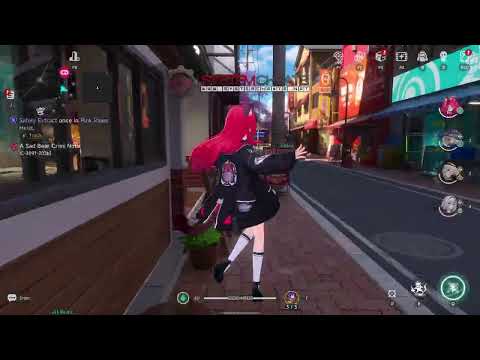
Cheat video
Cheat video
Neverness to Everness Hack
Neverness to Everness Hacks
Neverness to Everness Cheat
Neverness to Everness Cheats
Open world action RPG • Anomaly hunting suite • Global, NA, EU and CN

Neverness to Everness Hack with ESP, Aimbot and Teleport for PC

Get instant access to the Neverness to Everness Cheat for PC.

Neverness to Everness, often shortened to NTE, is a free to play open world action RPG from Hotta Studio, a Suzhou based studio owned by Perfect World Games, which also publishes the game. It runs on Unreal Engine 5 and is set in Hethereau, a modern city where supernatural anomalies and everyday life exist side by side. You play an Appraiser, an unlicensed Anomaly Hunter who contains anomalies with Esper abilities.

The game has two sides. In a fight it is a third person hack and slash game, with a party of up to four characters you switch between, plus dodges, perfect dodges and parries. Outside a fight it is city life: cars you customize and upgrade, apartments and shops, fishing, mini games and heists. Characters come from a gacha system called Scarborough Fair.

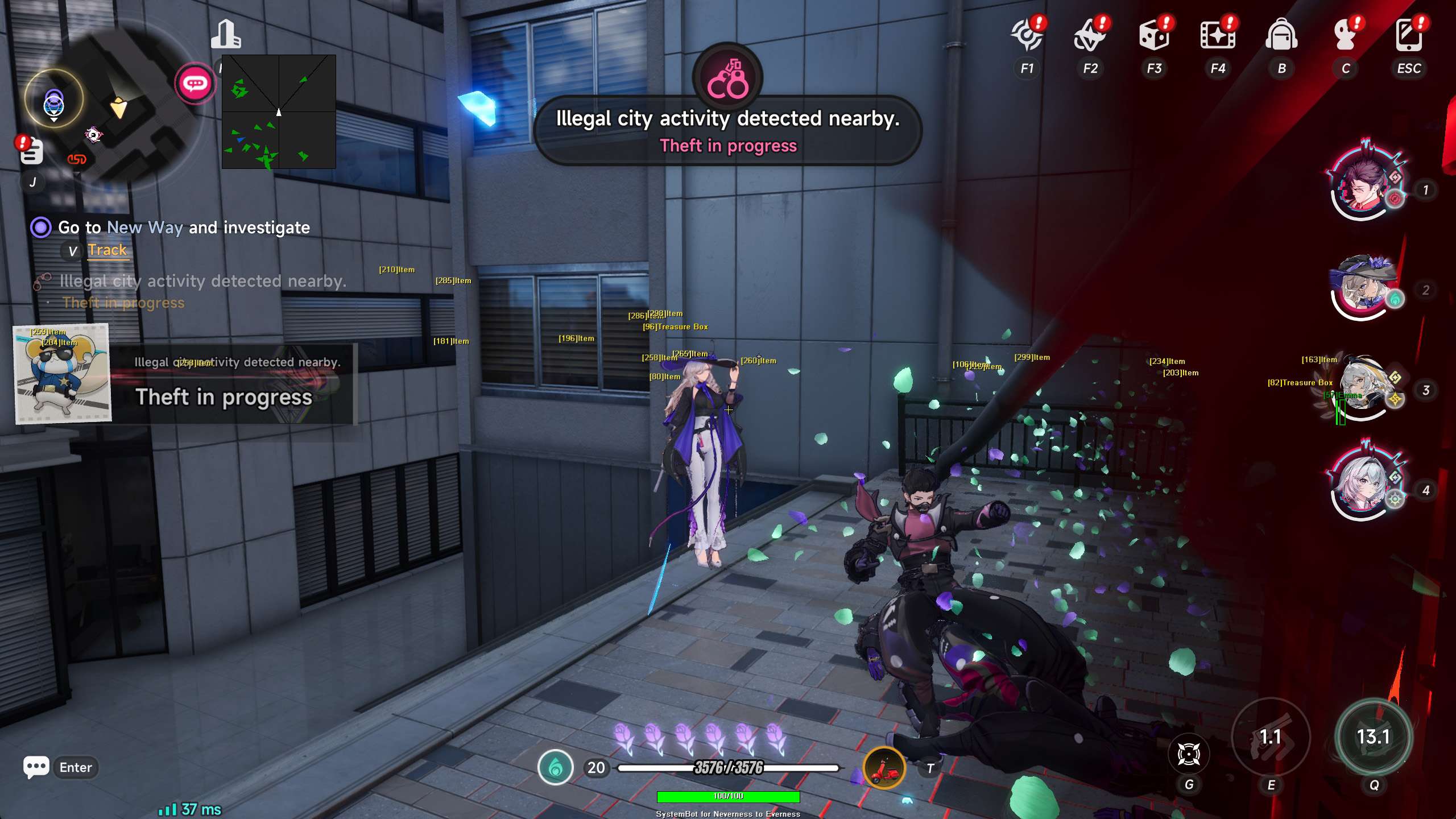
Our Neverness to Everness hack is built for both sides. It marks anomalies, treasure boxes and heist safes on your screen, teleports you to quests and items, fights for you on a key, fishes for you, and keeps you moving with a speed hack, a glide hack and No Clip.

Appraiser briefing
Built for Hethereau

Item ESP for anomalies, treasure boxes and Pink Heist safes, Teleport to Quest, Auto Combat, the Auto Fish Bot and God Mode, all in one Neverness to Everness cheat. It is sold on its own and it is also included in the Premium Package.

Neverness to Everness Hack and Cheat Features

The NTE cheat covers combat, exploration, automation and movement. Everything is set from the cheat menu on a menu key you choose, and your setup saves to a default profile plus three custom profiles. The highlights are below, and the full option list is in the Features panel on this page.

  • Neverness to Everness AimbotAuto Aim and Auto Fire with Smooth Aim, Limit Angle and an aim key. Aim Style picks targets by FOV, distance or health, and Aim Bone picks Head, Neck or Chest. A Triggerbot with Fire Delay and its own trigger key sits next to it.
  • Player and AI ESPBounding Box in 2D or 3D, Head Dot, 2D Line and Aim Laser, with name, distance and a health bar. Friendly and enemy players and friendly and enemy AI each switch on separately, with their own colours.
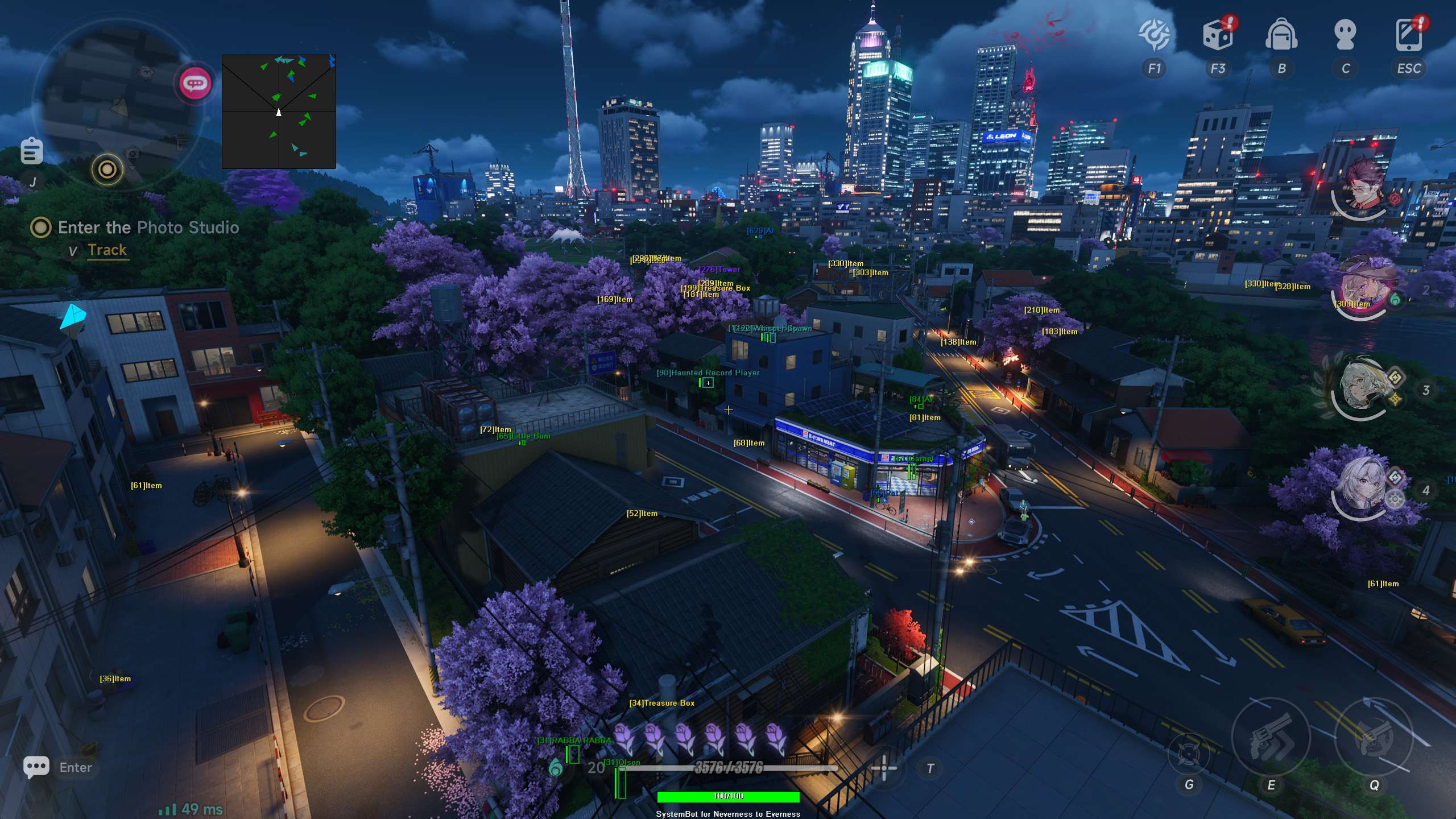
  • Item ESP for HethereauAnomaly ESP, Treasure Box ESP, Boss Spawn ESP, Event ESP, Oracle ESP, Key ESP, Wallet ESP, Coupon ESP and many more, with Item Distance ESP and an include or exclude Filter across 50 item filters.
  • Teleport and OPKTeleport to Quest, Teleport to Crosshair, Teleport to Items and Teleport to Entity, with an indicator for your destination. OPK teleports all enemies to a single spot.
  • AutomationAuto Combat on a toggle or a held key, Auto Interact, the Auto Fish Bot, Auto Skip Dialogue, Auto Skip Cutscene and Auto Quest Completion.
  • MovementSpeed Hack and Glide Hack from 1.5x to 10x, No Clip with its own speed, Unlimited Jumps and No Dodge Cooldown.
  • ModifiersGod Mode, Vehicle God Mode, Remove Vehicle Speed Limit, Attack Speed, Magic Projectile, Never Wanted and Freeze Monsters, plus Skin Changer, Glider Changer and Awaken Cosmetic.
  • Radar, Warnings and ControlA 2D radar for players and AI, a Warning System with a Beep System, Custom FOV, Hide UID, Hide HUD and a Panic Key that hides all cheat visuals and menus.
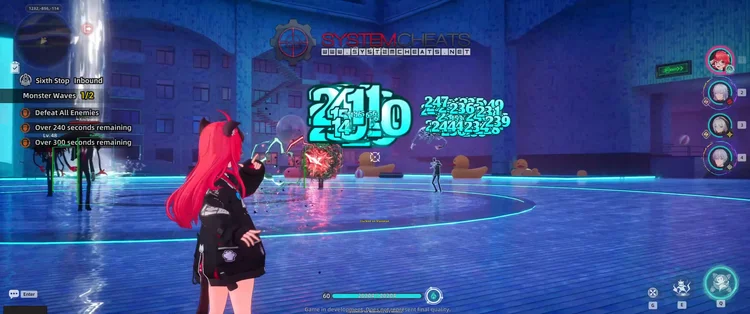
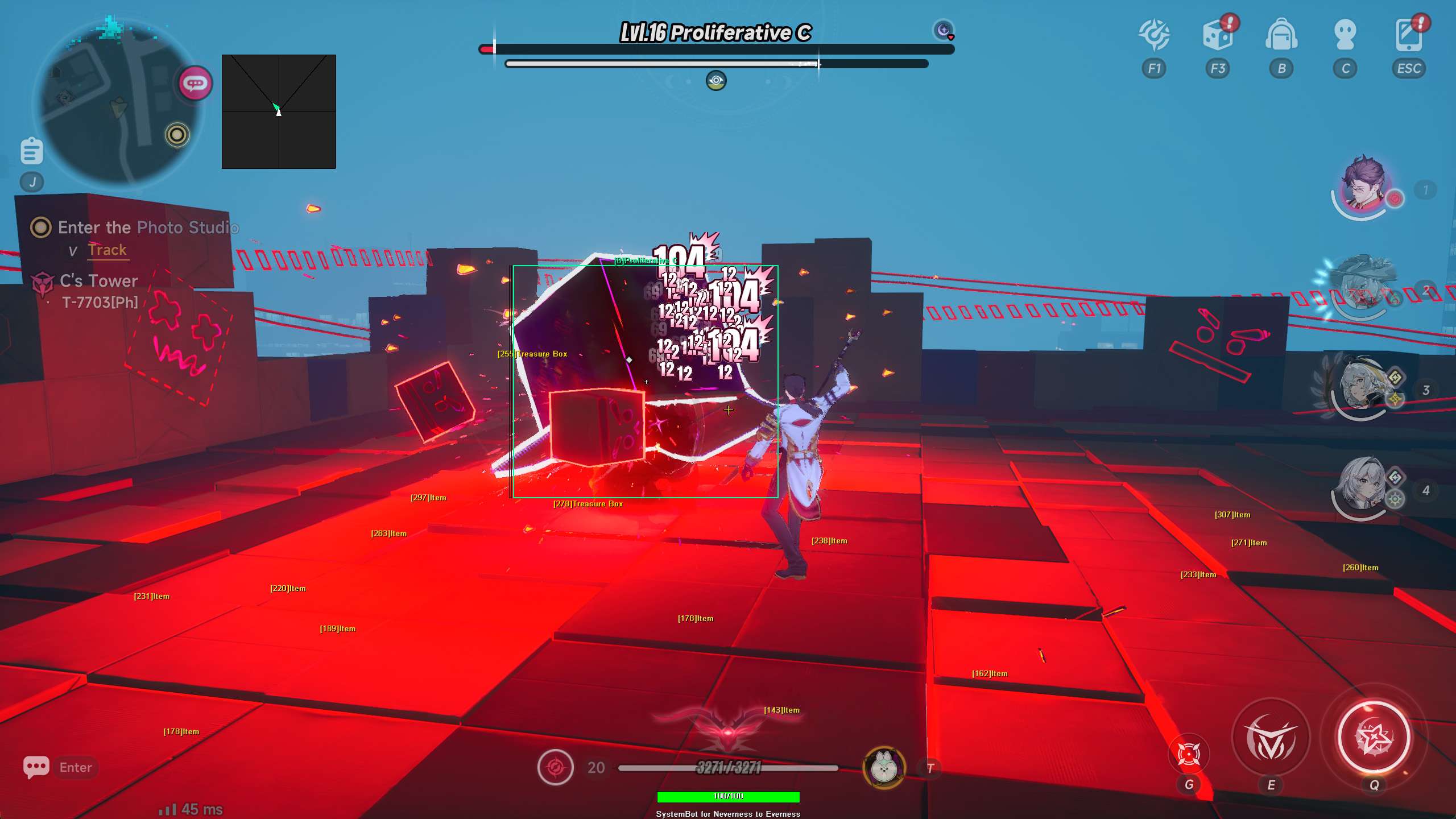
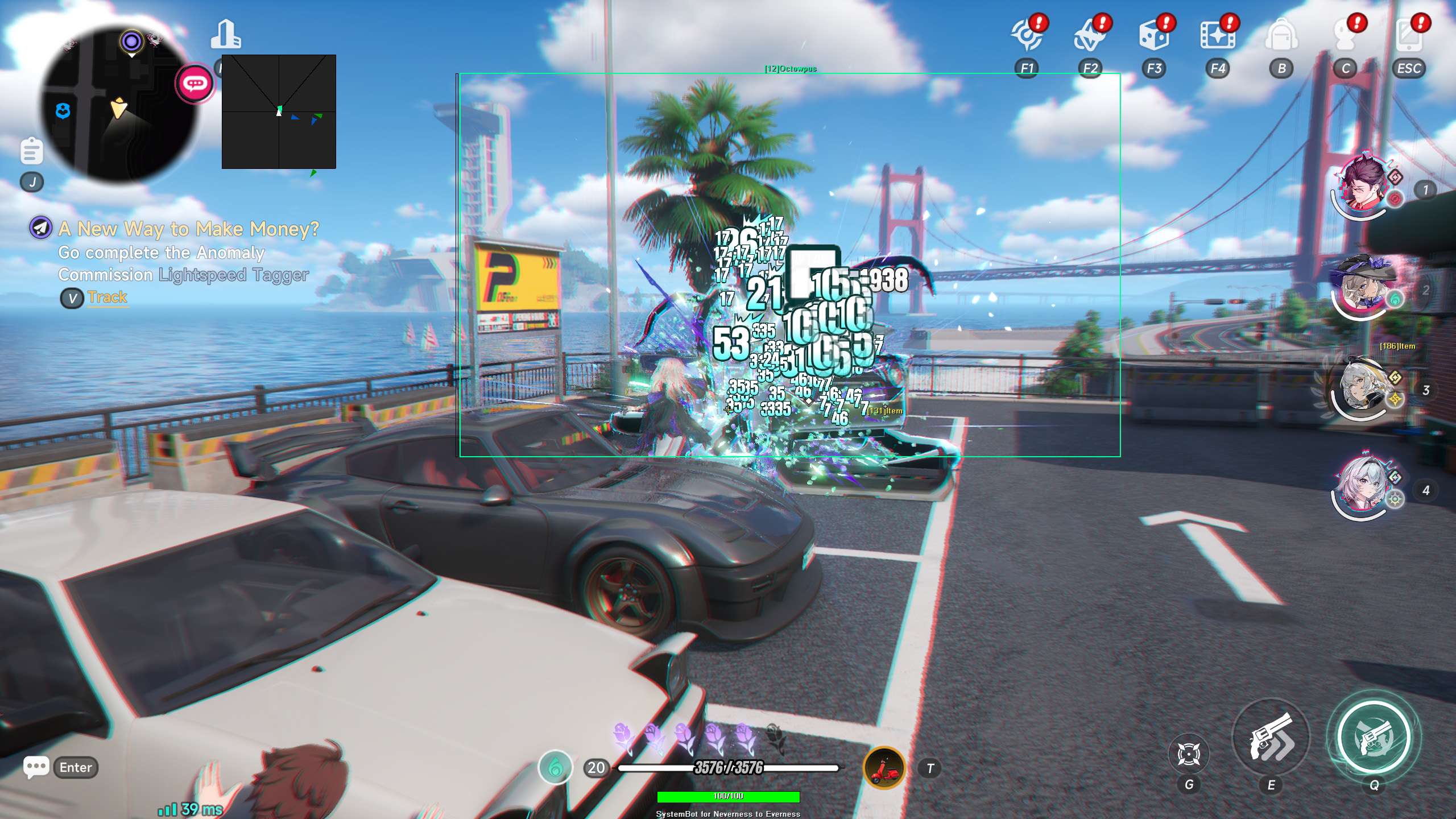
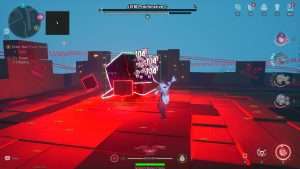
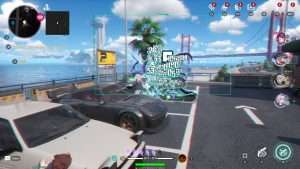
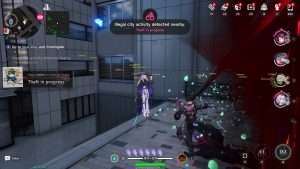
Neverness to Everness Hack in-game screenshot 1 of 4 Neverness to Everness Hack in-game screenshot 2 of 4 Neverness to Everness Hack in-game screenshot 3 of 4 Neverness to Everness Hack in-game screenshot 4 of 4

Neverness to Everness ESP for Anomaly Hunting

Hethereau is full of anomalies, from small disturbances to openly dangerous phenomena, and as an Appraiser it is your job to contain them. Anomaly Hunts and Anomaly Commissions are part of the job, and story places include the Eibon Antique Shop and the Bureau of Anomaly Control. The Neverness to Everness ESP marks what you are looking for. Anomaly ESP highlights Anomalies, Event ESP highlights world events and Treasure Box ESP highlights loot crates and treasure boxes.

Item Distance ESP shows how far away each item is, Max Item Distance sets how far the item ESP reaches, and the Filter includes or excludes item categories across 50 item filters, so your screen only shows what you want. Each type has its own colour, such as Anomaly RGBA and Treasure Box RGBA, so an anomaly and a crate are easy to tell apart.

Pink Paws Heist and Bank Heist Cheat

Pink Paws Heist is a recurring heist activity that pays out Fons, one of the game’s currencies, and reviewers list bank heists among the city activities. The cheat has a set of tools for heists. Force Enter Pink Paws Heist forces entry into the heist and Force Evacuate Pink Paws Heist forces an immediate evacuation, each on its own key.

Pink Heist Item ESP, Pink Heist Container ESP and Pink Heist Safe ESP highlight the heist items, containers and safes, each with its own colour. For bank heists, Auto Pickup Bank Loot collects all loot drops inside the bank, and Auto Teleport to Bank Loot moves your character straight to dropped bank loot.

Neverness to Everness Hack for Boss Fights and Team Combat

Combat in NTE is third person hack and slash. You take a party of up to four characters into a fight, switch between them, and chain their Esper abilities together in what the game calls the Esper Cycle. Timing your dodges, perfect dodges and parries is part of the combat, and some players feel that certain bosses have large health pools.

No Dodge Cooldown lets you dodge without the cooldown, Attack Speed increases how fast your character attacks and God Mode makes you invincible to all damage. Freeze Monsters stops AI enemies from attacking or moving, OPK teleports all enemies to a single spot at the OPK Distance you set, and Auto Combat fights enemies for you. Boss Spawn ESP highlights boss spawn points, so you know where the fight is before you get there.

Neverness to Everness Teleport Hack for Quests

One review of the game describes side quests as running back and forth from point A to B, talking to the same characters over and over again. The teleport tools cut that walk short. Teleport to Quest moves your character to the active quest marker, and Auto Quest Completion finishes the stage of your current quest with a press of its key.

Auto Skip Dialogue speeds through conversations, Auto Skip Cutscene skips cinematic cutscenes, and Dialogue ESP highlights characters with available dialogue, so you know who to talk to. Teleport to Crosshair, Teleport to Items and Teleport to Entity cover the rest, each on its own key, and the Draw Teleport Entity Indicator marks your teleport destination.

Speed Hack, Glide Hack and No Clip Across Hethereau

Hethereau is a whole city to cross. You run, jump, sprint, climb, swim and drive, and climbing and swimming use stamina while sprinting does not. Gliders carry you over the streets. The Speed Hack speeds up your character from 1.5x to 10x, on a toggle or while you hold its key, and the Glide Hack speeds up your glide in the same range. Unlimited Jumps lets you jump endlessly in the air, and No Clip lets you fly through solid walls and objects at a No Clip Speed you set. Add Teleport to Crosshair and a trip across town gets much shorter.

Neverness to Everness Cheat for Cars and Police Chases

Cars are part of daily life in Hethereau. You customize and upgrade them, and game guides describe a crime system where your wanted level rises and the police give chase. Never Wanted prevents the police or authorities from chasing you, so a drive across the city stays a drive. Vehicle God Mode makes your vehicle invincible, and Remove Vehicle Speed Limit changes the maximum speed of your vehicle. The 2D radar with Center 2D Radar and Radar Scale keeps players and AI in view while your eyes stay on the road.

Auto Fish Bot and Item ESP for City Life

Between anomaly hunts, NTE is about life in the city. Reviews mention the City Tycoon mode, running a business, housing and fishing, and the game also has Fishkeeping, Scratchers and Riichi Mahjong. The Auto Fish Bot catches fish for you, and Auto Interact collects items when you are near them.

For collectors, the item ESP covers Wallet ESP, Coupon ESP, Key ESP, Vending Machine ESP, Steal Item ESP, Furniture ESP, Photo Scenery ESP and Easter Egg ESP, plus Pockmon ESP for Pockmon creatures and Chameleon ESP for hidden Chameleons. Skin Changer and Glider Changer change your look with a press of a button, and Awaken Cosmetic unlocks and displays custom awaken cosmetic styles. The Auto features save you time. They do not change the game’s energy limits or give you free currency.

How to Get the Neverness to Everness Cheat

Getting started with the Neverness to Everness cheat takes three steps.

01
Create Your Account

Register on the forum for free. Your subscriptions, downloads and support all run through it.

02
Pick Your Subscription

Buy the Neverness to Everness cheat on its own, or get the Premium Package, which includes it. The price box on this page shows the options.

03
Check the Status and Play

Look at the live cheat status page, start the loader, launch the game and open the cheat menu with your menu key.

Is It Safe to Cheat in Neverness to Everness?

Neverness to Everness uses Anti-Cheat Expert (ACE), a kernel level anti-cheat, according to the game’s official store listing. The game also lets players report others in online races and report posts on its Bagel social feed. No cheat is ever completely risk free. The live cheat status page always shows the current state of every cheat, so check it before you play. Inside the game, the Panic Key hides all cheat visuals and menus with one press, and Hide UID hides your UID on screen.

Frequently Asked Questions

Is the Neverness to Everness cheat online?

The live cheat status page always shows the current state of every cheat, including Neverness to Everness. Check it before you buy or play.

Is the Neverness to Everness cheat included in the Premium Package?

Yes. The Neverness to Everness cheat is included in the Premium Package and the One Day Trial, and it is also sold as a single cheat.

Which versions of Neverness to Everness does the cheat support?

The Global, NA, EU and CN versions of Neverness to Everness on Windows PC. The live cheat status page shows the current state of each version.

Which anti-cheat does Neverness to Everness use?

Anti-Cheat Expert (ACE), a kernel level anti-cheat, according to the game’s official store listing.

Does the Neverness to Everness cheat have an aimbot?

Yes. The Neverness to Everness Aimbot has Auto Aim, Auto Fire, Smooth Aim, Aim Bone and Aim on Enemy AI, and a Triggerbot sits next to it. Combat in NTE is hack and slash, so Auto Combat, Attack Speed and OPK are there for close fights.

Can the cheat help with Pink Paws Heist?

Yes. Force Enter Pink Paws Heist and Force Evacuate Pink Paws Heist each have their own key, and Pink Heist Item, Container and Safe ESP highlight the heist items, containers and safes. For bank heists, Auto Pickup Bank Loot collects all loot drops inside the bank.

Does the Auto Fish Bot or Auto Combat give free currency?

No. The Auto features do the work for you, but they do not change the game’s energy limits and they do not give free gacha currency.

Does the cheat work on mobile, Mac or PlayStation 5?

No. NTE is also on mobile, macOS and PlayStation 5, but the cheat supports Windows 10 and 11 PC only.

Take Control of Hethereau

Anomalies to find, heists to run, quests to finish and a whole city to cross. The NTE cheat puts ESP, teleports, automation and movement tools on one menu, so you spend your time on the parts of the game you enjoy.

Need Help?

Our support team is available 24 hours a day, 7 days a week through the SystemCheats forum and TeamSpeak. Read what customers say on Trustpilot, or compare all cheat packages to find the right fit.

Cheat & Hack Information

What is Neverness to Everness?


Neverness to Everness is a free to play open world action RPG from Hotta Studio, published by Perfect World Games. It is set in Hethereau, a modern city full of supernatural anomalies. Fights are third person hack and slash, and outside them you drive cars, fish and run heists.


Cheating in Neverness to Everness


The Neverness to Everness cheat has Item ESP for anomalies and treasure boxes, Teleport to Quest, Auto Combat, the Auto Fish Bot, God Mode and a speed hack. It is sold as a single cheat and in the Premium Package.


Is the Neverness to Everness cheat safe?


Neverness to Everness uses Anti-Cheat Expert (ACE), a kernel level anti-cheat, according to its official store listing. No cheat is ever completely risk free. However, you can always adjust your settings to play legitimately for the long run. Check the live status page before you play.

Pricing

Features

Aimbot
Auto Aim Moves your aim onto a valid target for you automatically
Auto Fire Fires your weapon for you once a target is locked
Fire Delay (0 ~ 1000) Adds a short wait in milliseconds before firing once a target is locked
Smooth Aim (1 ~ 50) Slows the aim movement so it looks natural, and higher values make it slower
Limit Angle (0 ~ 180) Sets how far from your crosshair a target can be for the aimbot to lock on
Use Aim Key Makes the aimbot work only while you hold or toggle your aim key
Bullet Speed Prediction Leads moving targets based on how long the shot takes to arrive
Bullet Drop Prediction Aims a little higher to make up for bullet drop over long distances
Prediction Scale (1 ~ 30) Fine tunes how strong the lead and bullet drop prediction is
Visibility Check Stops the aimbot from targeting enemies hidden behind walls or cover
Stick to Target Keeps the aimbot on one target until it is down or leaves range
Randomize Aim Adds small random changes to where your aim lands for a human look
Randomize Aim Speed (10 ~ 1000) Sets how often, in milliseconds, the random aim movement changes
Aim Style (FOV, Distance, Health) Sets how the aimbot chooses the best target when more than one is in range
Aim Bone (Head, Neck, Chest) Sets which body part the aimbot aims at, such as the head or chest
Aim on Friendly Player Lets the aimbot target friendly players and squad members
Aim on Enemy Player Lets the aimbot target and lock onto enemy players
Aim on Friendly AI Lets the aimbot target friendly AI, such as allied bots and NPCs
Aim on Enemy AI Lets the aimbot target hostile AI, such as bots, monsters and bosses
Max Distance (0 ~ 1500) Sets the farthest distance, in meters, at which targets are still picked up or shown
Draw Locked Draws a marker on the target the aimbot is locked onto
Draw Aim FOV Draws a circle on screen that shows where the aimbot is active
Triggerbot
Triggerbot Shoots for you when your crosshair is on a valid target
Use Trigger Key Makes the triggerbot fire only while you hold the trigger key
Fire Delay (0 ~ 1000) Adds a short wait in milliseconds before firing once a target is locked
Trigger on Friendly Player Lets the triggerbot fire at friendly players
Trigger on Enemy Player Lets the triggerbot fire at enemy players
Trigger on Friendly AI Lets the triggerbot fire at friendly AI units
Trigger on Enemy AI Lets the triggerbot fire at hostile AI enemies
Max Distance (0 ~ 1500) Sets the farthest distance, in meters, at which targets are still picked up or shown
Player
Bounding Box (None, 2D, 3D) Draws a box around each target so you can see where they are
Box Size (1 ~ 10) Sets how thick the lines of each ESP box are drawn
2D Line Draws snap lines from your screen to each target
Player Name ESP Shows the name of each player above their character
Player Distance ESP Shows how far away each player is in meters
Player Health ESP (None, Scaled, Static, Vertical) Shows a health bar for each player so you can see how hurt they are
Head Dot Draws a dot on the head of each target you can see
Dot Size (2 ~ 20) Sets how big the dot markers are drawn on each target
Aim Laser (50 ~ 3000) Draws a line that shows where each target is aiming
Laser Size (50 ~ 3000) Sets the length and thickness of the aim laser line
Show Friendly Player Shows friendly players and teammates on the ESP and radar
Show Enemy Player Shows enemy players on the ESP and radar
Max Distance (0 ~ 1500) Sets the farthest distance, in meters, at which targets are still picked up or shown
AI
Bounding Box (None, 2D, 3D) Draws a box around each target so you can see where they are
Box Size (1 ~ 10) Sets how thick the lines of each ESP box are drawn
2D Line Draws snap lines from your screen to each target
AI Name ESP Shows the name or type of each AI character
AI Distance ESP Shows how far away each AI character is from you
AI Health ESP (None, Scaled, Static, Vertical) Shows a health bar for each AI character
Head Dot Draws a dot on the head of each target you can see
Dot Size (2 ~ 20) Sets how big the dot markers are drawn on each target
Aim Laser (50 ~ 3000) Draws a line that shows where each target is aiming
Laser Size (50 ~ 3000) Sets the length and thickness of the aim laser line
Show Friendly AI Shows friendly AI, such as allied bots, on the ESP and radar
Show Enemy AI Shows hostile AI, such as bots and monsters, on the ESP and radar
Max Distance (0 ~ 1500) Sets the farthest distance, in meters, at which targets are still picked up or shown
Item
Item ESP Shows items and supplies in the game world
Oracle ESP Highlights Oracle locations on the ESP so you can find them
Furniture ESP Highlights interactable furniture on the ESP so you can find them
Anomaly ESP Highlights Anomalies on the ESP so you can find them
Tower ESP Highlights Tower locations across the map
Upgrade ESP Highlights upgrade materials lying on the map
Magician ESP Highlights Magician characters on the ESP so you can find them
Dialogue ESP Highlights characters that have dialogue for you
Key ESP Highlights keys on the ESP so you can find them
Wallet ESP Highlights wallets and other currency items
Coupon ESP Highlights collectible coupons on the ESP so you can find them
Treasure Box ESP Highlights loot crates and treasure boxes
Vending Machine ESP Highlights vending machines across the map
Gacha ESP Highlights gacha related items and locations on the ESP
Photo Scenery ESP Highlights photo mode locations on the ESP so you can find them
Steal Item ESP Highlights items that can be stolen from the world
Easter Egg ESP Highlights hidden easter eggs on the ESP so you can find them
Dan Event ESP Highlights Dan Event locations on the ESP so you can find them
Rain Man ESP Highlights Rain Man events on the ESP so you can find them
Pockmon ESP Highlights Pockmon creatures on the ESP so you can find them
Boss Spawn ESP Highlights boss spawn points on the ESP so you can find them
Fuel ESP Highlights fuel on the ESP so you can find it
Event ESP Highlights world events on the ESP so you can find them
Chameleon ESP Highlights hidden Chameleons on the ESP so you can find them
Pink Heist Item ESP Highlights Pink Heist items on the ESP so you can find them
Pink Heist Container ESP Highlights Pink Heist containers on the ESP so you can find them
Pink Heist Safe ESP Highlights Pink Heist safes on the ESP so you can find them
Item Distance ESP Shows how far away each item is from you
Max Item Distance (0 ~ 500) Sets how far away items and loot are still shown
Filter (Exclude, Include) Lets you filter the ESP by specific item categories
Radar
Show Radar Turns on the 2D radar overlay on your screen
Show Cross Draws cross lines through the middle of the radar
Show Window Draws the background frame of the radar window
Show Dot Shows targets as dots on the radar window
Show FOV Draws a cone on the radar that shows where you are looking
Show Friendly Player Shows friendly players and teammates on the ESP and radar
Show Enemy Player Shows enemy players on the ESP and radar
Show Friendly AI Shows friendly AI, such as allied bots, on the ESP and radar
Show Enemy AI Shows hostile AI, such as bots and monsters, on the ESP and radar
Stick to Window Keeps targets that are out of range pinned to the edge of the radar
Radar Scale (0 ~ 60) Sets the radar zoom, lower zooms in and higher zooms out
Window Size (45 ~ 260) Sets the width and height of the radar window
Cross Size (45 ~ 260) Sets the length of the cross lines in the middle of the radar
Dot Size (2 ~ 20) Sets how big the dot markers are drawn on each target
Dot Type (Triangle, Dot) Switches radar markers between plain dots and triangles that point where targets face
Center 2D Radar Places the radar in the middle of the screen, around your crosshair
Max Distance (0 ~ 1500) Sets the farthest distance, in meters, at which targets are still picked up or shown
Teleport
Teleport to Crosshair Moves your character instantly to the spot you are aiming at
Teleport to Items Moves your character instantly to the items you picked
Teleport to Quest Moves your character instantly to the active quest objective
Teleport to Entity Moves your character instantly to the player or AI you target
Draw Teleport Entity Indicator Shows a marker on the target your next teleport will take you to
OPK (Off, Toggle, Hold) Teleports all nearby enemies to one spot in front of you
OPK Distance (5 ~ 20) Sets how far in front of you enemies are gathered for One Position Kill
Automation
Auto Combat Fights nearby enemies for you automatically
Auto Combat Type (Toggle, Hold) Sets how the Auto Combat key turns the feature on
Auto Interact Picks up items for you automatically when you are near them
Auto Fish Bot Catches fish for you automatically while you are fishing
Auto Skip Dialogue Speeds through conversations with characters for you automatically
Auto Skip Cutscene Skips cutscenes for you automatically so you can keep playing
Auto Quest Completion Finishes the current stage of your quest with one button press
Auto Pickup Bank Loot Picks up all loot drops inside the bank for you automatically
Auto Teleport to Bank Loot Teleports your character straight to loot dropped in the bank
Movement
Speed Hack (Off, 1.5x ~ 10x) Makes your character move faster than normal
Speed Hack Type (Toggle, Hold) Sets how the speed hack works, such as holding or toggling its key
No Clip (Off, Toggle, Hold) Lets you fly through walls, objects and terrain
No Clip Speed (10 ~ 100) Sets how fast you fly while No Clip is on
Unlimited Jumps Lets you jump again and again in mid air
Glide Hack (Off, 1.5x ~ 10x) Speeds up how fast your character glides
No Dodge Cooldown Lets you dodge again without waiting for the cooldown
Modifiers
God Mode Makes your character invincible to incoming damage
Vehicle God Mode Makes your vehicle invincible so it takes no damage
Remove Vehicle Speed Limit Removes the top speed limit on your vehicle
Attack Speed (1 ~ 20) Increases how fast your character attacks
Multi Attack (1 ~ 20) Hits enemies multiple times per swing
Magic Projectile Makes your projectiles always hit the target
Magic Projectile Multiplier (1 ~ 20) Increases how many magic projectiles you fire
Never Wanted Clears your wanted level and stops the authorities from chasing you
Freeze Monsters Stops AI enemies from moving or attacking
Force Enter Pink Paws Heist Forces you into the Pink Paws Heist event
Force Evacuate Pink Paws Heist Forces an instant evacuation from the Pink Paws Heist
Skin Changer Lets you change your character skin with the press of a button
Glider Changer Lets you change your glider with the press of a button
Awaken Cosmetic Unlocks and shows custom awaken cosmetic styles
Peeking Removes the character fade when you try to peek
Warning
Warning System Shows on-screen warnings when enemies are near, can see you or aim at you
Is Aiming At You Angle (0 ~ 180) Sets the angle used to warn you when an enemy is aiming at you
Can See You Angle (0 ~ 180) Sets the angle used to warn you when an enemy can see you
Max Distance (0 ~ 1500) Sets the farthest distance, in meters, at which targets are still picked up or shown
Beep System Plays a warning beep when an enemy is looking or aiming at you
Max Beep Distance (0 ~ 1500) Sets how far away an enemy can be and still set off the warning beep
Misc
Crosshair Draws a custom crosshair in the center of your screen, over the game's own
Crosshair Size (2 ~ 200) Sets the size of the custom crosshair on your screen
Draw FPS Shows your current frames per second on screen
Draw Resolution Shows your current screen resolution on the overlay
Draw Time Shows your local system time on the overlay
Draw Watermark Shows the SystemCheats watermark on screen so you know the cheat is active
Draw Health Bar Shows your own health as a bar on screen
Use Panic Key Turns on a hotkey that instantly hides all cheat visuals and menus
Font Size (10 ~ 20) Sets the size of the ESP and overlay text on screen
Font Shadow (None, Bordered, Shadow) Adds a shadow or border behind overlay text so it is easier to read
Hide UID Hides your player UID number from the screen
Hide HUD Hides all the game's HUD elements from your screen
Custom FOV Lets you override the game's field of view with your own value
FOV Value (30 ~ 170) Sets the field of view used while Custom FOV is turned on
Colors
Enemy Invisible RGBA Sets the color for enemies hidden behind walls or cover
Enemy Visible RGBA Sets the color for enemies in your direct line of sight
Enemy AI Invisible RGBA Sets the color for hostile AI hidden behind walls or cover
Enemy AI Visible RGBA Sets the color for hostile AI in your direct line of sight
Friendly Invisible RGBA Sets the color for teammates hidden behind walls or cover
Friendly Visible RGBA Sets the color for teammates in your direct line of sight
Friendly AI Invisible RGBA Sets the color for friendly AI hidden behind walls or cover
Friendly AI Visible RGBA Sets the color for friendly AI in your direct line of sight
Item RGBA Sets the color for general items shown on the ESP
Oracle RGBA Sets the color the ESP uses for Oracle locations
Furniture RGBA Sets the color for furniture shown on the ESP
Anomaly RGBA Sets the color used to draw Anomalies on the ESP
Tower RGBA Sets the color the ESP uses for Tower locations
Upgrade RGBA Sets the color the ESP uses for upgrades
Magician RGBA Sets the color for Magicians shown on the ESP
Dialogue RGBA Sets the color for dialogue markers shown on the ESP
Key RGBA Sets the color for keys shown on the ESP
Wallet RGBA Sets the color the ESP uses to mark wallets
Coupon RGBA Sets the color used to draw coupons on the ESP
Treasure Box RGBA Sets the color the ESP uses for treasure boxes
Vending Machine RGBA Sets the color the ESP uses for vending machines
Gacha RGBA Sets the color for gacha items shown on the ESP
Photo Scenery RGBA Sets the color the ESP uses for photo locations
Steal Item RGBA Sets the color the ESP uses for stealable items
Easter Egg RGBA Sets the color for easter eggs shown on the ESP
Dan Event RGBA Sets the color for Dan Events shown on the ESP
Rain Man RGBA Sets the color the ESP uses to mark Rain Man
Pockmon RGBA Sets the color the ESP uses for Pockmon creatures
Boss Spawn RGBA Sets the color used to draw boss spawns on the ESP
Fuel RGBA Sets the color for fuel pickups shown on the ESP
Event RGBA Sets the color for events shown on the ESP
Chameleon RGBA Sets the color used to draw Chameleons on the ESP
Pink Heist Item RGBA Sets the color the ESP uses for Pink Heist items
Pink Heist Container RGBA Sets the color the ESP uses for Pink Heist containers
Pink Heist Safe RGBA Sets the color the ESP uses for Pink Heist safes
Crosshair RGBA Sets the color for the custom crosshair drawn on your screen
Menu RGBA Sets the color scheme for the in-game cheat menu
Aim FOV RGBA Sets the color of the aimbot FOV circle drawn on screen
Filters
6 Friendly Player Filters Lets you enter friendly player names to show or hide on the ESP
6 Enemy Player Filters Lets you enter enemy player names to show or hide on the ESP
50 Item Filters Lets you list item names to fine tune which items the ESP shows
Positions
Customizable Menu Position with the Mouse Lets you move the menu by dragging it with the mouse
Customizable Radar Position with the Mouse Lets you move the radar by dragging it with the mouse
Keys
Customizable Auto Quest Completion Key Sets the hotkey that completes the current stage of your quest
Customizable Force Enter Pink Paws Heist Key Sets the hotkey that forces entry into the Pink Paws Heist
Customizable Force Evacuate Pink Paws Heist Key Sets the hotkey that forces an evacuation from the Pink Paws Heist
Customizable Skin Changer Key Sets the hotkey that triggers the skin changer
Customizable Glider Changer Key Sets the hotkey that triggers the glider changer
Customizable Panic Key Sets a key that instantly hides or turns off all cheat features
Customizable Menu Key Sets the key that opens and closes the cheat menu
Customizable Aim Key Sets the key that turns on the aimbot while held or toggled
Customizable Trigger Key Sets the key you hold or toggle to turn the triggerbot on
Customizable Item Key Sets the key that filters or grabs items
Customizable Speed Hack Key Sets the key that turns on the Speed Hack movement boost
Customizable Teleport to Crosshair Key Sets the hotkey that teleports you to where you aim
Customizable Teleport Items Key Sets the hotkey that teleports nearby items to you
Customizable Teleport to Entity Key Sets the hotkey that teleports you straight to your target
Customizable Teleport to Quest Key Sets the hotkey that teleports you to your active quest objective
Customizable No Clip Key Sets the key that switches No Clip flight on and off
Customizable OPK Key Sets the key that gathers nearby enemies in one spot for One Position Kill
Customizable Auto Combat Key Sets the hotkey that turns auto combat on and off
Settings
Save/Load Default Settings Saves your settings to the default profile or loads them back
Save/Load Custom 1 Settings Saves your settings to custom profile 1 or loads them back
Save/Load Custom 2 Settings Saves your settings to custom profile 2 or loads them back
Save/Load Custom 3 Settings Saves your settings to custom profile 3 or loads them back