Windrose Hack with Aimbot, ESP and God Mode Cheat for PC

Included in Premium Package and One Day Trial

Only Steam version supported
Windrose Hack
Windrose Aimbot
Windrose Cheat
Windrose Cheats
Pirate survival • Co-op on land and sea • Windows PC

Windrose Hack with Aimbot and ESP for PC

Get instant access to the Windrose Cheat for PC.

Windrose is a pirate survival adventure set in an alternative Age of Piracy. It is made by Kraken Express, a studio based in Uzbekistan. The game runs on Unreal Engine and is sold for Windows PC on Steam and the Epic Games Store. The project started life under the name Crosswind, and it has sold more than two million copies.

You play a captain who dares to challenge Blackbeard. After a clash with him you wash up on a small island with almost nothing. From there you gather resources, build a base, repair your ship and rescue your crew. The story grows into a conflict between empires, pirate clans and dark supernatural powers, and the main quest sends you after the fragments of an artifact called the Obol. You fight animals, zombie pirates and human pirates on land and at sea, alone offline or in online co-op. There is no PvP, so the fights are against the enemies the game puts in your way.

Our Windrose hack is built around that loop: an aimbot with bullet prediction, 3D and 2D radar ESP for enemies, animals, ships and loot, a warning system, and survival tools such as God Mode, Unlimited Stamina and Ghost Mode.

Tactical upgrade briefing
Built for the pirate survival loop

Windrose asks you to fight, loot, hunt and sail, often with a crew. The Windrose cheat covers each part: ESP for enemies, animals, chests and death caches, an aimbot that can lock onto ships, and God Mode and Unlimited Stamina for the long fights on land.

Windrose Hack and Cheat Features

The Windrose cheat covers aim, awareness, loot and survival. Everything is set from the in-game menu, and a default slot plus three custom settings slots keep different setups ready, each with its own hotkey. The highlights are below, and the full option list is in the Features panel on this page.

  • Windrose AimbotAuto Aim with Smooth Aim, Limit Angle and an aim key. Aim Style picks targets by FOV or distance, and Aim Bone sets Head Priority, Neck Priority or Chest Priority. Bullet Speed Prediction and Prediction Scale help against moving targets, and Bullet Drop Prediction adjusts the aim for bullet drop, with a Max Distance of up to 1500.
  • Triggerbot and Auto FireThe Triggerbot fires when your crosshair is on a valid target, with a Fire Delay, its own trigger key and a Max Distance. Auto Fire shoots once the aimbot has locked on. Targets can be enemy AI, animals, ships and downed targets.
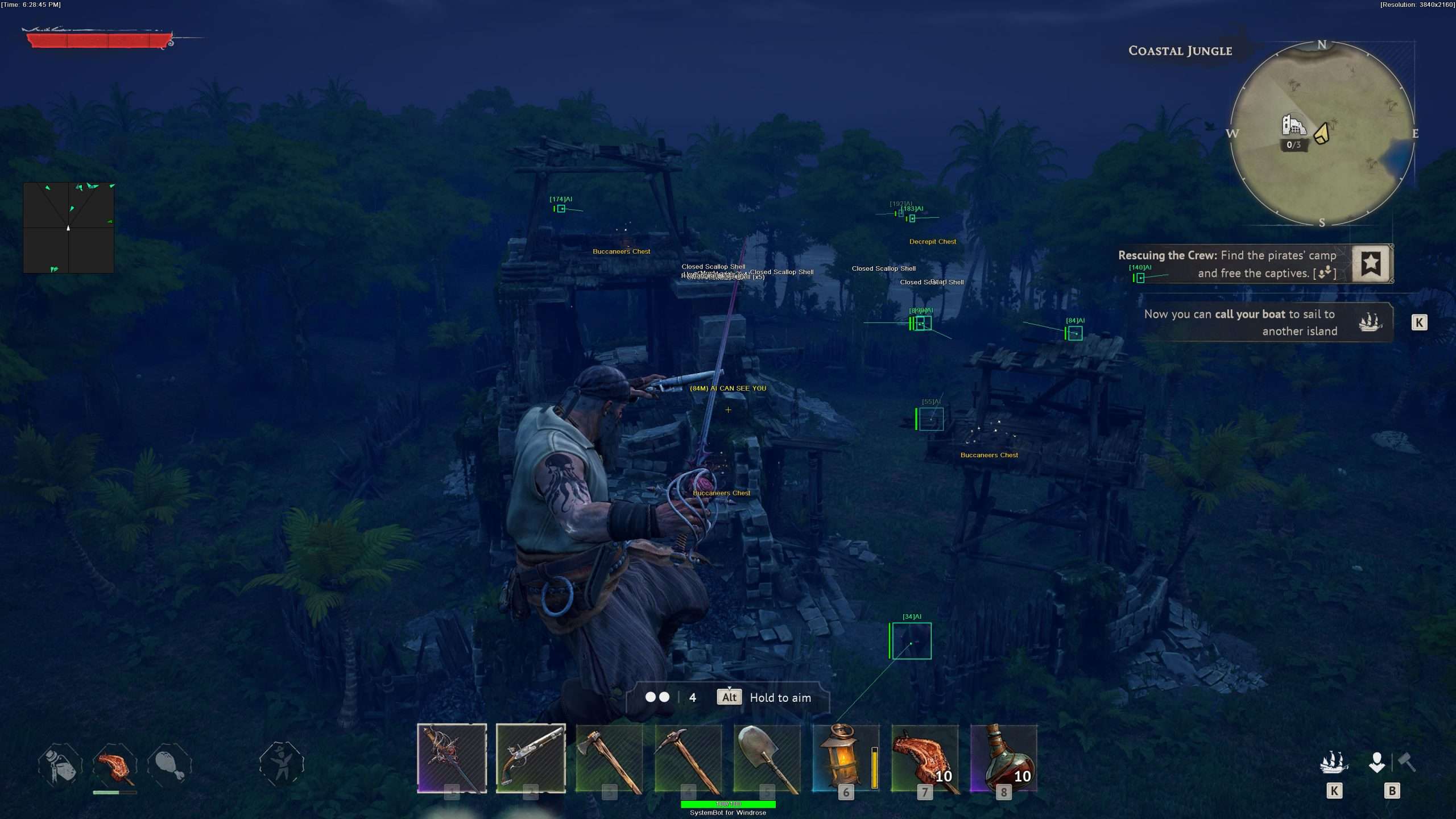
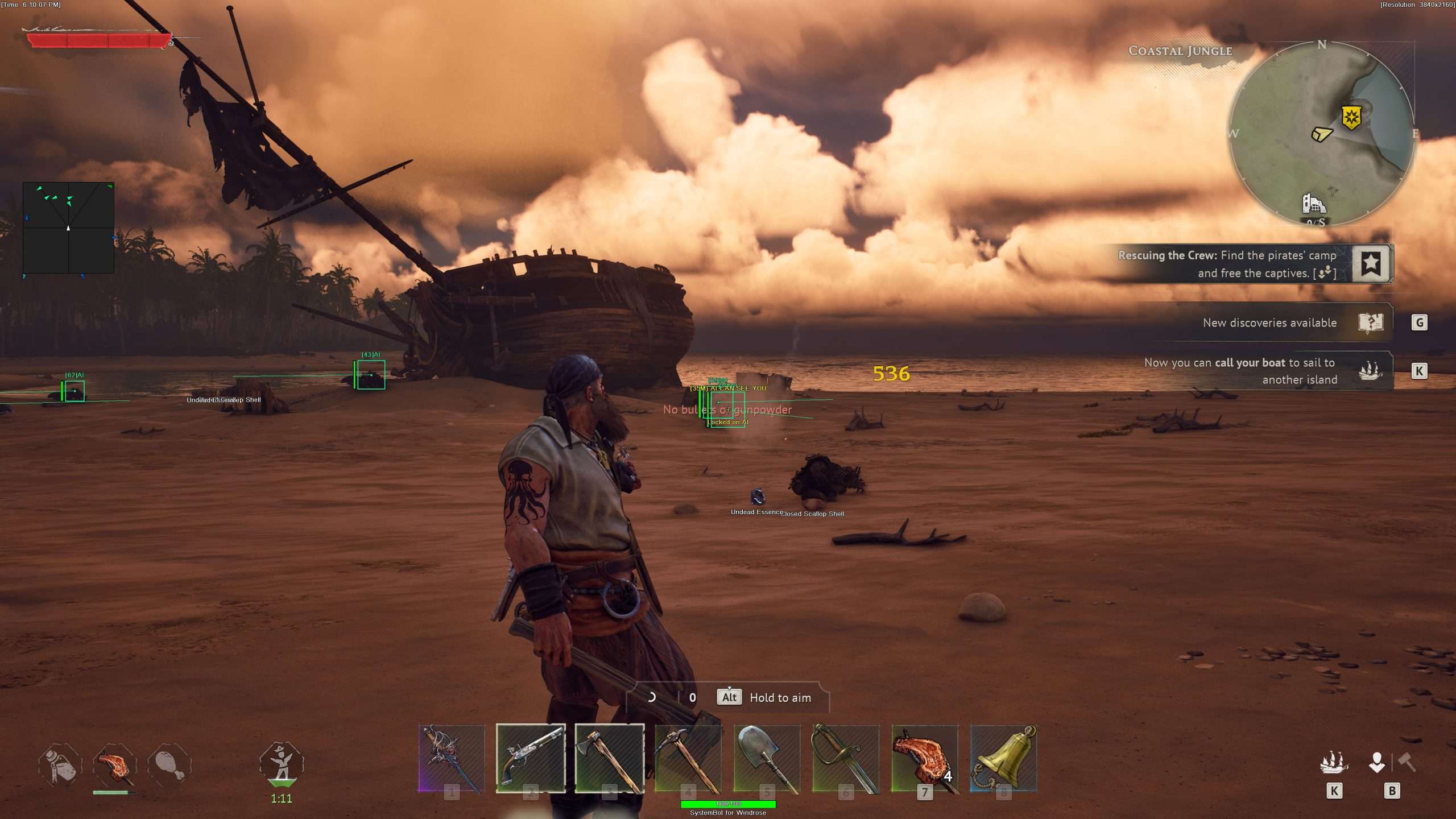
  • 3D Radar ESPBounding Box in 2D or 3D, Head Dot, 2D Line and Aim Laser. Name, distance and health ESP for players, AI enemies and animals, with health shown as Scaled, Static or Vertical. Show Ship marks ships, and Projectile ESP shows active grenades and flying objects.
  • Loot, Chest and Cache ESPLoot ESP, Chest ESP and Pickup ESP, plus Cache ESP for post-mortem death caches, Building ESP for player-built structures and Explosion Barrel ESP. Max Item Distance goes up to 300, and the Item filter has 50 entries.
  • 2D RadarA top-down radar with Radar Scale, Window Size and Stick To Window. Dots for friendly players, friendly and hostile AI, animals, ships and downed units, drawn as triangles or dots.
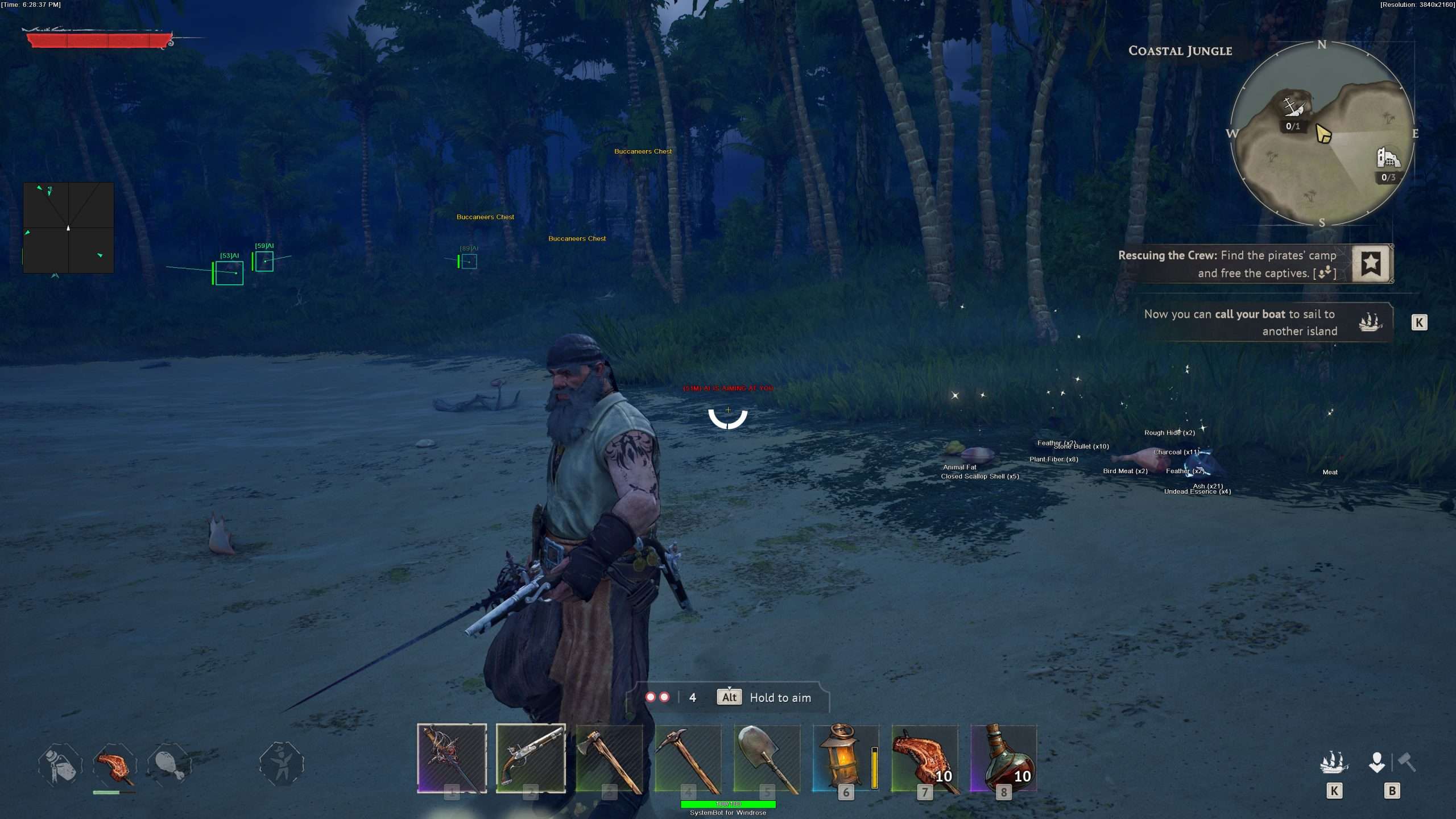
  • Warning SystemAn alert above your crosshair when an enemy is aiming at you or can see you, each with its own angle, plus a Beep System with its own Max Beep Distance.
  • Windrose God Mode and Unlimited StaminaGod Mode sets your health to maximum and prevents death. Unlimited Stamina sets your stamina to maximum and stops it from running out. Draw Health Bar shows your own health on screen.
  • Ghost Mode and ControlGhost Mode lets you move freely through walls and terrain, with its own speed, its own key and Save Ghost Location. Add a Panic Key, custom crosshairs, font options and a menu you can move with the mouse.
Windrose Hack in-game screenshot 1 of 4 Windrose Hack in-game screenshot 2 of 4 Windrose Hack in-game screenshot 3 of 4 Windrose Hack in-game screenshot 4 of 4

Windrose Aimbot and the Flintlock Fuse

Firearms in Windrose do not fire the instant you pull the trigger. Pistols and muskets use a short fuse, so the shot leaves a moment later and you have to keep aiming until it does. If the target steps aside during that wait, the shot misses. The Windrose aimbot helps you hold the aim through that wait.

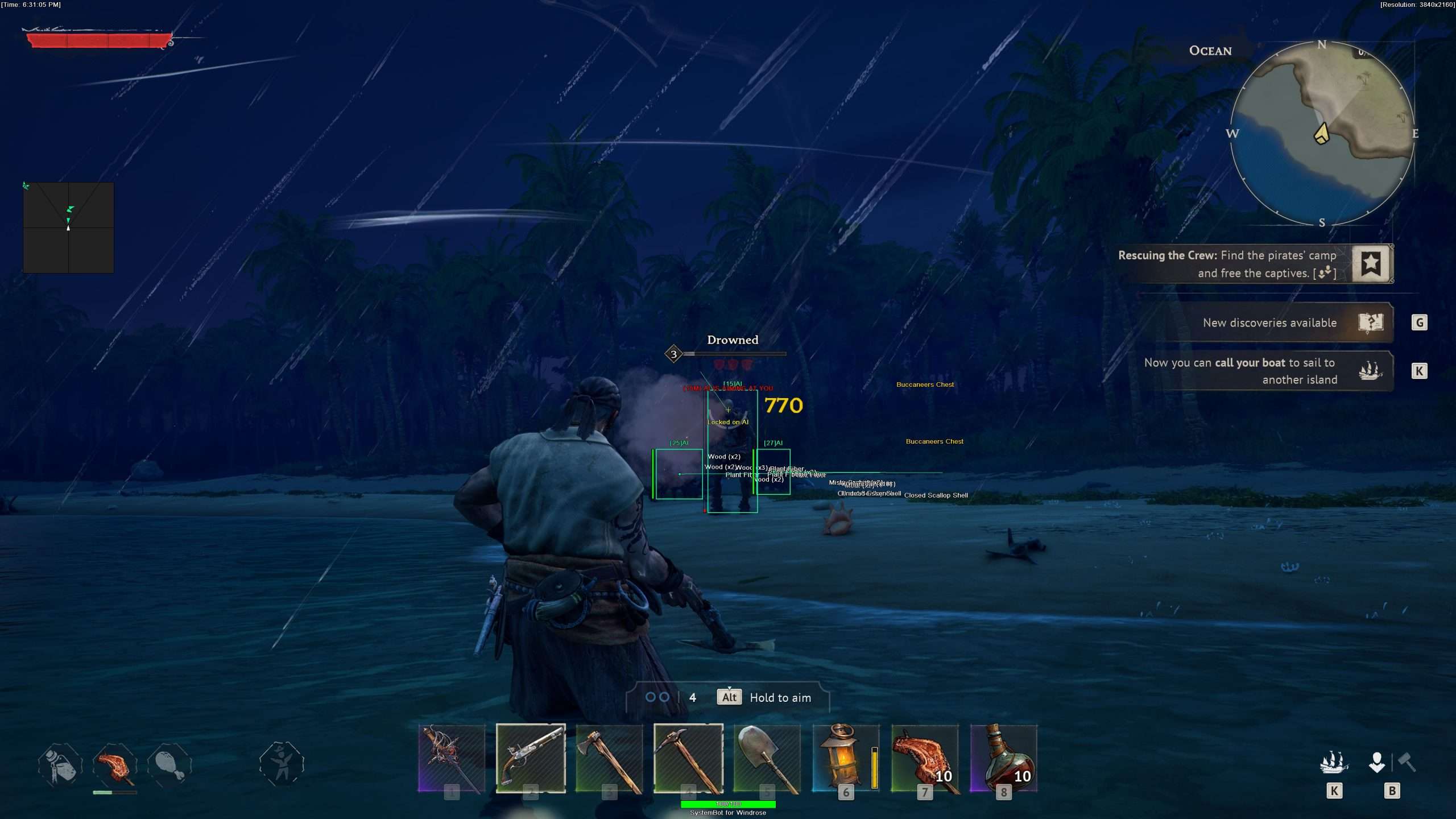
Auto Aim locks onto the closest valid target, Stick to Target keeps the lock on that one enemy until it dies, and Smooth Aim sets how fast the aim moves. Against an enemy on the move, Bullet Speed Prediction works out the travel time of the shot, and Prediction Scale sets how strong that correction is. With Use Aim Key on, the aimbot only works while you hold the key, so you decide when it takes over.

Windrose ESP When Pirates Come in Groups

Ground combat in Windrose can be punishing. Players describe dying in two or three hits while enemies take many more, and they name fights against groups as the hardest part. Knowing who is coming, and from where, matters as much as a fast blade. The Windrose ESP marks hostile AI with a box, a name, the distance and a health bar, and Show Enemy AI puts them on the 2D Radar as well.

The Warning System shows an alert above your crosshair when an enemy is aiming at you or can see you, and the Beep System adds a sound when a threat is close. Aim Laser draws a line that shows where targets are aiming, which helps against ranged attackers such as the Drowned.

Windrose Unlimited Stamina for Hard Melee Fights

The official site describes the combat as Soulslite. You fight with sabers, rapiers, halberds and greatswords, and melee is built around parrying, blocking and dodging. A common complaint from players is that stamina runs out after two or three swings, and that fights against groups are the hardest part. Unlimited Stamina keeps your stamina at maximum, so you can keep swinging, blocking and dodging. The Windrose God Mode option keeps your health at maximum and stops you from dying, which takes the sting out of a fight you misjudged. Players also note that solo play gets harder later on, and that is where these two options come in handy.

Windrose Hack for Tough Bosses Like Thomas Richards

Windrose has named bosses, and they hit hard. Thomas Richards uses a Grab attack and throws bombs, named enemies such as Jim Godart stand in your way, and the Alpha Wolf grapples you with a bleed attack. One player review says a boss could not be beaten even with maxed gear. The cheat gives you a clear read on each fight.

AI Health ESP shows the health of AI enemies as Scaled, Static or Vertical indicators, so you see how close a boss is to falling. Aim on Enemy AI with Aim Bone set to Head Priority tells the aimbot to aim for the head, and God Mode lets you learn a boss pattern without paying for each mistake.

Windrose Naval Combat with Ship ESP and Aim on Ship

At sea you command ships such as the nimble ketch, the versatile brig and the frigate, which the developer calls monstrous. Naval fights mix cannon broadsides with boarding actions, and you can move straight from the deck to the shore. The Windrose cheat marks ships in the 3D Radar with Show Ship, in separate Enemy Ship and Friendly Ship colours, and the 2D Radar marks ship spots too, so you see a ship before it closes in.

Aim on Ship lets the aimbot lock onto ships, and Trigger on Ship lets the triggerbot fire when a ship is in your crosshair. If you do lose your ship, the game lets you rebuild it for a small cost in wood.

Loot and Animal ESP for the Survival Grind

Windrose runs on resources. Players point out that experience comes from quests and exploration rather than kills, and that some quests ask for items such as 50 gunpowder. Loot ESP highlights dropped loot, Chest ESP shows chests you can open and Pickup ESP shows items ready for pickup, up to a Max Item Distance of 300.

The Item filter has 50 entries, so you can show only what you need, and the Item key hides or shows item ESP with one press. Hunting matters too. Food does not kill you when you skip it, but meals buff your attributes. Animal Name, Distance and Health ESP show the wildlife around you, such as boars, Show Animal puts animals on the 2D Radar, and Aim on Animal lets the aimbot target them.

Cache ESP and Ghost Mode After a Death

Death in Windrose costs time. Crafted items stay with you, but raw resources drop where you fell, and you respawn at your last tent, which can be far away. You cannot respawn on your ship. Cache ESP shows post-mortem death caches, so the spot where you dropped your resources is marked on screen once it is in range. Ghost Mode takes you through walls and terrain at the speed you set, and Save Ghost Location stores a position to return to later.

Windrose Co-op with Your Crew

Windrose plays in online co-op with up to eight players on self hosted or dedicated servers, and the developer recommends groups of up to four. Show Friendly Player marks your crewmates in their own Friendly Visible and Friendly Invisible colours, Building ESP shows player-built structures such as your base, and with Aim on Friendly Player and Trigger on Friendly Player switched off, the aimbot and triggerbot leave your crew alone.

How to Get the Windrose Cheat

Getting started with the Windrose cheat takes three steps.

01
Pick Your Plan

Register on the forum and choose a single Windrose subscription or the Premium Package. The price box on this page shows both.

02
Download the Loader

Download the SystemCheats loader, run it as administrator and select Windrose.

03
Set Sail

Start Windrose, open the cheat menu with your menu key and save your setup to one of the settings slots.

Is It Safe to Cheat in Windrose?

Kraken Express does not name an anti-cheat system on the Windrose store page, its official website or its FAQ. The game’s EULA forbids cheats, hacks, bots, trainers, automation tools and similar programs, and it allows the publisher to warn or suspend players who break those rules. No cheat is ever completely risk free. The live cheat status page always shows the current state of every cheat, including Windrose, so check it before you play.

Frequently Asked Questions

Is the Windrose cheat online?

The live cheat status page always shows the current state of every cheat, including Windrose. Check it before you buy.

Is Windrose included in the Premium Package?

Yes. The Windrose cheat is sold as a single cheat and is also part of the Premium Package. The price box on this page shows both options.

Which versions of Windrose does the cheat support?

The cheat runs on Windows 10 and 11 PCs. Only the Steam version of Windrose is supported.

Which anti-cheat does Windrose use?

Kraken Express does not name one on its store page, official site or FAQ. The EULA forbids cheats and similar programs and allows warnings and suspensions.

Is there PvP in Windrose?

No. Windrose is played solo or in online co-op, and the enemies are animals, zombie pirates and human pirates controlled by the game. The cheat has aim and ESP options for AI enemies, animals and ships.

Can I use the Windrose cheat with a co-op crew?

The cheat has options made for a crew: friendly player ESP, separate friendly colours and friendly dots on the 2D Radar. Leave Aim on Friendly Player and Trigger on Friendly Player switched off, and the aimbot and triggerbot stay off your crewmates.

Can the Windrose aimbot target ships?

Yes. Aim on Ship lets the aimbot lock onto ships, and Trigger on Ship lets the triggerbot fire when a ship is in your crosshair.

Get the Windrose Hack and Set Sail

Windrose is a long voyage of fighting, looting, hunting and sailing. With the Windrose cheat you see the enemies, animals and loot around you, keep your health and stamina at maximum, and find a lost cache more easily. Check the status page, pick your plan and take your crew to sea.

Need Help?

Our support team is available 24 hours a day, 7 days a week through the SystemCheats forum and TeamSpeak. Read what customers say on Trustpilot, or compare all cheat packages to find the right fit. If you also sail in Sea of Thieves, it has its own Sea of Thieves cheat.

Cheat & Hack Information

What is Windrose?


Windrose is a pirate survival adventure from Kraken Express, set in an alternative Age of Piracy. You wash up on an island after a clash with Blackbeard, build a base, repair your ship and fight on land and at sea, alone or in co-op.


Cheating in Windrose


Our Windrose cheat has an aimbot with bullet prediction, 3D Radar ESP, Chest ESP, Cache ESP, God Mode and Unlimited Stamina. You can buy it as a single cheat or get it with the Premium Package.


Is the Windrose cheat safe?


Kraken Express does not name an anti-cheat system for Windrose, and the game's EULA forbids cheats and allows warnings and suspensions. No cheat is ever completely risk free. However, you can always adjust your settings to play legitimately for the long run. Check the live status page before you play.

Pricing

Features

Aimbot
Auto Aim Moves your aim onto a valid target for you automatically
Auto Fire Fires your weapon for you once a target is locked
Fire Delay (0 ~ 1000) Adds a short wait in milliseconds before firing once a target is locked
Smooth Aim (1 ~ 50) Slows the aim movement so it looks natural, and higher values make it slower
Limit Angle (0 ~ 180) Sets how far from your crosshair a target can be for the aimbot to lock on
Use Aim Key Makes the aimbot work only while you hold or toggle your aim key
Bullet Speed Prediction Leads moving targets based on how long the shot takes to arrive
Bullet Drop Prediction Aims a little higher to make up for bullet drop over long distances
Prediction Scale (1 ~ 30) Fine tunes how strong the lead and bullet drop prediction is
Visibility Check Stops the aimbot from targeting enemies hidden behind walls or cover
Stick to Target Keeps the aimbot on one target until it is down or leaves range
Randomize Aim Adds small random changes to where your aim lands for a human look
Randomize Aim Speed (10 ~ 1000) Sets how often, in milliseconds, the random aim movement changes
Aim Style (FOV, Distance) Sets how the aimbot chooses the best target when more than one is in range
Aim Bone (Head Priority, Neck Priority, Chest Priority) Sets which body part the aimbot aims at, such as the head or chest
Aim on Friendly Player Lets the aimbot target friendly players and squad members
Aim on Enemy Player Lets the aimbot target and lock onto enemy players
Aim on Friendly AI Lets the aimbot target friendly AI, such as allied bots and NPCs
Aim on Enemy AI Lets the aimbot target hostile AI, such as bots, monsters and bosses
Aim on Ship Lets the aimbot target and lock onto ships
Aim on Animal Lets the aimbot target and lock onto animals
Aim on Downed Lets the aimbot target players and enemies who are downed
Max Distance (0 ~ 1500) Sets the farthest distance, in meters, at which targets are still picked up or shown
Draw Locked Draws a marker on the target the aimbot is locked onto
Draw Aim FOV Draws a circle on screen that shows where the aimbot is active
Triggerbot
Triggerbot Shoots for you when your crosshair is on a valid target
Use Trigger Key Makes the triggerbot fire only while you hold the trigger key
Fire Delay (0 ~ 1000) Adds a short wait in milliseconds before firing once a target is locked
Trigger on Friendly Player Lets the triggerbot fire at friendly players
Trigger on Enemy Player Lets the triggerbot fire at enemy players
Trigger on Friendly AI Lets the triggerbot fire at friendly AI units
Trigger on Enemy AI Lets the triggerbot fire at hostile AI enemies
Trigger on Ship Lets the triggerbot fire at ships in your crosshair
Trigger on Animal Lets the triggerbot fire at animals in your crosshair
Trigger on Downed Lets the triggerbot fire at downed targets
Max Distance (0 ~ 1500) Sets the farthest distance, in meters, at which targets are still picked up or shown
3D Radar
Bounding Box (None, 2D, 3D) Draws a box around each target so you can see where they are
Box Size (1 ~ 10) Sets how thick the lines of each ESP box are drawn
2D Line Draws snap lines from your screen to each target
Player Name ESP Shows the name of each player above their character
Player Distance ESP Shows how far away each player is in meters
Player Health ESP (None, Scaled, Static, Vertical) Shows a health bar for each player so you can see how hurt they are
Player Downed ESP Highlights players who are downed but not dead and need a revive
AI Name ESP Shows the name or type of each AI character
AI Distance ESP Shows how far away each AI character is from you
AI Health ESP (None, Scaled, Static, Vertical) Shows a health bar for each AI character
Animal Name ESP Shows the name or species of each animal
Animal Distance ESP Shows how far away each animal is from you
Animal Health ESP (None, Scaled, Static, Vertical) Shows a health bar for each animal nearby
Head Dot Draws a dot on the head of each target you can see
Dot Size (2 ~ 20) Sets how big the dot markers are drawn on each target
Aim Laser (50 ~ 3000) Draws a line that shows where each target is aiming
Laser Size (50 ~ 3000) Sets the length and thickness of the aim laser line
Projectile ESP Shows grenades, thrown items and other projectiles while they fly
Loot ESP Shows loot and lootable containers such as drawers
Chest ESP Shows loot chests across the map that you can open
Pickup ESP Highlights dropped weapons, gear and other items you can pick up
Explosion Barrel ESP Shows explosive barrels that are close to you
Cache ESP Shows the loot caches left behind when someone dies
Building ESP Shows buildings and structures made by players
Show Friendly Player Shows friendly players and teammates on the ESP and radar
Show Enemy Player Shows enemy players on the ESP and radar
Show Friendly AI Shows friendly AI, such as allied bots, on the ESP and radar
Show Enemy AI Shows hostile AI, such as bots and monsters, on the ESP and radar
Show Ship Shows ships on the ESP and radar so you always know where they are
Show Animal Shows animals on the ESP and radar so you always know where they are
Show Downed Shows downed players and AI on the ESP and radar
Max Distance (0 ~ 1500) Sets the farthest distance, in meters, at which targets are still picked up or shown
Max Item Distance (0 ~ 300) Sets how far away items and loot are still shown
Item Distance ESP Shows how far away each item is from you
Filter Lets you fine tune which items appear on the ESP
2D Radar
Show Radar Turns on the 2D radar overlay on your screen
Show Cross Draws cross lines through the middle of the radar
Show Window Draws the background frame of the radar window
Show Dot Shows targets as dots on the radar window
Show FOV Draws a cone on the radar that shows where you are looking
Show Friendly Player Shows friendly players and teammates on the ESP and radar
Show Enemy Player Shows enemy players on the ESP and radar
Show Friendly AI Shows friendly AI, such as allied bots, on the ESP and radar
Show Enemy AI Shows hostile AI, such as bots and monsters, on the ESP and radar
Show Ship Shows ships on the ESP and radar so you always know where they are
Show Animal Shows animals on the ESP and radar so you always know where they are
Show Downed Shows downed players and AI on the ESP and radar
Stick To Window Keeps targets that are out of range pinned to the edge of the radar
Radar Scale (0 ~ 60) Sets the radar zoom, lower zooms in and higher zooms out
Window Size (45 ~ 260) Sets the width and height of the radar window
Cross Size (45 ~ 260) Sets the length of the cross lines in the middle of the radar
Dot Size (2 ~ 20) Sets how big the dot markers are drawn on each target
Dot Type (Triangle, Dot) Switches radar markers between plain dots and triangles that point where targets face
Center 2D Radar Places the radar in the middle of the screen, around your crosshair
Max Distance (0 ~ 1500) Sets the farthest distance, in meters, at which targets are still picked up or shown
Warning System
Warning System Shows on-screen warnings when enemies are near, can see you or aim at you
Is Aiming At You Angle (0 ~ 180) Sets the angle used to warn you when an enemy is aiming at you
Can See You Angle (0 ~ 180) Sets the angle used to warn you when an enemy can see you
Max Distance (0 ~ 1500) Sets the farthest distance, in meters, at which targets are still picked up or shown
Beep System Plays a warning beep when an enemy is looking or aiming at you
Max Beep Distance (0 ~ 1500) Sets how far away an enemy can be and still set off the warning beep
Misc
Crosshair (2 ~ 200) Draws a custom crosshair in the center of your screen, over the game's own
Crosshair Size (2 ~ 200) Sets the size of the custom crosshair on your screen
Dynamic Crosshair Resizes the crosshair as your weapon spread changes when you move and shoot
Draw FPS Shows your current frames per second on screen
Draw Resolution Shows your current screen resolution on the overlay
Draw Time Shows your local system time on the overlay
Draw Watermark Shows the SystemCheats watermark on screen so you know the cheat is active
Draw Health Bar Shows your own health as a bar on screen
Use Panic Key Turns on a hotkey that instantly hides all cheat visuals and menus
Font Size (10 ~ 20) Sets the size of the ESP and overlay text on screen
Font Shadow (None, Bordered, Shadow) Adds a shadow or border behind overlay text so it is easier to read
Ghost Mode Lets you fly freely through walls and terrain to scout the map
Ghost Mode Speed (1 ~ 100) Sets how fast you fly while Ghost Mode is on
Save Ghost Location Remembers your Ghost Mode position so you return there next time
Unlimited Stamina Keeps your stamina at full so it never runs out
God Mode Makes your character invincible to incoming damage
Colors
Enemy Invisible RGBA Color Sets the color for enemies hidden behind walls or cover
Enemy Visible RGBA Color Sets the color for enemies in your direct line of sight
Enemy AI Invisible RGBA Color Sets the color for hostile AI hidden behind walls or cover
Enemy AI Visible RGBA Color Sets the color for hostile AI in your direct line of sight
Enemy Ship RGBA Color Sets the color for enemy ships shown on the ESP
Friendly Invisible RGBA Color Sets the color for teammates hidden behind walls or cover
Friendly Visible RGBA Color Sets the color for teammates in your direct line of sight
Friendly AI Invisible RGBA Color Sets the color for friendly AI hidden behind walls or cover
Friendly AI Visible RGBA Color Sets the color for friendly AI in your direct line of sight
Friendly Ship RGBA Color Sets the color for friendly ships shown on the ESP
Projectile RGBA Color Sets the color the ESP uses for incoming hostile projectiles
Loot RGBA Color Sets the color for loot shown on the ESP
Chest RGBA Color Sets the color used to draw chests on the ESP
Pickup RGBA Color Sets the color the ESP uses for items lying on the ground
Explosion Barrel RGBA Color Sets the color for explosive barrels shown on the ESP
Crosshair RGBA Color Sets the color for the custom crosshair drawn on your screen
Menu RGBA Color Sets the color scheme for the in-game cheat menu
Is Aiming At You RGBA Color Sets the warning color used when an enemy aims at you
Can See You RGBA Color Sets the color of the warning shown when an enemy can see you
Is Visible RGBA Color Sets the indicator color used when you are exposed and visible
Aim FOV RGBA Color Sets the color of the aimbot FOV circle drawn on screen
Filters
Friendly Player 6 Lets you enter friendly player names to show or hide on the ESP
Enemy Player 6 Lets you enter enemy player names to show or hide on the ESP
Item 50 Lets you list item names to fine tune which items the ESP shows
Positions
Custom Radar Position with the Mouse Lets you move the radar by dragging it with the mouse
Custom Menu Position with the Mouse Lets you move the menu by dragging it with the mouse
Settings/Keys
Customizable Panic Key Sets a key that instantly hides or turns off all cheat features
Customizable Menu Key Sets the key that opens and closes the cheat menu
Customizable Aim Key Sets the key that turns on the aimbot while held or toggled
Customizable Trigger Key Sets the key you hold or toggle to turn the triggerbot on
Customizable Item Key Sets a key that shows or hides the item ESP
Customizable Ghost Mode Key Sets the key that switches Ghost Mode on and off
Save Default Settings Saves your current settings to the default profile
Load Default Settings Loads your saved settings from the default profile
Customizable Hotkey for Default Config Sets a key that loads the default profile instantly
Save Custom 1 Settings Saves your current settings to custom profile 1
Load Custom 1 Settings Loads your saved settings from custom profile 1
Customizable Hotkey for Custom 1 Config Sets a key that loads custom profile 1 instantly
Save Custom 2 Settings Saves your current settings to custom profile 2
Load Custom 2 Settings Loads your saved settings from custom profile 2
Customizable Hotkey for Custom 2 Config Sets a key that loads custom profile 2 instantly
Save Custom 3 Settings Saves your current settings to custom profile 3
Load Custom 3 Settings Loads your saved settings from custom profile 3
Customizable Hotkey for Custom 3 Config Sets a key that loads custom profile 3 instantly