Exoborne Hack: Aimbot, ESP and Loot ESP Cheat for PC

Included only in Premium Package during playtest

The cheat is still in development
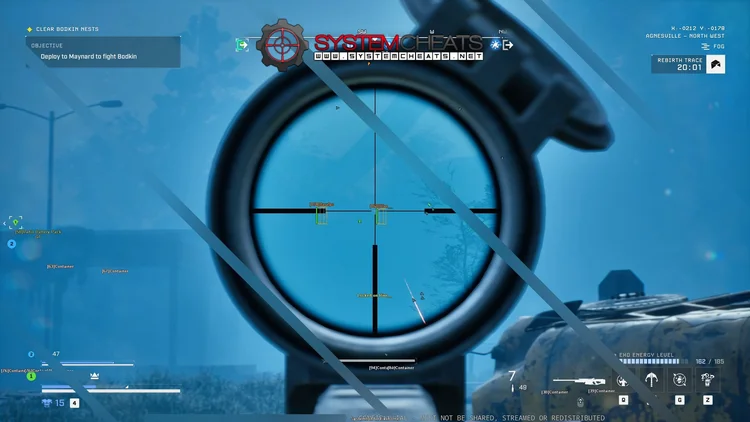
Cheat video
Exoborne Hack
Exoborne Hacks
Exoborne Cheat
Exoborne Aimbot
Extraction shooter • Aimbot, ESP and loot ESP • Steam

Exoborne Hack with Aimbot and ESP for PC

Aimbot, ESP and loot ESP in the Exoborne Cheat for PC.

Exoborne is an open-world, tactical extraction shooter from Sharkmob, with co-development support from YAGER, the Berlin studio behind The Cycle: Frontier. It is set in Colton County, a fictional part of the southeastern United States. A corporation called Rebirth promised salvation with Project Rebirth. The plan failed and society collapsed. You play a Reborn, a survivor with implants that let you use Exo-Rigs, and you fight rival player squads and AI enemies in the same match.

A raid follows a hard loop. You drop in, scavenge for loot, fight bandits, Rebirth forces and other Reborn squads, and then reach a helicopter or dropship before the time runs out. If you die, you lose what you carried. On top of that, the Forces of Nature turn the map against you, with tornadoes, lightning strikes, firestorms, toxic clouds, acid rain and fog. A glider and a grappling hook make the fights vertical, so danger can come from the rooftops as easily as from the street.

Our Exoborne hack is built for that loop: an aimbot with bullet drop and speed prediction, a 3D Radar ESP for players, AI and loot, a 2D Radar, a Warning System for players who aim at you, and OBS Stream Proof. Some details on this page, such as the Kestrel Exo-Rig and the Rebirth Trace, come from the playtests.

Tactical upgrade briefing
Get Out Alive With Your Loot

In Exoborne one bad fight near extraction costs you everything you carried. The Exoborne cheat shows who is around you, what loot is worth grabbing and who is aiming at you, so you pick your fights instead of walking into them. Until the game releases, the Exoborne cheat is in the Premium Package only. Access follows the game’s test phases, so check the live cheat status page before you buy.

Exoborne Hack and Cheat Features

The Exoborne cheat covers aim, awareness and loot, with separate switches for friendly players, enemy players and AI. Everything is set from the in-game menu, and a default slot plus Custom 1, Custom 2 and Custom 3 keep four setups ready, each with its own hotkey. The highlights are below, and the full option list is in the Features panel on this page.

  • Aimbot with Bullet PredictionAuto Aim with Smooth Aim, Humanized Aim, Limit Angle and an aim key. Bullet Speed Prediction, Bullet Drop Prediction and Prediction Scale place the aim where the target will be. Aim Bone picks Head Priority, Chest Priority, Head or Chest, and Aim Style picks targets by FOV, distance or health.
  • TriggerbotFires when your crosshair crosses a valid target. Set a Fire Delay, pick enemy players, enemy AI, friendlies or downed targets, cap the Max Distance and run it on its own trigger key.
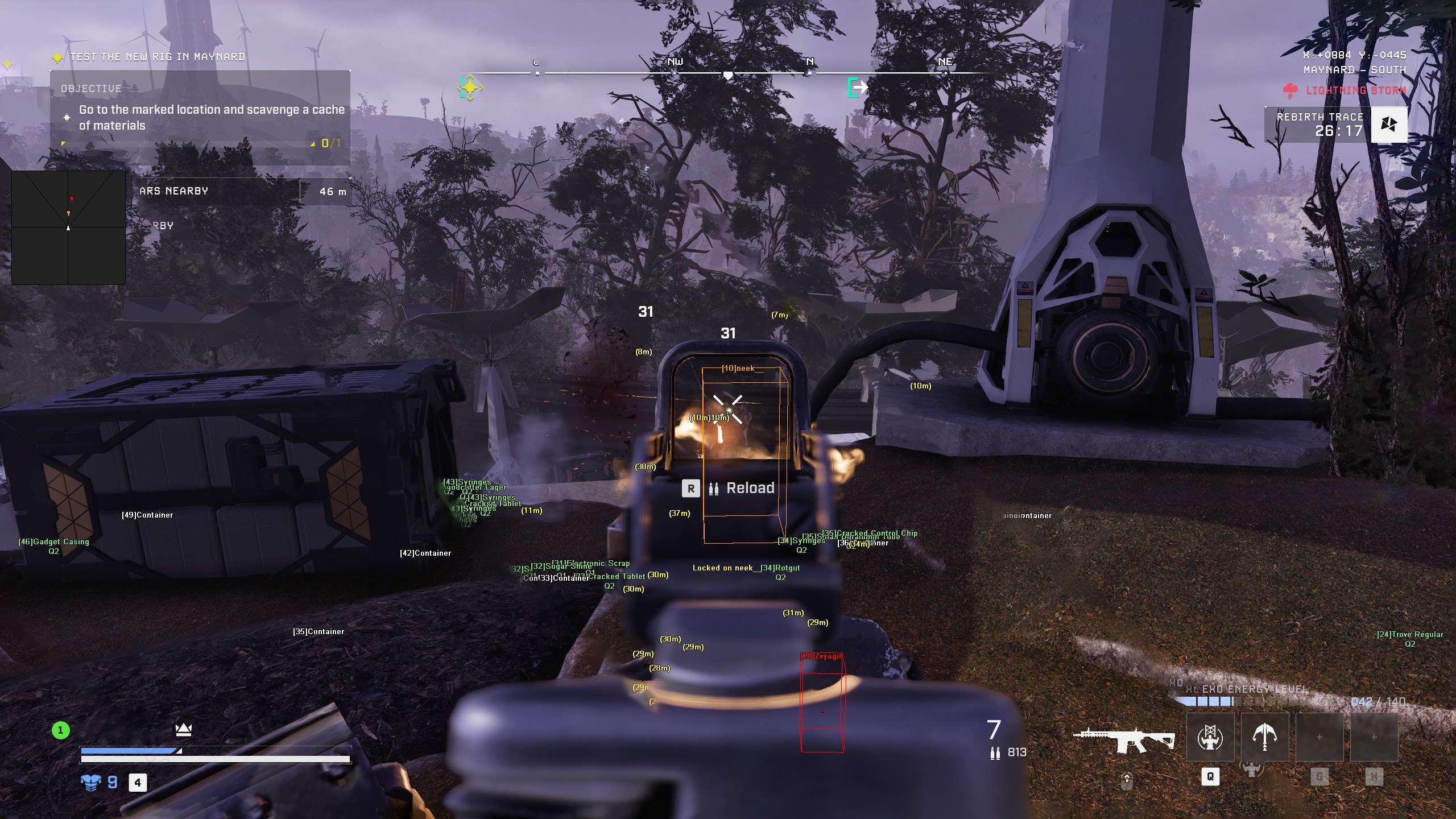
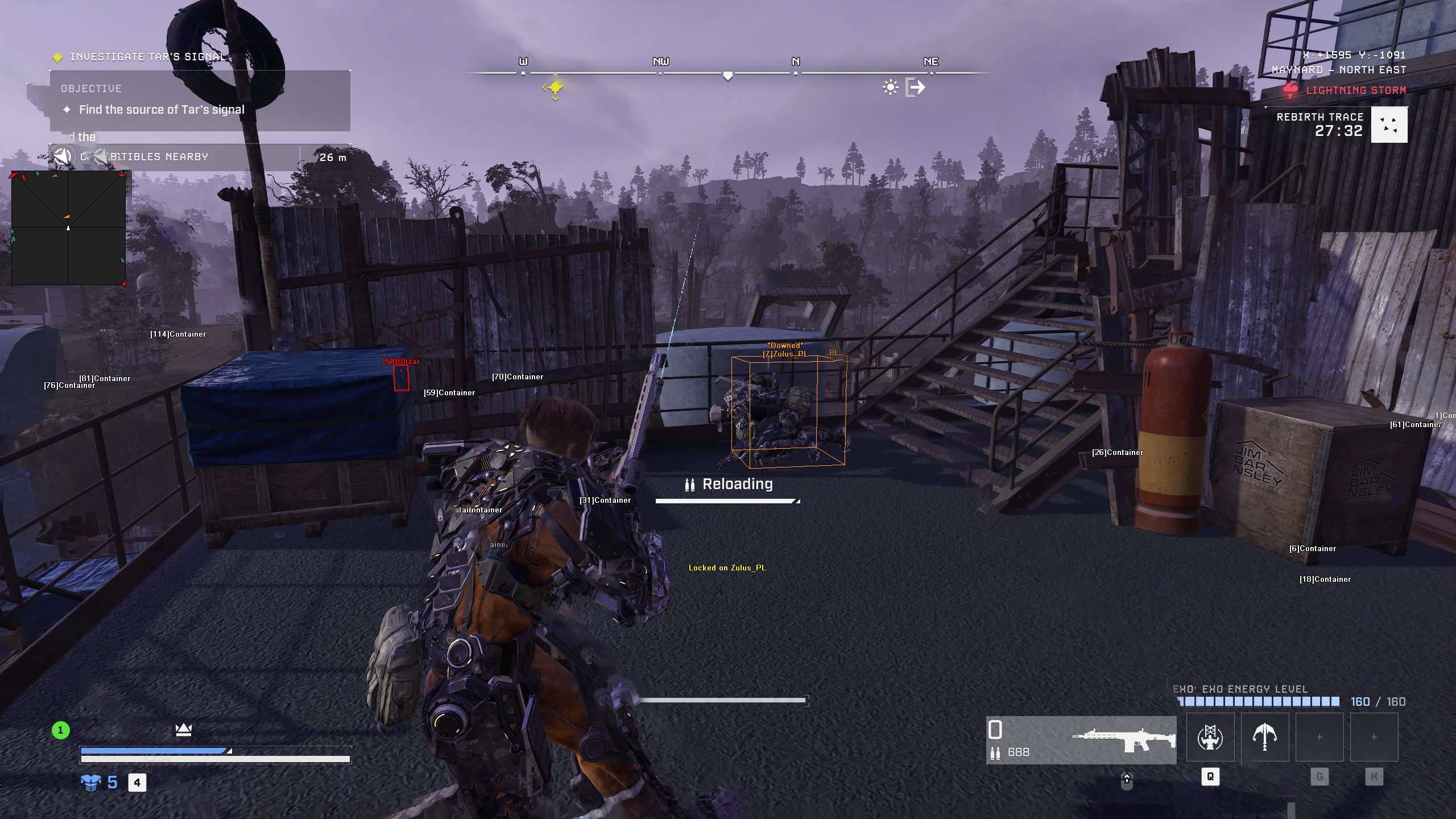
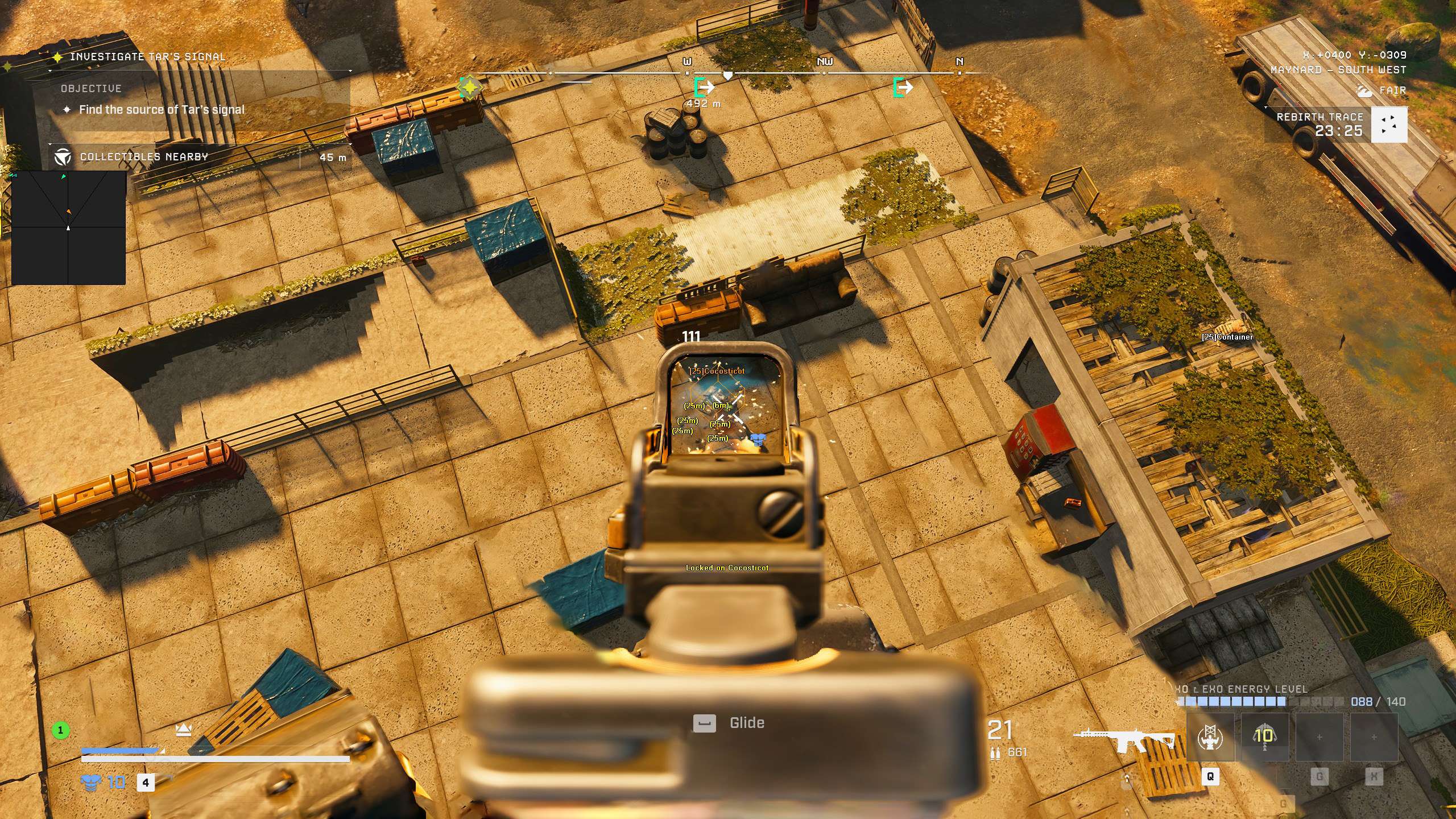
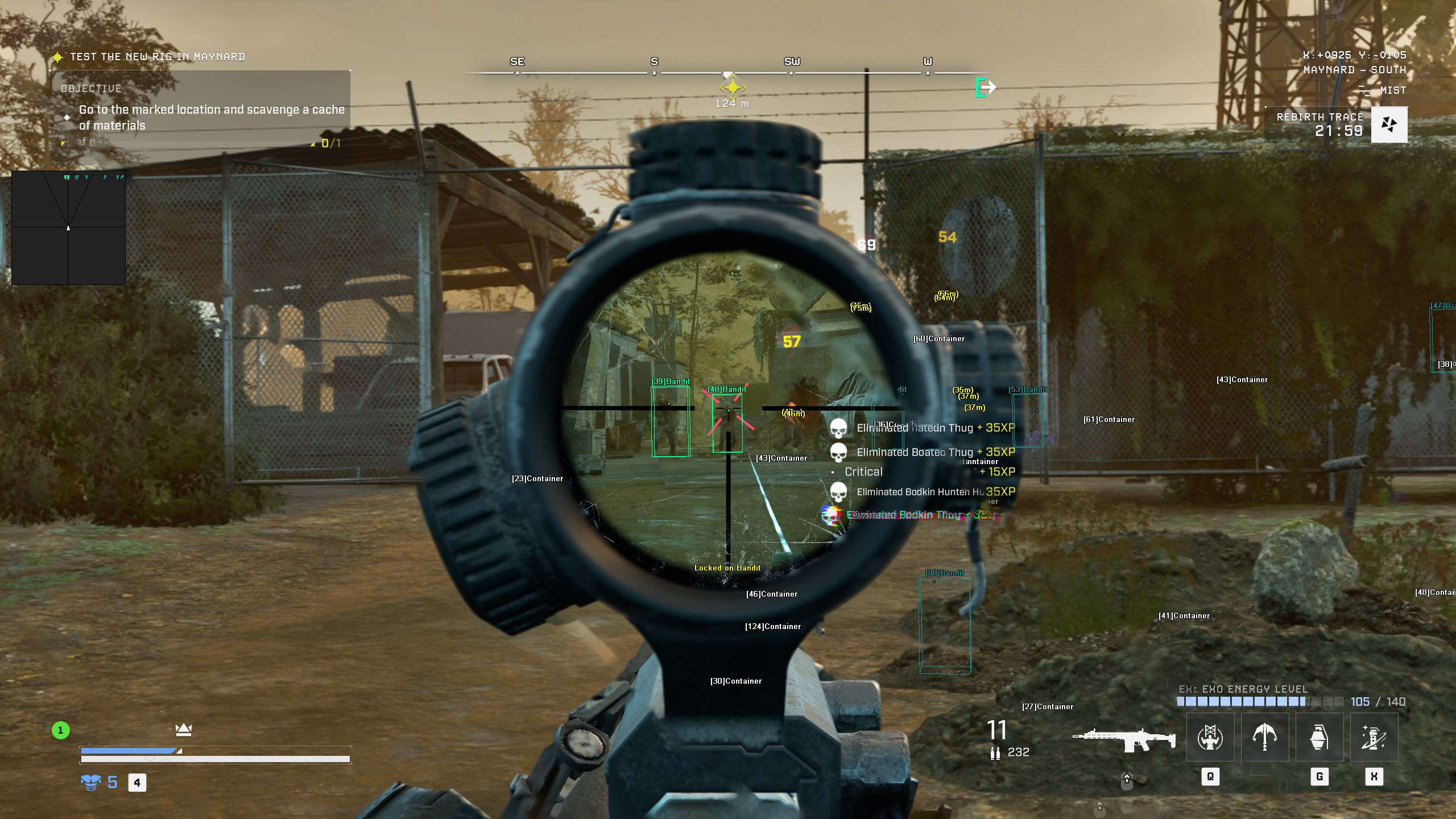
  • 3D Radar ESP for Players and AIBounding Box in 2D or 3D, Head Dot, 2D Line and Aim Laser, with Player Name, Distance, Health and Downed ESP. AI Name, Distance and Health ESP mark the AI enemies, and Projectile ESP shows projectiles.
  • Loot ESP with Item QualityArtifact, Exo, Component, Schematic, Weapon Frame, Valuable, Currency, Container, Ammo, Consumable, Throwable, Resource, Collectible and Cable ESP, each with its own colour. Item Quality ESP shows the quality of each item, and the Item Quality Filter and 50 Item Filters keep the screen clean.
  • 2D RadarA top-down radar with Radar Scale, Window Size, Center 2D Radar and Stick To Window. Friendly and enemy players and AI show as a triangle or a dot, plus Show FOV.
  • Warning SystemAn on-screen warning when a player is aiming at you or can see you, each with its own angle, plus a Beep System with its own Max Beep Distance.
  • Stream Proof and ControlOBS Stream Proof, a Panic Key, a custom crosshair (Cross, Dot or T-Cross) with Dynamic Crosshair, Draw Health Bar and Draw Ammo, plus six friendly and six enemy player filters.
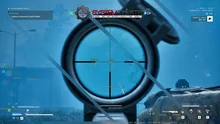
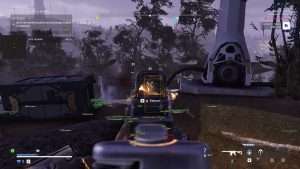
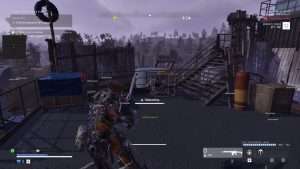
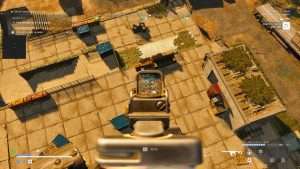
Exoborne Hack in-game screenshot 1 of 4 Exoborne Hack in-game screenshot 2 of 4 Exoborne Hack in-game screenshot 3 of 4 Exoborne Hack in-game screenshot 4 of 4

Exoborne Radar and Warnings for the End of the Raid

In Exoborne the walk to extraction is where a raid gets tense. In the playtests, the Rebirth Trace revealed player locations and loadout values late in a match, and picking up an Artifact put a marker on the map that showed your position to others. That turned the way out into a manhunt. The Warning System shows a warning when a player is aiming at you or can see you, and the Beep System adds a sound alert within its set distance. The 2D Radar with Show Enemy Player keeps the squads around you on one small window, so you can choose a quieter route to the helicopter.

Exoborne ESP Through Fog, Storms and Acid Rain

Exoborne is set in a world torn apart by extreme forces of nature. Fog, storms and acid rain cut down how far you can see, and electrical fields can switch off your abilities for a while. The 3D Radar draws a box and a Head Dot on players in range and adds their Player Name, Distance and Health on your screen. The Enemy Visible and Enemy Invisible colours tell you at a glance who is in the open and who is behind cover, and Visibility Check makes the aimbot pick only enemies you can see.

Exoborne Loot ESP for Artifacts and Crafting

Progress in Exoborne runs on loot. Crafting materials build and upgrade weapons, scopes, magazines, barrels and Exo-Rig parts, and weapon mods come in rarities such as Epic and Legendary. The Exoborne loot ESP has separate groups for Artifact, Exo, Component, Schematic, Weapon Frame and Valuable items, each with its own colour. Item Quality ESP shows the quality of an item, Max Item Distance keeps far items off the screen, and the Item Quality Filter and the 50 Item Filters let you hide what you do not need. Less time searching means less time in the open with a full bag.

Exoborne Aimbot for Gliders, Grapples and Rooftops

Verticality is a core part of Exoborne. Players open a glider in strong winds, pull themselves up with a grappling hook and fight from rooftops, and PCGamesN noted that good positioning lets a solo player beat a full squad. In the playtests, the Kestrel Exo-Rig was the aerial specialist, built for dominating the skies. Targets in the air move fast and at odd angles, so the Exoborne aimbot uses Bullet Speed Prediction, Bullet Drop Prediction and Prediction Scale to place the aim where the target will be, and Smooth Aim keeps the movement calm while you track it.

Third Person Looting, First Person Aiming

Exoborne plays in third person, and aiming down sights switches the camera to first person. That switch changes what you see right when a fight starts. Draw Aim FOV shows the area the aimbot works in, Aim Bone with Head Priority aims for the head first, and Sway Compensation is there for the moment you look down the scope. Humanized Aim, Randomize Aim and Randomize Aim Speed vary how the aim moves, with Aim Delay and Aim Switch Delay next to them in the menu.

Bandits, Rebirth Forces and Robots

Rival squads are not the only threat in a raid. Exoborne also has AI enemies, from bandits and Rebirth forces to AI robots, and PCGamesN found the AI hit and miss, from not noticing you at all to suspiciously accurate. So you cannot count on the AI missing. AI Name ESP, AI Distance ESP and AI Health ESP mark AI enemies on the 3D Radar in their own Enemy AI colours, and Aim on Enemy AI and Trigger on Enemy AI let you deal with them quickly and keep your focus on the players near extraction.

Solo, Duo or Trio Squad Play

Squads in Exoborne have up to three players. In the playtests, solo players with Group Fill turned off got solo-only lobbies, while duos and trios played in their own raids. In a squad fight you need to tell friend from foe fast. Show Friendly Player and Show Enemy Player are separate switches with their own colours, and the aimbot and triggerbot have their own friendly and enemy settings. Aim on Downed decides if the aimbot targets downed players, and the 6 Friendly Players and 6 Enemy Players filters sit next to them in the menu.

How to Get the Exoborne Cheat

Getting started with the Exoborne hack takes three steps.

01
Create Your Account

Register on the forum for free. Your subscriptions, downloads and support all run through it.

02
Get the Premium Package

Until the game releases, Exoborne comes with the Premium Package only, together with the other games it covers.

03
Set Up Your Raid

Start the cheat with the SystemCheats loader, open the in-game menu with your menu key and save your setup in the default slot or Custom 1, 2 or 3.

Is It Safe to Cheat in Exoborne?

The official Sharkmob posts and the Steam page we checked do not name an anti-cheat for Exoborne. A community-run list reports Easy Anti-Cheat and Anybrain in a playtest, but no official source confirms that. Sharkmob co-founder Martin Hultberg has said that the paid, premium model is one of the major things against cheaters. No cheat is ever completely risk free. Settings such as Use Aim Key, Smooth Aim, Humanized Aim and Visibility Check keep the aim under your control, and the Panic Key is one press away.

Frequently Asked Questions

Is the Exoborne cheat online?

Access to the Exoborne cheat follows the game’s test phases, so check the live cheat status page before you buy. The status page always shows the real state of the Exoborne cheat.

Is the Exoborne cheat included in the Premium Package?

Yes. Until Exoborne releases, the cheat is in the Premium Package only, together with the other games listed under Cheats Included on its page. A single Exoborne subscription is not sold before the release.

Which version of Exoborne does the cheat support?

The Steam version of Exoborne on Windows 10 and 11 PC. The cheat does not work on PlayStation or Xbox.

Which anti-cheat does Exoborne use?

The official Sharkmob posts and the Steam page we checked do not name one. A community-run list reports Easy Anti-Cheat and Anybrain in a playtest, but that is not confirmed by Sharkmob.

Which loot does the Exoborne ESP show?

The 3D Radar has separate ESP groups for Artifact, Exo, Component, Schematic, Weapon Frame, Valuable, Currency, Container, Ammo, Consumable, Throwable, Resource, Collectible, Cable and Misc items, plus Item Quality ESP, the Item Quality Filter and 50 Item Filters.

Does the Exoborne aimbot work on AI enemies?

Yes. Aim on Enemy AI and Trigger on Enemy AI work on AI enemies such as bandits, and you can switch them off to keep the aimbot on players only. AI Name, Distance and Health ESP show AI enemies on the 3D Radar.

Can I stream Exoborne with the cheat running?

The cheat has an OBS Stream Proof option for streaming with OBS, and a Panic Key on a key of your choice.

Take Control of Your Exoborne Raids

Exoborne punishes mistakes with the loss of your gear. With the Exoborne cheat you see the squads, the AI and the loot around you, you get a warning when someone aims at you, and you decide when to fight and when to head for extraction.

Need Help?

Our support team is available 24 hours a day, 7 days a week through the SystemCheats forum and TeamSpeak. Read what customers say on Trustpilot, or compare all cheat packages to find the right fit.

Cheat & Hack Information

What is Exoborne?


Exoborne is an open-world tactical extraction shooter from Sharkmob. You play a Reborn with an Exo-Rig, fight rival squads and AI enemies for loot, and lose what you carry if you die before extraction.


Cheating in Exoborne


Our Exoborne cheat has an aimbot with bullet prediction, 3D Radar ESP for players and AI, loot ESP with Item Quality, a 2D Radar and a Warning System. Until the game releases, it comes with the Premium Package only.


Is the Exoborne cheat safe?


The official Sharkmob posts and the Steam page we checked do not name an anti-cheat for Exoborne. No cheat is ever completely risk free. However, you can always adjust your settings to play legitimately for the long run. Access follows the game's test phases, so check the live status page before you play.

Pricing

Premium Package ONLY until Exoborne releases. A single Exoborne subscription is not sold before the release.

Features

Aimbot
Auto Aim Moves your aim onto a valid target for you automatically
Auto Fire Fires your weapon for you once a target is locked
Fire Delay (0 ~ 1000) Adds a short wait in milliseconds before firing once a target is locked
Smooth Aim (1 ~ 50) Slows the aim movement so it looks natural, and higher values make it slower
Humanized Aim Moves the aim on a curved path with small changes in speed, like a real hand
Limit Angle (0 ~ 180) Sets how far from your crosshair a target can be for the aimbot to lock on
Use Aim Key Makes the aimbot work only while you hold or toggle your aim key
Bullet Speed Prediction Leads moving targets based on how long the shot takes to arrive
Bullet Drop Prediction Aims a little higher to make up for bullet drop over long distances
Prediction Scale (1 ~ 30) Fine tunes how strong the lead and bullet drop prediction is
Sway Compensation Cancels weapon sway and breathing so your aim stays steady
Visibility Check Stops the aimbot from targeting enemies hidden behind walls or cover
Stick to Target Keeps the aimbot on one target until it is down or leaves range
Randomize Aim Adds small random changes to where your aim lands for a human look
Randomize Aim Speed (10 ~ 1000) Sets how often, in milliseconds, the random aim movement changes
Aim Delay (0 ~ 1000) Adds a short delay before the aimbot starts moving, so it looks more human
Aim Switch Delay (0 ~ 1000) Adds a short wait in milliseconds before the aimbot switches to a new target
Aim Style (FOV, Distance, Health) Sets how the aimbot chooses the best target when more than one is in range
Aim Bone (Head Priority, Chest Priority, Head, Chest) Sets which body part the aimbot aims at, such as the head or chest
Aim on Friendly Player Lets the aimbot target friendly players and squad members
Aim on Enemy Player Lets the aimbot target and lock onto enemy players
Aim on Friendly AI Lets the aimbot target friendly AI, such as allied bots and NPCs
Aim on Enemy AI Lets the aimbot target hostile AI, such as bots, monsters and bosses
Aim on Vehicle Lets the aimbot lock onto vehicles as well as players on foot
Aim on Downed Lets the aimbot target players and enemies who are downed
Aim on Cloaked Lets the aimbot target and lock onto cloaked players
Max Distance (0 ~ 1500) Sets the farthest distance, in meters, at which targets are still picked up or shown
Draw Locked Draws a marker on the target the aimbot is locked onto
Draw Aim FOV Draws a circle on screen that shows where the aimbot is active
Triggerbot
Triggerbot Shoots for you when your crosshair is on a valid target
Use Trigger Key Makes the triggerbot fire only while you hold the trigger key
Fire Delay (0 ~ 1000) Adds a short wait in milliseconds before firing once a target is locked
Trigger on Friendly Player Lets the triggerbot fire at friendly players
Trigger on Enemy Player Lets the triggerbot fire at enemy players
Trigger on Friendly AI Lets the triggerbot fire at friendly AI units
Trigger on Enemy AI Lets the triggerbot fire at hostile AI enemies
Trigger on Vehicle Lets the triggerbot fire at vehicles in your crosshair
Trigger on Downed Lets the triggerbot fire at downed targets
Trigger on Cloaked Lets the triggerbot fire at cloaked enemies
Max Distance (0 ~ 1500) Sets the farthest distance, in meters, at which targets are still picked up or shown
3D Radar
Bounding Box (None, 3D, 2D) Draws a box around each target so you can see where they are
Box Size (1 ~ 10) Sets how thick the lines of each ESP box are drawn
2D Line Draws snap lines from your screen to each target
Player Name ESP Shows the name of each player above their character
Player Distance ESP Shows how far away each player is in meters
Player Health ESP (None, Vertical, Scaled, Static) Shows a health bar for each player so you can see how hurt they are
Player Downed ESP Highlights players who are downed but not dead and need a revive
Player Cloaked ESP Highlights players who are cloaked so you can still see them
AI Name ESP Shows the name or type of each AI character
AI Distance ESP Shows how far away each AI character is from you
AI Health ESP (None, Vertical, Scaled, Static) Shows a health bar for each AI character
Head Dot Draws a dot on the head of each target you can see
Dot Size (2 ~ 20) Sets how big the dot markers are drawn on each target
Aim Laser Draws a line that shows where each target is aiming
Laser Size (50 ~ 3000) Sets the length and thickness of the aim laser line
Projectile ESP Shows grenades, thrown items and other projectiles while they fly
Resource ESP Highlights crafting materials and research parts on the ESP
Ammo ESP Shows ammo boxes and ammo pickups across the map
Consumable ESP Shows consumable items on the map that you can pick up
Throwable ESP Shows grenades and other throwables you can pick up
Weapon Frame ESP Highlights weapon frames so you can find them fast
Component ESP Shows component items lying around the map
Schematic ESP Highlights schematics you can pick up on the map
Exo ESP Shows Exo suits on the ESP so you can spot them
Artifact ESP Shows where artifacts are lying around the map
Currency ESP Shows money and currency you can pick up
Valuable ESP Highlights valuable items so you can find them fast
Misc ESP Highlights miscellaneous items, quest drops and materials
Container ESP Shows lootable containers and supply caches
Collectible ESP Shows audio logs, lore items and other hidden collectibles
Cable ESP Shows the cables that need repair and what state they are in
Show Friendly Player Shows friendly players and teammates on the ESP and radar
Show Enemy Player Shows enemy players on the ESP and radar
Show Friendly AI Shows friendly AI, such as allied bots, on the ESP and radar
Show Enemy AI Shows hostile AI, such as bots and monsters, on the ESP and radar
Show Vehicle Shows vehicles on the ESP and radar so you always know where they are
Show Downed Shows downed players and AI on the ESP and radar
Show Cloaked Shows cloaked players on the ESP so you can still see them
Max Distance (0 ~ 1500) Sets the farthest distance, in meters, at which targets are still picked up or shown
Max Item Distance (0 ~ 500) Sets how far away items and loot are still shown
Item Distance ESP Shows how far away each item is from you
Item Quality ESP Shows the quality of each item on the map
Item Quality Filter Filters which items are shown by their quality
Filter Sets how the item filter list works, hiding the listed items or showing only them
2D Radar
Show Radar Turns on the 2D radar overlay on your screen
Show Cross Draws cross lines through the middle of the radar
Show Window Draws the background frame of the radar window
Show Dot Shows targets as dots on the radar window
Show FOV Draws a cone on the radar that shows where you are looking
Show Friendly Player Shows friendly players and teammates on the ESP and radar
Show Enemy Player Shows enemy players on the ESP and radar
Show Friendly AI Shows friendly AI, such as allied bots, on the ESP and radar
Show Enemy AI Shows hostile AI, such as bots and monsters, on the ESP and radar
Show Vehicle Shows vehicles on the ESP and radar so you always know where they are
Show Downed Shows downed players and AI on the ESP and radar
Show Cloaked Shows cloaked players on the ESP so you can still see them
Stick To Window Keeps targets that are out of range pinned to the edge of the radar
Radar Scale (0 ~ 60) Sets the radar zoom, lower zooms in and higher zooms out
Window Size (45 ~ 260) Sets the width and height of the radar window
Cross Size (45 ~ 260) Sets the length of the cross lines in the middle of the radar
Dot Size (2 ~ 20) Sets how big the dot markers are drawn on each target
Dot Type (Triangle, Dot) Switches radar markers between plain dots and triangles that point where targets face
Center 2D Radar Places the radar in the middle of the screen, around your crosshair
Max Distance (0 ~ 1500) Sets the farthest distance, in meters, at which targets are still picked up or shown
Warning System
Warning System Shows on-screen warnings when enemies are near, can see you or aim at you
Is Aiming At You Angle (0 ~ 180) Sets the angle used to warn you when an enemy is aiming at you
Can See You Angle (0 ~ 180) Sets the angle used to warn you when an enemy can see you
Max Distance (0 ~ 1500) Sets the farthest distance, in meters, at which targets are still picked up or shown
Beep System Plays a warning beep when an enemy is looking or aiming at you
Max Beep Distance (0 ~ 1500) Sets how far away an enemy can be and still set off the warning beep
Misc
Crosshair (None, Cross, Dot, T-Cross) Draws a custom crosshair in the center of your screen, over the game's own
Crosshair Size (2 ~ 200) Sets the size of the custom crosshair on your screen
Dynamic Crosshair Resizes the crosshair as your weapon spread changes when you move and shoot
Draw FPS Shows your current frames per second on screen
Draw Resolution Shows your current screen resolution on the overlay
Draw Time Shows your local system time on the overlay
Draw Watermark Shows the SystemCheats watermark on screen so you know the cheat is active
Draw Health Bar Shows your own health as a bar on screen
Draw Ammo Shows your current weapon ammo count on screen
Use Panic Key Turns on a hotkey that instantly hides all cheat visuals and menus
Font Size (10 ~ 20) Sets the size of the ESP and overlay text on screen
Font Shadow (None, Shadow, Bordered) Adds a shadow or border behind overlay text so it is easier to read
Colors
Customizable Enemy Invisible RGBA Color Sets the color for enemies hidden behind walls or cover
Customizable Enemy Visible RGBA Color Sets the color for enemies in your direct line of sight
Customizable Enemy AI Invisible RGBA Color Sets the color for hostile AI hidden behind walls or cover
Customizable Enemy AI Visible RGBA Color Sets the color for hostile AI in your direct line of sight
Customizable Enemy Vehicle RGBA Color Sets the color for enemy vehicles shown on the ESP
Customizable Friendly Invisible RGBA Color Sets the color for teammates hidden behind walls or cover
Customizable Friendly Visible RGBA Color Sets the color for teammates in your direct line of sight
Customizable Friendly AI Invisible RGBA Color Sets the color for friendly AI hidden behind walls or cover
Customizable Friendly AI Visible RGBA Color Sets the color for friendly AI in your direct line of sight
Customizable Friendly Vehicle RGBA Color Sets the color for friendly team vehicles shown on the ESP
Customizable Projectile RGBA Color Sets the color the ESP uses for incoming hostile projectiles
Customizable Resource RGBA Color Sets the color the ESP uses for crafting resources
Customizable Ammo RGBA Color Sets the color used to draw ammo boxes and pickups on the ESP
Customizable Consumable RGBA Color Sets the color used to draw consumables on the ESP
Customizable Throwable RGBA Color Sets the color the ESP uses for throwable items
Customizable Weapon Frame RGBA Color Sets the color the ESP uses for weapon frames
Customizable Component RGBA Color Sets the color used to draw components on the ESP
Customizable Schematic RGBA Color Sets the color the ESP uses for schematics
Customizable Exo RGBA Color Sets the color the ESP uses for Exo suits
Customizable Artifact RGBA Color Sets the color used to draw artifacts on the ESP
Customizable Currency RGBA Color Sets the color for currency and money pickups on the ESP
Customizable Valuable RGBA Color Sets the color the ESP uses for valuable items
Customizable Misc RGBA Color Sets the color for miscellaneous loot items shown on the ESP
Customizable Container RGBA Color Sets the color used to draw loot containers on the ESP
Customizable Collectible RGBA Color Sets the color used to draw collectibles and lore items on the ESP
Customizable Cable RGBA Color Sets the color used to draw cables on the ESP
Customizable Crosshair RGBA Color Sets the color for the custom crosshair drawn on your screen
Customizable Menu RGBA Color Sets the color scheme for the in-game cheat menu
Customizable Is Aiming At You RGBA Color Sets the warning color used when an enemy aims at you
Customizable Can See You RGBA Color Sets the color of the warning shown when an enemy can see you
Customizable Is Visible RGBA Color Sets the indicator color used when you are exposed and visible
Customizable Aim FOV RGBA Color Sets the color of the aimbot FOV circle drawn on screen
Filters
6 Friendly Players Lets you enter friendly player names to show or hide on the ESP
6 Enemy Players Lets you enter enemy player names to show or hide on the ESP
50 Item Filters Lets you list item names to fine tune which items the ESP shows
Positions
Customizable Menu Position with the Mouse Lets you move the menu by dragging it with the mouse
Customizable Radar Position with the Mouse Lets you move the radar by dragging it with the mouse
Settings/Keys
Customizable Panic Key Sets a key that instantly hides or turns off all cheat features
Customizable Menu Key Sets the key that opens and closes the cheat menu
Customizable Aim Key Sets the key that turns on the aimbot while held or toggled
Customizable Trigger Key Sets the key you hold or toggle to turn the triggerbot on
Customizable Item Key Sets a key that shows or hides the item ESP
Save Default Settings Saves your current settings to the default profile
Load Default Settings Loads your saved settings from the default profile
Customizable Hotkey for Default Config Sets a key that loads the default profile instantly
Save Custom 1 Settings Saves your current settings to custom profile 1
Load Custom 1 Settings Loads your saved settings from custom profile 1
Customizable Hotkey for Custom 1 Config Sets a key that loads custom profile 1 instantly
Save Custom 2 Settings Saves your current settings to custom profile 2
Load Custom 2 Settings Loads your saved settings from custom profile 2
Customizable Hotkey for Custom 2 Config Sets a key that loads custom profile 2 instantly
Save Custom 3 Settings Saves your current settings to custom profile 3
Load Custom 3 Settings Loads your saved settings from custom profile 3
Customizable Hotkey for Custom 3 Config Sets a key that loads custom profile 3 instantly
Additional
OBS Stream Proof Hides cheat visuals from OBS and other recording software