Tower of Fantasy Hack, ToF Aimbot, ESP and Teleport for PC

Included for free with any cheat subscription

Steam & Launcher are supported
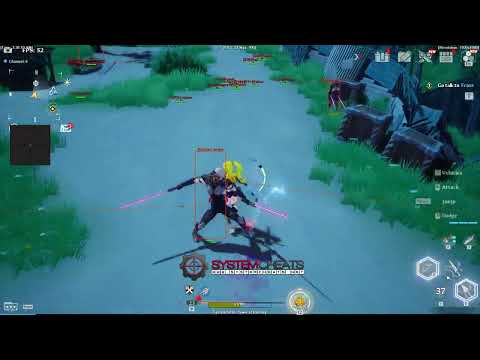
Cheat video
Cheat video
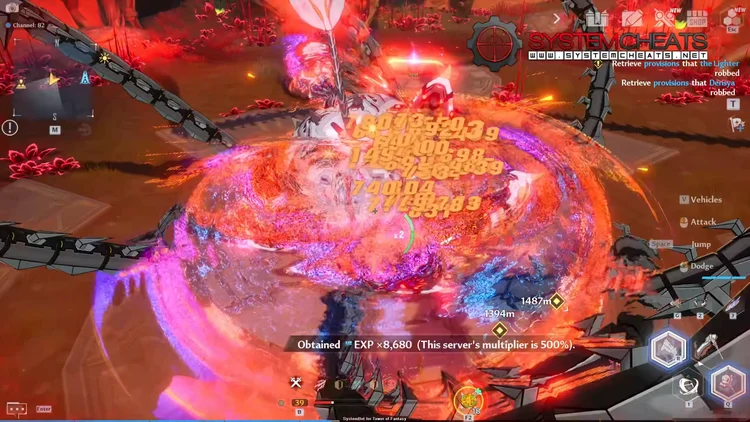
ToF Screenshot 1
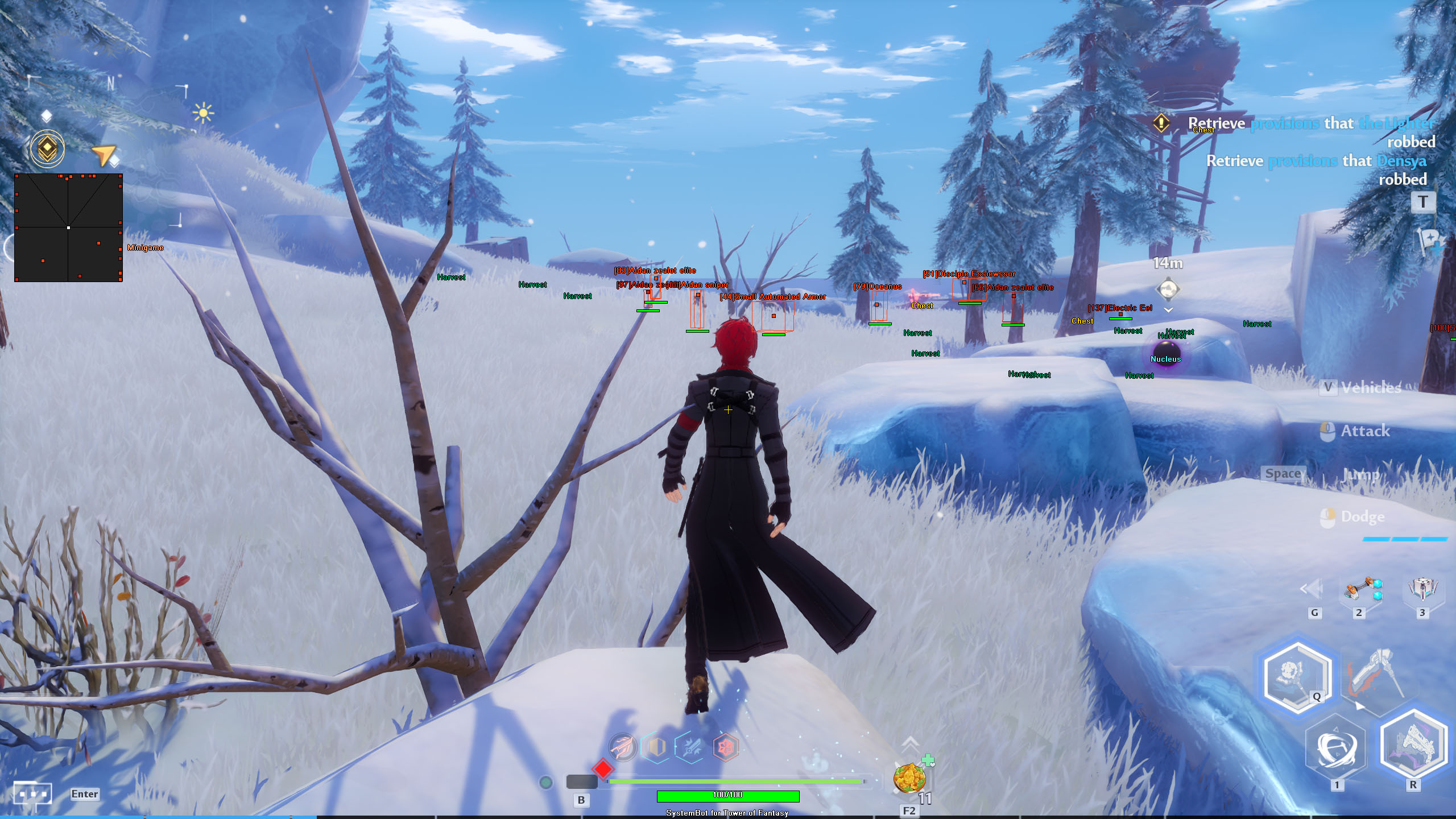
ToF Screenshot 2
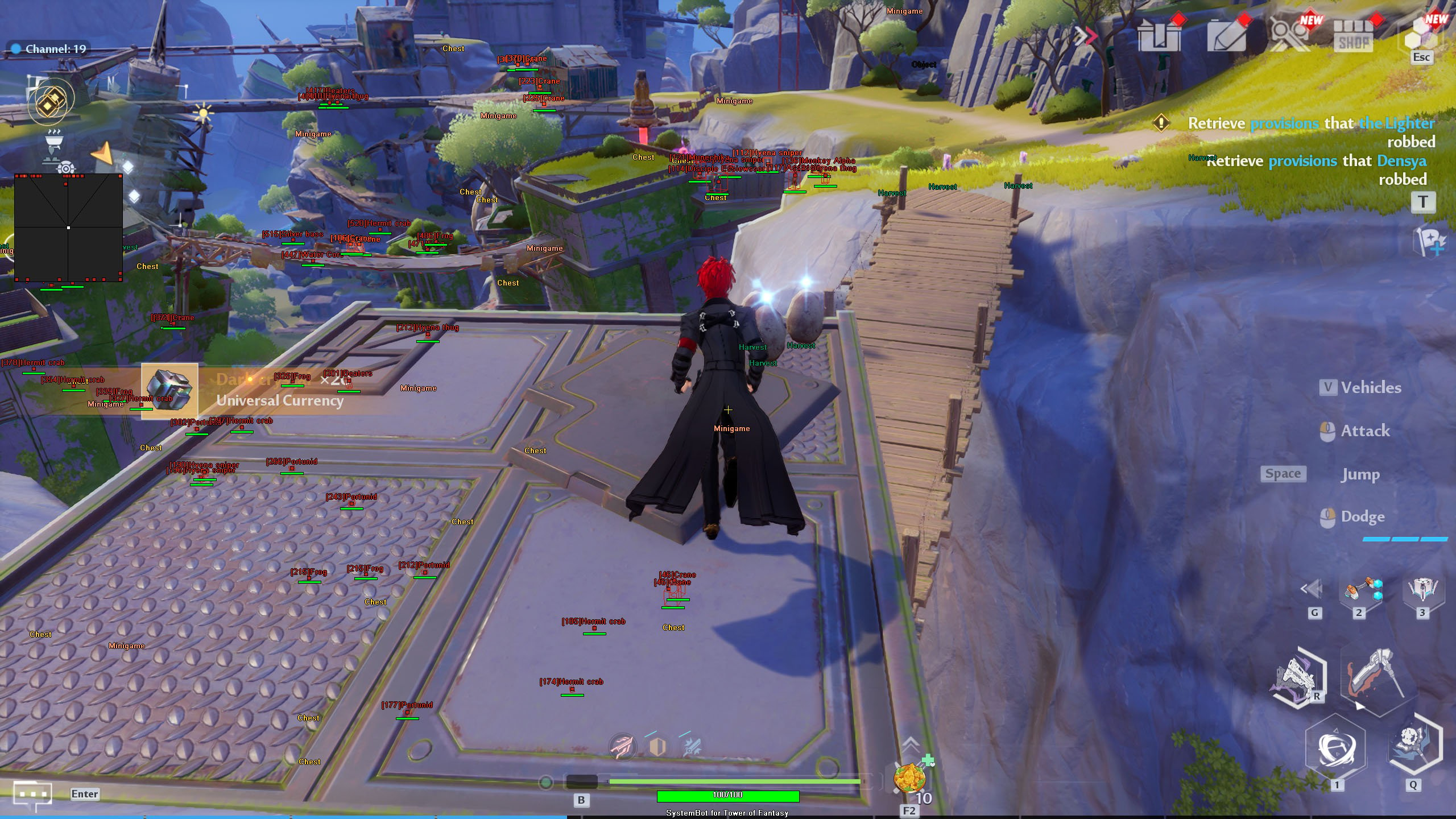
ToF Screenshot 3
ToF Screenshot 4
Open world action RPG • Movement, loot and aim tools • Steam and PC launcher

Tower of Fantasy Hack with Aimbot, ESP and Teleport for PC

Get instant access to the Tower of Fantasy Cheat for PC.

Tower of Fantasy is a free to play open world action RPG with MMO elements, made by Hotta Studio and published on PC by Perfect World Games. It runs on Unreal Engine 4 and is set hundreds of years in the future on the distant planet Aida, a world contaminated by Omnium energy after a cataclysm. The world is shared, so you see other players while you explore, fight and gather.

Combat is fast hack and slash. You carry up to three weapons and swap between them, and each weapon has its own abilities and element. Dodging costs stamina, and a well timed dodge triggers phantasia, which freezes time and the enemies around you for a few seconds and fully charges your other weapons. Besides the open world, there is co-op for up to four players, PvP in the Apex League arena, world bosses, weekly raids and endgame modes such as Evolution Vanguard, Bygone Phantasm and Void Abyss.

Our Tower of Fantasy hack is built for that mix of long trips, loot and boss fights. It moves you across Aida with Teleport, Fly Hack and Speed Hack, shows chests, harvest spots and minigames through the ESP, and brings an aimbot with bullet prediction for monsters and players. Everything runs from an in-game menu, and three settings slots keep your setups ready.

Tactical upgrade briefing
Free with any SystemCheats subscription

The Tower of Fantasy cheat is included for free with any purchased SystemCheats subscription, so there is no separate Tower of Fantasy price to pay. One cheat covers the whole loop of the game: getting across Aida fast, finding what is worth picking up, and landing your hits when the boss fight starts. It is also part of the Premium Package and the One Day Trial.

Tower of Fantasy Hack and Cheat Features

The ToF hack is split into aim, awareness, world tools and control. You switch each part on or off in the menu, set your own keys for aim, trigger, speed, teleport and panic, and colour each type of target to your taste. The highlights are below, and the full option list is in the Features panel on this page.

  • Aimbot with Bullet PredictionAuto Aim and Auto Fire with Smooth Aim, Limit Angle, Fire Delay and an aim key. Bullet Speed Prediction, Bullet Drop Prediction and Prediction Scale lead moving targets. Aim Bone picks Head Priority or Chest Priority, and Aim on Monster, Enemy Player, Friendly Player and Object are separate switches.
  • TriggerbotFires when your crosshair is on a valid target. Choose monsters, enemy players, friendly players or objects, set a Fire Delay and a Max Distance, and run it on its own trigger key.
  • 3D Radar ESPBounding Box in 2D or 3D with Box Size, Head Dot, 2D Line and Aim Laser. Player Name, Distance and Health ESP, Projectile ESP, and separate switches for friendly players, enemy players and monsters, all within a Max Distance.
  • Chest, Harvest and World ESPChest ESP, Nucleus ESP, Object ESP, Harvest ESP and Minigame ESP, each with its own colour. Max Chest Distance, Max Object Distance and Max Harvest Distance keep the screen clean.
  • Movement and World ToolsTeleport with a Teleport Key, Speed Hack with Speed Hack Type and its own key, Fly Hack, Jump Hack, No Fall Damage, Unlimited Dodge and Auto Pickup.
  • Warning System and 2D RadarThe Warning System has an Aiming At You Angle and a Can See You Angle, and the Beep System adds a sound alert within its Max Distance. The 2D Radar shows friendly players, enemy players and monsters, with Radar Scale, Show FOV and a window you can move with the mouse.
  • Misc and ControlA custom crosshair (Cross, Dot or T-Cross), Draw FPS, Draw Health Bar, Draw Watermark, font options, a Panic Key, and default plus two custom settings slots.
Tower of Fantasy Hack in-game screenshot 1 of 4 Tower of Fantasy Hack in-game screenshot 2 of 4 Tower of Fantasy Hack in-game screenshot 3 of 4 Tower of Fantasy Hack in-game screenshot 4 of 4

Tower of Fantasy Teleport and Fly Hack for a Vast World

The Steam page describes a vast alien world full of open vistas, and the game keeps its players moving between large areas such as Kailo and Lockhart. Crossing it on foot takes time. The Teleport feature and its Teleport Key cut those trips short. Speed Hack comes with a Speed Hack Type and its own key, so you can switch it on for a long run and off again in a busy area. Fly Hack and Jump Hack take you over cliffs and rooftops, and No Fall Damage means a long drop does not cost you health.

Tower of Fantasy ESP for Chests, Harvest Spots and Minigames

A big open world hides a lot of small things: chests, harvest spots, objects and minigames spread over the map. Finding them by hand means running in circles. The world ESP marks them for you. Chest ESP, Harvest ESP, Nucleus ESP, Object ESP and Minigame ESP each draw with their own colour, and Max Chest Distance, Max Harvest Distance and Max Object Distance decide how far out they show. Auto Pickup picks up items for you, so a loop through a region takes less time.

Tower of Fantasy Aimbot for World Bosses and Raids

The endgame of Tower of Fantasy is built around bosses. Evolution Vanguard puts you against high level bosses, world bosses appear in the open world, and weekly raid instances and Joint Operations test a whole group. The Tower of Fantasy aimbot has Aim on Monster as its own switch, and Aim Bone picks Head Priority or Chest Priority. Against a boss that keeps moving, Bullet Speed Prediction, Bullet Drop Prediction and Prediction Scale help you lead the target, and Magic Projectile is there as a separate option. The triggerbot has Trigger on Monster, and Projectile ESP draws projectiles in their own colour.

Tower of Fantasy Unlimited Dodge for Long Boss Fights

Dodging is a core part of combat in Tower of Fantasy, and every dodge costs stamina. When the stamina bar runs out in the middle of a boss fight, you are left standing in the attack. Unlimited Dodge lets you keep dodging through a long fight, and with Show Monster on, the Bounding Box and Head Dot help you keep track of the monsters in range.

Apex League PvP with Aim and Warning System

The Apex League is the PvP arena of Tower of Fantasy, and there you face other players instead of monsters. Aim on Enemy Player, Visibility Check and Stick to Target keep the aim on one opponent you can see, while Smooth Aim keeps the movement soft and Limit Angle keeps the aim close to your crosshair. Player Health ESP shows how much health your opponent has left. The Warning System tells you when an enemy is aiming at you or can see you, each with its own angle, and the Beep System adds a sound alert within its set distance.

Co-op Groups and Joint Operations

Co-op in Tower of Fantasy lets up to four players team up, and Joint Operations and raids are made for groups. With a full group around the boss, you want the ESP and the aim on the right targets. Show Friendly Player keeps your teammates visible, and Aim on Friendly Player and Trigger on Friendly Player are switches you can turn off so the aim stays on the monsters. The 2D Radar shows friendly players, enemy players and monsters on one small window, with Radar Scale and Window Size set to your taste.

Warp Server Progress Through Daily Play

The Warp Server is a separate server type without gacha. Weapons and characters are earned and upgraded through regular daily play, players trade in the Trade Hall and the Auction Hall, and you can pick two of six life classes such as Explorer, Forger and Fishing. Equipment stats reset each season, so Warp players build up their gear again. Time becomes the real cost. The Warp Server uses the same game client as the standard version. Speed Hack and Teleport shorten the trips between tasks, Harvest ESP and Auto Pickup speed up gathering, and Show Monster puts the monsters you hunt on the radar.

How to Use the Tower of Fantasy Cheat

Getting started with the Tower of Fantasy hack takes three steps.

01
Create Your Account

Register on the forum for free. Your subscriptions, downloads and support all run through it.

02
Pick Any Subscription

Tower of Fantasy is included for free with any purchased SystemCheats subscription. Check the live cheat status page before you buy.

03
Load and Play

Run the SystemCheats loader, select Tower of Fantasy and start the game from Steam or its own PC launcher. Open the menu with the Menu Key and save your setup in a settings slot.

Is It Safe to Cheat in Tower of Fantasy?

No official source names the anti-cheat product that Tower of Fantasy uses, and the Steam page shows no kernel anti-cheat notice. The game’s EULA on Steam says the game has built-in mechanisms against unfair advantages. It describes Cheat Detection Software that can collect details about your account, your gameplay and unauthorized programs.

It bans hacks, cheats, bots and trainers, and it allows the license to be ended for cheating. That EULA is an older text from before Perfect World Games took over publishing, so the current terms may differ. No cheat is ever completely risk free. The live cheat status page always shows the current state of every cheat, including Tower of Fantasy, so check it before you play.

Frequently Asked Questions

Is the Tower of Fantasy cheat included in the Premium Package?

Yes. Tower of Fantasy is part of the Premium Package and the One Day Trial. It is also included for free with any purchased SystemCheats subscription, so there is no separate Tower of Fantasy price.

Is the Tower of Fantasy cheat online?

The live cheat status page always shows the current state of every cheat, including Tower of Fantasy. Check it before you play.

Which versions of Tower of Fantasy does the cheat support?

The Steam version and the version from the game’s own PC launcher, on Windows 10 and 11. The Epic Games Store version is not supported.

Which anti-cheat does Tower of Fantasy use?

No official source names the product. The EULA on Steam describes Cheat Detection Software and bans cheats, bots and trainers, so treat the game as protected.

Does the Tower of Fantasy ESP show chests and harvest spots?

Yes. Chest ESP and Harvest ESP mark them in the world, along with Nucleus ESP, Object ESP and Minigame ESP. Each one has its own colour, and chests, harvest spots and objects also have their own distance setting.

Can I keep the aimbot off my co-op teammates?

Yes. Aim on Friendly Player and Trigger on Friendly Player are separate switches, so you can turn them off and keep the aim on monsters and enemy players.

Get the Tower of Fantasy Cheat

Tower of Fantasy is included for free with any purchased SystemCheats subscription, so it comes with any cheat or package you pick. Teleport across Aida, find the chests and harvest spots on the way, and meet the next world boss with the aimbot ready. Compare the other games on the cheats page.

Need Help?

Our support team is available 24 hours a day, 7 days a week through the SystemCheats forum and TeamSpeak. Read what customers say on Trustpilot, or compare all cheat packages to find the right fit.

Cheat & Hack Information

What is Tower of Fantasy?


Tower of Fantasy is a free to play open world action RPG with MMO elements from Hotta Studio, published on PC by Perfect World Games. It is set on the distant planet Aida. You swap between three weapons in fast hack and slash combat and meet other players in a shared world.


Cheating in Tower of Fantasy


The Tower of Fantasy cheat has Teleport, Fly Hack and Speed Hack, Chest ESP and Harvest ESP, and an aimbot with bullet prediction. It comes free with any purchased SystemCheats subscription and is also part of the Premium Package.


Is the Tower of Fantasy cheat safe?


No official source names the anti-cheat product in Tower of Fantasy, but its EULA describes Cheat Detection Software. No cheat is ever completely risk free. However, you can always adjust your settings to play legitimately for the long run. Check the live status page before you play.

Pricing

Features

Aimbot
Auto Aim Moves your aim onto a valid target for you automatically
Auto Fire Fires your weapon for you once a target is locked
Fire Delay (0 ~ 1000) Adds a short wait in milliseconds before firing once a target is locked
Smooth Aim (1 ~ 50) Slows the aim movement so it looks natural, and higher values make it slower
Limit Angle (0 ~ 180) Sets how far from your crosshair a target can be for the aimbot to lock on
Use Aim Key Makes the aimbot work only while you hold or toggle your aim key
Bullet Speed Prediction Leads moving targets based on how long the shot takes to arrive
Bullet Drop Prediction Aims a little higher to make up for bullet drop over long distances
Prediction Scale (1 ~ 30) Fine tunes how strong the lead and bullet drop prediction is
Visibility Check Stops the aimbot from targeting enemies hidden behind walls or cover
Stick to Target Keeps the aimbot on one target until it is down or leaves range
Aim Style (FOV, Distance, First in list) Sets how the aimbot chooses the best target when more than one is in range
Aim Bone (Head Priority, Chest Priority) Sets which body part the aimbot aims at, such as the head or chest
Aim on Friendly Player Lets the aimbot target friendly players and squad members
Aim on Enemy Player Lets the aimbot target and lock onto enemy players
Aim on Monster Lets the aimbot target and lock onto monsters
Aim on Object Lets the aimbot target shootable objects, such as mission objectives
Max Distance (0 ~ 1500) Sets the farthest distance, in meters, at which targets are still picked up or shown
Draw Locked Draws a marker on the target the aimbot is locked onto
Draw Aim FOV Draws a circle on screen that shows where the aimbot is active
Magic Projectile Makes your projectiles always hit the target
Triggerbot
Triggerbot Shoots for you when your crosshair is on a valid target
Use Trigger Key Makes the triggerbot fire only while you hold the trigger key
Fire Delay (0 ~ 1000) Adds a short wait in milliseconds before firing once a target is locked
Trigger on Friendly Player Lets the triggerbot fire at friendly players
Trigger on Enemy Player Lets the triggerbot fire at enemy players
Trigger on Monster Lets the triggerbot fire at monsters in your crosshair
Trigger on Object Lets the triggerbot fire at shootable mission objects and power spheres
Max Distance (0 ~ 1500) Sets the farthest distance, in meters, at which targets are still picked up or shown
3D Radar
Bounding Box (None, 3D, 2D) Draws a box around each target so you can see where they are
Box Size (1 ~ 10) Sets how thick the lines of each ESP box are drawn
2D Line Draws snap lines from your screen to each target
Player Name ESP Shows the name of each player above their character
Player Distance ESP Shows how far away each player is in meters
Player Health ESP Shows a health bar for each player so you can see how hurt they are
Head Dot Draws a dot on the head of each target you can see
Dot Size (2 ~ 20) Sets how big the dot markers are drawn on each target
Aim Laser Draws a line that shows where each target is aiming
Laser Size (50 ~ 3000) Sets the length and thickness of the aim laser line
Projectile ESP Shows grenades, thrown items and other projectiles while they fly
Chest ESP Shows loot chests across the map that you can open
Nucleus ESP Shows Nucleus pickups lying around the map
Object ESP Shows objects in the game world you can use
Harvest ESP Highlights harvestable spots on the ESP so you can find them
Minigame ESP Shows where the minigames are on the map
Show Friendly Player Shows friendly players and teammates on the ESP and radar
Show Enemy Player Shows enemy players on the ESP and radar
Show Monster Shows monsters on the ESP so you always know where they are
Max Distance (0 ~ 1500) Sets the farthest distance, in meters, at which targets are still picked up or shown
Max Chest Distance Sets how far away chests are still shown
Max Object Distance Sets how far away objects are still shown
Max Harvest Distance Sets how far away harvest spots are still shown
2D Radar
Show Radar Turns on the 2D radar overlay on your screen
Show Cross Draws cross lines through the middle of the radar
Show Window Draws the background frame of the radar window
Show Dot Shows targets as dots on the radar window
Show FOV Draws a cone on the radar that shows where you are looking
Show Friendly Player Shows friendly players and teammates on the ESP and radar
Show Enemy Player Shows enemy players on the ESP and radar
Show Monster Shows monsters on the ESP so you always know where they are
Stick To Window Keeps targets that are out of range pinned to the edge of the radar
Radar Scale (0 ~ 60) Sets the radar zoom, lower zooms in and higher zooms out
Window Size (45 ~ 260) Sets the width and height of the radar window
Cross Size (45 ~ 260) Sets the length of the cross lines in the middle of the radar
Dot Size (2 ~ 20) Sets how big the dot markers are drawn on each target
Warning system
Warning System Shows on-screen warnings when enemies are near, can see you or aim at you
Aiming At You Angle Sets the angle within which an enemy aiming your way triggers the Aiming At You warning
Can See You Angle (0 ~ 180) Sets the angle used to warn you when an enemy can see you
Max Distance (0 ~ 1500) Sets the farthest distance, in meters, at which targets are still picked up or shown
Beep System Plays a warning beep when an enemy is looking or aiming at you
Max Distance (0 ~ 1500) Sets the farthest distance, in meters, at which targets are still picked up or shown
Misc
Crosshair (None, Cross, Dot, T-Cross) Draws a custom crosshair in the center of your screen, over the game's own
Crosshair Size (2 ~ 200) Sets the size of the custom crosshair on your screen
Draw FPS Shows your current frames per second on screen
Draw Resolution Shows your current screen resolution on the overlay
Draw Time Shows your local system time on the overlay
Draw Watermark Shows the SystemCheats watermark on screen so you know the cheat is active
Draw Health Bar Shows your own health as a bar on screen
Use Panic Key Turns on a hotkey that instantly hides all cheat visuals and menus
Font Size (10 ~ 20) Sets the size of the ESP and overlay text on screen
Font Shadow Adds a shadow or border behind overlay text so it is easier to read
Speed Hack Makes your character move faster than normal
Speed Hack Type Sets how the speed hack works, such as holding or toggling its key
Fly Hack Lets your character fly freely around the map
Jump Hack Boosts your jumping beyond what the game normally allows
Teleport Teleports your character instantly when you press the Teleport Key
Unlimited Dodge Lets you dodge as often as you like with no limit
No Fall Damage Stops you from taking damage when you fall from a height
Auto Pickup Picks up nearby items for you automatically
Colors
Customizable Enemy Invisible RGBA Color Sets the color for enemies hidden behind walls or cover
Customizable Enemy Visible RGBA Color Sets the color for enemies in your direct line of sight
Customizable Friendly Invisible RGBA Color Sets the color for teammates hidden behind walls or cover
Customizable Friendly Visible RGBA Color Sets the color for teammates in your direct line of sight
Customizable Monster Invisible RGBA Color Sets the color for monsters hidden behind walls or cover
Customizable Monster Visible RGBA Color Sets the color for monsters you can see directly
Customizable Projectile RGBA Color Sets the color the ESP uses for incoming hostile projectiles
Customizable Chest RGBA Color Sets the color used to draw chests on the ESP
Customizable Nucleus RGBA Color Sets the color for Nucleus pickups shown on the ESP
Customizable Object RGBA Color Sets the color for objects shown on the ESP
Customizable Harvest RGBA Color Sets the color for harvest spots and gathering points on the ESP
Customizable Minigame RGBA Color Sets the color for minigame spots shown on the ESP
Customizable Crosshair RGBA Color Sets the color for the custom crosshair drawn on your screen
Customizable Menu RGBA Color Sets the color scheme for the in-game cheat menu
Customizable Is Aiming At You RGBA Color Sets the warning color used when an enemy aims at you
Customizable Can See You RGBA Color Sets the color of the warning shown when an enemy can see you
Customizable Is Visible RGBA Color Sets the indicator color used when you are exposed and visible
Customizable Aim FOV RGBA Color Sets the color of the aimbot FOV circle drawn on screen
Positions
Customizable Radar position with the mouse Lets you move the radar by dragging it with the mouse
Customizable Menu position with the mouse Lets you move the menu by dragging it with the mouse
Keys
Panic Key Sets a key that instantly hides or turns off all cheat features
Menu Key Sets the key that opens and closes the cheat menu
Aim Key Sets the key that turns on the aimbot while held or toggled
Trigger Key Sets the key you hold or toggle to turn the triggerbot on
Speed Hack Key Sets the key that turns on the Speed Hack movement boost
Teleport Key Sets the key that triggers the Teleport feature
Settings
Save default settings Saves your current settings to the default profile
Load default settings Loads your saved settings from the default profile
Save custom 1 settings Saves your current settings to custom profile 1
Load custom 1 settings Loads your saved settings from custom profile 1
Save custom 2 settings Saves your current settings to custom profile 2
Load custom 2 settings Loads your saved settings from custom profile 2