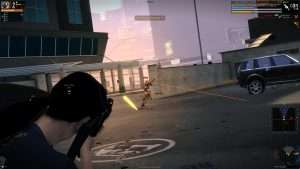
APB Reloaded Hack Aimbot ESP for PC

Included in Premium Package and One Day Trial
APB Reloaded Hack
APB Reloaded Cheat
APB Reloaded Aimbot
APB Reloaded Hacks
APB Reloaded Hack • Undetected

APB Reloaded Hack Aimbot ESP for PC

Get instant access to the APB Reloaded Cheat for PC.

APB Reloaded drops players into the chaotic urban warzone of San Paro, a sprawling coastal metropolis on the brink of total social collapse. Faced with uncontrollable crime waves, City Hall enacted the City Surveillance Act, empowering armed civilian vigilantes to patrol districts with lethal authority. As an Enforcer representing corporate law or a Criminal fighting for syndicate dominance, every city block becomes an open battleground. Players clash across dense high-rise boulevards in the Financial District and multi-tiered shipping docks in the Waterfront District, engaging in dynamic missions triggered by real-time robberies, storefront ram-raids, and VIP extractions.

Survival in San Paro demands blistering trigger discipline and flawless driving coordination. Combatants pilot high-performance muscle cars and armored vans through busy traffic while passengers lean out of windows exchanging automatic rifle fire. Yet the game brutal gunplay punishing weapon bloom reticle expansion and aggressive horizontal recoil make sustained firefights exceptionally challenging. A single mistimed burst with an N-TEC 5 or Colby PMG sends rounds flying wildly off target, turning guaranteed victories into costly squad wipes. When Level 5 Prestige or Notoriety bounties broadcast your coordinates to the entire district, hostile squads converge from every avenue to claim the cash reward.

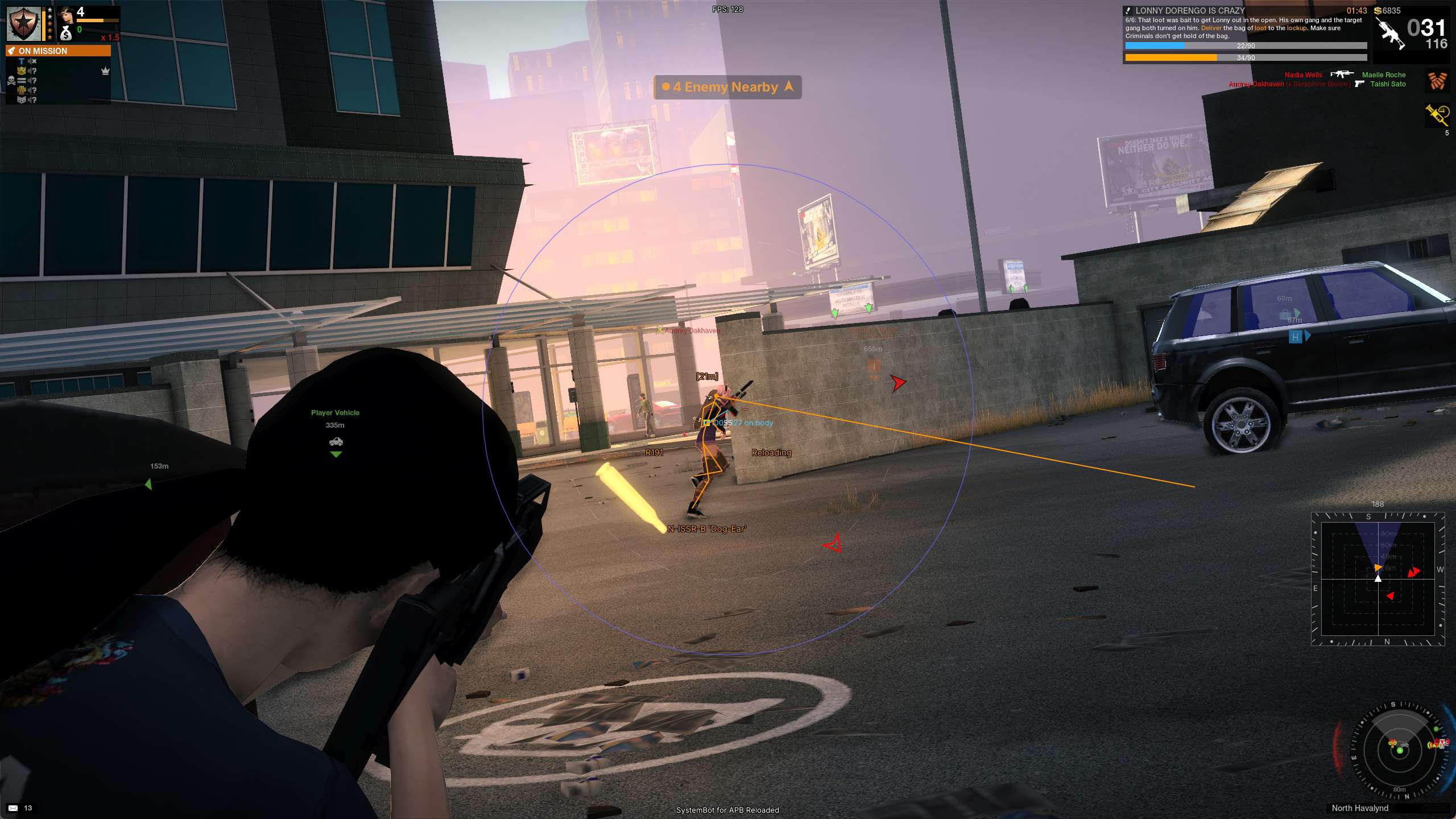
Navigating urban blind spots, managing continuous weapon spread, and countering surprise vehicle ambushes can feel overwhelming without superior battlefield intelligence. Our undetected APB Reloaded hack provides the ultimate tactical advantage across every street and rooftop. Engineered with precision Aimbot, bloom-synchronized Smart Crosshair Triggerbot, full 3D Player and Vehicle ESP, explosive Nade tracking, and 2D Radar overlays, our software ensures your squad controls San Paro with total authority.

Tactical upgrade briefing
San Paro urban dominance breakthroughs

Master street combat with our Smart Crosshair Triggerbot, Silent Aim, Launcher Trajectory Prediction, Vehicle 3D ESP, and Dedicated Arrest Filters. Neutralize hostile syndicates, secure VIP mission drops, and survive max-tier bounties with ease.

APB Reloaded Hack and Cheat Features

This APB Reloaded cheat delivers an extensive modular tactical suite engineered specifically around the unique mechanics of San Paro urban warfare. Every single option is fully adjustable through our clear in-game menu overlay on the DELETE key, enabling seamless transitions between natural legit play and commanding district control. The major capabilities are detailed below, and the complete 297-feature catalog is documented in the Features tab.

  • Precision Aimbot and Silent AimAuto Aim, Smooth Aim damping, Humanized Aim curving, Aim Style prioritization by FOV or world distance, and Aim on Nearest Bone. Land shots without camera movement via Silent Aim, prevent suspicious hit rates using the Miss Chance slider, and lead distant targets with Bullet Speed and Drop Prediction. Activate with Hold, Toggle, or Always On.
  • Smart Crosshair Bloom TriggerbotAutonomous firing engineered for APB bloom mechanics. The Wait For Crosshair feature monitors real-time reticle size, withholding fire until your weapon recovers from bloom expansion. Includes Smart Crosshair calibration that automatically learns each weapon smallest baseline spread, alongside customizable pre-fire and post-fire delays.
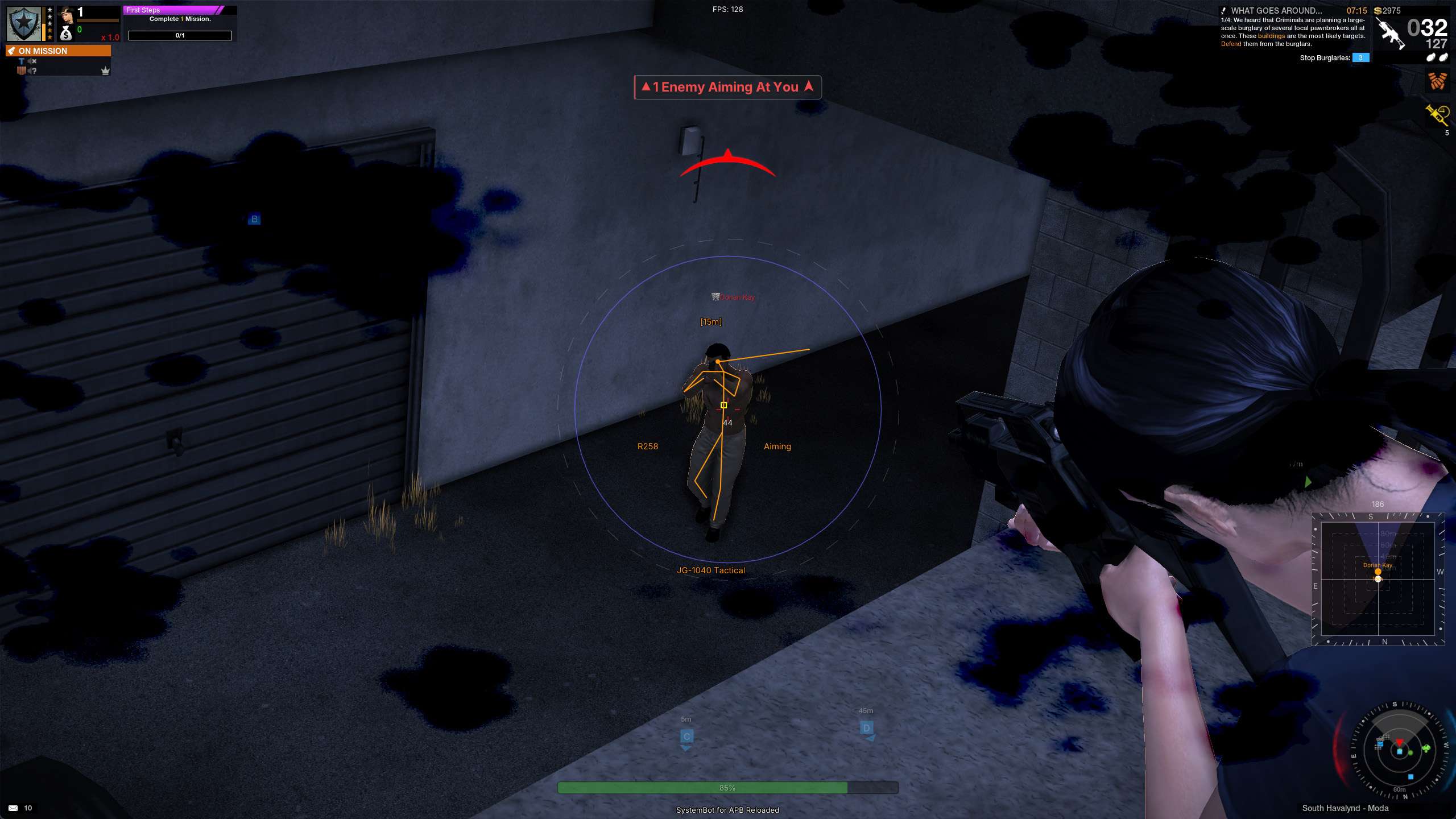
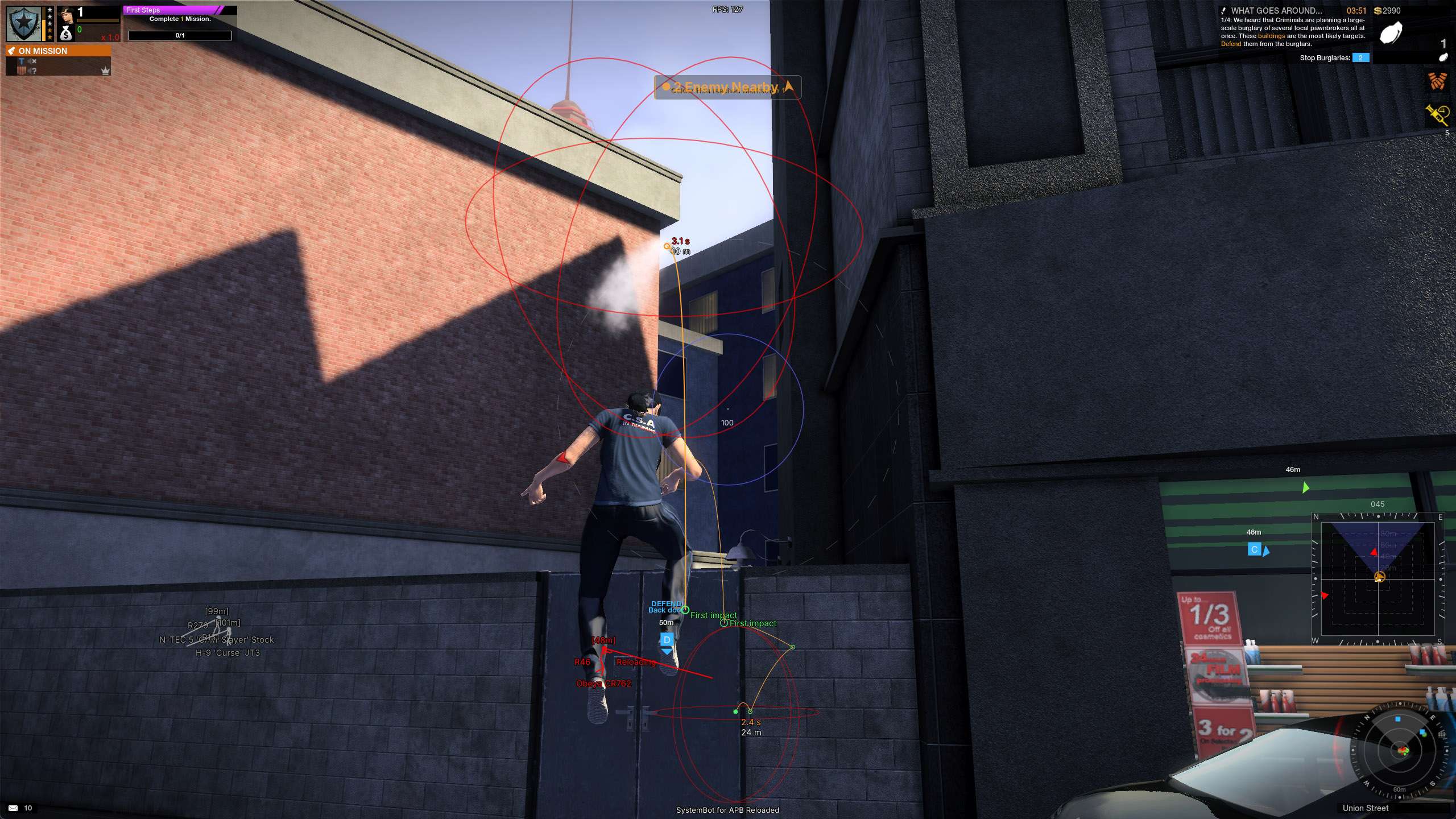
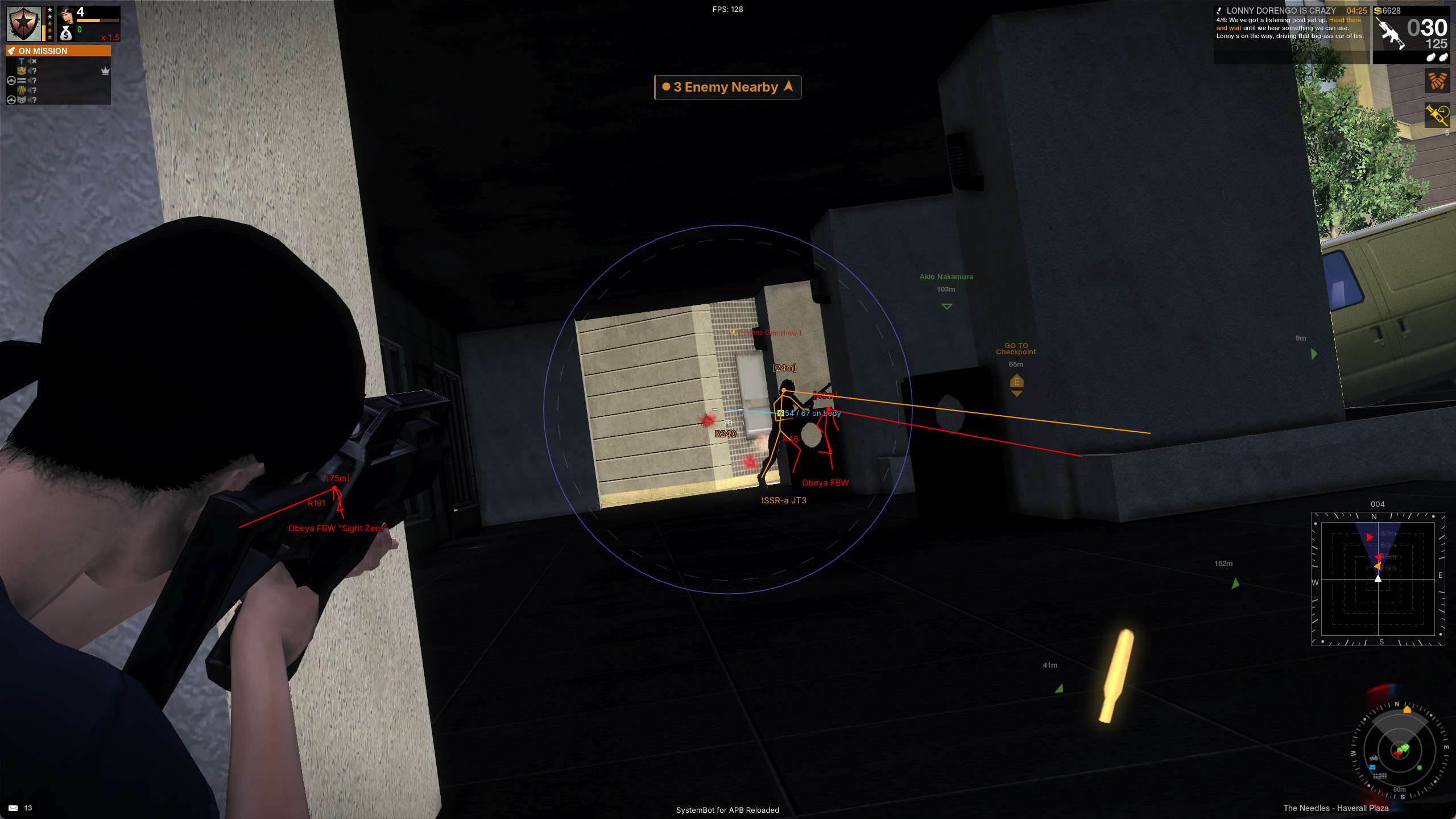
  • Player and Vehicle 3D ESPLocate combatants and moving transports through solid concrete towers. Displays 2D, 3D, and Corner bounding boxes, bone skeletons, player names, distance, health bars, equipped weapons, and snaplines. Vehicle ESP tracks vehicle health, model names, current speed, and seated passenger lists in real time.
  • Grenade ESP and Launcher TrajectoryNever get caught off guard by cooked explosives. Visual Nade ESP tracks thrown percussion and fragmentation grenades with proximity rings. Dedicated Projectile Trajectory prediction renders live ballistic arcs for OPGL drum grenade launchers and OSMAW rocket launchers, showing exactly where heavy ordnance will impact.
  • 2D Radar and Proximity Warning SystemMaintain 360-degree tactical awareness across urban intersections. The top-down 2D radar renders players and vehicles with customizable range rings and contact labels. Off-screen directional edge arrows point to flanking enemies, while the Warning system sounds audio cues and alerts you when an enemy is aiming directly at you.
  • Combat Modifiers and Arrest ControlEliminate weapon kick and bullet dispersion with No Recoil and No Spread. Specially designed Ignore Filters allow Enforcer players to bypass spawn-protected, stunned, or arrested targets, ensuring seamless stun-to-cuff transitions without wasting ammunition on incapacitated suspects.

Dominate High-Stakes District Missions and Turf Wars

Missions in APB Reloaded place opposing squads in direct conflict over contested city objectives.
Whether defending a high-value money truck, holding a rooftop terminal in the Financial District, or delivering stolen contraband across the Waterfront canals, mission stages frequently turn into chaotic meat-grinders.
Opponents utilize coordinated vehicle roadblocks, smoke screens, and roof camping snipers to stall your objective timer.
Our APB Reloaded aimbot turns the tide of every engagement by instantly locking onto enemy targets within your customized field of view.
Using Smooth Aim and Humanized Aim curves, crosshair motion follows smooth, organic trajectories that mimic the mouse control of elite tournament marksmen.
For discreet gameplay, Silent Aim redirects bullet trajectories directly to chosen target bones while keeping your view perspective completely natural, allowing you to eliminate targets while appearing completely normal to spectators.

Smart Crosshair Triggerbot and Weapon Bloom Mastery

The defining combat mechanic of APB Reloaded is its unforgiving weapon bloom system.
Unlike standard first-person shooters where bullets travel near screen center, firing in APB causes your crosshair reticle to expand outward rapidly.
Holding down the trigger on weapons like the N-TEC 5 assault rifle or Colby PMG submachine gun quickly blooms your spread, causing shots to spray harmlessly around opponents even at medium range.
Our groundbreaking Smart Crosshair Triggerbot eliminates bloom-induced misses completely.
By monitoring the game internal reticle state, the triggerbot calculates when your weapon has recovered to minimum spread before breaking the trigger.
With Use Smart Crosshair enabled, our software dynamically learns the smallest possible reticle size for whatever firearm you equip, timing each shot perfectly to guarantee laser-beam accuracy across full-auto burst cycles.

Urban Vehicle Tracking and 3D Player ESP

San Paro dense multi-level architecture offers endless opportunities for enemy ambushes.
Opponents frequently hide inside parking garages, wait on fire escapes, or flank behind storefront alleys.
During vehicular chases, knowing which enemy car carries the mission VIP or identifying a heavily damaged vehicle about to explode is vital for tactical survival.
Our Player and Vehicle ESP penetrates through solid concrete, shipping containers, and vehicle hulls up to 150 meters away.
Customizable 3D bounding boxes, player bone skeletons, health bars, and equipped weapon readouts reveal every hostile move before they step around a corner.
Vehicle ESP reveals the exact model name, structural integrity percentage, current speed, and full occupant list of every car on your street, enabling your crew to intercept getaways and execute devastating vehicle ambushes with precision.

Tactical Enforcer Arrests and Launcher Trajectory Prediction

For players who prefer the unique non-lethal gameplay of the Enforcer faction, executing clean arrests requires meticulous target selection.
When utilizing Less-Lethal stun shotguns like the Stabba CCG or Stabba NL9, draining an opponent stamina leaves them helpless on the ground for an arrest.
In standard play, frantic teammates or automated targeting often accidentally fire lethal rounds into stunned targets, forfeiting massive arrest standing bonuses.
Our specialized Ignore Stunned and Ignore Arrested filters automatically prevent your aimbot from locking onto incapacitated suspects, keeping your crosshair focused strictly on active threats while you move in for the handcuffs.
Additionally, when utilizing heavy explosive weapons, our Draw Projectile Trajectory feature calculates gravity and velocity arcs in real time for OPGL grenade launchers and OSMAW rockets, allowing you to lob explosive shells over barricades and through high warehouse windows with zero guesswork.

How to Use the APB Reloaded Cheat

Getting set up with our APB Reloaded hack is straightforward, secure, and completed in minutes.

01
Download the loader

Choose your subscription plan on our store and download the lightweight SystemCheats loader application to your PC.

02
Load and launch

Run the loader as administrator, log in with your active customer credentials, select the APB Reloaded profile, and launch the game via Steam or Little Orbit launcher.

03
Rule San Paro

Press DELETE in game to open the menu overlay, customize your aimbot smoothness, smart crosshair thresholds, and ESP visual styles, and save your custom profiles.

Is it Safe to Use the APB Reloaded Hack?

Your gaming account security and uninterrupted playtime are our top development priorities.
APB Reloaded utilizes client-side integrity checks and automated behavioral telemetry to monitor multiplayer action.
Our dedicated reverse engineering specialists provide rapid updates, routine code audits, and thorough testing for all official Little Orbit game patches.
Our software functions through secure low-level driver architecture with memory obfuscation, ensuring our loader remains undetected by automated anti-cheat systems.
In addition, our customizable Miss Chance slider, Smooth Aim curves, and Deadzone features ensure that your aim tracking appears organic and indistinguishable from authentic mouse control, allowing you to dominate district shootouts with complete peace of mind.

Frequently Asked Questions

Is the APB Reloaded hack safe and undetected on PC?

Yes, our APB Reloaded cheat is built with kernel-level driver architecture, advanced memory protection, and regular security updates to deliver safe and undetected gameplay on Windows PC.

What features are included in the APB Reloaded cheat?

The suite includes Precision Aimbot, Silent Aim, Smart Crosshair Bloom Triggerbot, 3D Player and Vehicle ESP, Nade ESP, Launcher Trajectory Prediction, 2D Radar, and Proximity Warnings.

How does the Smart Crosshair Triggerbot work?

Smart Crosshair dynamically measures your equipped weapon spread expansion, firing automatically only when the reticle contracts back to minimum bloom, ensuring optimal bullet accuracy on every shot.

How do I get access to the APB Reloaded cheat?

You can purchase a dedicated APB Reloaded membership on our store or gain instant access to our complete library of supported multiplayer shooters with our comprehensive Premium Package.

Claim District Bounties and Rule San Paro Today

Stop losing hard-fought mission stages, struggling against weapon bloom recoil, and falling victim to sudden vehicle ambushes.
With APB Reloaded Cheats from SystemCheats, you gain the decisive aiming precision, situational map vision, and tactical advantage needed to dominate every district encounter.
Equip your Enforcer or Criminal with the ultimate urban warfare suite and rule the streets of San Paro today.

Need Help with your APB Reloaded Cheat?

Our dedicated customer support staff is ready around the clock to assist you with loader installation, feature configuration, or optimal gameplay presets. Check out our Premium Package for all-inclusive access to our full library of supported online action titles. Read genuine customer testimonials and community experiences on our official Trustpilot page.

Cheat & Hack Information

What is APB Reloaded?


APB Reloaded is a fast-paced multiplayer open-world urban action shooter set in the crime-ridden metropolis of San Paro. Players fight as licensed Enforcer vigilantes or syndicate Criminals across massive Action Districts, competing in high-stakes turf wars, dynamic opposition missions, and vehicular street battles.

Cheating in APB Reloaded


Controlling aggressive weapon bloom and surviving relentless gang shootouts requires unmatched precision and tactical awareness. Our APB Reloaded cheat delivers pinpoint Aimbot targeting, smart crosshair bloom Triggerbot, full 3D Player and Vehicle ESP, 2D Radar, and proximity warning systems.

Should you cheat in APB Reloaded?


Our APB Reloaded hack is engineered for maximum performance, stability, and security on PC. Whether you want subtle aim smoothing to blend seamlessly into spectator views or full tactical dominance to secure every district mission, our software gives you complete command over San Paro.

Pricing

Features

Aimbot
Aimbot Enable aim assist. Every row below is inert while this is off.
Aimbot Key Bind the key that engages aim assist. Right-click it for Hold, Toggle or Always On.
Field of View (0 ~ 180) Set how far from the crosshair a target still counts, in degrees off centre. Covers the aim assist and both shot rows. Past 90 the ring cannot be drawn, but targeting still works out to 180.
Aim Style (FOV, Distance) Pick how the best target is chosen: nearest to the crosshair, or nearest in the world.
Aim on Nearest Bone Begin the pull at the body part closest to your crosshair, then walk up to the main aim bone as the shot settles.
Aim Bones (Body Part Picker) Right-click a body part to make it the main aim point. Left-click the others to allow them when the main one is covered.
Stick to Target Hold the current target until they drop or leave range. Prevents flicker between targets.
Max Distance (0 ~ 150) Ignore targets past this distance in metres.
Silent Aim (Risky) Land shots on the locked target without your view moving. Hold the aim key to lock on. Cover still protects a target. Risky: it hits so often that reports come easier. Keep Miss Chance up.
Miss Chance (0 ~ 80) Let this percent of shots go where you are really pointing. Never missing is the most obvious tell there is.
Smooth Aim (1 ~ 100) Damp the movement. Higher = slower drift, lower = snappier.
Humanized Aim Vary the aim speed and bend the path, instead of a steady straight pull.
Randomize Curve (30 ~ 100) Set how strong the humanizing is. 30 = subtle, 100 = speed varies most and the path bows.
Randomize Aim Land slightly off centre instead of the same spot every time. Stays inside the target at any range.
Randomize Aim Speed (10 ~ 1000) Set how often (ms) the landing point moves. Lower = tighter grouping, higher = a wider, slower wander.
Aim Delay (0 ~ 1000) Wait this many ms before the assist starts moving.
Aim Switch Delay (0 ~ 1000) Cool down this many ms before retargeting.
Deadzone (0 ~ 20) Stop moving inside this pixel radius of the target. Kills micro-jitter on-target.
Angle Scaling (FOV, Static) Pick how the target area reacts to zoom. FOV follows your zoom, Static keeps it the same size on screen.
Draw Silent Aim Trace Draw a line from the crosshair to whatever shots are being sent at.
Draw Locked (None, Box, Name, Both) Mark the locked target with a box, its name, or both.
Locked Box Size (6 ~ 20) Size the lock indicator box in pixels.
Locked Box Thickness (1 ~ 10) Thicken the lock box outline.
Draw Aim FOV Draw the field-of-view cone on screen.
Draw Deadzone Draw the deadzone region on screen.
Deadzone Thickness (1 ~ 10) Thicken the deadzone outline.
Draw Projectile Trajectory Show where a launcher round would fly and land if you fired now (OPGL, OSMAW and the like). Guns hit instantly and draw nothing. Fire the launcher once first - its speed is learned from your own round.
Trajectory Thickness (1 ~ 10) Thicken the trajectory line.
Auto Fire Pull the trigger while the assist is locked. Cadence comes from the Pre / Post delay sliders. Needs the aim key active.
Trigger Mode (Hold, Tap) Pick how the trigger is pulled. Hold keeps firing and suits every weapon in this game. Tap sends one press per shot.
Min Pre Fire Delay (0 ~ 1000) Set the lower bound (ms) of the pre-fire delay.
Max Pre Fire Delay (0 ~ 1000) Set the upper bound (ms) of the pre-fire delay. The actual delay lands anywhere in the range.
Min Post Fire Delay (0 ~ 1000) Set the lower bound (ms) between shots.
Max Post Fire Delay (0 ~ 1000) Set the upper bound (ms) between shots.
Bullet Speed Prediction Lead moving targets for shots that take time to arrive. The bow needs it. Guns hit instantly and ignore it.
Bullet Drop Prediction Aim higher to cover the fall of the shot over distance. The bow needs it. Guns hit instantly and ignore it.
Prediction Compensation (1 ~ 50) Fine-tune how far ahead of a moving target to aim. 1 = true physics. The drop is physics and is never scaled.
Aim on Enemy Player Target hostile players.
Aim on Friendly Player Target players on your own side.
Aim on Neutral Player Target people with no mission relationship to you.
Aim on Visible Only Skip targets behind cover.
Aim on Enemy Vehicle Target cars belonging to people you are against.
Aim on Friendly Vehicle Target cars belonging to your own side.
Aim on Neutral Vehicle Target parked street cars and anything else with no side.
Ignore Spawn Protected Skip players who cannot be hurt yet - just spawned.
Ignore Arrested Skip players who have been arrested.
Ignore Stunned Skip players who have been stunned - leave them for the arrest.
Triggerbot
Triggerbot Fire on its own when the crosshair is on a body. Every row below is inert while this is off.
Triggerbot Key Bind the key that arms the triggerbot. Right-click it for Hold, Toggle or Always On.
First Shot Delay (0 ~ 500) Wait this long (ms) after the crosshair lands on a body before the first shot. 0 fires the instant it lands.
Min Delay Between Shots (0 ~ 1000) Shortest wait (ms) from one shot to the next.
Max Delay Between Shots (0 ~ 1000) Longest wait (ms) from one shot to the next. Each shot picks a random wait between Min and Max.
Max Distance (0 ~ 150) Ignore bodies past this distance in metres.
Wait For Crosshair After every shot, wait until the crosshair of the gun you hold has closed back down before the next shot.
Show Crosshair Size Print the live crosshair size (0 to 100) just under your crosshair. Use it to pick the numbers below.
Use Smart Crosshair Learns the smallest crosshair each gun can reach while you hold it, and measures from there: 0 = that gun's smallest. Uses Margin Over Smallest below. Crosshair Must Close To is off.
Margin Over Smallest (0 ~ 100) Smart mode. Fire when the crosshair is within this much of the gun's smallest size. 0 = only fully closed, 50 = halfway open.
Crosshair Must Close To (0 ~ 100) Smart mode off. Fire only when the crosshair is this size or smaller. 0 = fully closed, 100 = fully open, for the gun you hold.
Fire On These Bones (Body Part Picker) Left-click a body part to arm it. The trigger fires when the
Fire at Enemy Player Fire at hostile players.
Fire at Friendly Player Fire at players on your own side. Off, and it should stay off.
Fire at Neutral Player Fire at people with no mission relationship to you.
Fire at Visible Only Do not fire when something solid is in the way.
Fire at Enemy Vehicle Fire at cars belonging to people you are against.
Fire at Friendly Vehicle Fire at cars belonging to your own side.
Fire at Neutral Vehicle Fire at parked street cars and anything else with no side.
Ignore Arrested Do not fire at players who have been arrested.
Ignore Stunned Do not fire at players who have been stunned - leave them for the arrest.
Ignore Spawn Protected Do not fire at players who cannot be hurt yet - just spawned.
Player ESP
Bounding Box (None, 2D, 3D, Corner) Pick the box style around the target. Corner = brackets only.
Box Size (1 ~ 10) Thicken the bounding box outline.
Player Skeleton ESP Draw the target's body lines.
Player Skeleton Size (1 ~ 10) Thicken the skeleton lines.
Skeleton Visibility Check Colour each bone by whether YOU can see it: a player behind a car with only his feet showing has only his feet in the Visible colour. Off = the whole skeleton takes one colour.
Player Name ESP Show the target's display name.
Player Distance ESP Show distance in metres.
Player Weapon ESP Show the weapon the target is holding, by its real name.
Player State ESP Show Aiming while the target is aiming down sights, and Reloading while they reload.
Player Rank ESP Show the target's rank, the number the game prints beside a name.
Snapline (None, Bottom, Center, Top) Draw a line from the screen edge to the target.
Head Dot Mark the target's head with a dot.
Head Dot Size (2 ~ 20) Size the head dot in pixels.
Player Aim Laser Draw a line from each player's head to where they are looking.
Player Aim Laser Size (1 ~ 10) Thickness of the aim laser in pixels.
Player Aim Laser Length (1 ~ 100) How far the aim laser reaches, in metres.
Max ESP Distance (0 ~ 150) Hide ESP for targets past this distance (m). 0 = no limit. 0 walks every actor in the level and can cost frames.
Max Skeleton Distance (0 ~ 150) Hide the skeleton past this distance. 0 = no limit.
Show Enemy Player Draw players you are against.
Show Friendly Player Draw players on your own side.
Show Neutral Player Draw players with no mission relationship to you.
Show Player Vehicles Draw cars at all. The Vehicle tab picks which ones.
Show Arrested Players Draw players who have been arrested.
Show Stunned Players Draw players who have been stunned.
Show Spawn Protected Draw players who cannot be hurt yet - just spawned.
Show Visible Only Draw only targets you can actually see. Hides anyone behind cover.
Vehicle ESP
Vehicle Visible Show vehicles with confirmed line of sight.
Vehicle Invisible Show occluded vehicles only when Show Visible Only is off.
Bounding Box (None, 2D, 3D, Corner) Pick the box style around the target. Corner = brackets only.
Box Size (1 ~ 10) Thicken the bounding box outline.
Vehicle Name ESP Show the target's display name.
Vehicle Distance ESP Show distance in metres.
Vehicle Health ESP (None, Left, Right, Top, Bottom) Pick which side of the box the health bar sits on.
Vehicle Health Percentage Show the numeric health percentage beside the bar.
Show Occupants Count the people riding in the vehicle, as (N) after its name.
Snapline (None, Bottom, Center, Top) Draw a line from the screen edge to the target.
Max ESP Distance (0 ~ 150) Stop drawing cars past this distance in metres. 0 = no limit.
Show Enemy Vehicles Cars belonging to people you are against.
Show Friendly Vehicles Cars belonging to your own side.
Show Neutral Vehicles Cars with no mission relationship to you, including parked street cars.
Show Visible Only Hide cars you have no line of sight to.
Ignore Empty Vehicles Skip parked cars with nobody riding in them.
Item ESP
Mission Item ESP Show pickups the current mission is asking for.
Mission Item Distance (0 ~ 150) Stop drawing mission items past this distance in metres. 0 = no limit.
World Item ESP Show ordinary pickups that no mission is asking for.
World Item Distance (0 ~ 150) Stop drawing world items past this distance in metres. 0 = no limit.
Item Box ESP Draw a box around each pickup.
Item Name ESP Show the pickup name.
Item Distance ESP Show distance in metres next to each pickup.
Item Distance Fade Fade pickups out with distance: solid to half of that kind's distance, then fading to nothing at the limit.
Item Stack Distance (0 ~ 50) Group nearby pickups of the same name into one marker. 0 turns grouping off.
Item Stack Count (2 ~ 10) How many have to be together before they group. Smaller groups are left as separate markers.
World ESP
Enable Nade ESP Show held and thrown grenades, fuse timers and flight previews.
Held Grenade Timer Show the remaining fuse below the crosshair while cooking a grenade.
Timer Vertical Offset (-300 ~ 300) Pixels below the screen centre. Negative moves the timer up.
Urgent Fuse Threshold (0.1 ~ 3) Switch the timer colour below this many seconds.
Urgent Timer Colour Use the warning colour once the fuse reaches the threshold.
Show Thrown Grenades Show live fused projectiles in the world.
Grenade Marker Draw a marker at each thrown grenade.
Thrown Fuse Timer Show the remaining fuse beside each thrown grenade.
Grenade Distance Show distance in metres beside thrown grenades.
Maximum Distance (1 ~ 150) Maximum distance in metres for thrown grenades. A held preview stays visible.
Marker Size (2 ~ 16) Size of grenade and endpoint markers in pixels.
Held Throw Trajectory Preview the throw until the fuse ends or the first collision.
Thrown Projectile Trajectory Predict the rest of the flight from the grenade's own velocity.
Impact Marker Mark the first collision or the predicted fuse end.
Explosion Radius Draw the game's own damage radius at the grenade or the endpoint.
Radius as 3D Sphere Three world-space circles. Off draws one horizontal ring.
Line Thickness (1 ~ 6) Thickness of trajectory, radius and marker lines.
Prediction Time (0.25 ~ 8) Maximum seconds to preview. The remaining fuse can shorten it.
Trajectory Detail (16 ~ 160) Flight segments to test. Higher costs more collision checks.
World Distance Fade Fade grenades out with distance: solid to half of Maximum Distance, then fading towards nothing at the limit.
World Stack Distance (0 ~ 50) Group grenades lying close together into one marker. 0 turns grouping off.
World Stack Count (2 ~ 10) How many have to be together before they group. Smaller groups are left as separate markers.
Radar
Show Radar Draw the radar overlay.
Show Cross Draw crosshair lines through the radar center.
Show Window Draw the outer border of the radar.
Show Compass Draw a bearing ring around the radar: N / E / S / W and ticks
Compass Width (8 ~ 40) How wide the compass ring is, in pixels.
Compass Opacity (0 ~ 100) Fade the whole compass ring: band, ticks, letters and heading.
Show Player Marker Draw your own marker at the radar center.
Show FOV Draw a cone showing your view direction. It narrows when you aim.
Scroll to Zoom Change Radar Scale with the mouse wheel over the radar. Only while the menu is open.
Pin to Screen Center Pin the radar over your crosshair. Dragging and resizing are disabled while this is on.
Shape (Square, Circular) Pick the radar window shape and its clipping boundary.
Radar Scale (5 ~ 150) Set the distance in metres at the radar edge. Lower = zoomed in, higher = zoomed out.
Window Size (45 ~ 500) Size the radar window in pixels.
Cross Size (45 ~ 500) Span the cross axes end-to-end, in pixels.
Background Fill (0 ~ 100) Fade a fill behind the radar so markers read over bright terrain. The colour is Radar Background.
Max Distance (0 ~ 150) Stop plotting targets past this distance in metres. 0 = no limit.
Marker Size (2 ~ 20) Size every radar marker in pixels, yours included.
Marker Shape (Triangle, Dot) Pick the marker shape. A triangle turns to show which way a contact is looking, and falls back to a dot when that cannot be read.
Out of Range (Hide, Pin to Rim, Draw Anywhere) Choose what happens to a contact further out than Radar Scale. Pin to Rim keeps its direction, dimmed, at the edge.
Stack Distance (0 ~ 60) Merge markers closer together than this many pixels. 0 turns stacking off. Try 14.
Stack Count (2 ~ 10) Only merge a group of at least this many markers.
Ring Labels Print the metres on each range ring.
Ring Amount (0 ~ 4) Draw rings inside the radar to read a distance off. 0 turns them off.
Ring Opacity (0 ~ 100) Fade the rings and their metre text together.
Show Enemy Player Plot enemy players on the radar.
Show Friendly Player Plot friendly players on the radar.
Show Neutral Player Plot people with no mission relationship to you.
Show Arrested Players Plot arrested players, in their side's colour.
Show Visible Player Only Plot only players you can actually see. Hides anyone behind cover.
Show Enemy Vehicles Plot cars belonging to people you are against.
Show Friendly Vehicles Plot cars belonging to your own side.
Show Neutral Vehicles Plot parked street cars and anything else with no side.
Show Visible Vehicles Only Plot only cars you can actually see.
Show Arrows Point an arrow at every contact that is off screen.
Ring Shape (Circle, Ellipse, Screen Edge) Pick the path the arrows sit on. Screen Edge pushes each one to the border it points at.
Ring Radius (60 ~ 420) Set how far the arrows sit from the ring centre, in pixels. Ignored by the Screen Edge shape.
Show The Ring Draw the ring itself as a faint dashed line. A setup aid - turn it off to play.
Off-Screen Only Only point at contacts you cannot already see. Off draws an arrow for everyone, doubling up with the ESP.
Threats Only Only point at contacts that can see you or are aiming at you. Uses the Warning tab's two angles.
Max Distance (0 ~ 150) Stop pointing at anything past this distance in metres. 0 = no limit, and it widens the world scan.
Max Arrows (1 ~ 24) Draw at most this many arrows, keeping the nearest.
Show Enemy Player Point at enemy players.
Show Friendly Player Point at friendly players.
Show Neutral Player Point at people with no mission relationship to you.
Show Arrested Players Point at arrested players. Off by default - an arrest is not a threat.
Show Visible Player Only Point only at players you can actually see. Hides anyone behind cover.
Show Enemy Vehicles Point at cars belonging to people you are against.
Show Friendly Vehicles Point at cars belonging to your own side.
Show Neutral Vehicles Point at parked street cars. Off by default - an arrow per car is a ring of arrows.
Show Visible Vehicles Only Point only at cars you can actually see.
Arrow Shape (Triangle, Chevron, Teardrop) Pick the arrow shape.
Arrow Size (6 ~ 34) Size an arrow in pixels, tip to base.
Arrow Opacity (10 ~ 100) Fade every arrow together.
Bigger When Closer Grow an arrow as its target gets nearer. A distance read without reading a number.
Fainter When Far Fade an arrow out with distance.
Outline Draw a dark edge so a red arrow survives a red canyon.
Colour By (Class, Threat Tier, One Colour) Choose what an arrow's colour says. Class matches the radar dot, Threat Tier matches the Warning tab.
Mark Behind You Draw an arrow hollow when its target is behind you.
Above / Below Hint Add a small tick when a contact is well above or below you.
Fade Into View Thin an arrow out as its target reaches the edge of the screen, so the ESP takes over with no pop.
Merge Overlapping Collapse arrows pointing the same way into one, with a count.
Pulse On Appear Flash an arrow briefly the first time a contact needs one.
Smoothing (0 ~ 90) Damp the swing while you turn. 0 is exact and jittery, high is calm and late.
Warning
Warning System Enable the on-screen warnings. Drop the background opacity to 0 for floating text with no panel.
Show Header Draw the WARNINGS strip above the lines. Off leaves only the warnings themselves.
Uppercase Print AI CAN SEE YOU instead of AI Can See You.
Draw Panel Background Draw the card behind the warnings. Off leaves floating text with no panel.
Max Distance (0 ~ 150) Set the warning range in metres. 0 means no limit.
Aiming At You Warn when an enemy's aim is within the angle below.
Aiming Angle (0 ~ 180) How close to head-on counts as aiming, in degrees. Smaller is stricter.
Can See You Warn when an enemy's view cone covers you AND nothing is in the way. Falls back to the angle alone until the visibility cache has an answer.
Seeing Angle (0 ~ 180) How wide an enemy's view cone is, in degrees.
Enemies Nearby Warn about anyone within Max Distance. Pure proximity, ignores sightlines and aim.
Split Player and AI Keep separate lines per class. Off merges them into one ENEMY line per tier.
Show Counts Print 3 AI AIMING instead of a line that is only on or off.
Keep Empty Rows Hold every row in place, greyed out, instead of collapsing the panel as threats come and go.
Worst Tier Only Show only the most severe tier that has anybody in it. Aiming beats seeing beats nearby.
Direction Arrow Point an arrow at the nearest contact on that line.
Arrow Side (Left, Right) Put the direction arrow before or after the text.
Tier Icon Mark each tier with a shape as well as a colour.
Icon Side (Left, Right) Put the tier icon before or after the text.
Colour By Tier Colour each line by its threat tier. Off colours it by class instead, using the Filters swatches.
Stripe Follows Worst Turn the panel's edge stripe the colour of the worst active tier.
Pulse On Escalation Flash a line when it first appears. Twice, not a loop.
Hold Time (0 ~ 3000) Keep a count on screen this many milliseconds after it drops. 0 shows the raw frame-by-frame value.
Background Opacity (0 ~ 100) Fade the warning panel background from 0 to 100 percent.
Text Opacity (0 ~ 100) Fade the warning text from 0 to 100 percent.
Linked Size (12 ~ 30) The one size every row uses while Link All Sizes is on.
Font Boldness (Default, Bold) Pick the font weight for the warning panel.
Font Shadow (None, Bordered, Shadow) Pick the outline or shadow behind the warning text.
Show Enemy Player Count enemy players as threats.
Show Friendly Player Count friendly players as threats. This game is co-op, so this is the only way to see the Player rows work at all.
Show Visible Player Only Only count players you can actually see. Aiming and Can See You already require it.
Show Enemy AI Count hostile AI as threats.
Show Friendly AI Count friendly AI, NPCs and animals as threats.
Show AI Elites Count elites and bosses. Its own channel - this works with Show Enemy AI off.
Show Visible AI Only Only count AI you can actually see. Aiming and Can See You already require it.
Link All Sizes Put every row on the Linked Size slider. Off lets each row keep its own size.
Combat
No Recoil Take control of how far the weapon kicks as you fire.
Recoil Strength (1 ~ 100) How strongly to hold the weapon down.
Misc
Language Pick the menu language. One entry means this build ships one.
Menu Key Show or hide the menu. Default DELETE.
Panic Key (Hide All Visuals) Hide every visual at once. Press again to restore. The menu still opens. Unbound by default.
Full Streamproof Take the menu out of screen recordings and screenshots.
Draw FPS Draw the current frame rate top-center.
Draw Resolution Draw the screen resolution top-left.
Draw Time Draw the current time top-right.
Draw Watermark Draw the watermark bottom-center.
Draw Health Bar Draw your own health as a bar. Drag it while the menu is open to reposition. Hidden at full health.
Draw Health Bar Percentage Draw the numeric percentage on the health bar.
Draws Opacity (%) (10 ~ 100) Fade the FPS, resolution, time and watermark together. 100 = fully opaque.
Health Bar Opacity (%) (10 ~ 100) Fade the bar, its background, its border and the percentage. 100 = fully opaque.
Overlay Frame Rate (30 ~ 240) How many times a second the ESP redraws.
DPI Scaling (100 ~ 200) Scale the menu size in percent. Does not affect the overlay.
Font Boldness (Default, Bold) Pick the font weight for overlay text. The menu is unaffected.
Font Shadow (None, Bordered, Shadow) Pick the outline or shadow behind overlay text.
Font Size (12 ~ 30) Size the overlay text. The menu is unaffected.
Crosshair (None, Dot, Cross, T-Cross, X) Draw a crosshair at screen center, over the game's own.
Crosshair Size (1 ~ 20) Set the arm length in pixels (dot diameter in Dot mode).
Crosshair Thickness (0.5 ~ 5) Thicken the arms. Dot mode is filled and ignores this.
Crosshair Gap (0 ~ 10) Set the gap from screen center to where each arm starts.
Notifications Show pop-up cards for keybinds, toggles and setting changes.
Notify Keybinds Show a card when a keybind is captured or cleared.
Notify Toggles Show a card when a keybind flips a feature.
Notify Setting Changes Show a card when a colour or slider changes. Off by default - it gets noisy while tuning.
Position (Bottom Left, Bottom Right, Top Left, Top Right, Top Center) Pick where notification cards stack on screen.
Duration (s) (1 ~ 10) Set how long each card stays visible before fading.
Max Visible (1 ~ 8) Cap how many cards stack at once.
Fade Duration (s) (0 ~ 1.5) Set the fade-in and fade-out tail length in seconds.
Filters
Filter Lists Build named lists of things to show or hide - by name or by type - and every ESP tab obeys them.
Colors
Per-Feature Colors Recolour anything the menu draws. Every box, label, line, marker and warning has its own colour, grouped under the tab it belongs to.
Visible and Hidden Channels Give a target one colour when you can see it and another when it is behind cover.
Menu Theme Recolour the menu itself - surfaces, text, accents - and save the result as a theme.
Keybinds
Bind Anything Every switch in the menu can be bound to a key, gathered here in one place instead of hunted for.
Hold, Toggle or Always On Choose per key how it behaves. Hold runs the feature only while the key is down. Toggle flips it on and off. Always On leaves it running and keeps the key as a reminder of what it does - which is how you run the aimbot without holding anything. Rows that fire once per press only offer a plain key.
Panic Key One key hides everything the menu draws, instantly.
Settings
Save Config Save everything - every switch, slider, colour, keybind and overlay position - under a name of your choosing.
Load Switch the whole menu to a saved config in one press.
Load Hotkey Give a config its own key. Press it in game to swap your entire setup mid-match, without opening the menu.
Auto Save Save the active config on every change, so nothing is ever lost.
Save As / Duplicate / Rename / Delete Manage your configs. Copying a config carries its hotkey and its notes with it.
Notes Write a note on a config so you remember what it was for.
Import / Copy to Clipboard Share a config with someone else, or paste one in.
Reset to Default Put everything back to factory settings.
Additional
Full Streamproof You can record your whole monitor. It won't be visible if you enable the "Full Streamproof" toggle in Misc.