APB Reloaded Hack, Aimbot, ESP and Triggerbot Cheat for PC

Included in Premium Package and One Day Trial
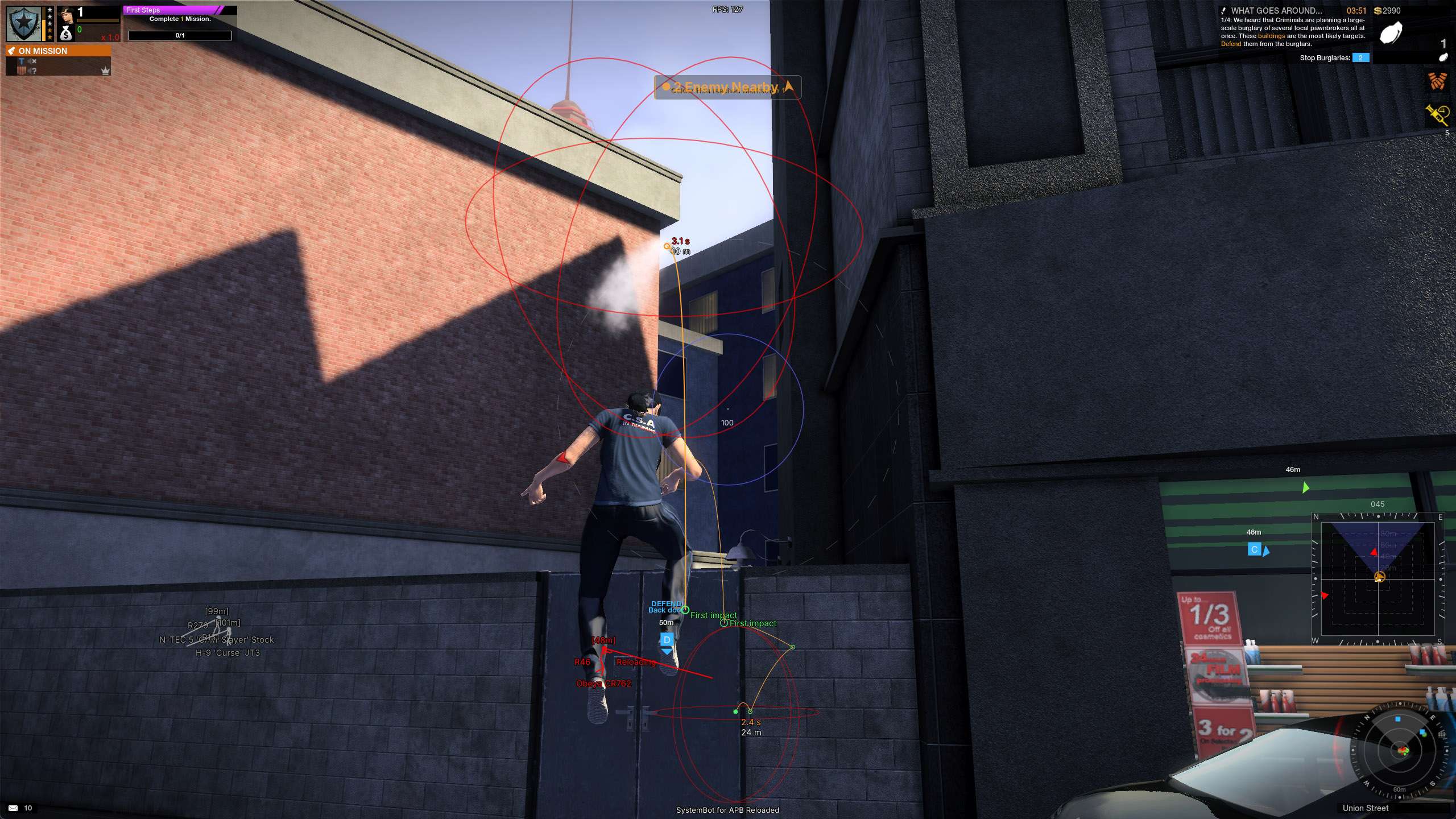
APB Reloaded Hack
APB Reloaded Cheat
APB Reloaded Aimbot
APB Reloaded Hacks
Open world shooter • Enforcers vs Criminals • Windows PC

APB Reloaded Hack with Aimbot, ESP and Triggerbot for PC

Get instant access to the APB Reloaded Cheat for PC.

APB Reloaded is a free to play open world shooter set in San Paro, a fictional city split between two sides of the law. Enforcers keep order and Criminals break it. When a Criminal commits a crime, the game sends an all points bulletin to Enforcer players of similar skill, and the chase is on. Little Orbit develops and publishes the game for Windows PC, and you can play it on Steam or through the GamersFirst launcher. It started life as APB: All Points Bulletin from Realtime Worlds and came back as the free to play APB Reloaded.

The action happens in two districts, Financial and Waterfront. Each one holds up to 100 players, with pedestrians and a day and night cycle. Missions put groups of players against each other in shootouts and car chases, and the money you earn buys weapons, vehicles and looks. Between fights, the Social District has no weapons and holds garages, auction houses, music studios and shops, where players build the cars, outfits and theme songs APB is known for. Fight Club is the faster, short form mode.

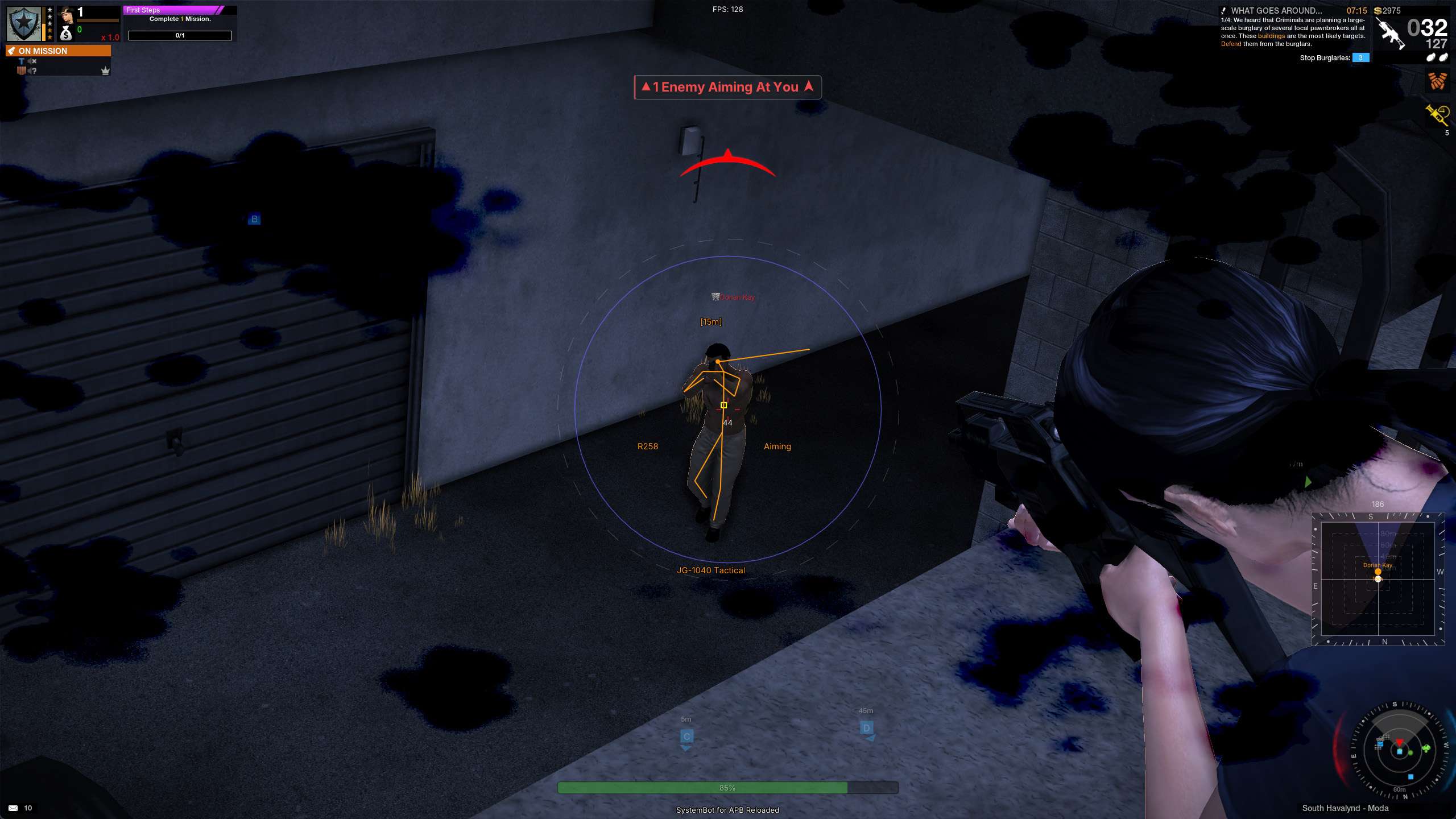
The gunplay is where APB Reloaded gets hard. Guns lose accuracy with each shot and while you move, so holding down the trigger sends rounds wide of the target. Our APB Reloaded hack is built for that: an aimbot with humanized aim, a triggerbot that waits for your crosshair to close, ESP for players, cars, mission items and grenades, a radar with off-screen arrows and a warning panel that tells you when an enemy is aiming at you.

Tactical upgrade briefing
Built for the streets of San Paro

An aimbot that can leave stunned and arrested players alone, a triggerbot that fires once your crosshair has closed, and ESP that marks the items your mission needs and counts the people riding in each car. Any switch in the menu can sit on its own key, and a Load Hotkey swaps your whole setup in the middle of a match.

APB Reloaded Hack and Cheat Features

The APB Reloaded cheat covers aim, awareness and control. It sorts players and cars into enemy, friendly and neutral, so you see the side you are fighting and not the whole district. Everything is set in the menu, which opens with the DELETE key by default. The highlights are below, and the full option list is in the Features panel on this page.

  • APB Reloaded AimbotAimbot on its own key with Hold, Toggle or Always On. Choose the main aim point with Aim Bones, add Aim on Nearest Bone, and use Smooth Aim, Humanized Aim, Randomize Aim and Aim Delay so the pull looks like a real player’s aim. Stick to Target stops flicker between targets.
  • Silent Aim and Miss ChanceSilent Aim (Risky) lands shots on the locked target without your view moving. Cover still protects a target, and Miss Chance lets a share of your shots go where you are really pointing, so your hits do not look perfect.
  • Smart Crosshair TriggerbotThe Triggerbot fires when your crosshair is on a body. Wait For Crosshair holds the next shot until your crosshair has closed, Use Smart Crosshair learns the smallest crosshair of each gun, and First Shot Delay plus Min and Max Delay Between Shots set the rhythm.
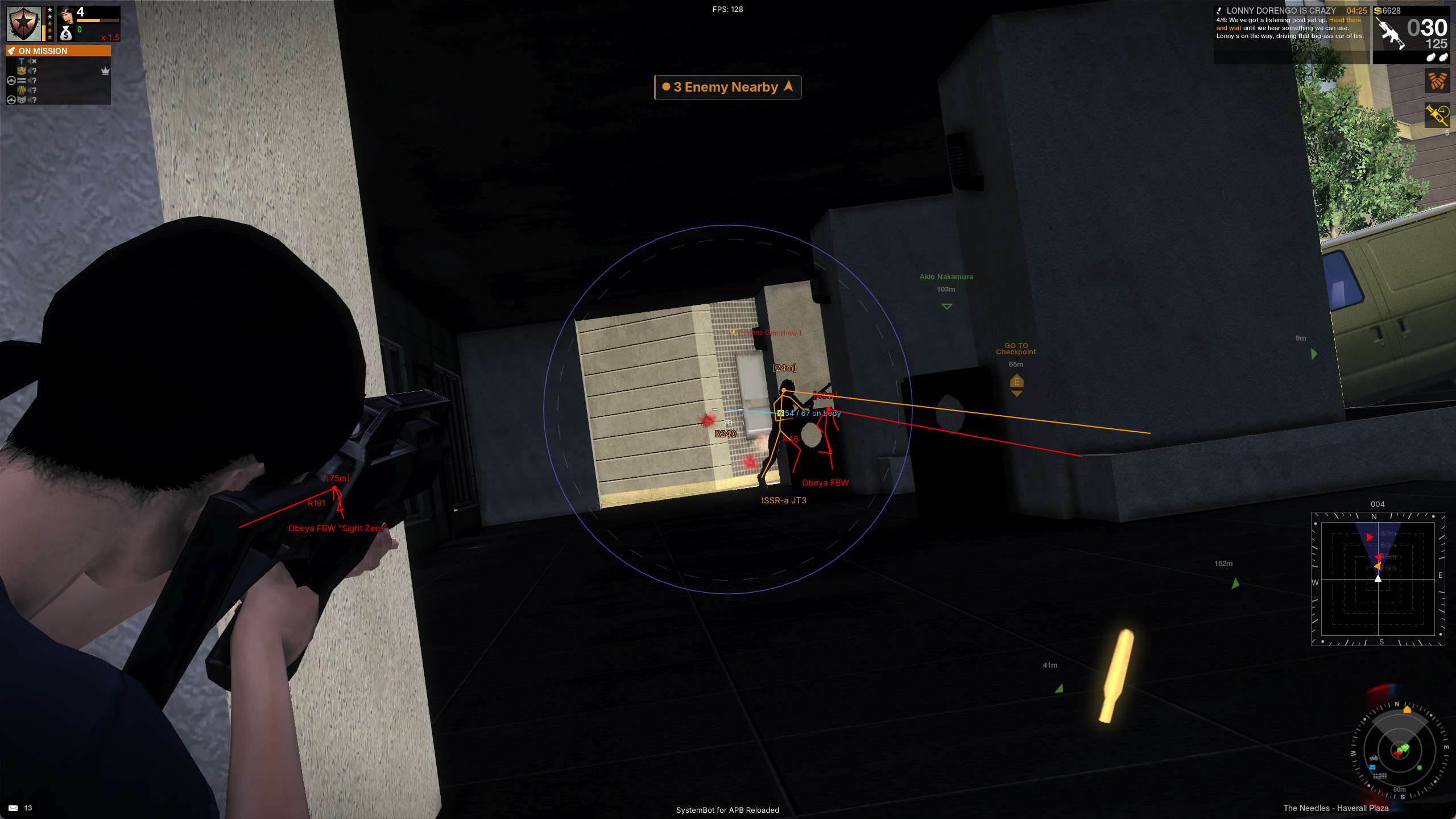
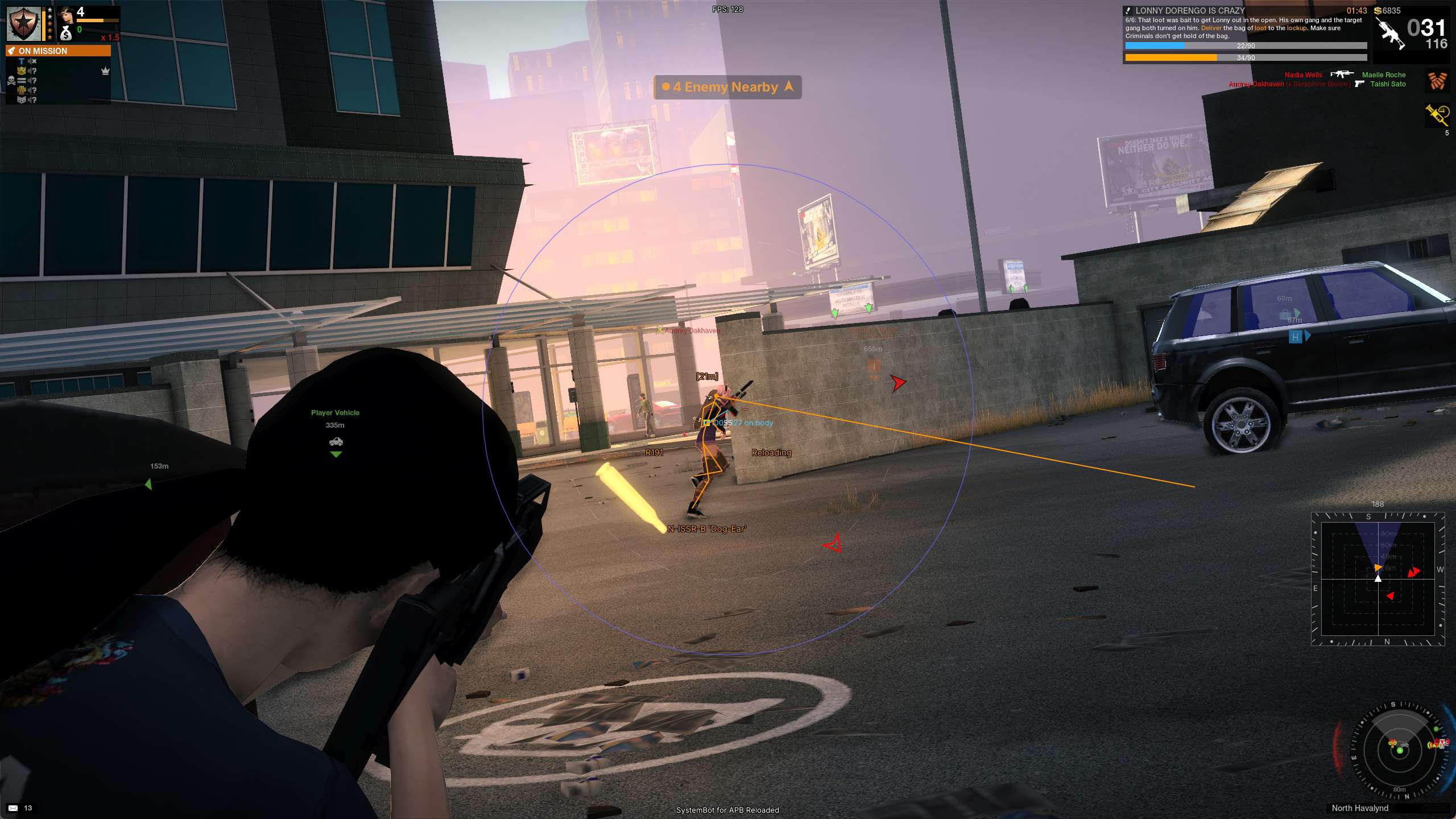
  • APB Reloaded ESP for PlayersBounding Box in 2D, 3D or Corner, Player Skeleton ESP, Head Dot, Snapline and Player Aim Laser. It also shows name, distance, rank and the weapon by its real name, and Player State ESP shows Aiming and Reloading.
  • Vehicle ESPVehicle Name ESP, Vehicle Distance ESP and Vehicle Health ESP with Vehicle Health Percentage. Show Occupants counts the people riding in a car, and Ignore Empty Vehicles skips parked cars with nobody inside.
  • Mission Item and Nade ESPMission Item ESP shows the pickups your current mission asks for, and World Item ESP shows the rest. Enable Nade ESP adds thrown grenades, fuse timers, throw previews and the game’s own Explosion Radius.
  • Radar and Off-Screen ArrowsShow Radar draws a square or circular radar with Show Compass and range rings. Show Arrows points at contacts off screen, Threats Only keeps arrows for players who can see you or aim at you, and Mark Behind You draws a hollow arrow for anyone at your back.
  • Warning SystemOn-screen warnings for Aiming At You and Can See You, each with its own angle, plus Enemies Nearby within Max Distance. A Direction Arrow points at the nearest contact, and Show Counts prints how many are on each line.
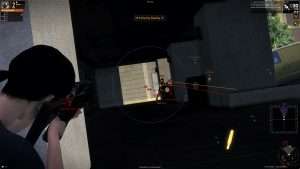
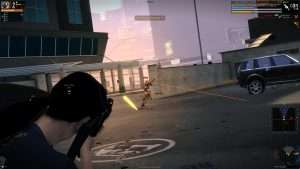
APB Reloaded Hack in-game screenshot 1 of 4 APB Reloaded Hack in-game screenshot 2 of 4 APB Reloaded Hack in-game screenshot 3 of 4 APB Reloaded Hack in-game screenshot 4 of 4

APB Reloaded Triggerbot Against Weapon Bloom

Bloom is the heart of APB gunplay. Each shot opens your crosshair wider, moving makes it worse, and full auto spray sends rounds past the target. The answer is to let the crosshair close between shots, and the APB Reloaded Triggerbot does that for you. With Wait For Crosshair on, it waits after each shot until the crosshair of the gun you hold has closed back down.

Use Smart Crosshair learns the smallest crosshair each gun can reach while you hold it, and Margin Over Smallest sets how close to that size it has to be before the next shot. Turn on Show Crosshair Size to see the live number just under your crosshair while you tune it. For the kick of the gun itself, No Recoil with Recoil Strength sets how strongly the weapon is held down.

APB Reloaded Aimbot That Can Leave Stunned Players Alone

Enforcers arrest Criminals, and stun weapons like the Stabba-PIG do stamina damage. When the plan is an arrest, an aimbot that keeps shooting is the last thing you want. The APB Reloaded Aimbot and the Triggerbot both have Ignore Stunned, Ignore Arrested and Ignore Spawn Protected. Stunned players are left for the arrest, arrested players are skipped, and players who just spawned and are still protected do not pull your aim away from a real threat. The ESP can still draw them, so you know where they are.

Car Chases and APB Reloaded Vehicle ESP

Missions in San Paro turn into shootouts and car chases, and a car full of opponents can reach your objective before you see it coming. The Vehicle ESP shows each car’s name and distance, a health bar on the side of the box you pick, and Vehicle Health Percentage for the exact number.

Show Occupants counts the people riding in a car and prints the number after its name, so you know whether that getaway car holds one Criminal or a full group. When it is time to stop the car, Aim on Enemy Vehicle points the aimbot at cars that belong to the other side, and Fire at Enemy Vehicle lets the Triggerbot shoot at them too.

APB Reloaded OPGL Trajectory and Nade ESP

APB Reloaded has grenade launchers like the OPGL, and grenades of its own. Guns hit the moment you fire, but a launcher round takes time to fly. Draw Projectile Trajectory shows where a launcher round would fly and land if you fired at that moment, for launchers like the OPGL and OSMAW.

Fire the launcher once first, because the cheat learns its speed from your own round. With Enable Nade ESP on, Show Thrown Grenades marks live grenades with a Thrown Fuse Timer, and Held Throw Trajectory previews your own throw. Impact Marker marks where the grenade hits first, and Explosion Radius draws the game’s own damage radius, so you know whether to run or stay behind cover.

APB Reloaded Mission Item ESP

Many missions come down to items you have to grab and deliver. Mission Item ESP shows only the pickups the current mission is asking for, so you head straight for the objective. World Item ESP shows ordinary pickups that no mission needs. Item Stack Distance groups nearby pickups with the same name into one marker, and Item Distance Fade lets far away items fade out, so the screen stays easy to read.

APB Reloaded ESP in a 100 Player District

A district holds up to 100 players, and not all of them are part of your mission. The cheat sorts everyone into enemy, friendly and neutral. ESP, Radar, Aimbot and Triggerbot each let you choose which of those to show or target. With Visible and Hidden Channels, a target gets one colour when you can see it and another when it is behind cover. Skeleton Visibility Check goes one step further and colours each bone by whether you can see it.

A player behind a car with only his feet showing has only his feet in the Visible colour. On the off-screen arrows, the Above / Below Hint adds a small tick when a contact is well above or below you, which helps when the shot comes from a rooftop. The Player Aim Laser draws a line from each player’s head to where they are looking, and the Warning System tells you when an enemy is aiming at you or can see you.

Aim That Looks Human and Setups on a Key

Some fights call for softer aim than a hard lock. Humanized Aim varies the aim speed and bends the path instead of a steady straight pull, and Randomize Curve sets how strong that is. Randomize Aim lands slightly off centre instead of on the same spot, Aim Delay waits before the aim starts moving, and Deadzone stops tiny movements on the target.

When you need a different setup, Save Config stores every switch, slider, colour and keybind under a name you choose, and a Load Hotkey swaps your whole setup in game without opening the menu. The Panic Key hides all visuals at once, and Full Streamproof takes the menu out of screen recordings and screenshots.

How to Use the APB Reloaded Cheat

Getting started with the APB Reloaded cheat takes three steps.

01
Create Your Account

Register on the forum for free. Your subscriptions, downloads and support all run through it.

02
Pick Your Plan

Buy the APB Reloaded cheat on its own, or get it with the Premium Package. The price box on this page lists the plans.

03
Load and Play

Download the loader, start APB Reloaded and press DELETE in game to open the menu and set up your aimbot, triggerbot and ESP.

Is It Safe to Cheat in APB Reloaded?

APB Reloaded uses GFAC, the GamersFirst Anti-Cheat that Little Orbit built in house. Little Orbit describes three parts: a client-side kernel mode driver with runtime protection, a server-side analysis engine, and a sanction system that can change matchmaking, lock game features or ban. Little Orbit has said it is tackling the cheating problem head on. No cheat is ever completely risk free. Settings like Miss Chance, Humanized Aim and Aim Delay make your aim look more human, but they do not remove the risk. The live cheat status page always shows the current state of every cheat.

Frequently Asked Questions

Is the APB Reloaded cheat included in the Premium Package?

Yes. You can buy the APB Reloaded cheat on its own, and it is also included in the Premium Package and the One Day Trial. The price box on this page shows the plans.

Which versions of APB Reloaded does the cheat support?

The Windows PC version of APB Reloaded. The game is free to play on Steam and through the GamersFirst launcher.

Which anti-cheat does APB Reloaded use?

GFAC, the GamersFirst Anti-Cheat that Little Orbit built itself, with a client-side kernel mode driver and server-side analysis. Guides that name BattlEye, Easy Anti-Cheat or SARD are out of date.

Is the APB Reloaded cheat online?

The live cheat status page always shows the current state of every cheat, including APB Reloaded. Check it before you buy.

Does the aimbot shoot stunned or arrested players?

Only if you let it. Ignore Stunned, Ignore Arrested and Ignore Spawn Protected are in both the Aimbot and the Triggerbot, so you can leave those players alone.

Does the triggerbot work with weapon bloom?

Yes. Wait For Crosshair holds each shot until the crosshair of the gun you hold has closed back down, and Use Smart Crosshair learns the smallest crosshair of each gun.

Can I switch setups during a match?

Yes. Save Config stores your settings under a name, and Load Hotkey gives a config its own key, so one press in game swaps your whole setup without opening the menu.

Take Control of San Paro

Pick up the APB Reloaded Hack, set your aim, triggerbot and ESP the way you like, and play the streets of San Paro with a clear view of who is coming.

Need Help?

Our support team is available 24 hours a day, 7 days a week through the SystemCheats forum and TeamSpeak. Read what customers say on Trustpilot, or compare all cheat packages to find the right fit.

Cheat & Hack Information

What is APB Reloaded?


APB Reloaded is a free to play open world shooter from Little Orbit, set in the city of San Paro. Enforcers keep order and Criminals break it, with up to 100 players in each district and missions full of shootouts and car chases.


Cheating in APB Reloaded


Our APB Reloaded cheat has an aimbot with Humanized Aim, a triggerbot that waits for weapon bloom, player and Vehicle ESP, Mission Item ESP and a Warning System. You can buy it as a single cheat or get it with the Premium Package.


Is the APB Reloaded cheat safe?


APB Reloaded uses GFAC, the GamersFirst Anti-Cheat from Little Orbit, with a client-side kernel mode driver and server-side analysis. No cheat is ever completely risk free. However, you can always adjust your settings to play legitimately for the long run. Check the live status page before you play.

Pricing

Features

Aimbot
Aimbot Turns the aimbot on, and the other aimbot settings do nothing while it is off
Aimbot Key Sets the key that turns on the aimbot while you hold or toggle it
Field of View (0 ~ 180) Sets how far from your crosshair a target can be and still count, in degrees
Aim Style (FOV, Distance) Sets how the aimbot chooses the best target when more than one is in range
Aim on Nearest Bone Starts the aim at the body part nearest your crosshair, then moves to the main aim bone
Aim Bones Picks the main body part to aim at and backup parts for when it is covered
Stick to Target Keeps the aimbot on one target until it is down or leaves range
Max Distance (0 ~ 150) Sets the farthest distance, in meters, at which targets are still picked up or shown
Silent Aim Sends your shots to the locked target without moving your camera
Miss Chance (0 ~ 80) Lets some of your shots go where you really point, so your play looks natural
Smooth Aim (1 ~ 100) Slows the aim movement so it looks natural, and higher values make it slower
Humanized Aim Moves the aim on a curved path with small changes in speed, like a real hand
Randomize Curve (30 ~ 100) Sets how strongly the aim path curves and changes speed for a human look
Randomize Aim Adds small random changes to where your aim lands for a human look
Randomize Aim Speed (10 ~ 1000) Sets how often, in milliseconds, the random aim movement changes
Aim Delay (0 ~ 1000) Adds a short delay before the aimbot starts moving, so it looks more human
Aim Switch Delay (0 ~ 1000) Adds a short wait in milliseconds before the aimbot switches to a new target
Deadzone (0 ~ 20) Stops the aim moving once it is this close to the target, to stop shaking
Angle Scaling (FOV, Static) Sets whether the aimbot angle grows and shrinks with your zoom or stays the same
Draw Silent Aim Trace Draws a line from your crosshair to where Silent Aim is sending your shots
Draw Locked (None, Box, Name, Both) Draws a marker on the target the aimbot is locked onto
Locked Box Size (6 ~ 20) Sets the size, in pixels, of the box drawn on the locked target
Locked Box Thickness (1 ~ 10) Sets how thick the outline of the locked target box is drawn
Draw Aim FOV Draws a circle on screen that shows where the aimbot is active
Draw Deadzone Draws the deadzone area around your crosshair on screen
Deadzone Thickness (1 ~ 10) Sets how thick the deadzone outline is drawn on screen
Draw Projectile Trajectory Shows where a launcher round would fly and land if you fired now
Trajectory Thickness (1 ~ 10) Sets how thick the projectile path line is drawn on screen
Auto Fire Fires your weapon for you once a target is locked
Trigger Mode (Hold, Tap) Sets how the trigger is pressed when the cheat shoots for you
Min Pre Fire Delay (0 ~ 1000) Sets the shortest wait in milliseconds before the first shot is fired
Max Pre Fire Delay (0 ~ 1000) Sets the longest wait in milliseconds before the first shot is fired
Min Post Fire Delay (0 ~ 1000) Sets the shortest wait in milliseconds between shots
Max Post Fire Delay (0 ~ 1000) Sets the longest wait in milliseconds between shots
Bullet Speed Prediction Leads moving targets based on how long the shot takes to arrive
Bullet Drop Prediction Aims a little higher to make up for bullet drop over long distances
Prediction Compensation (1 ~ 50) Fine tunes how far ahead of a moving target the aim is placed
Aim on Enemy Player Lets the aimbot target and lock onto enemy players
Aim on Friendly Player Lets the aimbot target friendly players and squad members
Aim on Neutral Player Lets the aimbot target people who are not on either side
Aim on Visible Only Makes the aimbot skip targets that are hidden behind cover
Aim on Enemy Vehicle Lets the aimbot target cars that belong to the other side
Aim on Friendly Vehicle Lets the aimbot target cars that belong to your own side
Aim on Neutral Vehicle Lets the aimbot target parked street cars and other cars with no side
Ignore Spawn Protected Makes the aimbot skip players who just spawned and cannot be hurt yet
Ignore Arrested Makes the aimbot skip players who have been arrested
Ignore Stunned Makes the aimbot skip stunned players so you can arrest them
Triggerbot
Triggerbot Shoots for you when your crosshair is on a valid target
Triggerbot Key Sets the key that turns the triggerbot on
First Shot Delay (0 ~ 500) Sets how long the triggerbot waits after the crosshair lands on a body before the first shot
Min Delay Between Shots (0 ~ 1000) Sets the shortest wait between one triggerbot shot and the next
Max Delay Between Shots (0 ~ 1000) Sets the longest wait between shots, each shot picks a random wait between Min and Max
Max Distance (0 ~ 150) Sets the farthest distance, in meters, at which targets are still picked up or shown
Wait For Crosshair Waits after each shot until the crosshair has closed back down before firing again
Show Crosshair Size Shows the live crosshair size under your crosshair to help you pick the settings
Use Smart Crosshair Learns the smallest crosshair of each gun and measures the fire point from there
Margin Over Smallest (0 ~ 100) Fires when the crosshair is within this much of the gun's smallest size
Crosshair Must Close To (0 ~ 100) Fires only once the crosshair has shrunk to this size or smaller
Fire On These Bones Lets you pick the body parts the triggerbot fires on
Fire at Enemy Player Lets the triggerbot fire at enemy players
Fire at Friendly Player Lets the triggerbot fire at players on your own side, best left off
Fire at Neutral Player Lets the triggerbot fire at players with no mission link to you
Fire at Visible Only Stops the triggerbot from firing when something solid is in the way
Fire at Enemy Vehicle Lets the triggerbot fire at cars that belong to your enemies
Fire at Friendly Vehicle Lets the triggerbot fire at cars that belong to your own side
Fire at Neutral Vehicle Lets the triggerbot fire at parked street cars and other cars with no side
Ignore Arrested Makes the aimbot skip players who have been arrested
Ignore Stunned Makes the aimbot skip stunned players so you can arrest them
Ignore Spawn Protected Makes the aimbot skip players who just spawned and cannot be hurt yet
Player ESP
Bounding Box (None, 2D, 3D, Corner) Draws a box around each target so you can see where they are
Box Size (1 ~ 10) Sets how thick the lines of each ESP box are drawn
Player Skeleton ESP Draws the body lines of each player as a skeleton
Player Skeleton Size (1 ~ 10) Sets how thick the skeleton lines are drawn
Skeleton Visibility Check Colors each bone by whether you can see it, so only the visible parts use the Visible color
Player Name ESP Shows the name of each player above their character
Player Distance ESP Shows how far away each player is in meters
Player Weapon ESP Shows the weapon each player is holding right now
Player State ESP Shows when a player is aiming down sights or reloading
Player Rank ESP Shows each player's rank, the number the game prints beside a name
Snapline (None, Bottom, Center, Top) Draws a line from a chosen spot on your screen to each target
Head Dot Draws a dot on the head of each target you can see
Head Dot Size (2 ~ 20) Sets the size of the dot drawn on each head, in pixels
Player Aim Laser Draws a line from each player's head to where they are looking
Player Aim Laser Size (1 ~ 10) Sets how thick the aim laser line is, in pixels
Player Aim Laser Length (1 ~ 100) Sets how far the aim laser reaches, in meters
Max ESP Distance (0 ~ 150) Hides ESP for targets past this distance, zero means no limit
Max Skeleton Distance (0 ~ 150) Hides the skeleton past this distance, zero means no limit
Show Enemy Player Shows enemy players on the ESP and radar
Show Friendly Player Shows friendly players and teammates on the ESP and radar
Show Neutral Player Shows players who have no mission link to you
Show Player Vehicles Shows player cars on the ESP, the Vehicle tab picks which ones
Show Arrested Players Shows players who have been arrested, in their side's color
Show Stunned Players Shows players who have been stunned on the ESP
Show Spawn Protected Shows players who just spawned and cannot be hurt yet
Show Visible Only Draws only targets you can actually see and hides anyone behind cover
Vehicle ESP
Vehicle Visible Shows vehicles that are in your line of sight
Vehicle Invisible Shows vehicles that are hidden behind cover
Bounding Box (None, 2D, 3D, Corner) Draws a box around each target so you can see where they are
Box Size (1 ~ 10) Sets how thick the lines of each ESP box are drawn
Vehicle Name ESP Shows the name and type of each vehicle on the ESP
Vehicle Distance ESP Shows the distance to vehicles in meters
Vehicle Health ESP (None, Left, Right, Top, Bottom) Shows a health bar on vehicles and sets which side of the box it sits on
Vehicle Health Percentage Shows the vehicle health as a percentage next to the health bar
Show Occupants Shows how many people ride in each vehicle next to its name
Snapline (None, Bottom, Center, Top) Draws a line from a chosen spot on your screen to each target
Max ESP Distance (0 ~ 150) Hides ESP for targets past this distance, zero means no limit
Show Enemy Vehicles Shows cars that belong to players you are up against
Show Friendly Vehicles Shows cars that belong to players on your own side
Show Neutral Vehicles Shows parked street cars and other cars with no side
Show Visible Only Draws only targets you can actually see and hides anyone behind cover
Ignore Empty Vehicles Hides parked vehicles that have nobody riding in them
Item ESP
Mission Item ESP Shows the pickups your current mission is asking for
Mission Item Distance (0 ~ 150) Stops drawing mission items past this distance in metres
World Item ESP Shows ordinary pickups that no mission is asking for
World Item Distance (0 ~ 150) Stops drawing world items past this distance in metres
Item Box ESP Draws a box around each item pickup on the ground
Item Name ESP Shows the name of each item pickup on screen
Item Distance ESP Shows how far away each item is from you
Item Distance Fade Fades item labels out as they get further away from you
Item Stack Distance (0 ~ 50) Groups nearby items of the same name into one marker within this distance
Item Stack Count (2 ~ 10) Sets how many items must sit together before they merge into one marker
World ESP
Enable Nade ESP Shows held and thrown grenades with fuse timers and throw previews
Held Grenade Timer Shows the fuse time left under your crosshair while you cook a grenade
Timer Vertical Offset (-300 ~ 300) Moves the held grenade timer up or down from the screen center
Urgent Fuse Threshold (0.1 ~ 3) Sets how many seconds of fuse are left when the timer changes color
Urgent Timer Colour Switches the timer to the warning color when the fuse is nearly done
Show Thrown Grenades Shows grenades that have been thrown and are about to go off
Grenade Marker Draws a marker on each thrown grenade in the world
Thrown Fuse Timer Shows the fuse time left next to each thrown grenade
Grenade Distance Shows the distance in meters next to thrown grenades
Maximum Distance (1 ~ 150) Sets how far away thrown grenades are still shown
Marker Size (2 ~ 16) Sets the size of the radar markers in pixels, yours included
Held Throw Trajectory Shows the path your grenade will fly before you throw it
Thrown Projectile Trajectory Shows the rest of a thrown grenade's flight path
Impact Marker Marks where the grenade will first hit or where the fuse will end
Explosion Radius Draws the grenade damage radius at the grenade or where it will land
Radius as 3D Sphere Draws the blast radius as a 3D sphere, off draws one flat ring
Line Thickness (1 ~ 6) Sets how thick the grenade path, radius and marker lines are
Prediction Time (0.25 ~ 8) Sets how many seconds of grenade flight the preview shows
Trajectory Detail (16 ~ 160) Sets how detailed the grenade path is, higher uses more checks
World Distance Fade Fades world objects out as they get farther away
World Stack Distance (0 ~ 50) Groups objects that lie close together into one marker
World Stack Count (2 ~ 10) Sets how many objects must be close together before they group into one marker
Radar
Show Radar Turns on the 2D radar overlay on your screen
Show Cross Draws cross lines through the middle of the radar
Show Window Draws the background frame of the radar window
Show Compass Draws a compass ring with N, E, S, W and ticks around the radar
Compass Width (8 ~ 40) Sets how wide the compass ring is, in pixels
Compass Opacity (0 ~ 100) Fades the whole compass ring, including its ticks, letters and heading
Show Player Marker Draws your own marker at the center of the radar
Show FOV Draws a cone on the radar that shows where you are looking
Scroll to Zoom Lets you change the radar scale with the mouse wheel while the menu is open
Pin to Screen Center Pins the radar over your crosshair and turns off dragging and resizing
Shape (Square, Circular) Picks the shape of the radar window and where it cuts off markers
Radar Scale (5 ~ 150) Sets the radar zoom, lower zooms in and higher zooms out
Window Size (45 ~ 500) Sets the width and height of the radar window
Cross Size (45 ~ 500) Sets the length of the cross lines in the middle of the radar
Background Fill (0 ~ 100) Fades in a fill behind the radar so markers are easy to read over bright ground
Max Distance (0 ~ 150) Sets the farthest distance, in meters, at which targets are still picked up or shown
Marker Size (2 ~ 20) Sets the size of the radar markers in pixels, yours included
Marker Shape (Triangle, Dot) Picks the radar marker shape, a triangle also turns to show where a contact is looking
Out of Range (Hide, Pin to Rim, Draw Anywhere) Chooses what happens to a contact further out than the radar scale
Stack Distance (0 ~ 60) Merges radar markers that are closer together than this many pixels
Stack Count (2 ~ 10) Sets how many markers must be grouped before they merge into one
Ring Labels Prints the distance in meters on each range ring
Ring Amount (0 ~ 4) Sets how many distance rings are drawn inside the radar
Ring Opacity (0 ~ 100) Fades the range rings and their distance text together
Show Enemy Player Shows enemy players on the ESP and radar
Show Friendly Player Shows friendly players and teammates on the ESP and radar
Show Neutral Player Shows players who have no mission link to you
Show Arrested Players Shows players who have been arrested, in their side's color
Show Visible Player Only Shows only players you can actually see and hides anyone behind cover
Show Enemy Vehicles Shows cars that belong to players you are up against
Show Friendly Vehicles Shows cars that belong to players on your own side
Show Neutral Vehicles Shows parked street cars and other cars with no side
Show Visible Vehicles Only Shows only the cars you can actually see and hides the rest
Show Arrows Points an arrow at every contact that is off screen
Ring Shape (Circle, Ellipse, Screen Edge) Picks the path the off-screen arrows sit on
Ring Radius (60 ~ 420) Sets how far the arrows sit from the ring center, in pixels
Show The Ring Draws the arrow ring as a faint dashed line to help with setup
Off-Screen Only Points arrows only at contacts you cannot already see on screen
Threats Only Points arrows only at players who can see you or are aiming at you
Max Distance (0 ~ 150) Sets the farthest distance, in meters, at which targets are still picked up or shown
Max Arrows (1 ~ 24) Limits how many arrows are drawn, keeping the nearest ones
Show Enemy Player Shows enemy players on the ESP and radar
Show Friendly Player Shows friendly players and teammates on the ESP and radar
Show Neutral Player Shows players who have no mission link to you
Show Arrested Players Shows players who have been arrested, in their side's color
Show Visible Player Only Shows only players you can actually see and hides anyone behind cover
Show Enemy Vehicles Shows cars that belong to players you are up against
Show Friendly Vehicles Shows cars that belong to players on your own side
Show Neutral Vehicles Shows parked street cars and other cars with no side
Show Visible Vehicles Only Shows only the cars you can actually see and hides the rest
Arrow Shape (Triangle, Chevron, Teardrop) Picks the shape of the off-screen arrows
Arrow Size (6 ~ 34) Sets the arrow size in pixels, from tip to base
Arrow Opacity (10 ~ 100) Sets how see-through every arrow is, all arrows fade together
Bigger When Closer Grows an arrow as its target gets nearer, so you can read distance at a glance
Fainter When Far Fades an arrow out the further away its target is
Outline Draws a dark edge around arrows so they stand out on any background
Colour By (Class, Threat Tier, One Colour) Chooses what an arrow's color shows, matching the radar dot or the Warning tab
Mark Behind You Draws an arrow hollow when its target is behind you
Above / Below Hint Adds a small tick when a contact is well above or below you
Fade Into View Thins an arrow out as its target reaches the screen edge, so the ESP takes over smoothly
Merge Overlapping Merges arrows that point the same way into one, with a count
Pulse On Appear Flashes an arrow briefly the first time a contact needs one
Smoothing (0 ~ 90) Smooths the radar swing while you turn, low is exact and high is calmer but late
Warning
Warning System Shows on-screen warnings when enemies are near, can see you or aim at you
Show Header Draws the title strip above the panel lines
Uppercase Writes the warning text in capital letters
Draw Panel Background Draws a panel behind the warnings, off leaves floating text
Max Distance (0 ~ 150) Sets the farthest distance, in meters, at which targets are still picked up or shown
Aiming At You Warns you when an enemy is aiming at you
Aiming Angle (0 ~ 180) Sets how close to head on an enemy must aim to count as aiming at you
Can See You Warns you when an enemy can see you and nothing is in the way
Seeing Angle (0 ~ 180) Sets how wide an enemy's view is when checking if they can see you
Enemies Nearby Warns you about anyone within the max distance, even if they cannot see you
Split Player and AI Keeps players and AI on separate warning lines, off merges them
Show Counts Shows how many enemies are on each warning line instead of just on or off
Keep Empty Rows Keeps every warning row in place, greyed out, instead of hiding empty ones
Worst Tier Only Shows only the most serious threat level that has someone in it
Direction Arrow Adds an arrow that points at the nearest enemy on that warning line
Arrow Side (Left, Right) Sets whether the direction arrow sits before or after the warning text
Tier Icon Marks each threat level with a shape as well as a color
Icon Side (Left, Right) Sets whether the threat level icon sits before or after the warning text
Colour By Tier Colors each warning line by threat level instead of by enemy type
Stripe Follows Worst Colors the panel edge stripe to match the worst active threat level
Pulse On Escalation Flashes a warning line twice when it first appears
Hold Time (0 ~ 3000) Keeps a warning count on screen for a short time after it drops
Background Opacity (0 ~ 100) Sets how see-through the warning panel background is
Text Opacity (0 ~ 100) Sets how see-through the text on the panel is
Linked Size (12 ~ 30) Sets the one text size every warning row uses while Link All Sizes is on
Font Boldness (Default, Bold) Sets the font weight of the panel text, normal or bold
Font Shadow (None, Bordered, Shadow) Adds a shadow or border behind overlay text so it is easier to read
Show Enemy Player Shows enemy players on the ESP and radar
Show Friendly Player Shows friendly players and teammates on the ESP and radar
Show Visible Player Only Shows only players you can actually see and hides anyone behind cover
Show Enemy AI Shows hostile AI, such as bots and monsters, on the ESP and radar
Show Friendly AI Shows friendly AI, such as allied bots, on the ESP and radar
Show AI Elites Shows elite and boss enemies in their own color
Show Visible AI Only Only counts AI enemies you can actually see, not those behind cover
Link All Sizes Makes every warning row use the Linked Size, off lets each row keep its own size
Combat
No Recoil Removes weapon recoil so your aim stays steady while firing
Recoil Strength (1 ~ 100) Sets how strongly the weapon is held down against recoil
Misc
Language Lets you pick the language of the cheat menu
Menu Key Sets the key that opens and closes the cheat menu
Panic Key Sets a key that hides every visual at once, press again to bring them back, the menu still opens
Full Streamproof Hides the menu from screen recordings and screenshots
Draw FPS Shows your current frames per second on screen
Draw Resolution Shows your current screen resolution on the overlay
Draw Time Shows your local system time on the overlay
Draw Watermark Shows the SystemCheats watermark on screen so you know the cheat is active
Draw Health Bar Shows your own health as a bar on screen
Draw Health Bar Percentage Shows your health as a number in percent on the health bar
Draws Opacity (10 ~ 100) Fades the FPS, resolution, time and watermark texts together
Health Bar Opacity (10 ~ 100) Fades the health bar, its background, border and percentage together
Overlay Frame Rate (30 ~ 240) Sets how many times a second the ESP redraws
DPI Scaling (100 ~ 200) Scales the size of the cheat menu without changing the overlay
Font Boldness (Default, Bold) Sets the font weight of the panel text, normal or bold
Font Shadow (None, Bordered, Shadow) Adds a shadow or border behind overlay text so it is easier to read
Font Size (12 ~ 30) Sets the size of the ESP and overlay text on screen
Crosshair (None, Dot, Cross, T-Cross, X) Draws a custom crosshair in the center of your screen, over the game's own
Crosshair Size (1 ~ 20) Sets the size of the custom crosshair on your screen
Crosshair Thickness (0.5 ~ 5) Sets how thick the crosshair arms are drawn
Crosshair Gap (0 ~ 10) Sets the gap between the screen center and where each crosshair arm starts
Notifications Shows pop-up cards for keybinds, toggles and setting changes
Notify Keybinds Shows a card when a keybind is set or cleared
Notify Toggles Shows a card when a keybind turns a feature on or off
Notify Setting Changes Shows a card when a color or slider setting changes
Position (Bottom Left, Bottom Right, Top Left, Top Right, Top Center) Sets where notification cards stack on your screen
Duration (1 ~ 10) Sets how long each notification card stays on screen before it fades
Max Visible (1 ~ 8) Sets how many notification cards can stack on screen at once
Fade Duration (0 ~ 1.5) Sets how long notification cards take to fade in and fade out
Filters
Filter Lists Lets you build named lists of things to show or hide, and every ESP tab follows them
Colors
Per-Feature Colors Lets you pick a color for every box, label, line, marker and warning the menu draws
Visible and Hidden Channels Gives a target one color when you can see it and another when it is behind cover
Menu Theme Lets you recolor the menu surfaces, text and accents and save it as a theme
Keybinds
Bind Anything Lets you bind any switch in the menu to a key, all from one place
Hold, Toggle or Always On Lets you choose if each key works on hold, toggles on and off, or stays always on
Panic Key Sets a key that hides every visual at once, press again to bring them back, the menu still opens
Settings
Save Config Saves every switch, slider, color, keybind and overlay position under a name you choose
Load Switches the whole menu to a saved config in one press
Load Hotkey Gives a config its own key so you can swap your whole setup mid match
Auto Save Saves the active config on every change so nothing gets lost
Save As / Duplicate / Rename / Delete Lets you save, copy, rename or delete configs, copies keep their hotkey and notes
Notes Lets you write a note on a config so you remember what it was for
Import / Copy to Clipboard Lets you share a config with someone else or paste one in
Reset to Default Puts every setting back to the factory defaults
Additional
Full Streamproof Hides the menu from screen recordings and screenshots