Halloween The Game Hack, Aimbot and ESP Cheat for PC

Included in Premium Package and One Day Trial

Only Steam version supported
Halloween The Game Hack
Halloween The Game Cheat
Halloween The Game Aimbot
Halloween The Game Hacks
Survival horror • One killer against four • Steam

Halloween The Game Hack with Aimbot and ESP for PC

Get instant access to the Halloween The Game Cheat for PC.

Halloween: The Game, or simply Halloween, is the stealth and survival horror game from IllFonic, built on Unreal Engine 5 for Windows PC, PlayStation 5 and Xbox Series X and S. It takes you to Haddonfield on Halloween night in the era of the original film, with the look, dialogue and technology of that time. Director and composer John Carpenter and producer Malek Akkad worked with the team, and a single-player story lets you play as Michael Myers while it teaches the mechanics used in multiplayer.

Multiplayer is one against four. One player is Michael Myers, the Boogeyman, and four players are civilians, the Heroes of Haddonfield. The civilians warn residents, scavenge weapons and supplies, guide NPC residents to safety and try to contact the police before time runs out. Michael cannot be killed. He can be knocked down, blinded or detained by the police, and he hunts with stealth, Shape Jump and abilities that grow stronger through Stalk Tiers and Bloodthirst.

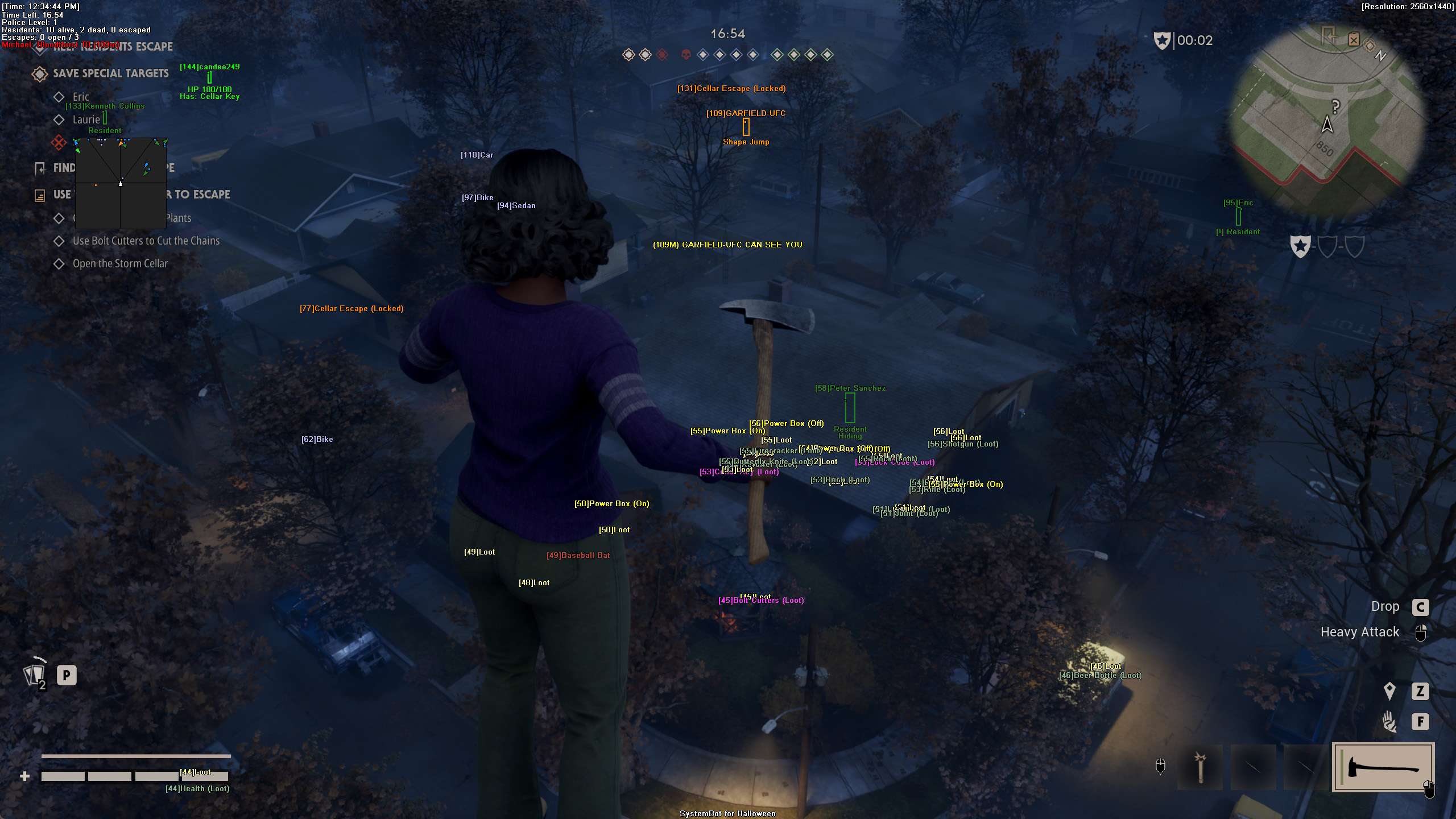
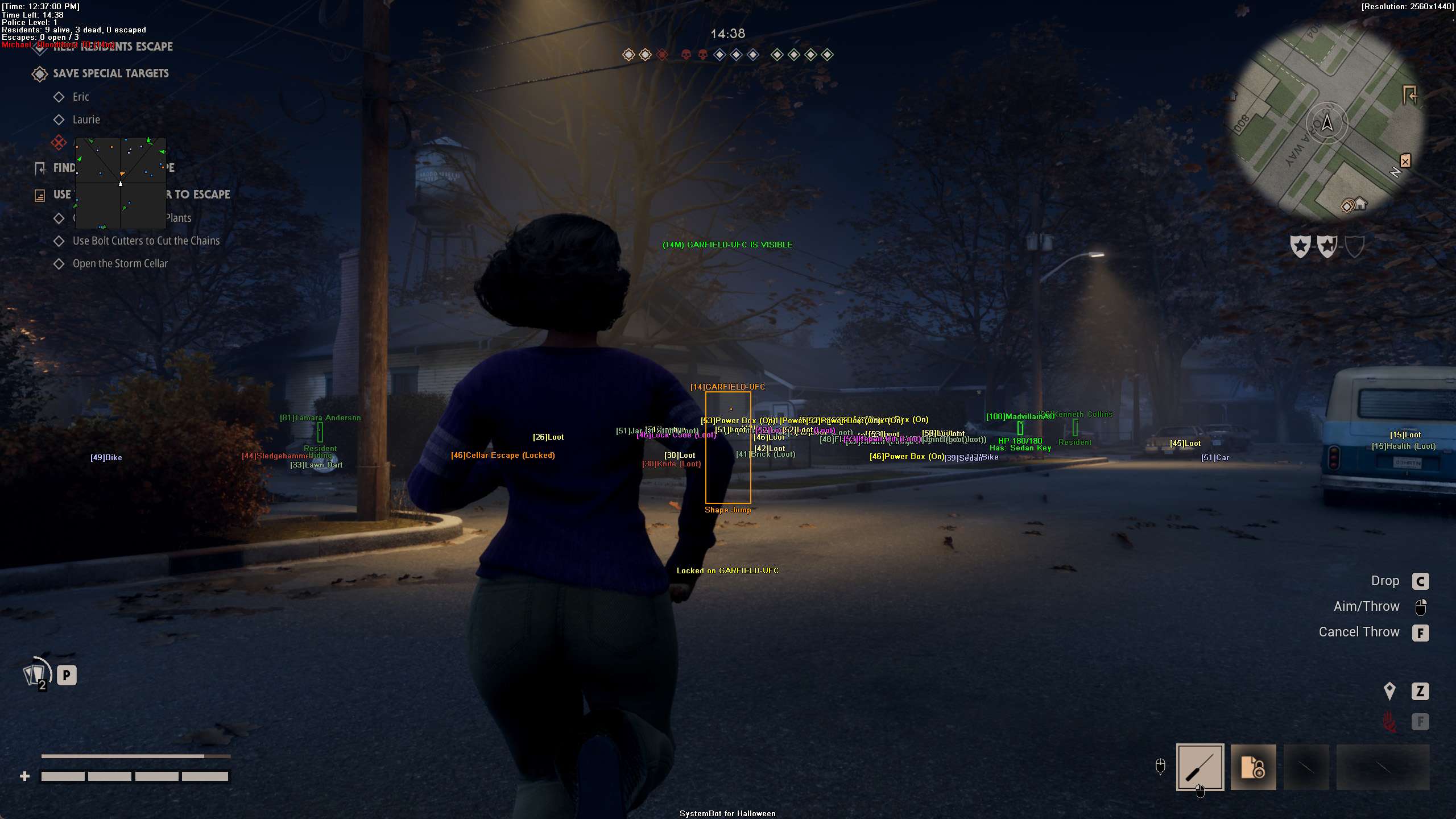
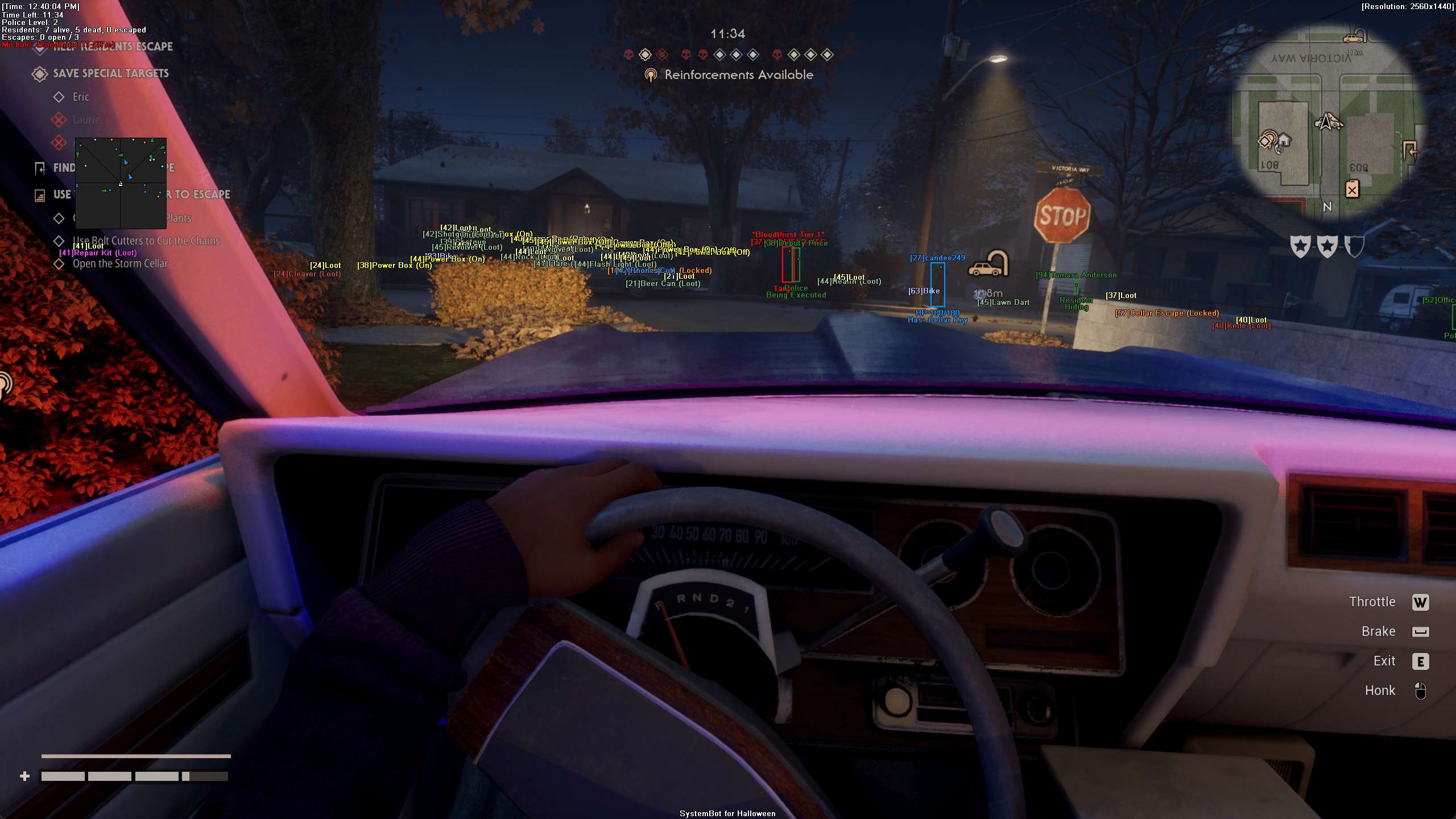
Our Halloween The Game hack puts that whole night on your screen: Killer ESP with Michael’s Bloodthirst and Stalk Tier, objective ESP for escapes and phones, a Warning System for the moment he looks your way, Fullbright for dark rooms and an aimbot for the firearms you find.

Tactical upgrade briefing
Built for a long night in Haddonfield

See where Michael Myers is and how strong he has become, find the escapes and the phone before time runs out, and keep track of your team and the residents you guide. The Halloween The Game cheat puts aim help, ESP and warnings in one in-game menu, and it is also part of the Premium Package.

Halloween The Game Hack and Cheat Features

The Halloween The Game cheat covers aim, awareness and control. Everything is set in the in-game menu. The highlights are below, and the full option list is in the Features panel on this page.

  • Aimbot with Bullet PredictionAuto Aim with Smooth Aim, Limit Angle and an aim key. Aim Bone picks Head, Neck or Chest, and Aim Style picks targets by FOV, distance or health. Bullet Speed Prediction and Prediction Scale lead moving targets, and Bullet Drop Prediction makes up for bullet drop over distance.
  • TriggerbotFires when your crosshair covers a target. Set a Fire Delay, choose the killer, friendlies, AI or downed targets, cap the Max Distance and run it on its own trigger key.
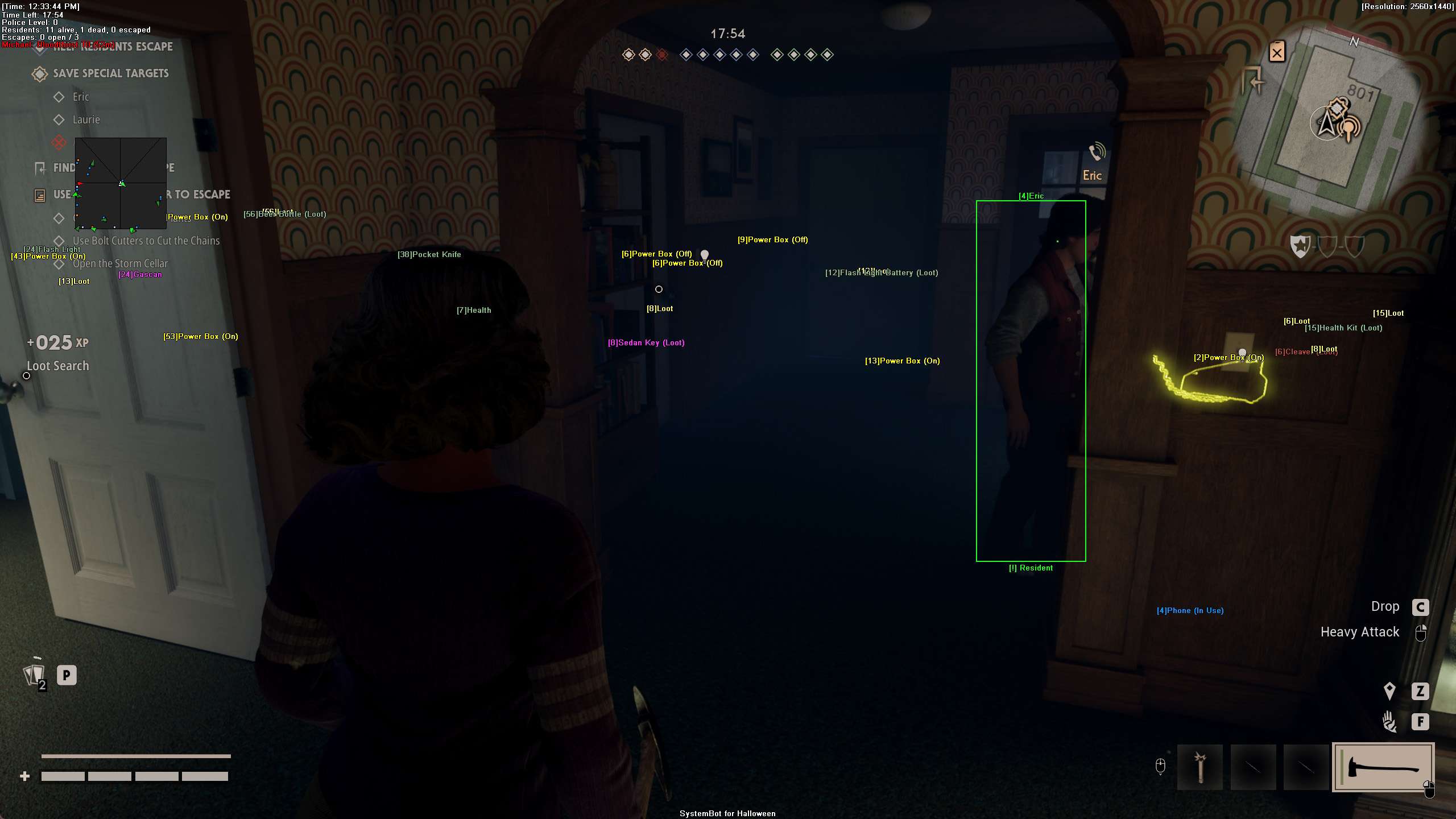
  • Killer and Hero ESPBounding Box in 2D, Corners or 3D, Head Dot, 2D Line and Aim Laser. The killer’s name, distance, status and Bloodthirst, plus each teammate’s name, distance, status, health and held item.
  • Objective ESPEscape ESP and Escape Status ESP, Phone ESP, Power Box ESP, Vehicle ESP, Hiding Spot ESP and Key Item ESP, with Item Distance ESP and Max Item Distance.
  • 2D RadarA top-down radar with Radar Scale, Window Size and Stick To Window. It plots teammates, Michael and AI, and Show Escapes and Show Phones add the escapes and phones. Markers are Triangle or Dot, and Show FOV draws your view cone.
  • Warning SystemAn on-screen alert when a target is aiming at you or can see you, each with its own angle, a Beep System, and a Target Warning card when Michael Myers targets you.
  • Fullbright and Ghost ModeFullbright removes shadows and lights up the map like daylight. Ghost Mode detaches the camera to fly through walls, with its own speed and Save Ghost Location. Speed Hack makes you move faster and runs on Toggle or Hold.
  • Misc and ControlA custom crosshair (Cross, Dot or T-Cross), Match Info, a Panic Key, OBS Stream Proof, six friendly and six enemy filter slots, and a default plus three custom setups with their own hotkeys.
Halloween The Game Hack in-game screenshot 1 of 4 Halloween The Game Hack in-game screenshot 2 of 4 Halloween The Game Hack in-game screenshot 3 of 4 Halloween The Game Hack in-game screenshot 4 of 4

Halloween The Game ESP: Know Where Michael Myers Is

Michael’s Shape Jump lets him appear in places you do not expect, and he stalks from cover before he strikes. On Haddonfield Heights, with its hedges, side streets and backyards under the water tower, the first sign of him often comes too late. The Michael Myers ESP starts with Killer Name ESP, which labels him through solid structures.

Killer Distance ESP shows how many meters away he is, and Show Enemy plots him on the 2D Radar. The Enemy Visible and Enemy Invisible colours tell you at a glance if he is in the open or behind cover, and the Aim Laser draws a line in the direction he is facing, so you can see if he is looking your way.

Michael Myers ESP for Stalk Tiers and Bloodthirst

Michael gets stronger during a match. He climbs Stalk Tiers and builds Bloodthirst, and when he grabs a civilian, that player has to struggle to break free. Killer Bloodthirst ESP shows his active Bloodthirst and Stalk Tier level, and Killer Status ESP shows whether he is stalking, carrying, stunning or in a chase. The Warning System adds an alert when he is facing you or can see you, each with its own angle. The Beep System plays a tone that gets stronger as danger comes closer, and Target Warning shows a warning card when Michael targets you. That gives you a moment to break line of sight before the grab.

Escape ESP and Phone ESP for the Civilian Objectives

The civilians have a lot to do before time runs out. Escapes are discovered on the map, a phone brings the police, and restoring power and fueling vehicles are part of the job. Escape ESP reveals the location of escape points, and Escape Status ESP shows whether an escape point is powered, locked or opened.

Phone ESP highlights the telephones used to contact the police, Power Box ESP marks power boxes across the map, and Vehicle ESP highlights drivable vehicles. On the 2D Radar, Show Escapes and Show Phones put the same points on the mini-map. Match Info shows match statistics, elapsed time and objective counters, and Ghost Mode detaches the camera so you can fly through walls and look at the next house before you walk in.

Weapon, Loot and Key Item ESP for Scavenging

Civilians scavenge for what they need. Pocket knives, heavy melee weapons such as Wood Axes and Pick-Axes, rifles and shotguns are found on the maps, and a key found early can decide how fast a match ends. Searching one dark room after another while Michael is close costs time. Weapon ESP marks weapons on the map, from knives to shotguns, Loot ESP highlights search containers, drawers and toolboxes, and Key Item ESP highlights important objective items.

Item ESP covers general supplies, Item Distance ESP shows how far away each one is, and the Item Key turns item and objective ESP on and off. Lighting comes up in player reviews too, and one sums it up as “Dark is too dark, and light is too light.” For those rooms, Fullbright lights up the entire map.

Halloween The Game Cheat for Guiding NPC Residents

The streets of Haddonfield have NPC residents who need help. Civilians can tell them to hide, to follow or to call the police, and guiding them to safety is part of winning. It is also a frequent complaint in negative reviews, where one player writes that civilians “need to babysit stupid npcs to win”.

AI Name ESP shows the name of each resident and officer, AI Type ESP tells you what kind of NPC it is, and AI Distance ESP shows how far away they are. Show AI plots them on the 2D Radar, and the Friendly AI Visible and Friendly AI Invisible colours show who is in sight and who is behind a wall, so you can find the resident you lost and bring them back to the group.

Halloween The Game Aimbot for Firearms Against Michael

Michael cannot be killed, but he can be knocked down, and a rifle or shotgun at the right moment buys your team time. The Halloween The Game aimbot is built for that moment. Aim on Enemy lets Auto Aim target the killer, Aim Bone picks where the aim locks, and Bullet Speed Prediction with Prediction Scale leads him while he moves.

Visibility Check only picks targets in direct line of sight, Stick to Target stays on him until he is downed or out of range, and Draw Locked shows which target the aimbot is on. The Triggerbot fires when your crosshair covers a target, with Trigger on Enemy, a Fire Delay and its own trigger key. Blinding him is another way to slow him down, and the Warning System tells you when he turns back toward you.

Hero ESP for Your Team of Four

Four civilians face one killer, and a team that splits up is easier to hunt. Michael also has a Detection Pulse to find residents in Hiding Spots, so a hiding place is no sure thing. Hero Status ESP shows whether each teammate is healthy, injured, carried or downed, Hero Health ESP adds a health bar, and Hero Item ESP shows what item or weapon they are holding.

Hero Name ESP and Hero Distance ESP tell you who is where. When Michael is carrying a teammate, you see it at once and know where help is needed. Hiding Spot ESP still marks hiding spots, so you know where cover is when you need it, and six friendly and six enemy filter slots let you track the players you care about.

How to Get the Halloween The Game Cheat

Getting started with SystemCheats takes three steps.

01
Check the Status

Open the live cheat status page. It lists each cheat as online, offline or staff only.

02
Create Your Account

Register on the forum for free. Your subscriptions, downloads and support all run through it.

03
Pick Your Plan

Buy Halloween The Game as a single cheat, or get it with the other games in the Premium Package. Both are in the price box on this page.

Is It Safe to Cheat in Halloween The Game?

PCGamingWiki lists Easy Anti-Cheat as required on all versions of Halloween: The Game. That listing is not an official statement from IllFonic. No cheat is ever completely risk free. Smooth Aim, a low Limit Angle, Use Aim Key and Visibility Check keep the aim under your control, the Panic Key hides all cheat visuals with one press, and the live cheat status page always shows the current state of every cheat.

Frequently Asked Questions

Is the Halloween The Game cheat online?

The live cheat status page always shows the current state of every cheat, including Halloween The Game. Check it before you buy.

Is Halloween The Game included in the Premium Package?

Yes. Halloween The Game is part of the Premium Package, together with the other games listed under Cheats Included on its page, and it is also part of the One Day Trial. You can also buy it as a single cheat. The options are in the price box on this page.

Which versions of Halloween The Game does the cheat support?

The Halloween The Game cheat is made for Windows PC. Only the Steam version of the game is supported.

Which anti-cheat does Halloween The Game use?

PCGamingWiki lists Easy Anti-Cheat for all versions of the game. That listing is not an official statement from IllFonic.

Does the cheat show how strong Michael is?

Yes. Killer Bloodthirst ESP shows his active Bloodthirst and Stalk Tier level, and Killer Status ESP shows whether he is stalking, carrying, stunning or in a chase.

Can it help me find the phone and the escapes?

Yes. Phone ESP and Escape ESP mark them on your screen, Escape Status ESP shows whether an escape point is powered, locked or opened, and Show Phones and Show Escapes put them on the 2D Radar.

Does it help in dark rooms?

Fullbright removes shadows and lights up the map like daylight, so dark houses are easier to search.

Survive the Night with the Halloween The Game Hack

Michael Myers does not stay where you last saw him. The Halloween The Game ESP puts the killer, the escapes, the residents and your team on your screen, and the aimbot helps in the moment you need to knock him down. Check the status page, pick a single cheat or the Premium Package, and set it up your way. The other games we support are on the cheats page.

Need Help?

Our support team is available 24 hours a day, 7 days a week through the SystemCheats forum and TeamSpeak. Read what customers say on Trustpilot, or compare all cheat packages to find the right fit.

Cheat & Hack Information

What is Halloween The Game?


Halloween The Game is a stealth and survival horror game from IllFonic, built on Unreal Engine 5 and set in Haddonfield on Halloween night. In multiplayer, one player is Michael Myers and four players are civilians who warn residents and try to call the police.


Cheating in Halloween The Game


The Halloween The Game cheat has Killer ESP with Michael's Bloodthirst and Stalk Tier, Escape ESP and Phone ESP, a Warning System, Fullbright and an aimbot for the firearms you find. It is sold as a single cheat and in the Premium Package.


Is the Halloween The Game cheat safe?


PCGamingWiki lists Easy Anti-Cheat for Halloween The Game. That listing is not an official statement from IllFonic. No cheat is ever completely risk free. However, you can always adjust your settings to play legitimately for the long run. Check the live status page before you play.

Pricing

Features

Aimbot
Auto Aim Moves your aim onto a valid target for you automatically
Auto Fire Fires your weapon for you once a target is locked
Fire Delay (0 ~ 1000) Adds a short wait in milliseconds before firing once a target is locked
Smooth Aim (1 ~ 50) Slows the aim movement so it looks natural, and higher values make it slower
Limit Angle (0 ~ 180) Sets how far from your crosshair a target can be for the aimbot to lock on
Use Aim Key Makes the aimbot work only while you hold or toggle your aim key
Bullet Speed Prediction Leads moving targets based on how long the shot takes to arrive
Bullet Drop Prediction Aims a little higher to make up for bullet drop over long distances
Prediction Scale (1 ~ 30) Fine tunes how strong the lead and bullet drop prediction is
Visibility Check Stops the aimbot from targeting enemies hidden behind walls or cover
Stick to Target Keeps the aimbot on one target until it is down or leaves range
Aim Style (FOV, Distance, Health) Sets how the aimbot chooses the best target when more than one is in range
Aim Bone (Head, Neck, Chest) Sets which body part the aimbot aims at, such as the head or chest
Aim on Friendly Lets the aimbot target and lock onto your teammates
Aim on Enemy Lets the aimbot target and lock onto enemies
Aim on AI Lets the aimbot target and lock onto AI characters
Aim on Downed Lets the aimbot target players and enemies who are downed
Max Distance (0 ~ 1500) Sets the farthest distance, in meters, at which targets are still picked up or shown
Draw Locked (None, Text, Box, Both) Draws a marker on the target the aimbot is locked onto
Draw Aim FOV Draws a circle on screen that shows where the aimbot is active
Triggerbot
Triggerbot Shoots for you when your crosshair is on a valid target
Use Trigger Key Makes the triggerbot fire only while you hold the trigger key
Fire Delay (0 ~ 1000) Adds a short wait in milliseconds before firing once a target is locked
Trigger on Friendly Lets the triggerbot fire at friendly teammates
Trigger on Enemy Lets the triggerbot fire at enemies in your crosshair
Trigger on AI Lets the triggerbot fire at AI controlled characters
Trigger on Downed Lets the triggerbot fire at downed targets
Max Distance (0 ~ 1500) Sets the farthest distance, in meters, at which targets are still picked up or shown
3D Radar
Bounding Box (None, 2D, Corners, 3D) Draws a box around each target so you can see where they are
Box Size (1 ~ 10) Sets how thick the lines of each ESP box are drawn
2D Line Draws snap lines from your screen to each target
Hero Name ESP Shows the name of each survivor on the map
Hero Distance ESP Shows how far away each survivor is from you
Hero Status ESP Shows if a survivor is healthy, injured, carried or downed
Hero Health ESP Shows a health bar for each survivor on the map
Hero Item ESP Shows the item or weapon each survivor is holding
Killer Name ESP Shows the name of the killer through walls
Killer Distance ESP Shows how far away the killer is from you
Killer Status ESP Shows what the killer is doing, such as stalking or chasing
Killer Bloodthirst ESP Shows the current stalk and bloodthirst level of the killer
AI Name ESP Shows the name or type of each AI character
AI Distance ESP Shows how far away each AI character is from you
AI Type ESP Shows what type of AI each character is, such as a townsfolk, child or deputy
Head Dot Draws a dot on the head of each target you can see
Dot Size (2 ~ 20) Sets how big the dot markers are drawn on each target
Aim Laser Draws a line that shows where each target is aiming
Laser Size (50 ~ 3000) Sets the length and thickness of the aim laser line
Projectile ESP Shows grenades, thrown items and other projectiles while they fly
Escape ESP Shows exit gates, the map edge and escape roads
Escape Status ESP Shows whether each exit is locked, without power or open
Vehicle ESP Highlights vehicles, such as cars, trucks and tanks, through terrain
Phone ESP Highlights the landline telephones used to call the police
Power Box ESP Highlights circuit breaker power boxes and generators across the map
Hiding Spot ESP Shows closets, beds and sheds where survivors can hide
Key Item ESP Shows key items such as car keys, fuses and batteries
Weapon ESP Highlights dropped weapons on the ground
Item ESP Shows items and supplies in the game world
Loot ESP Shows loot and lootable containers such as drawers
Trap ESP Highlights traps placed on the map, such as bear traps and tripwires
Radio ESP Marks the emergency CB radios across the neighborhood
Show Friendly Shows your teammates on the ESP and radar
Show Enemy Shows enemies on the ESP and radar so you always know where they are
Show AI Shows AI characters on the ESP and radar
Show Invisible Shows hidden, stealthy and cloaked targets on the radar
Max Distance (0 ~ 1500) Sets the farthest distance, in meters, at which targets are still picked up or shown
Max Item Distance (0 ~ 1500) Sets how far away items and loot are still shown
Item Distance ESP Shows how far away each item is from you
2D Radar
Show Radar Turns on the 2D radar overlay on your screen
Show Cross Draws cross lines through the middle of the radar
Show Window Draws the background frame of the radar window
Show Dot Shows targets as dots on the radar window
Show FOV Draws a cone on the radar that shows where you are looking
Show Friendly Shows your teammates on the ESP and radar
Show Enemy Shows enemies on the ESP and radar so you always know where they are
Show AI Shows AI characters on the ESP and radar
Show Invisible Shows hidden, stealthy and cloaked targets on the radar
Show Escapes Marks exit gates and escape routes on the radar
Show Phones Marks landline telephone locations on the radar
Stick To Window Keeps targets that are out of range pinned to the edge of the radar
Radar Scale (0 ~ 60) Sets the radar zoom, lower zooms in and higher zooms out
Window Size (45 ~ 260) Sets the width and height of the radar window
Cross Size (45 ~ 260) Sets the length of the cross lines in the middle of the radar
Dot Size (2 ~ 20) Sets how big the dot markers are drawn on each target
Dot Type (Triangle, Dot) Switches radar markers between plain dots and triangles that point where targets face
Center 2D Radar Places the radar in the middle of the screen, around your crosshair
Max Distance (0 ~ 1500) Sets the farthest distance, in meters, at which targets are still picked up or shown
Warning System
Warning System Shows on-screen warnings when enemies are near, can see you or aim at you
Is Aiming At You Angle (0 ~ 180) Sets the angle used to warn you when an enemy is aiming at you
Can See You Angle (0 ~ 180) Sets the angle used to warn you when an enemy can see you
Max Distance (0 ~ 1500) Sets the farthest distance, in meters, at which targets are still picked up or shown
Beep System Plays a warning beep when an enemy is looking or aiming at you
Misc
Crosshair (None, Cross, Dot, T-Cross) Draws a custom crosshair in the center of your screen, over the game's own
Crosshair Size (2 ~ 200) Sets the size of the custom crosshair on your screen
Draw FPS Shows your current frames per second on screen
Draw Resolution Shows your current screen resolution on the overlay
Draw Time Shows your local system time on the overlay
Draw Watermark Shows the SystemCheats watermark on screen so you know the cheat is active
Use Panic Key Turns on a hotkey that instantly hides all cheat visuals and menus
Font Size (10 ~ 20) Sets the size of the ESP and overlay text on screen
Font Shadow (Bordered, Shadow, None) Adds a shadow or border behind overlay text so it is easier to read
Fullbright Lights up the whole map evenly so dark areas are easy to see
Speed Hack Makes your character move faster than normal
Speed Hack Amount (10 ~ 500) Sets how strong the speed boost is while Speed Hack is on
Speed Hack Type (Toggle, Hold) Sets how the speed hack works, such as holding or toggling its key
Match Info Shows match stats such as elapsed time and objective counters
Target Warning Shows a warning card when Michael Myers is targeting you
Ghost Mode Lets you fly freely through walls and terrain to scout the map
Ghost Mode Speed (1 ~ 100) Sets how fast you fly while Ghost Mode is on
Save Ghost Location Remembers your Ghost Mode position so you return there next time
Auto Struggle Struggles for you automatically when you need to break free
Struggle Delay Sets the delay between the automatic struggle inputs
Auto Numbers Clicks the right numbers for you in the number QTE mini-games
Auto QTE Completes quick time events for you, such as the prompts when talking to residents
Filters
Friendly Player 1 - 6 Lets you enter friendly player names to set tracking for each ally
Enemy Player 1 - 6 Lets you enter enemy player names to track and single out
Colors
Enemy Invisible Sets the color for Michael Myers when he is behind walls or cover
Enemy Visible Sets the color for Michael Myers when he is in your direct line of sight
Enemy AI Invisible Sets the color for hostile AI hidden behind walls or cover
Enemy AI Visible Sets the color for hostile AI in your direct line of sight
Friendly Invisible Sets the color for teammates hidden behind walls or cover
Friendly Visible Sets the color for teammates in your direct line of sight
Friendly AI Invisible Sets the color for friendly AI hidden behind walls or cover
Friendly AI Visible Sets the color for friendly AI in your direct line of sight
Projectile Sets the color for thrown flares, fireworks and other thrown objects
Escape Sets the colors for locked escape gates and unlocked, powered exits
Vehicle Sets the color for escape station wagons and other vehicles
Phone Sets the color the ESP uses for rotary landline telephones
Power Box Sets the color for power breaker boxes and generators
Hiding Spot Sets the color for hiding spots such as closets, under-bed spaces and sheds
Key Item Sets the color for key objective items such as fuses, car keys and batteries
Weapon Sets the color for revolvers, shotguns, knives and defensive tools
Item Sets the color for general supplies and tools shown on the ESP
Loot Sets the color for search containers, drawers and toolboxes
Trap Sets the color for killer bear traps and tripwires
CB Radio Sets the color used to draw emergency CB radios on the ESP
Crosshair (None, Cross, Dot, T-Cross) Draws a custom crosshair in the center of your screen, over the game's own
Menu Sets the color scheme for the in-game cheat menu
Is Aiming At You Sets the warning color used when an enemy aims directly at you
Can See You Sets the warning color for when you are in Michael's line of sight
Is Visible Sets the indicator color used when you are exposed and visible
Aim FOV Sets the color of the aimbot FOV circle drawn on screen
Settings/Keys
Panic Key Sets a key that instantly hides or turns off all cheat features
Menu Key Sets the key that opens and closes the cheat menu
Aim Key Sets the key that turns on the aimbot while held or toggled
Trigger Key Sets the key you hold or toggle to turn the triggerbot on
Item Key Sets a key that shows or hides the item ESP
Speed Hack Key Sets the key that turns on the Speed Hack movement boost
Ghost Mode Key Sets the key that switches Ghost Mode on and off
Default Key Sets a key that loads the default profile instantly
Custom 1 Key Sets a key that loads custom profile 1 instantly
Custom 2 Key Sets a key that loads custom profile 2 instantly
Custom 3 Key Sets a key that loads custom profile 3 instantly
Additional
OBS Stream Proof Hides cheat visuals from OBS and other recording software