ARK: Survival Evolved Hack, Aimbot and Dino ESP Cheat for PC

Included in Premium Package and One Day Trial

Steam & Microsoft Store are supported - BattlEye is not supported
Cheat video
ARK Screenshot 1
ARK Screenshot 2
ARK Screenshot 3
ARK Screenshot 4
Survival crafting • Dinos, tames and tribes • Windows PC

ARK: Survival Evolved Hack with Aimbot and ESP for PC

Get instant access to the ARK: Survival Evolved Cheat for PC.

ARK: Survival Evolved is the open world survival game from Studio Wildcard, published together with Snail Games USA and built on Unreal Engine 4. You wake up on the shore of a mysterious island, naked, freezing and starving. From there you hunt, harvest, craft, grow crops, research technologies and build a shelter, while hunger, thirst, temperature, weather and a day and night cycle all work against you. Players often call it ARK, or ASE to tell it apart from the remaster ARK: Survival Ascended.

The heart of the game is the dinosaurs. Steam lists over 100 creatures you can tame, and a tame levels up, carries your gear, can be ridden and can be bred over generations with inherited traits. Players team up in tribes, share their tames and build bases from parts that snap together.

Steam describes servers for 100 or more players where your character, your buildings and your tames stay in the world when you log off. Evolved no longer has official servers, so online play runs on unofficial servers with their own rules, next to single player and private hosting. The maps range from The Island, Scorched Earth and Aberration to The Center, Ragnarok, Valguero, Crystal Isles, Lost Island and Fjordur.

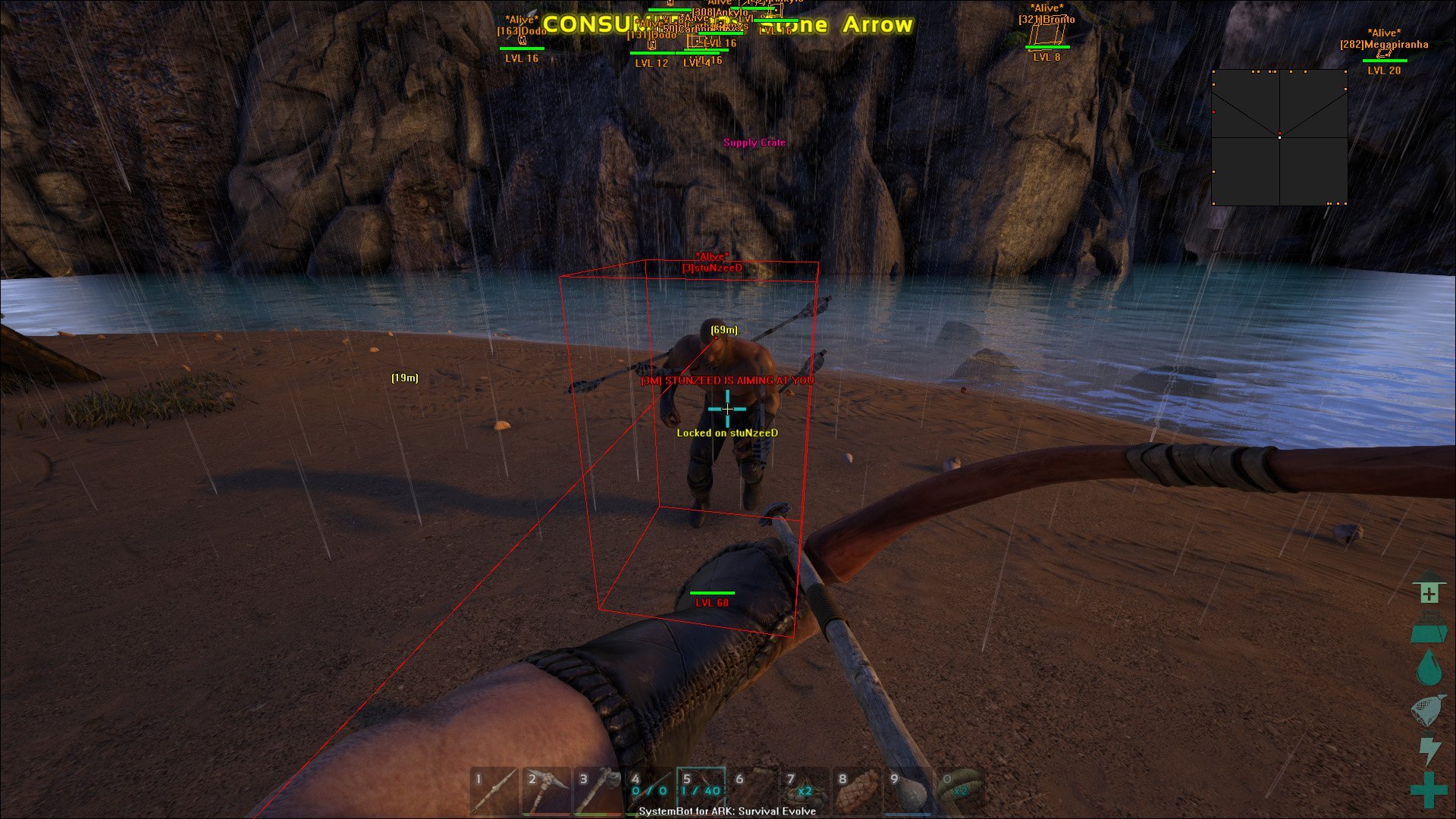
Our ARK: Survival Evolved hack is built for that world: an aimbot with bullet speed and bullet drop prediction, a triggerbot, 3D and 2D radar ESP for players and dinos, a dino level filter, item ESP, a warning system, and No Recoil, No Spread, No Sway and a Day Time Hack.

Tactical upgrade briefing
See the dino before you tame it

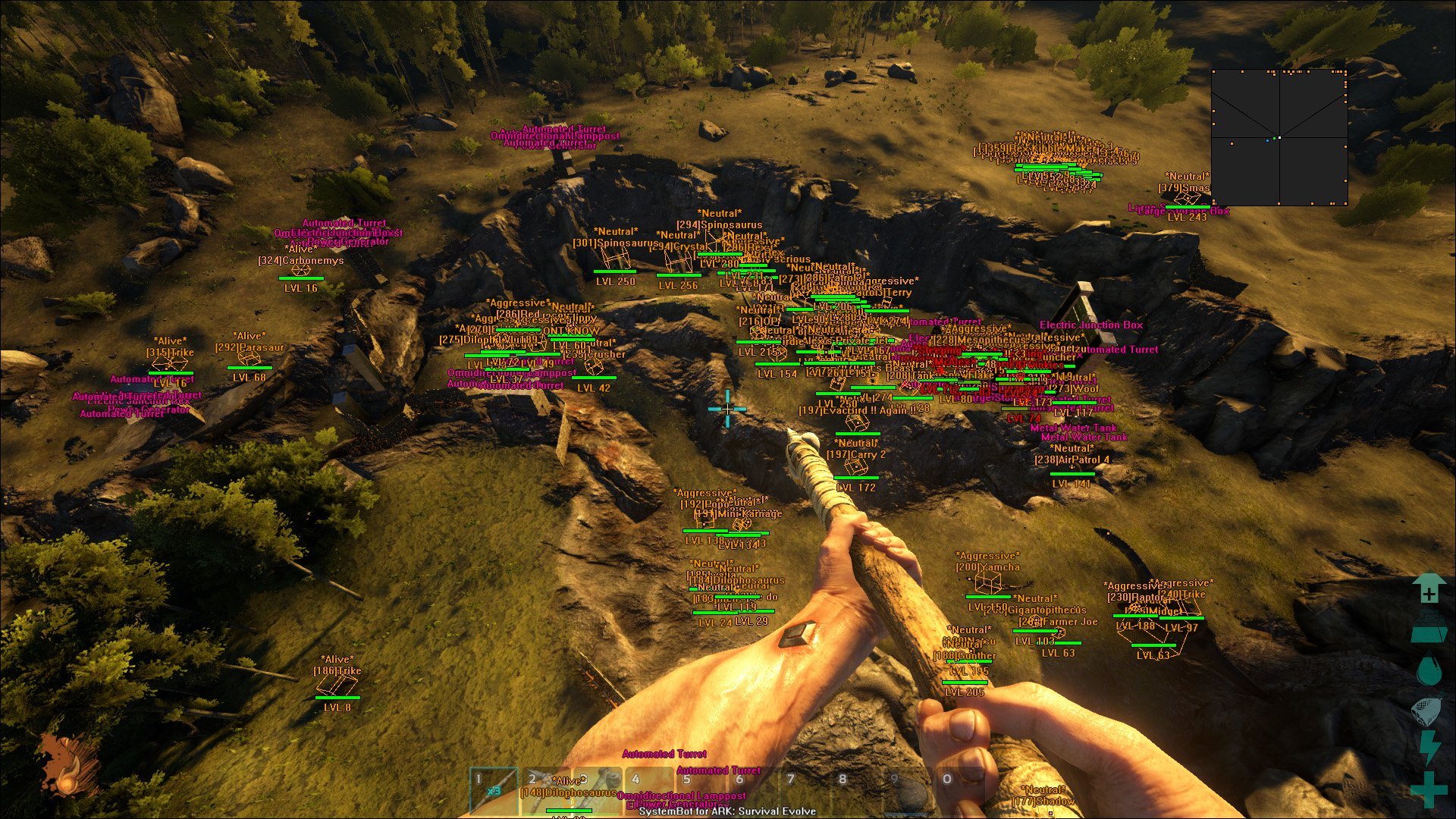
Dino Level ESP shows each dino’s level and the Dino Min Level Filter hides the ones below the level you set, the radar shows sleeping players and dinos, and the Warning System tells you when someone is aiming at you. Less time riding around searching, more time building up your tribe.

ARK: Survival Evolved Hack and Cheat Features

The ARK cheat covers aim, awareness and survival, with separate options for players and dinos, friendly and enemy. Everything is set from the in-game menu, and three settings slots keep different setups ready. The highlights are below, and the full option list is in the Features panel on this page.

  • Aimbot with Bullet PredictionAuto Aim with Smooth Aim, Limit Angle and Use Aim Key. Bullet Speed Prediction, Bullet Drop Prediction and Prediction Scale lead moving targets. Aim Bone picks Bone Scan, Head or Chest, and Aim Style picks targets by FOV, Distance, First in list or Health.
  • TriggerbotFires when your crosshair is on a valid target, with a Fire Delay, its own trigger key and a Max Distance. Choose friendly or enemy players, friendly or enemy dinos, and sleeping targets.
  • 3D Radar ESP for PlayersBounding Box in 2D or 3D, Head Dot, 2D Line and Aim Laser, with Player Name, Distance, Health, Status and Level ESP, all within the Player Max Distance you set.
  • Dino ESP with Level FilterDino Name, Distance, Health, Status and Dino Level ESP, a Dino Max Distance and a Dino Min Level Filter, with friendly and enemy dinos shown in their own colours.
  • Item and Grenade ESPItem ESP and Grenade ESP, each with its own Max Distance, plus 80 Item filter out slots and 80 Dino filter out slots to keep the screen clean.
  • 2D RadarA top-down radar with Radar Scale, Window Size and Stick To Window, placed with the mouse. Players, dinos, sleeping and dead ones are each switched on or off.
  • Warning SystemAn on-screen warning when someone is aiming at you or can see you, each with its own angle, plus a Beep System with its own Max Distance.
  • Weapon Control and MiscNo Recoil, No Spread and No Sway, a Day Time Hack, a custom crosshair (Cross, Dot or T-Cross), health bars, a Panic Key, and default plus two custom settings slots.
ARK: Survival Evolved Hack in-game screenshot 1 of 4 ARK: Survival Evolved Hack in-game screenshot 2 of 4 ARK: Survival Evolved Hack in-game screenshot 3 of 4 ARK: Survival Evolved Hack in-game screenshot 4 of 4

ARK: Survival Evolved ESP for Finding the Right Dino

Taming is the slow part of ARK. PC Gamer’s review singled out taming as a huge time sink, and a lot of that time goes into riding around the map looking for the right creature before the tame even starts. The ARK: Survival Evolved ESP cuts that search down.

Dino Name ESP tells you what a creature is, Dino Level ESP shows its level, and the Dino Min Level Filter hides the creatures below the level you choose. Add the 80 Dino filter out slots and the screen shows only the dinos you care about, so you can ride straight to a high level creature instead of checking one after another.

ARK: Survival Evolved Hack Against Alpha Tribes

On a busy server, a common fear is the alpha tribe. Players describe large tribes that take over a server and raid smaller tribes while they are offline, wiping turrets, metal bases and high level dinos. A small tribe cannot match that in numbers, so it has to see the danger early.

Player Name ESP, Player Distance ESP, Player Health ESP and Player Level ESP show who is coming and how strong they are, and the Warning System flags a player who is aiming at you or can see you. The Beep System adds a beep to the warning within its own Max Distance, so you hear it even while you are busy crafting.

Sleeping Players and Dead Bodies on the Radar

In ARK, logging off does not remove you from the world. Your character stays where you left it, asleep, and so do your tames. That matters when tribes raid each other. The cheat has Show Sleeping Player, Show Sleeping Dino, Show Dead Player and Show Dead Dino, on the 3D Radar and on the 2D Radar. The aimbot and the triggerbot each have their own switch for sleeping targets, Aim on Sleeping and Trigger on Sleeping, so you decide whether they are part of the fight or only marked on screen.

ARK: Survival Evolved Aimbot for Long Shots and Moving Mounts

Fights in ARK are rarely clean. The other player sits on a fast tame or circles you on a wyvern, and your shots take time to land. The ARK: Survival Evolved aimbot uses Bullet Speed Prediction, Bullet Drop Prediction and Prediction Scale to place the aim where the target will be. No Recoil, No Spread and No Sway keep your weapon steady while you line up the shot, and Smooth Aim with a low Limit Angle keeps the aim movement calm.

Rider or Mount: Aim on Players and Dinos

When a player rides a dino at you, you have two targets in one. The aimbot has separate switches for Aim on Player Enemy and Aim on Dino Enemy, with matching friendly options, so you choose whether it goes for the rider or the mount. The triggerbot has the same choice with Trigger on Player Enemy and Trigger on Dino Enemy.

Aim Bone picks Head or Chest, Visibility Check skips targets you cannot see, Stick to Target stays on one enemy instead of jumping between them, and Draw Locked marks the target the aimbot is on. The Dino Min Level Filter works in the aimbot and the triggerbot too, so low level dinos do not pull your aim or set off a shot.

Item ESP for the Grind Toward Boss Fights

The endgame in ARK is the boss fights. The Island has the Megapithecus, the Broodmother Lysrix and the Dragon, Scorched Earth has the Manticore and Aberration has Rockwell, each in Gamma, Beta and Alpha difficulty. Beating them unlocks Tek engrams and Element, the endgame resource. Getting there takes a lot of farming and a lot of loot. Item ESP with its Item Max Distance marks items around you, and the 80 Item filter out slots let you hide the clutter you do not need, so the screen only shows the items you want to see.

Day Time Hack for the Day and Night Cycle

ARK runs on a day and night cycle, and night on the island is dark. Visibility drops, and a player or a predator can get close before you see it. The Day Time Hack gives you day time while you play, and on top of that the 3D Radar ESP adds boxes, a Head Dot and names on players and dinos in range. Each group has its own colour: Player Enemy, Player Friendly, Dino Enemy, Dino Friendly and a Dino Alpha colour. The crosshair, menu and warning colours can be changed too, so the markers stay easy to read.

How to Get the ARK: Survival Evolved Cheat

Getting started with SystemCheats takes three steps.

01
Check the Status

Open the live cheat status page. It lists each cheat as online, offline or staff only.

02
Create Your Account

Register on the forum for free. Your subscriptions, downloads and support all run through it.

03
Pick Your Plan

Buy the ARK: Survival Evolved cheat on its own or get it with the Premium Package, then download the loader and start the game.

Is It Safe to Cheat in ARK: Survival Evolved?

Studio Wildcard switched on BattlEye for the official ARK: Survival Evolved servers, and its developers announced VAC ban waves and a zero tolerance policy against aimbots, ESP and other third party programs. The official servers are gone, and on unofficial servers the server owner decides whether BattlEye runs. The status page lists this cheat as ARK: Survival Evolved (Non-BE), which stands for non BattlEye.

Sources do not agree on whether VAC is still active, so we do not say that it is or that it is not. The game also has an anti-mesh system that removes anything found inside the map mesh. No cheat is ever completely risk free. The live cheat status page always shows the current state of every cheat, including this one.

Frequently Asked Questions

Is the ARK: Survival Evolved cheat online?

The live cheat status page always shows the current state of every cheat, including ARK: Survival Evolved. Check it before you buy.

Is ARK: Survival Evolved included in the Premium Package?

Yes. You can buy the ARK: Survival Evolved cheat as a single cheat, and it is also part of the Premium Package, which covers the games listed under Cheats Included on its page.

Which versions of ARK: Survival Evolved does the cheat support?

The status page lists two: ARK: Survival Evolved (Non-BE), where Non-BE stands for non BattlEye, and ARK: Survival Evolved (Microsoft Store). Both are for Windows 10 and 11 PCs.

Which anti-cheat does ARK: Survival Evolved use?

Studio Wildcard used BattlEye on its official servers and ran VAC ban waves. Sources disagree on whether VAC is still active, and on unofficial servers the owner chooses whether BattlEye is on.

Is this the cheat for ARK: Survival Ascended?

No. This cheat is for ARK: Survival Evolved, often called ASE. ARK: Survival Ascended (ASA) is a separate game, a remaster on Unreal Engine 5, and it is not listed for this cheat on the status page.

Can the cheat show only high level dinos?

Yes. The Dino Min Level Filter hides dinos below the level you set. It works in the 3D Radar, the aimbot and the triggerbot, and the 80 Dino filter out slots hide the creatures you do not want to see.

Can the aimbot target dinos as well as players?

Yes. Aim on Player Friendly, Aim on Player Enemy, Aim on Dino Friendly and Aim on Dino Enemy are separate switches, so you decide whether the aimbot goes for players, dinos or both.

Tame, Build and Defend Your Tribe

ARK asks a lot of your time: long tames, long farming runs and nights spent guarding a base. The ARK: Survival Evolved cheat helps you spend that time on the parts you enjoy, with ESP for players, dinos and items, an aimbot with bullet prediction and a warning system that watches your back. The other games are on the cheats page.

Need Help?

Our support team is available 24 hours a day, 7 days a week through the SystemCheats forum. Read what customers say on Trustpilot, or compare all cheat packages to find the right fit.

Cheat & Hack Information

What is ARK: Survival Evolved?


ARK: Survival Evolved is the open world survival game from Studio Wildcard, built on Unreal Engine 4. You hunt, craft and build on an island full of dinosaurs that you can tame, ride and breed.


Cheating in ARK: Survival Evolved


Our ARK: Survival Evolved cheat has an aimbot with bullet prediction, 3D Radar ESP for players and dinos, Dino Level ESP with a level filter, Item ESP and a Warning System. You can buy it as a single cheat or get it with the Premium Package.


Is the ARK: Survival Evolved cheat safe?


Studio Wildcard used BattlEye on the official servers. On unofficial servers the owner decides whether BattlEye runs, and this cheat is for the non BattlEye version. No cheat is ever completely risk free. However, you can always adjust your settings to play legitimately for the long run. Check the live status page before you play.

Reviews

Pricing

Features

Aimbot
Auto Aim Moves your aim onto a valid target for you automatically
Auto Fire Fires your weapon for you once a target is locked
Fire Delay (0 ~ 1000) Adds a short wait in milliseconds before firing once a target is locked
Smooth Aim (1 ~ 50) Slows the aim movement so it looks natural, and higher values make it slower
Limit Angle (0 ~ 180) Sets how far from your crosshair a target can be for the aimbot to lock on
Use Aim Key Makes the aimbot work only while you hold or toggle your aim key
Bullet Speed Prediction Leads moving targets based on how long the shot takes to arrive
Bullet Drop Prediction Aims a little higher to make up for bullet drop over long distances
Prediction Scale (1 ~ 30) Fine tunes how strong the lead and bullet drop prediction is
Visibility Check Stops the aimbot from targeting enemies hidden behind walls or cover
Stick to Target Keeps the aimbot on one target until it is down or leaves range
Aim Style (FOV, Distance, First in list, Health) Sets how the aimbot chooses the best target when more than one is in range
Aim Bone (Bone Scan, Head, Chest) Sets which body part the aimbot aims at, such as the head or chest
Aim on Player Friendly Lets the aimbot target and lock onto friendly players
Aim on Player Enemy Lets the aimbot target and lock onto enemy players
Aim on Dino Friendly Lets the aimbot target and lock onto friendly dinos
Aim on Dino Enemy Lets the aimbot target and lock onto enemy dinos
Aim on Sleeping Lets the aimbot target sleeping players and creatures
Max Distance (0 ~ 1500) Sets the farthest distance, in meters, at which targets are still picked up or shown
Dino Min Level Filter Makes the aimbot skip creatures below the level you set
Draw Locked Draws a marker on the target the aimbot is locked onto
Triggerbot
Triggerbot Shoots for you when your crosshair is on a valid target
Use Trigger Key Makes the triggerbot fire only while you hold the trigger key
Fire Delay (0 ~ 1000) Adds a short wait in milliseconds before firing once a target is locked
Trigger on Player Friendly Lets the triggerbot fire at friendly players
Trigger on Player Enemy Lets the triggerbot fire at enemy players
Trigger on Dino Friendly Lets the triggerbot fire at friendly dinos in your crosshair
Trigger on Dino Enemy Lets the triggerbot fire at enemy dinos in your crosshair
Trigger on Sleeping Lets the triggerbot fire at sleeping targets
Max Distance (0 ~ 1500) Sets the farthest distance, in meters, at which targets are still picked up or shown
Dino Min Level Filter Makes the aimbot skip creatures below the level you set
3D Radar
Bounding Box (None, 3D, 2D) Draws a box around each target so you can see where they are
Box Size (1 ~ 10) Sets how thick the lines of each ESP box are drawn
2D Line Draws snap lines from your screen to each target
Player Name ESP Shows the name of each player above their character
Player Distance ESP Shows how far away each player is in meters
Player Health ESP Shows a health bar for each player so you can see how hurt they are
Player Status ESP Shows the current status of each player on the ESP
Player Level ESP Shows the level of each player on the ESP
Player Max Distance Sets how far away players can be and still show on the ESP
Dino Name ESP Shows the name or species of each dino on the map
Dino Distance ESP Shows how far away each dino is from you
Dino Health ESP Shows a health bar for each dino near your position
Dino Status ESP Shows the current status of each dino on the map
Dino Level ESP Shows the level of each dino you can see on the map
Dino Max Distance Sets how far away dinos are still shown on screen
Dino Min Level Filter Makes the aimbot skip creatures below the level you set
Head Dot Draws a dot on the head of each target you can see
Dot Size (2 ~ 20) Sets how big the dot markers are drawn on each target
Aim Laser Draws a line that shows where each target is aiming
Laser Size (50 ~ 3000) Sets the length and thickness of the aim laser line
Grenade ESP Shows grenades on the ground and in the air
Grenade Max Distance Sets how far away grenades are still shown
Item ESP Shows items and supplies in the game world
Item Max Distance (0 ~ 500) Sets how far away items are still shown on screen
Show Player Friendly Shows friendly players on the ESP so you always know where they are
Show Player Enemy Shows enemy players on the ESP so you always know where they are
Show Dino Friendly Shows friendly dinos on the ESP so you always know where they are
Show Dino Enemy Shows enemy dinos on the ESP so you always know where they are
Show Sleeping Player Shows sleeping players on the ESP so you always know where they are
Show Sleeping Dino Shows sleeping dinos on the ESP so you always know where they are
Show Dead Player Shows dead players on the ESP so you can find their bodies
Show Dead Dino Shows dead dinos on the ESP so you can find their bodies
2D Radar
Show Radar Turns on the 2D radar overlay on your screen
Show Cross Draws cross lines through the middle of the radar
Show Window Draws the background frame of the radar window
Show Dot Shows targets as dots on the radar window
Show FOV Draws a cone on the radar that shows where you are looking
Show Player Friendly Shows friendly players on the ESP so you always know where they are
Show Player Enemy Shows enemy players on the ESP so you always know where they are
Show Dino Friendly Shows friendly dinos on the ESP so you always know where they are
Show Dino Enemy Shows enemy dinos on the ESP so you always know where they are
Show Sleeping Player Shows sleeping players on the ESP so you always know where they are
Show Sleeping Dino Shows sleeping dinos on the ESP so you always know where they are
Show Dead Player Shows dead players on the ESP so you can find their bodies
Show Dead Dino Shows dead dinos on the ESP so you can find their bodies
Stick To Window Keeps targets that are out of range pinned to the edge of the radar
Radar Scale (0 ~ 60) Sets the radar zoom, lower zooms in and higher zooms out
Window Size (45 ~ 260) Sets the width and height of the radar window
Cross Size (45 ~ 260) Sets the length of the cross lines in the middle of the radar
Dot Size (2 ~ 20) Sets how big the dot markers are drawn on each target
Warning System
Warning System Shows on-screen warnings when enemies are near, can see you or aim at you
Aiming At You Angle Sets the angle within which an enemy aiming your way triggers the Aiming At You warning
Can See You Angle (0 ~ 180) Sets the angle used to warn you when an enemy can see you
Max Distance (0 ~ 1500) Sets the farthest distance, in meters, at which targets are still picked up or shown
Beep System Plays a warning beep when an enemy is looking or aiming at you
Max Distance (0 ~ 1500) Sets the farthest distance, in meters, at which targets are still picked up or shown
Misc
Crosshair (None, Cross, Dot, T-Cross) Draws a custom crosshair in the center of your screen, over the game's own
Crosshair Size (2 ~ 200) Sets the size of the custom crosshair on your screen
Draw FPS Shows your current frames per second on screen
Draw Resolution Shows your current screen resolution on the overlay
Draw Time Shows your local system time on the overlay
Draw Watermark Shows the SystemCheats watermark on screen so you know the cheat is active
Draw Health Bar Shows your own health as a bar on screen
Use Panic Key Turns on a hotkey that instantly hides all cheat visuals and menus
Font Size (10 ~ 20) Sets the size of the ESP and overlay text on screen
No Recoil Removes weapon recoil so your aim stays steady while firing
No Spread Removes bullet spread so every shot lands on your crosshair
No Sway Removes weapon sway so your sights stay still while aiming
Day Time Hack Sets the time of day to daytime so the map stays bright
Filter (Include, Exclude) Sets how the item filter list works, hiding the listed items or showing only them
Colors
Customizable Player Enemy RGBA Color Sets the color the ESP uses for enemy players
Customizable Player Friendly RGBA Color Sets the color the ESP uses for friendly players
Customizable Dino Enemy RGBA Color Sets the color for hostile dinos shown on the ESP
Customizable Dino Friendly RGBA Color Sets the color for friendly and tamed dinos on the ESP
Customizable Dino Alpha RGBA Color Sets the color for alpha dinos shown on the ESP
Customizable Grenade RGBA Color Sets the color for active grenades and explosives on the ESP
Customizable Item RGBA Color Sets the color for items shown on the ESP
Customizable Crosshair RGBA Color Sets the color for the custom crosshair drawn on your screen
Customizable Menu RGBA Color Sets the color scheme for the in-game cheat menu
Customizable Is Aiming At You RGBA Color Sets the warning color used when an enemy aims at you
Customizable Can See You RGBA Color Sets the color of the warning shown when an enemy can see you
Customizable Is Visible RGBA Color Sets the indicator color used when you are exposed and visible
Filters
80 Item filter out slots Lets you list item names to hide from the ESP
80 Dino filter out slots Lets you list dino names to hide from the ESP
Positions
Customizable Radar position with the mouse Lets you move the radar by dragging it with the mouse
Customizable Menu position with the mouse Lets you move the menu by dragging it with the mouse
Keys
Customizable Panic Key Sets a key that instantly hides or turns off all cheat features
Customizable Menu Key Sets the key that opens and closes the cheat menu
Customizable Aim Key Sets the key that turns on the aimbot while held or toggled
Customizable Trigger Key Sets the key you hold or toggle to turn the triggerbot on
Settings
Save default settings Saves your current settings to the default profile
Load default settings Loads your saved settings from the default profile
Save custom 1 settings Saves your current settings to custom profile 1
Load custom 1 settings Loads your saved settings from custom profile 1
Save custom 2 settings Saves your current settings to custom profile 2
Load custom 2 settings Loads your saved settings from custom profile 2