Hell Let Loose Vietnam Hack, Aimbot and ESP Cheat for PC

Included in Premium Package and One Day Trial
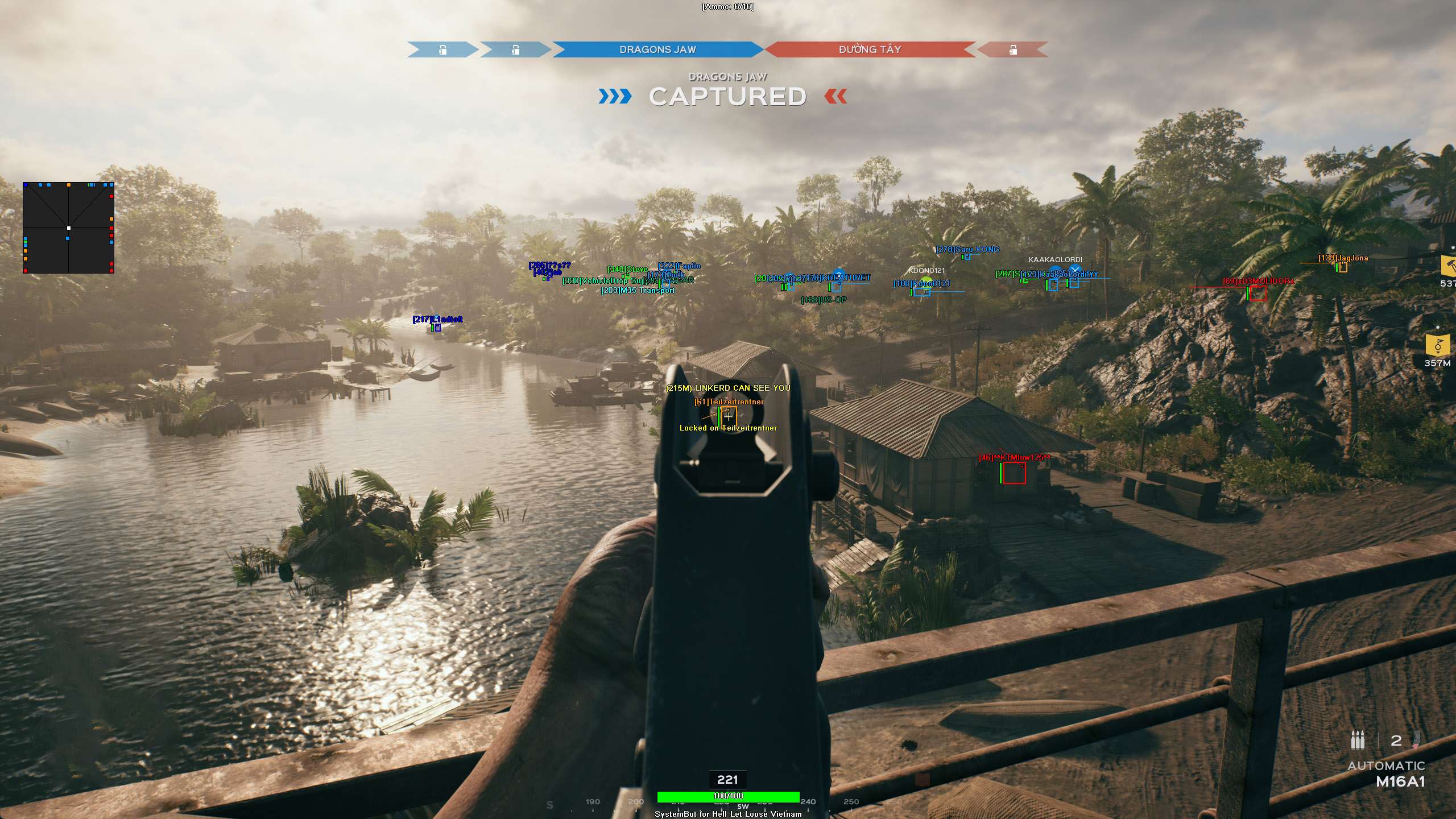
Hell Let Loose Vietnam Hack
Hell Let Loose Vietnam Hacks
Hell Let Loose Vietnam Cheat
Hell Let Loose Vietnam Aimbot
Vietnam War squad shooter • 50 vs 50 battles • Jungle awareness suite for Steam

Hell Let Loose Vietnam Hack with Aimbot and ESP for PC

Get instant access to the Hell Let Loose Vietnam Cheat for PC.

Hell Let Loose: Vietnam is a hardcore tactical first person shooter from Expression Games, published by Team17 and built in Unreal Engine 5. It takes the 50 vs 50 combined arms battles of the original Hell Let Loose to the Vietnam War. The North Vietnamese Army (NVA) fights the US side on maps such as Thanh Hoa Bridge, Hue Outskirts, Van Tuong, Quang Ngai, Dak To Airfield and Cam Ranh Port, with jungle, terraced farms, rivers, caves, docks and a long airstrip.

The two sides do not play the same way. The NVA build tunnel networks to deploy their troops out of sight, while the US side flies helicopters for fire support, troop transport and supply drops. Both sides run patrol boats on the rivers and tanks on open ground, and each team is built from roles such as Squad Leader, Machine Gunner, Sniper and Grenadier, with a Commander running the bigger picture. Fights over a sector can last a long time, and in thick jungle an enemy can be very hard to see.

Our Hell Let Loose Vietnam hack is built for that kind of war. It combines an aimbot with bullet drop and bullet speed prediction, a 3D Radar ESP for soldiers, vehicles, tunnels, Garrisons and mines, a 2D radar, a triggerbot, Ghost Mode and a warning system for enemy aim, satchels, ordnance and helicopters. The HLL Vietnam cheat supports the Steam version of the game on Windows PC.

Tactical upgrade briefing
Built for jungle warfare

Find NVA tunnel entrances and the lines that connect them, spot soldiers hidden in the jungle, and get a warning before an artillery strike or a bombing run lands on your squad. A Hell Let Loose subscription is included with this cheat.

Hell Let Loose Vietnam Hack and Cheat Features

The Hell Let Loose Vietnam cheat covers aim, awareness and control. The options are set in the cheat menu, which opens on a Menu Key you choose. You can save four setups (Default, Custom 1, Custom 2 and Custom 3), and each Custom setup loads with its own hotkey, so a sniper setup and a close range setup are one key press apart. The highlights are below, and the full option list is in the Features panel on this page.

  • Aimbot with Bullet PredictionAuto Aim with Smooth Aim, Limit Angle and Use Aim Key. Bullet Drop Prediction makes up for the arc of the bullet, Bullet Speed Prediction leads moving targets, and Prediction Scale sets how strong they are. Aim Bone picks Head, Chest, Stomach or Closest, and Aim Style picks targets by FOV, distance or lowest health.
  • Triggerbot and Auto FireThe Triggerbot shoots when your crosshair passes over a target, with its own Fire Delay, trigger key and Max Distance. Trigger on Enemy, Trigger on Friendly and Trigger on Vehicle pick what it fires at. Auto Fire fires your weapon when the aimbot has a target locked.
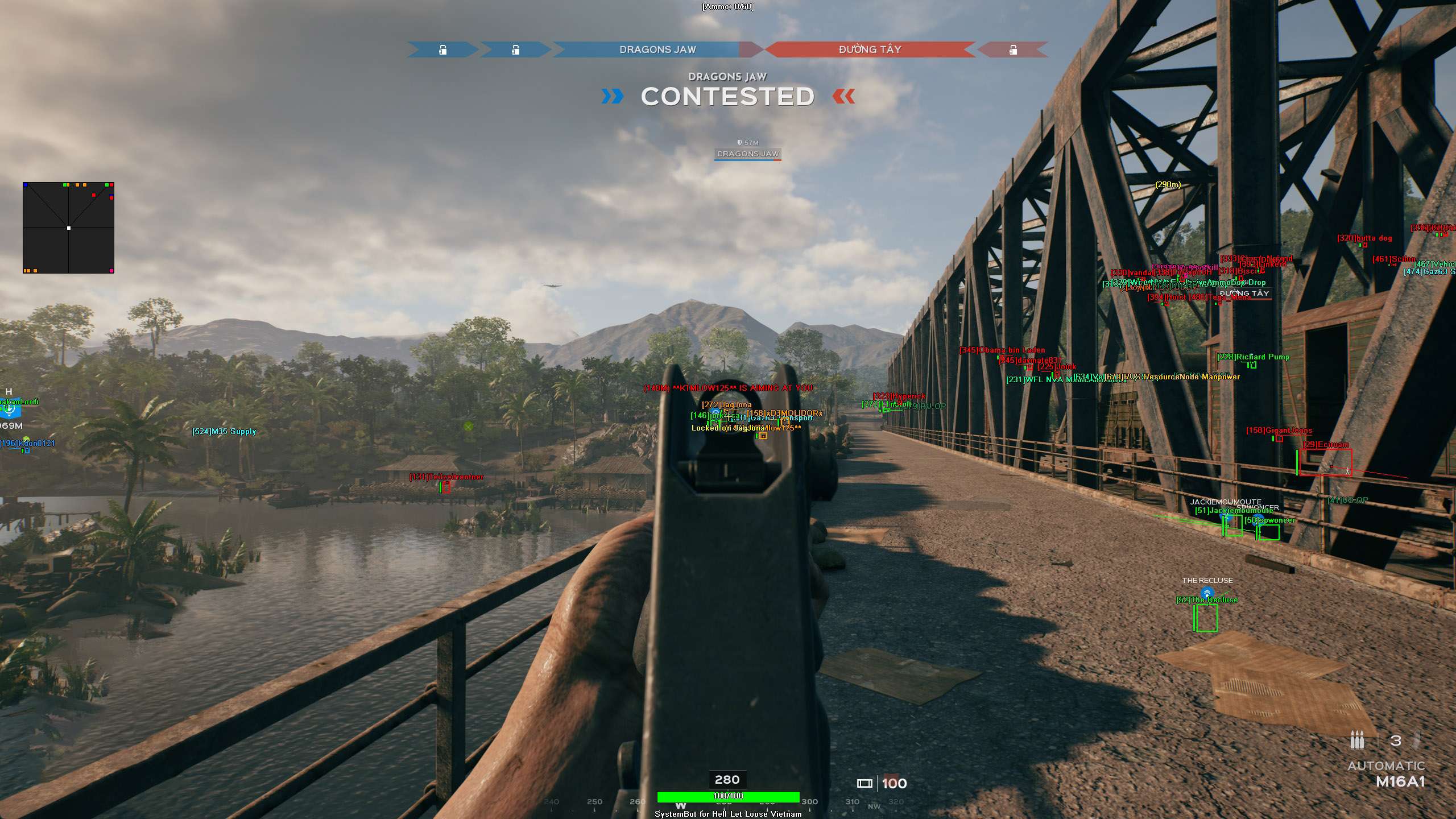
  • 3D Radar ESP and Role ESPBounding Box in 2D or 3D, Head Dot, 2D Line and Aim Laser, with Player Name, Distance, Health and Weapon ESP. Player Role ESP shows battlefield roles such as Commander, Officer, Sniper, Machine Gunner or Medic.
  • Tunnel and Map Object ESPTunnel ESP and Tunnel Link ESP for NVA tunnel entrances and the lines between them, Redeploy ESP for Garrisons and Outposts, plus Node ESP, Supply ESP, Mine ESP, Satchel ESP, Grenade ESP, Pickup ESP and Vehicle ESP, each with its own colour.
  • 2D RadarA top-down radar with Radar Scale, Window Size and Stick To Window. Friendly, enemy and vehicle dots or triangles, Show FOV, and a radar position you set with the mouse.
  • Warning SystemAn alert when an enemy Is Aiming At You or Can See You, each with its own angle, and a Beep System for sound alerts. Satchel Warning, Ordnance Warning and Rotor Warning cover satchel charges, incoming strikes and enemy helicopters.
  • Ghost ModeGhost Mode detaches the camera into a free flying view to scout jungle areas and enemy lines. Ghost Mode Speed sets how fast it moves, and Save Ghost Location keeps the camera spot between toggles.
  • Weapon Control and MiscNo Recoil, No Spread, No Sway and No Suppression for a steady weapon, a custom crosshair (Cross, Dot or T-Cross), Draw Ammo, Draw Health Bar, six friendly and six enemy player filters, a Panic Key and OBS Stream Proof.
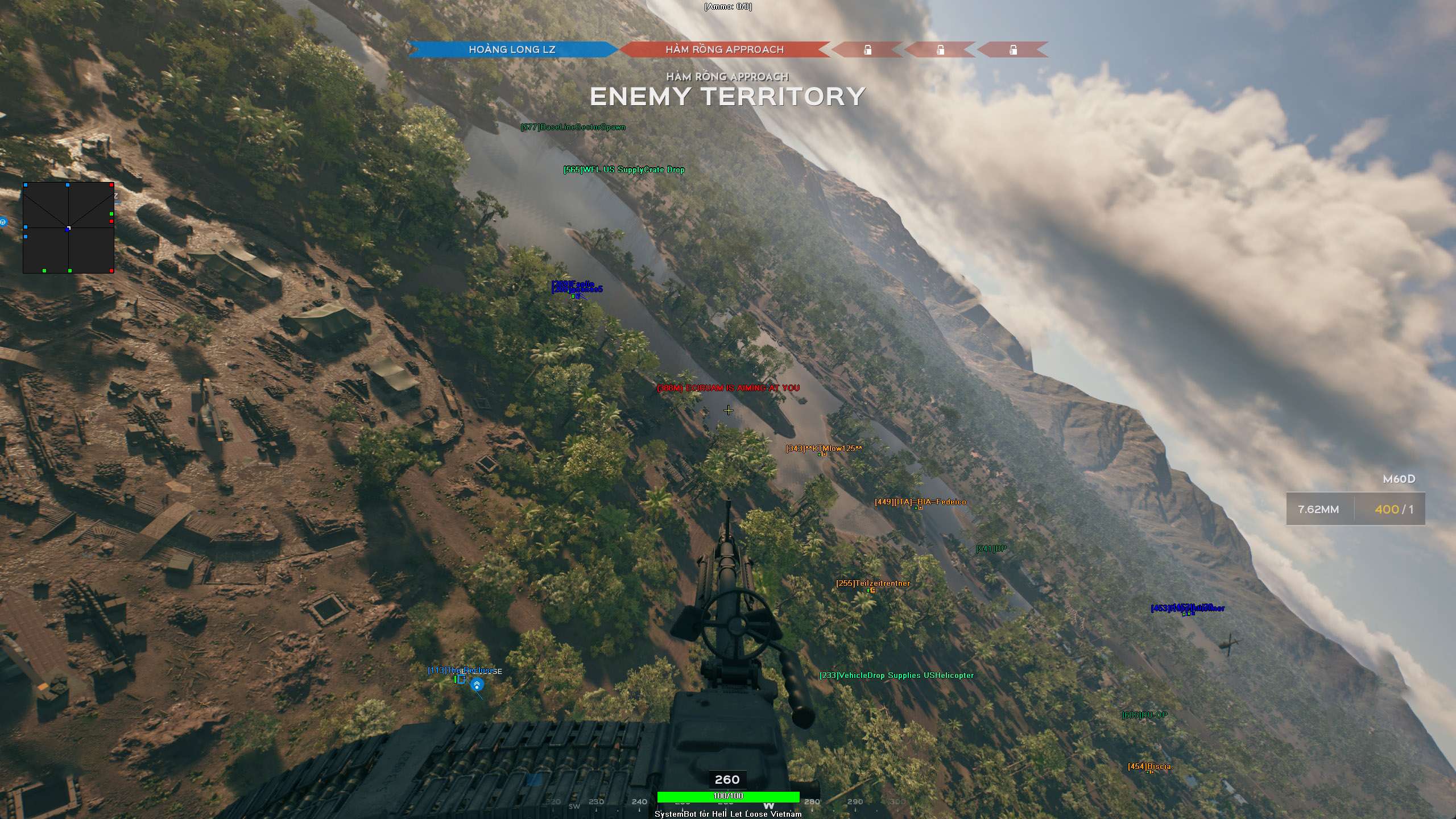
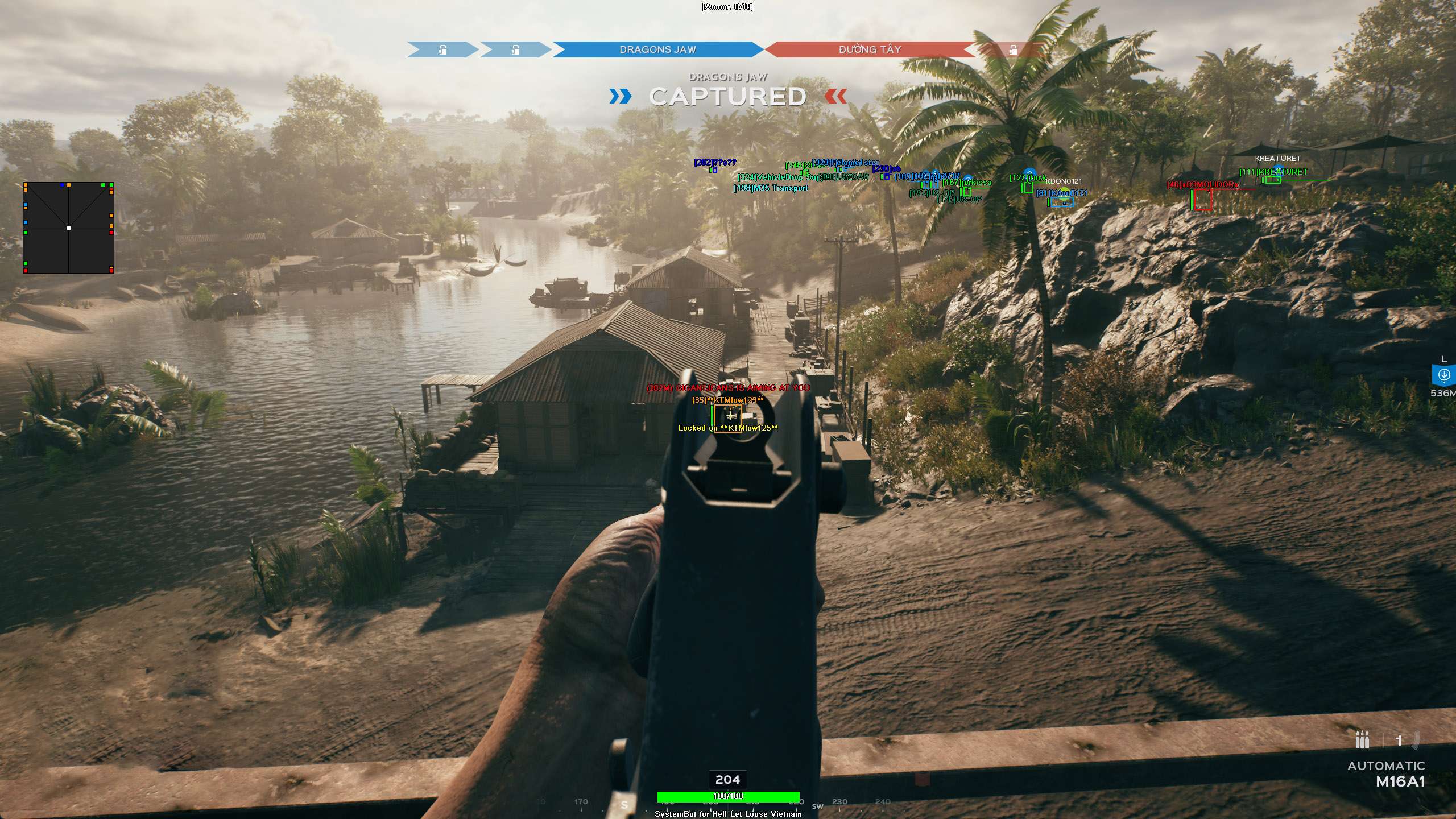
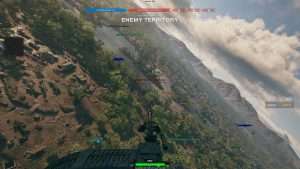
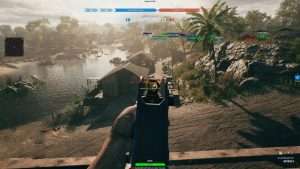
Hell Let Loose Vietnam Hack in-game screenshot 1 of 4 Hell Let Loose Vietnam Hack in-game screenshot 2 of 4 Hell Let Loose Vietnam Hack in-game screenshot 3 of 4 Hell Let Loose Vietnam Hack in-game screenshot 4 of 4

Hell Let Loose Vietnam ESP for Enemies Hidden in the Jungle

Spotting the enemy is a common struggle in Hell Let Loose: Vietnam. The CGMagazine review of the PC version says the low contrast of the jungle can hide enemies in plain sight. A soldier lying prone in a bush is hard to spot. The Hell Let Loose Vietnam ESP takes the guessing out of it.

The 3D Radar puts a Bounding Box and a Head Dot on each soldier within your Max Distance, and the Enemy Visible and Enemy Invisible colours tell you at a glance who is in the open and who is hidden behind leaves, walls or terrain. Player Distance ESP shows how far away each soldier is in meters.

Tunnel ESP to Find NVA Tunnel Networks

Tunnels are what make the NVA side different. NVA players build tunnel networks so their troops can deploy out of sight and appear where the US side does not expect them, and the official launch tips tell US players to hunt those networks down. Finding a tunnel entrance in the jungle by eye can take a long time.

Tunnel ESP highlights hidden underground tunnel entrances, and Tunnel Link ESP draws lines between connected entrances across the map, so you can see how the entrances are connected. For a US squad that means a clear target to push. For an NVA squad it means a quick view of the network your team has built.

Redeploy and Node ESP for Garrisons, Outposts and Supply Lines

A team in HLL Vietnam only fights well while it can respawn close to the front. Squads spawn at their HQ, at Garrisons and Outposts, and NVA troops can also deploy through tunnels. Engineers build resource Nodes with supplies from HQ, and US helicopters fly supplies and troops forward so the team can build its Garrison network. Redeploy ESP highlights Garrisons, Outposts and spawn points through terrain, Node ESP highlights resource nodes, and Supply ESP marks air-dropped supply crates and logistics boxes. A flanker can find the enemy spawn points and destroy them, or tell the squad leader where to push.

Hell Let Loose Vietnam Aimbot for Long Range Rifle Shots

Long shots are part of the game, from the bamboo forest and cliffs of Quang Ngai to the open ground around the airstrip at Dak To Airfield. Recon units field a Sniper with a spotter, and the US side also carries the M14 rifle. Bullets drop and take time to reach the target.

The Hell Let Loose Vietnam Aimbot uses Bullet Drop Prediction to make up for the arc of the bullet, Bullet Speed Prediction to lead running infantry, and Prediction Scale to tune both. Sway Compensation and No Sway keep the scope still while you line up the shot, and Visibility Check stops the aimbot from locking onto targets behind solid foliage or structures. With Player Role ESP you can pick out the enemy Sniper or Machine Gunner first.

Vehicle ESP for Hueys, Patrol Boats and Tanks

Vehicles move the war in Hell Let Loose: Vietnam. The US side flies the UH-1 Huey with an M60 door gun, the NVA answer with an Anti-Aircraft role and AA guns, patrol boats fight on the river network of Van Tuong and the open water of Cam Ranh Port, and the M48 and T-54 tanks push across open ground.

Vehicle ESP highlights tanks, transport trucks, patrol boats and helicopters through foliage. Rotor Warning warns you when an enemy helicopter is on its way. For anti-vehicle work, Aim on Vehicle lets the aimbot aim at tanks, transport trucks and helicopters, and Trigger on Vehicle lets the triggerbot fire at vehicles under your crosshair.

Mine ESP and Satchel Warning for Infantry and Tank Crews

Explosives can wait anywhere on the map. The game has DH10 anti-personnel mines, M21 anti-tank mines and NVA anti-tank mines, and players also carry satchel charges. Mine ESP highlights anti-personnel and anti-tank mines, so a tank crew can stay off the wrong road and infantry can pick a different path. Satchel ESP marks placed satchel charges on fortifications and vehicles, and the Satchel Warning alerts you when an enemy satchel is placed nearby. Item Distance ESP shows how far away each one is.

No Suppression for M60 Fire, Ordnance Warning for Strikes

Staying alive pays off. Warfare and Offensive are long fights over sectors, and in Conquest each redeploy drains your team’s Morale. Two threats keep squads pinned down. The Machine Gunner with the M60 lays down heavy suppressive fire, and the Commander can call a Napalm Strike, an Artillery Strike or a bombing run.

No Suppression removes the screen blur, tunnel vision and weapon flinch that suppressive fire causes, while No Recoil and No Spread keep your own shots on target. The Ordnance Warning warns of incoming artillery shells, air strikes and bombing runs, and the Warning System tells you when an enemy is aiming at you or can see you. That gives you a moment to get into cover.

How to Get the Hell Let Loose Vietnam Cheat

Getting started with the Hell Let Loose Vietnam cheat takes three steps.

01
Create Your Account

Register on the forum for free. Your subscriptions, downloads and support all run through it.

02
Pick Your Plan

Buy the Hell Let Loose Vietnam cheat on its own, or get it inside the Premium Package. The price box on this page shows the plans.

03
Load and Play

Download the SystemCheats loader, start Hell Let Loose: Vietnam on Steam and open the cheat menu with your Menu Key to set up your options.

Is It Safe to Cheat in Hell Let Loose Vietnam?

The Steam store page of Hell Let Loose: Vietnam lists Easy Anti-Cheat and marks it as a kernel level anti-cheat that has to be removed by hand after you uninstall the game. Server admins also have their own ban tools, and community servers run next to the official ones. No cheat is ever completely risk free. Smooth Aim, Fire Delay, Visibility Check and Use Aim Key keep the aim under your control, and the Panic Key hides all cheat features at once. The live cheat status page always shows the current state of every cheat, so check it before you play.

Frequently Asked Questions

Is the Hell Let Loose Vietnam cheat online?

The live cheat status page always shows the current state of every cheat, including the HLL Vietnam cheat. Check it before you buy.

Is the Hell Let Loose Vietnam cheat included in the Premium Package?

Yes. The Hell Let Loose Vietnam cheat is sold on its own and is also included in the Premium Package and the One Day Trial.

Which versions of Hell Let Loose Vietnam are supported?

The Steam version of Hell Let Loose: Vietnam on Windows PC. The original Hell Let Loose is a separate game with its own Hell Let Loose cheat. A Hell Let Loose subscription is included with this cheat, and a Hell Let Loose Vietnam subscription is included with the Hell Let Loose cheat.

Which anti-cheat does Hell Let Loose Vietnam use?

Easy Anti-Cheat. The Steam store page lists it and marks it as a kernel level anti-cheat.

Can I see NVA tunnels with the cheat?

Yes. Tunnel ESP highlights hidden underground tunnel entrances, and Tunnel Link ESP draws lines between connected entrances.

Does the aimbot work on helicopters and tanks?

Aim on Vehicle lets the aimbot aim at tanks, transport trucks and helicopters, and Trigger on Vehicle lets the triggerbot fire at vehicles.

Win More Fights in Hell Let Loose Vietnam

In the jungle, the side that sees first usually wins the fight. With ESP for soldiers, tunnels, vehicles and Garrisons, an aimbot with bullet prediction and a warning system for enemy aim and incoming strikes, the Hell Let Loose Vietnam Cheat gives you that view of the battle. Browse all cheats to see the other games we support.

Need Help?

Our support team is available 24 hours a day, 7 days a week through the SystemCheats forum and TeamSpeak. Read what customers say on Trustpilot, or compare all cheat packages to find the right fit.

Cheat & Hack Information

What is Hell Let Loose Vietnam?


Hell Let Loose: Vietnam is a hardcore tactical shooter from Expression Games, published by Team17. It brings 50 vs 50 combined arms battles to the Vietnam War, with NVA tunnels, helicopters, patrol boats and tanks.


Cheating in Hell Let Loose Vietnam


Our Hell Let Loose Vietnam cheat has an aimbot with bullet drop prediction, 3D Radar ESP, Tunnel ESP, Mine ESP, Ghost Mode and No Suppression. You can buy it as a single cheat or get it with the Premium Package. A Hell Let Loose subscription is included.


Is the Hell Let Loose Vietnam cheat safe?


Hell Let Loose Vietnam uses Easy Anti-Cheat, which the Steam store page marks as a kernel level anti-cheat. No cheat is ever completely risk free. However, you can always adjust your settings to play legitimately for the long run. Check the live status page before you play.


Reviews

Pricing

Features

Aimbot
Auto Aim Moves your aim onto a valid target for you automatically
Auto Fire Fires your weapon for you once a target is locked
Fire Delay (0 ~ 1000) Adds a short wait in milliseconds before firing once a target is locked
Smooth Aim (1 ~ 50) Slows the aim movement so it looks natural, and higher values make it slower
Limit Angle (0 ~ 180) Sets how far from your crosshair a target can be for the aimbot to lock on
Use Aim Key Makes the aimbot work only while you hold or toggle your aim key
Bullet Speed Prediction Leads moving targets based on how long the shot takes to arrive
Bullet Drop Prediction Aims a little higher to make up for bullet drop over long distances
Prediction Scale (1 ~ 30) Fine tunes how strong the lead and bullet drop prediction is
Sway Compensation Cancels weapon sway and breathing so your aim stays steady
Visibility Check Stops the aimbot from targeting enemies hidden behind walls or cover
Stick to Target Keeps the aimbot on one target until it is down or leaves range
Aim Style (FOV, Distance, Health) Sets how the aimbot chooses the best target when more than one is in range
Aim Bone (Head, Chest, Stomach, Closest) Sets which body part the aimbot aims at, such as the head or chest
Aim on Friendly Lets the aimbot target and lock onto your teammates
Aim on Enemy Lets the aimbot target and lock onto enemies
Aim on Vehicle Lets the aimbot lock onto vehicles as well as players on foot
Max Distance (0 ~ 1000) Sets the farthest distance, in meters, at which targets are still picked up or shown
Draw Locked Draws a marker on the target the aimbot is locked onto
Draw Aim FOV Draws a circle on screen that shows where the aimbot is active
Triggerbot
Triggerbot Shoots for you when your crosshair is on a valid target
Use Trigger Key Makes the triggerbot fire only while you hold the trigger key
Fire Delay (0 ~ 1000) Adds a short wait in milliseconds before firing once a target is locked
Trigger on Friendly Lets the triggerbot fire at friendly teammates
Trigger on Enemy Lets the triggerbot fire at enemies in your crosshair
Trigger on Vehicle Lets the triggerbot fire at vehicles in your crosshair
Max Distance (0 ~ 1000) Sets the farthest distance, in meters, at which targets are still picked up or shown
3D Radar
Bounding Box (None, 2D, 3D) Draws a box around each target so you can see where they are
Box Size (1 ~ 10) Sets how thick the lines of each ESP box are drawn
2D Line Draws snap lines from your screen to each target
Player Name ESP Shows the name of each player above their character
Player Distance ESP Shows how far away each player is in meters
Player Health ESP (None, Scaled, Static, Vertical) Shows a health bar for each player so you can see how hurt they are
Player Weapon ESP Shows the weapon each player is holding right now
Player Role ESP Shows the role of each player, such as Commander, Officer, Sniper or Medic
Head Dot Draws a dot on the head of each target you can see
Dot Size (2 ~ 20) Sets how big the dot markers are drawn on each target
Aim Laser Draws a line that shows where each target is aiming
Laser Size (50 ~ 3000) Sets the length and thickness of the aim laser line
Grenade ESP Shows grenades on the ground and in the air
Pickup ESP Highlights dropped weapons, gear and other items you can pick up
Redeploy ESP Shows Garrisons, Outposts and other spawn points through terrain
Tunnel ESP Shows hidden tunnel entrances and spider holes
Tunnel Link ESP Draws lines between tunnel entrances that connect to each other
Vehicle ESP Highlights vehicles, such as cars, trucks and tanks, through terrain
Mine ESP Shows anti-personnel and anti-tank mines
Trap ESP Highlights traps placed on the map, such as bear traps and tripwires
Supply ESP Shows air-dropped supplies and supply boxes
Supply Truck ESP Highlights supply trucks on the battlefield
Node ESP Shows resource nodes and resource dispensers
Satchel ESP Shows satchel charges that have been placed
Show Friendly Shows your teammates on the ESP and radar
Show Enemy Shows enemies on the ESP and radar so you always know where they are
Show Vehicle Shows vehicles on the ESP and radar so you always know where they are
Max Distance (0 ~ 1000) Sets the farthest distance, in meters, at which targets are still picked up or shown
Item Max Distance (0 ~ 1000) Sets how far away items are still shown on screen
Item Distance ESP Shows how far away each item is from you
2D Radar
Show Radar Turns on the 2D radar overlay on your screen
Show Cross Draws cross lines through the middle of the radar
Show Window Draws the background frame of the radar window
Show Dot Shows targets as dots on the radar window
Show FOV Draws a cone on the radar that shows where you are looking
Show Friendly Shows your teammates on the ESP and radar
Show Enemy Shows enemies on the ESP and radar so you always know where they are
Show Vehicle Shows vehicles on the ESP and radar so you always know where they are
Stick To Window Keeps targets that are out of range pinned to the edge of the radar
Radar Scale (0 ~ 60) Sets the radar zoom, lower zooms in and higher zooms out
Window Size (45 ~ 260) Sets the width and height of the radar window
Cross Size (45 ~ 260) Sets the length of the cross lines in the middle of the radar
Dot Size (2 ~ 20) Sets how big the dot markers are drawn on each target
Dot Type (Dot, Triangle) Switches radar markers between plain dots and triangles that point where targets face
Warning System
Warning System Shows on-screen warnings when enemies are near, can see you or aim at you
Is Aiming At You Angle (0 ~ 180) Sets the angle used to warn you when an enemy is aiming at you
Can See You Angle (0 ~ 180) Sets the angle used to warn you when an enemy can see you
Max Distance (0 ~ 1000) Sets the farthest distance, in meters, at which targets are still picked up or shown
Beep System Plays a warning beep when an enemy is looking or aiming at you
Satchel Warning Warns you when an enemy satchel charge is placed nearby
Ordnance Warning Warns you of incoming artillery, air strikes and bombing runs
Rotor Warning Warns you of enemy helicopters coming your way
Misc
Crosshair (None, Cross, Dot, T-Cross) Draws a custom crosshair in the center of your screen, over the game's own
Crosshair Size (2 ~ 200) Sets the size of the custom crosshair on your screen
Dynamic Crosshair Resizes the crosshair as your weapon spread changes when you move and shoot
Draw FPS Shows your current frames per second on screen
Draw Resolution Shows your current screen resolution on the overlay
Draw Time Shows your local system time on the overlay
Draw Watermark Shows the SystemCheats watermark on screen so you know the cheat is active
Draw Health Bar Shows your own health as a bar on screen
Draw Ammo Shows your current weapon ammo count on screen
Use Panic Key Turns on a hotkey that instantly hides all cheat visuals and menus
Font Size (10 ~ 20) Sets the size of the ESP and overlay text on screen
Font Shadow (None, Shadow, Bordered) Adds a shadow or border behind overlay text so it is easier to read
No Recoil Removes weapon recoil so your aim stays steady while firing
No Spread Removes bullet spread so every shot lands on your crosshair
No Sway Removes weapon sway so your sights stay still while aiming
No Suppression Removes the screen blur and effects caused by incoming fire
Ghost Mode Lets you fly freely through walls and terrain to scout the map
Ghost Mode Speed (1 ~ 100) Sets how fast you fly while Ghost Mode is on
Save Ghost Location Remembers your Ghost Mode position so you return there next time
Filters
6 Friendly Player Filters Lets you enter friendly player names to show or hide on the ESP
6 Enemy Player Filters Lets you enter enemy player names to show or hide on the ESP
Colors
Enemy Invisible RGBA Sets the color for enemies hidden behind walls or cover
Enemy Visible RGBA Sets the color for enemies in your direct line of sight
Enemy Vehicle RGBA Sets the color for enemy vehicles shown on the ESP
Friendly Invisible RGBA Sets the color for teammates hidden behind walls or cover
Friendly Visible RGBA Sets the color for teammates in your direct line of sight
Friendly Vehicle RGBA Sets the color for friendly team vehicles shown on the ESP
Grenade RGBA Sets the color for active grenades and explosives on the ESP
Pickup RGBA Sets the color the ESP uses for dropped weapons and gear
Redeploy RGBA Sets the color for redeploy points such as Garrisons and Outposts
Tunnel RGBA Sets the color for Viet Cong tunnel entrances
Tunnel Link RGBA Sets the color for underground tunnel connection lines
Vehicle RGBA Sets the color for empty and neutral vehicles
Mine RGBA Sets the color for landmines and explosive devices on the ESP
Trap RGBA Sets the color the ESP uses for placed traps
Supply RGBA Sets the color for supply crates and air drops
Supply Truck RGBA Sets the color for logistics supply trucks
Node RGBA Sets the color for resource nodes shown on the ESP
Satchel RGBA Sets the color for placed satchel charges
Crosshair RGBA Sets the color for the custom crosshair drawn on your screen
Menu RGBA Sets the color scheme for the in-game cheat menu
Is Aiming At You RGBA Sets the warning color used when an enemy aims at you
Can See You RGBA Sets the color of the warning shown when an enemy can see you
Is Visible RGBA Sets the indicator color used when you are exposed and visible
Aim FOV RGBA Sets the color of the aimbot FOV circle drawn on screen
Positions
RadarX Position Sets the horizontal screen position of the radar window
RadarY Position Sets the vertical screen position of the radar window
MenuX Position Sets the horizontal screen position of the cheat menu
MenuY Position Sets the vertical screen position of the cheat menu
Settings/Keys
Panic Key Sets a key that instantly hides or turns off all cheat features
Menu Key Sets the key that opens and closes the cheat menu
Aim Key Sets the key that turns on the aimbot while held or toggled
Trigger Key Sets the key you hold or toggle to turn the triggerbot on
Ghost Mode Key Sets the key that switches Ghost Mode on and off
Default Key Sets a key that loads the default profile instantly
Custom 1 Key Sets a key that loads custom profile 1 instantly
Custom 2 Key Sets a key that loads custom profile 2 instantly
Custom 3 Key Sets a key that loads custom profile 3 instantly
Save/Load Default Settings Saves your settings to the default profile or loads them back
Save/Load Custom 1 Settings Saves your settings to custom profile 1 or loads them back
Save/Load Custom 2 Settings Saves your settings to custom profile 2 or loads them back
Save/Load Custom 3 Settings Saves your settings to custom profile 3 or loads them back
Additional
OBS Stream Proof Hides cheat visuals from OBS and other recording software
Hell Let Loose subscription included Includes the Hell Let Loose cheat in the same subscription